
What Are the Different Types & Components of Access Control Systems?

What Are the Different Types & Components of Access Control Systems?

Author Image

Sahil Dhingra

Published 26 March 2026

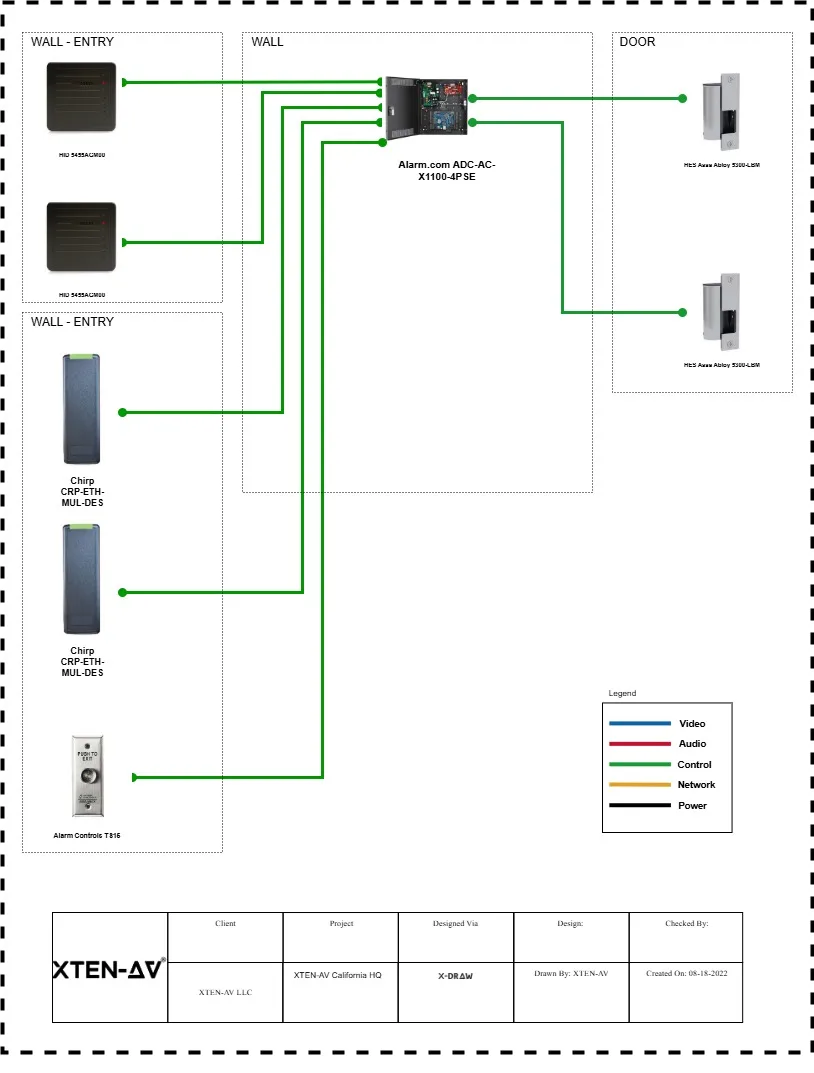
Access Control System Design and Planning With XTEN-AV X-Draw
Table Of Content

As a security system engineer, you know the smallest gap can lead to the biggest breach. Maybe it starts with a shared keycard. Or a door that didn’t fully latch. You can’t afford to rely on good habits alone. Real security needs systems that think ahead of the threats.

Before building that kind of protection, you need to understand the different types of access control systems. Each one works differently depending on your space, your users, and your level of risk. Choosing the right fit is where it starts.

Then comes the hardware. Access control systems components like door controllers, card readers, and biometric scanners have to work in sync. And without the right access control design software, even great equipment can fall short.

This guide walks you through today’s commercial access control systems, covering the access control devices that matter, the software that supports them, and the real-world insights that make it all work.

Key Takeaways:

  • Access control is more than securing doors. It is about managing who can enter, when they can enter, and how that access is granted.

  • The type of access control system you choose depends on the environment and the level of security required. Role-based, rule-based, and attribute-based models are common.

  • Every access-controlled entry point needs specific hardware. This includes a reader, door controller, lock, power supply, and a sensor for exit or door position.

  • Designing a reliable system starts with the right tools. Access control design software helps you meet compliance codes like ADA, NFPA, and UL 294.

  • Platforms like XTEN-AV streamline the entire process. You can auto-generate layouts, create accurate BOMs, and export access control proposals without missing any detail.

The all-in-one solution for your AV needs

Transform your audio-visual experience with XTEN-AV.

No Credit Card required

What is an Access Control System and How Does it Work?

Access control defines and enforces who can enter a space, when, and under what conditions. Instead of keys, you hand people a card, a code, or maybe use their fingerprint.  

The person scans their credential. A reader checks it with the system. If approved, the door unlocks. You can update access anytime, remove users, or change schedules. Every entry gets logged. You always know who went where. This helps during audits or if something goes wrong. No need to manage keys or track people manually. 

All the commercial spaces like offices, hospitals, schools, and apartment buildings rely on this system to manage entry. Once configured, they handle access in the background with minimal input. The system makes sure only the right people enter at the right time.

What are the Main Types of Access Control Systems Used Today?

There are different types of access control systems today, but they do not all work the same way. Some are built for physical spaces, think doors, gates, or turnstiles. Others focus on the digital side of things, like controlling who can log into company software or access internal files.

How the system is set up makes a difference too. Some are installed locally, and managed by in-house IT or security staff. These are usually preferred by organizations that want tighter control over everything. But it is difficult to manage them. On the other hand, cloud-based systems offer more flexibility. You can update them remotely and manage multiple sites from one place. It is very helpful when you’re dealing with several locations.

Access rules also work differently. In some setups, what you can access depends on your role, like a project engineer having access to equipment rooms. It depends on specific rules in other cases. Say the system only lets people in during working hours. Or it checks a sensor first to see if the area’s already too crowded.

There’s also a difference in how users check in. Smart cards send a signal when they’re close to a reader. These are known as active credentials. Then there are passive ones like QR codes or key fobs. They need to be scanned directly. Although both types serve the same purpose, they work in slightly different ways.

And finally, it matters where decisions are made. A centralized system controls everything from a single platform. That’s great for consistency. But in some cases, like college campuses or hospitals, it’s better to give different buildings their own local access controls. That’s where a distributed system comes in.

The all-in-one solution for your AV needs

Transform your audio-visual experience with XTEN-AV.

No Credit Card required

How Access Control Models Handle Permissions?

You pick a system, then you figure out how to assign access. Choosing an access control system is only the first step. What comes next is figuring out how permissions will actually be managed. This is where access control models come in.

Let’s start with Mandatory Access Control (MAC). In this model, permissions are fixed by a central admin. Users have no control over them, which makes it suitable for places where rules are strict and can’t be bent. It’s often used in government facilities or data centers where security policies are rigid. For example, even if a user works in the building, they can’t access a classified server room unless the admin has explicitly granted permission. This strict top-down control limits risks and ensures sensitive areas remain protected.

Discretionary Access Control (DAC) works best in setups where flexibility is important. Imagine a team lead who manages a shared folder. They decide who can view or edit the files inside. It’s simple and fast for small teams. But if someone leaves the project and still has access, that’s a risk, especially when no one’s keeping track.

Role-Based Access Control (RBAC) is a structured approach many companies rely on. Instead of assigning access individually, you group people by job roles. A finance analyst automatically gets access to budgeting tools, while marketing staff use campaign dashboards. It’s easy to scale and makes employee transitions smoother.

Rule-Based Access Control adds conditions. Think of a cleaning crew that’s allowed in the office only between 7 PM and 10 PM. If someone tries to swipe in at 11, the system blocks them. This method is helpful when timing or status should affect access.

Attribute-Based Access Control (ABAC) looks at more than just the user’s identity. It checks things like location, job title, and device. Suppose a remote engineer tries to log in. They’ll only get access if they’re using a company laptop on a secure connection and working on approved files. It’s built for dynamic environments where access decisions need to adapt in real time.

Each model fits a different kind of environment. There are two factors to choose the right model – how much control you need, and how often your security needs to adapt.

What are the essential hardware components of an access control system?

Every access-controlled door relies on a few core pieces of hardware that work together to keep the space secure. From readers to locks, each device plays a specific role. Here’s what a typical setup includes:

  • Door controller or PoE-based control panel : This device receives signals from readers and unlocks the door if access is approved.

  • Credential readers (card, fob, biometric, or keypad): Readers check a user’s credentials and send the result to the controller.

  • Electronic locks (magnetic locks or electric strikes) : These are the physical locking devices installed on the door to hold it shut until released.

  • REX sensor or push-to-exit button : Used to allow free egress from the secure side, often required for code compliance.

  • Door position switch : Detects whether the door is open or closed, often used for alerts or audit logs.

  • Power supply with battery backup: Ensures the system keeps running during a power cut.

When you’re designing access control layouts in XTEN-AV, all of this comes together easily. The system offers 1.5 million AVIXA-compliant products, helps with credential assignment, pulls spec sheets (also known as submittals), and even auto-builds your BOM. You can drag and drop parts into your design layout, and the access control proposal tool fills in the rest, ensuring your design doesn’t miss a thing.

How XTEN-AV Helps You Design Complete Access Control Systems Faster?

Designing commercial access control systems can take hours, especially when juggling multiple tools for layout, documentation, and quoting. XTEN-AV eliminates that hassle by giving you one connected workspace for every task. Start with access control components from a verified AVIXA product database. Drag and drop door controllers, biometric readers, card reader systems, and electronic door locks into your floorplan. The platform auto-generates signal flow schematics, wiring diagrams, and rack layouts, all based on real hardware.

With X-DRAW for design, cable paths, credential assignment, and even BOM creation are handled automatically. You can view your complete access control hardware list in real time, updated as the design evolves. Whether you’re specifying an RFID system, a REX sensor for request-to-exit functionality, or a maglock versus electric strike, everything is organized and code-ready with support for ADA, NFPA and UL 294.

To speed things up, XAVIA helps you handle design tasks just by describing what you need. Want to lay out access control for a two-story building? Or check if your card readers match the security level of a restricted area? Just ask. XAVIA understands the context and completes the task quickly, without the need to dig through menus or second-guess specs.

With X-DOC for documentation, you can convert your project into a branded proposal and quote in minutes. The system supports PDF and Excel exports for quick sharing. From planning plates and panels to selecting PoE controllers, XTEN-AV saves you 10 or more hours on every job without sacrificing accuracy or detail.

AV Design Mastery + Winning Proposals = 10x Productivity!

  • Automatic Cable Labeling & Styling
  • 100+ Free Proposal Templates
  • Upload & Create Floor Plans
  • 1.5M Products from 5200 Brands
  • AI-powered ‘Search Sense'
  • Legally Binding Digital Signatures
Laptop Mockup

Conclusion

Access control isn’t just about picking the right hardware. It’s about knowing how all the pieces come together. With the different types of access control systems, you might be dealing with card readers on one door, biometric access on another, and somewhere else a door controller that needs to talk to both. If that mix isn’t designed clearly from the start, you’ll spend more time fixing things than finishing the job.

That’s why modern design tools matter. With XTEN-AV, you aren’t flipping between floorplans and spec sheets. You can drag parts from a verified list, plan out your signal flow, generate a BOM, and move straight into your proposal. It cuts out the back-and-forth and helps avoid the usual mistakes.

When your design makes sense, the install goes faster, the system performs better, and the client trusts the outcome. That’s really what this work is about. Getting it right the first time. No shortcuts. No loose ends.

Start your 15-day free trial on XTEN-AV and design your next access control system faster.

FAQ's

Maglocks hold the door shut using magnetic force, but only while power is on. Electric strikes, on the other hand, control the latch mechanism and can work either when powered or without it. If you want doors to unlock during a power cut, maglocks are better. For doors that should stay locked, even if the power fails, strikes make more sense. It all comes down to your fail-safe or fail-secure needs and what the building requires.

Yes, many systems now support mobile credentials. Phones act like access cards using Bluetooth, NFC, or even QR codes. It’s quicker for users and easier to manage, especially when onboarding staff or revoking access. But to make it work, your readers and control software need to support mobile integrations. If you’re using older access control devices, you might need to upgrade some hardware first.

Start by checking how the door swings and whether there’s enough wall space for the reader. You’ll also need to meet ADA spacing rules. A tool like XTEN-AV’s floorplan builder helps here. You can drop in the readers, exit sensors, and locking hardware on a digital layout. This lets you see where everything fits before you even step onsite. It’s a cleaner way to catch spacing issues early.

Typically, you’ll need a credential reader, lock (magnetic or strike), door controller, power source, and an exit sensor. That’s the basic setup. If the system runs over PoE, you might skip the power supply. Some designs also add door position sensors or backup batteries. The exact access control hardware list changes depending on whether it’s a secure entry, an office suite, or a high-traffic lobby.

Yes, you can. If you’re using a platform like XTEN-AV, your access control layouts and schematics can be exported directly to CAD and BIM files. This makes life easier when coordinating with architects or MEP teams. It also keeps your signal flow schematic and equipment specs tightly documented, whether you’re working on a single floor or a multi-site rollout.

A tool like X.DOC handles this well. It lets you turn your design into a clean, detailed proposal with all the right branding and tech specs included. You don’t have to build quotes from scratch or juggle spreadsheets. X.DOC, the proposal automation tool, pulls from your BoM, matches the access control devices to actual spec sheets, and lets you drop in price, warranty, or compliance notes in seconds.

Once your floorplan and design are ready, use a platform like XTEN-AV to auto-generate your BoM. The system reads your project layout and builds a complete access control hardware list. It includes readers, locks, controllers, plates, and even rack layout items if needed. You don’t have to cross-check part numbers or miss anything critical. It’s faster, and you can edit the list before finalizing your proposal.

Explore more by topic

AV Design Mastery + Winning Proposals = 10x Productivity!

No Credit Card Required

Related Blogs
Access Control System Design and Planning With XTEN-AV X-Draw
  • Sahil Dhingra
  • Posted by Sahil Dhingra
March 26, 2026

Audio Visual What Are the Different Types & Components of Access Control...

Best Free Project Management Software for AV Business & System Integrators with CRM and Invoicing
  • Sahil Dhingra
  • Posted by Sahil Dhingra
February 18, 2026

Audio Visual Top 5 Project Management Software CRM & Invoicing Tools for...

Paging and PA system cost breakdown equipment cabling labor and commissioning
  • Sahil Dhingra
  • Posted by Sahil Dhingra
January 16, 2026

Audio Visual Paging and PA System Cost Estimation Guide Sahil Dhingra Published...

Sahil Dhingra
Sahil Dhingra
A software developer, business analyst & people’s manager, Sahil Dhingra has over 10 years of experience working for tech giants such as Apple, HP, and Cisco. With his deep understanding of the Software Development Life Cycle, Sahil strives to expand the horizon for SaaS-based products for AV professionals while also implementing the latest technologies such as AI, ML, VR, and Blockchain.

Leave a Reply

Your email address will not be published. Required fields are marked *

This website stores cookies on your computer. Cookie Policy