
How to Create Audio Visual (AV) Schematic Diagrams 10x Faster with AI (Text-to-CAD Workflow)
Sahil Dhingra
Published 07 April 2026
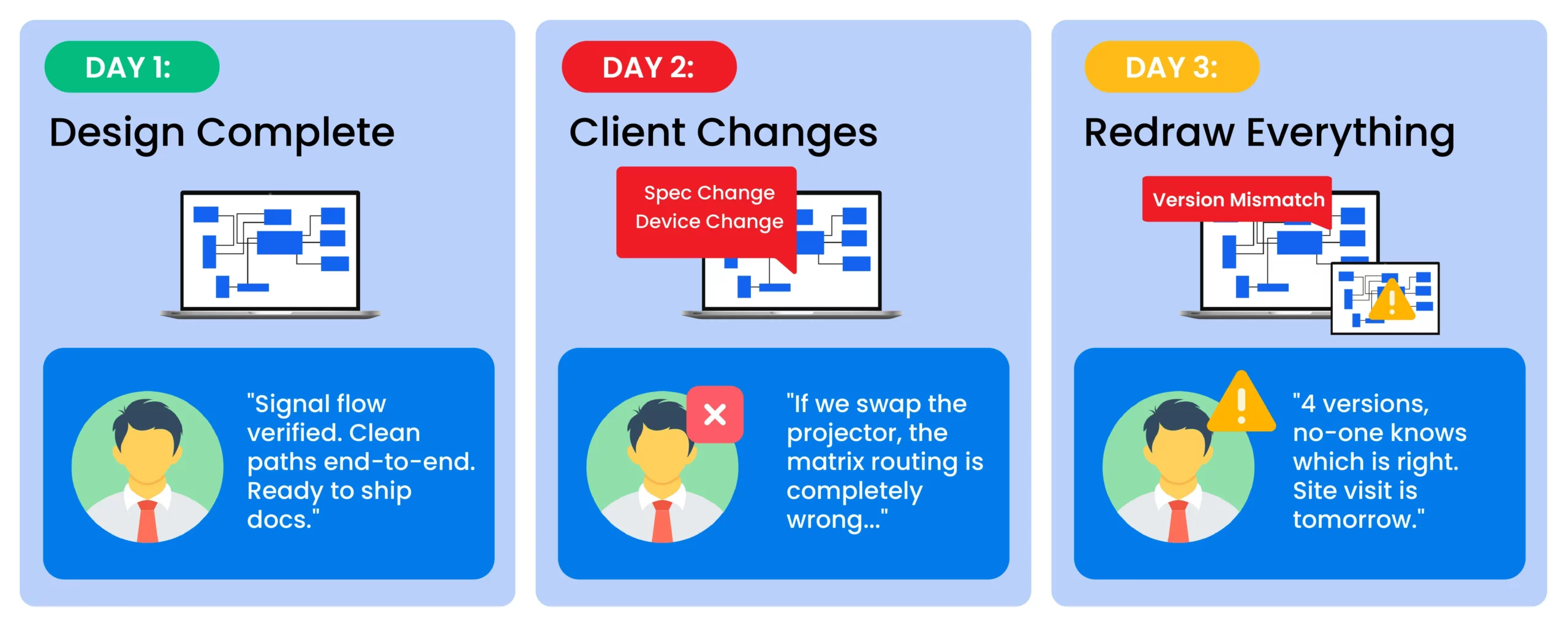
Manual AV schematic work is one of the biggest time drains in the industry. Keeping signal flow diagrams, rack elevations, cable schedules, and your BOM in sync across a multi-room project can easily eat up 3-4 days of design time, and that’s before the first client revision hits. One device swap, and you’re rebuilding documents you’ve already finished.
The risk isn’t just lost hours. When schematics and BOMs fall out of sync, errors make it to the field. Wrong cable spec, rack position and signal path are caught at commissioning, not at the desk.
That’s the problem where AI-powered AV schematic software is built to solve. Tools like XAVIA by XTEN-AV automate the AV documentation process, generating your complete schematic package from a single project prompt, keeping every document in sync as the design evolves, and flagging conflicts before anything leaves the office.
This guide walks through how it works and what it means for your workflow.
The all-in-one solution for your Audio Visual (AV) System Design & Installation needs
Transform your audio-visual experience with XTEN-AV.
No Credit Card required
Key Takeaways:
Speed that scales:
Documentation time drops from multiple days to a few hours, regardless of project size, and more design capacity without adding headcount.
Accuracy is built into the process:
XAVIA understands AV signal logic: HDMI bandwidth, HDBaseT distances, Dante topology and flags conflicts before documents leave the office.
BOM and schematic are always in sync:
Changes propagate across all documents automatically. No mismatched versions between your signal flow diagram and your procurement list.
Accessible to your whole team:
Junior staff can produce professional-grade schematics without requiring senior oversight on every drawing.
Client-ready output in one click:
Branded, professional documents are exported simultaneously in PDF, DWG, and Excel formats.
Custom device support:
Add proprietary or regional equipment not in the standard library. The AI incorporates it correctly based on the specs you define.
What Is an AV Schematic Diagram and Why Does It Matter?
An AV schematic diagram is a 2D technical drawing that shows how AV components (such as projectors, speakers, and switchers) connect, transmit signals, and perform their functions, using standard symbols.
The document serves as the primary resource that connects all elements of your project, including your BOM, cable schedule, rack layout, and client handoff package.
Why Traditional AV Schematic Software Like Visio and AutoCAD Fail AV Teams?
Most AV teams lose their project margins not at the install but at the desk, where they draw, redraw, cross-reference, and version-check. Visio and AutoCAD were never built for AV system design. But for years, they’ve been the only options to use. And the hidden cost of that workaround shows up in every project timeline.
Here’s what a typical manual AV schematic workflow actually looks like:
- Define system requirements: room size, devices, signal types
- Build the BOM manually in Excel
- Draw signal flow diagrams device by device
- Create rack elevations based on equipment specs
- Build a cable schedule with lengths and connector types
- Cross-check every document for consistency manually.
A typical AV signal flow diagram process for a mid-sized conference room takes 4 to 8 hours to draw manually. For a 12-room corporate HQ project, that’s 60 to 90 hours of design time.
In a widely cited r/CommercialAV discussion, practitioners reported documentation time exceeding 80 hours for complex multi-room builds.
And that’s just the first version. Every device change, client revision, or engineering update means starting over. Then there’s version control. How many times have you opened “Final_Schematic_v4_FINAL_revised.vsd” and wondered which one is actually current?
Real-world scenario: Your schematic specifies Cat6A. Your BOM lists Cat6, a single data entry error. Nobody catches it. Your crew pulls Cat6, terminates it, closes the ceiling, and moves on. Commissioning day: the displays won’t pass 4K/60. Because 4K over HDBaseT requires Cat6A for reliable long-distance performance. Now you’re reinstalling cable, delaying the handover date, and having a very uncomfortable conversation with your client. This isn’t rare. It’s the predictable consequence of managing schematics, BOMs, and revisions across disconnected tools. |
How AI Automates AV Line Schematic Diagram Creation?
AI-powered Audiovisual (AV) schematic drawing software like XAVIA completely flip the traditional model.
XAVIA is an AI-powered agent built specifically for the AV industry. It connects your entire AV project workflow: from BOM generation and schematic design to proposals and project reporting, all through a simple text or voice prompt.
XAVIA generates 4 core AV documents automatically:
- Line schematic: All devices, connections, and signal paths in a single diagram. This is the primary reference document for your installation crew.
- Signal flow diagram: Shows how audio and video signals travel from source to destination.
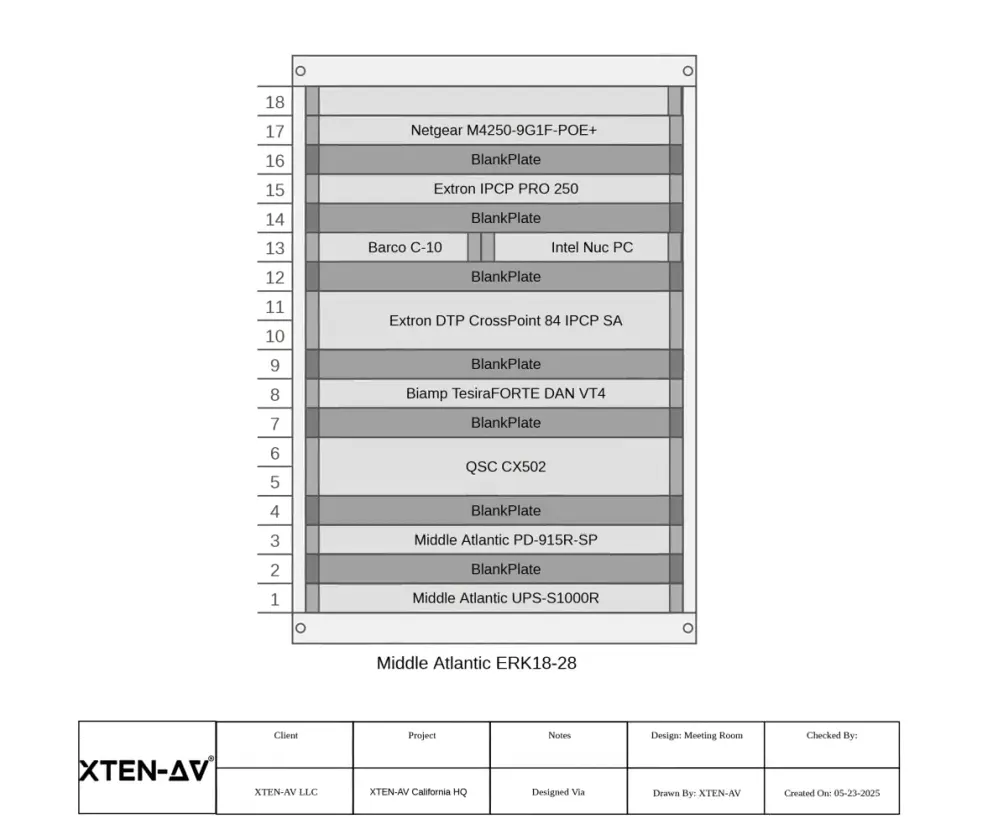
- Rack layout: Physical rack design with accurate RU spacing, PDU placement, and equipment sequencing built from your actual equipment list.
- Cable schedule: A complete list of cables, including types, lengths, connector specifications, and identification labels, auto-generated from the schematic.
Instead of you building the diagram piece by piece, the AI takes your system inputs and automatically generates a complete, accurate set of documents. The system complies with AVIXA standards, ensuring your designs meet actual AV deployment standards.
What “AVIXA-aligned” actually means: XAVIA validates designs against AVIXA’s audiovisual systems performance standards, the industry benchmark for AV system quality management. This includes signal level requirements, equipment performance thresholds, and documentation completeness criteria used by CTS-certified designers. |
The result? Teams using AI-assisted AV design tools complete designing and documentation faster on difficult projects that require multiple installation areas, as reflected in verified user reviews on Capterra.
Traditional AV processes use general-purpose tools like Visio for diagrams and AutoCAD for layouts. AI AV design platforms like XAVIA replace this fragmented stack with a unified, AV-specific system.
AI AV System Design vs. Manual: A Quick Comparison
Manual (Visio / AutoCAD) | AI-Powered (XAVIA) | |
Time per Schematic | 4-8 hours per diagram | 15–30 minutes |
BOM Linkage | Manual, error-prone | Auto-synced, live updates |
Version Control | File-per-version chaos | Cloud-based, change history |
Revision Speed | Hours of redrawing | Edit once, all docs update |
Error Detection | Caught on site (expensive) | Flagged before export |
Client Presentation | CAD exports are hard to read | Branded, PDF-ready output |
If your workflow looks like the left column, you’re not just slower, you’re operating at a structural disadvantage.
Adopting AI-powered Audio visual AV design tools doesn’t just save time; it changes how quickly your team can respond to RFPs, handle revisions, and deliver documentation ahead of client expectations.”
Want to see how this works on a real AV project?
Book a demo or start your free trial to experience it firsthand.
Step-by-Step: How to Create AV Schematic Diagrams Using AI
Here’s a step-by-step guide for creating AV schematic diagrams for your next project.
Step 1: Prompt XAVIA With Your Audio visual (AV) Project Requirements
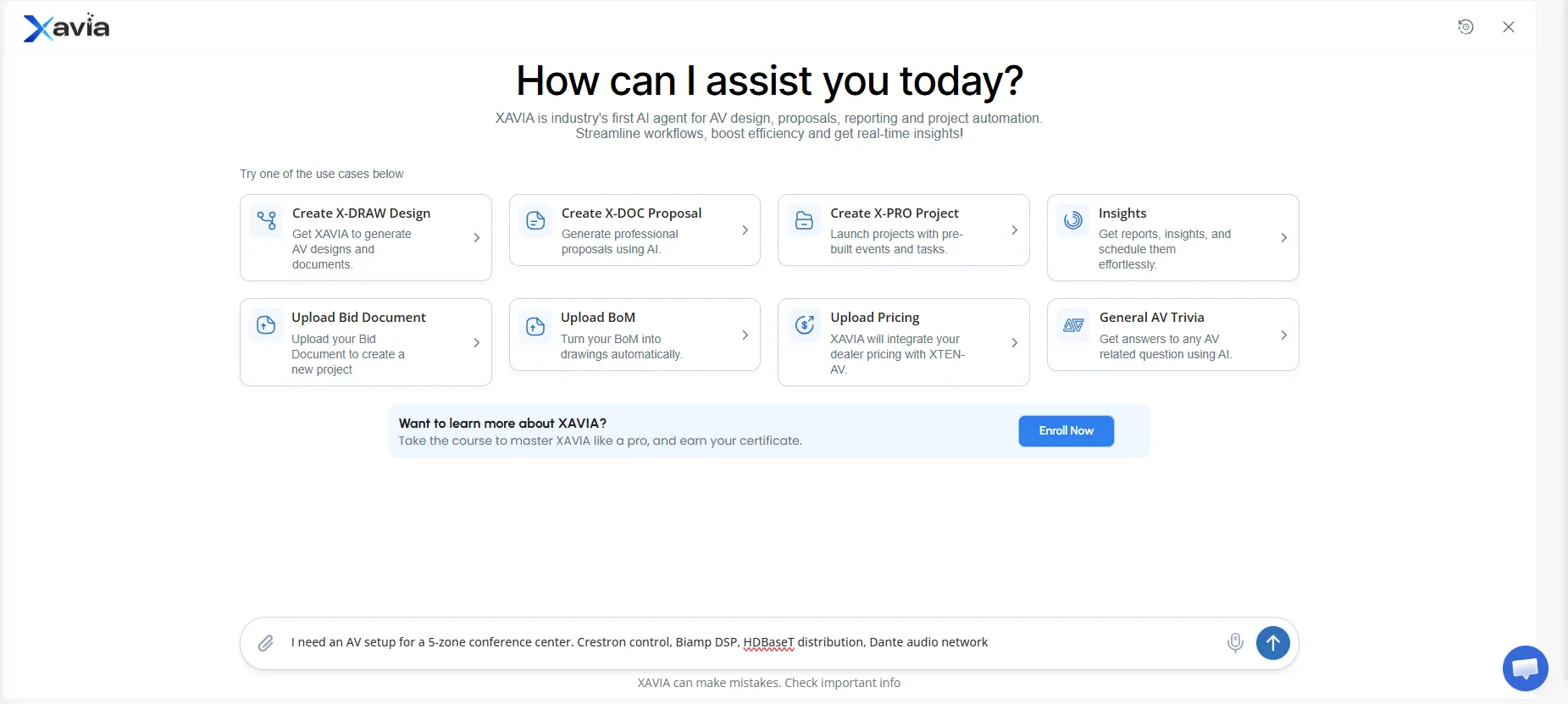
Start your AV system design by typing or speaking your prompt:
“I need an AV setup for a 5-zone conference center. Crestron control, Biamp DSP, HDBaseT distribution, Dante audio network.”
XAVIA works inside X-DRAW, XTEN-AV’s purpose-built AV design environment. Everything you generate lives in one connected platform from the moment you start.
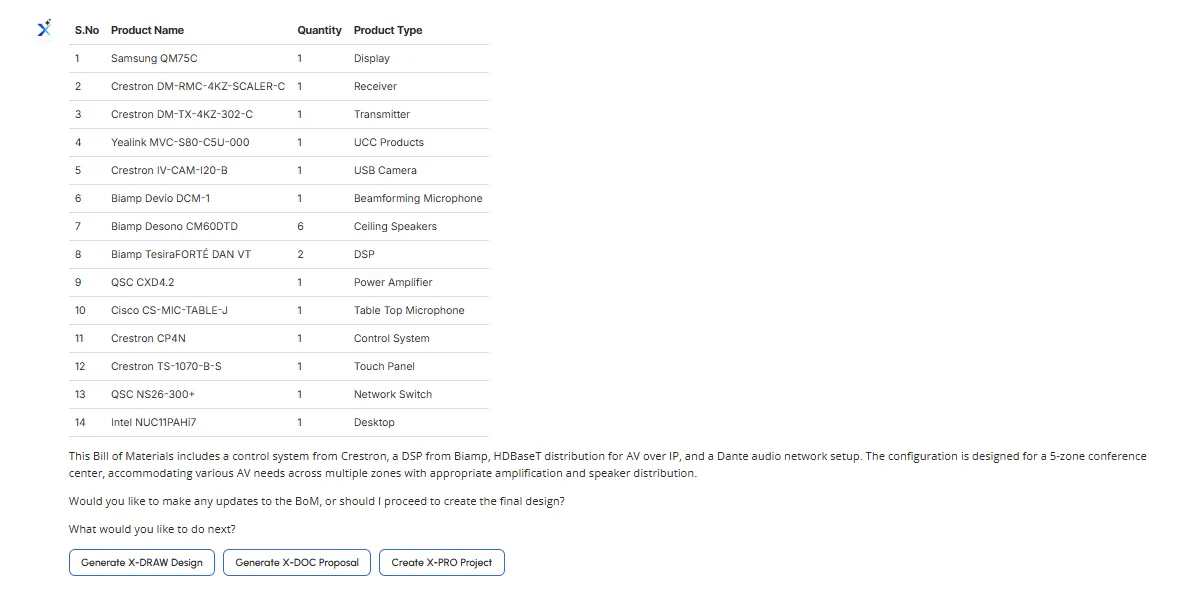
Step 2: Review Your Auto-Generated Audio visual (AV) BOM
Before a single line is drawn, XAVIA builds your complete automated AV BOM with spec-accuracy, compatibility checks, and pricing. Every device is pulled from the product library based on your room requirements and signal types.
Once confirmed, XAVIA passes your equipment list directly into X-DRAW, where your design documents get built.
Step 3: XAVIA AGenerates Your AI Generative Audio Visual (AV) Schematic Diagrams
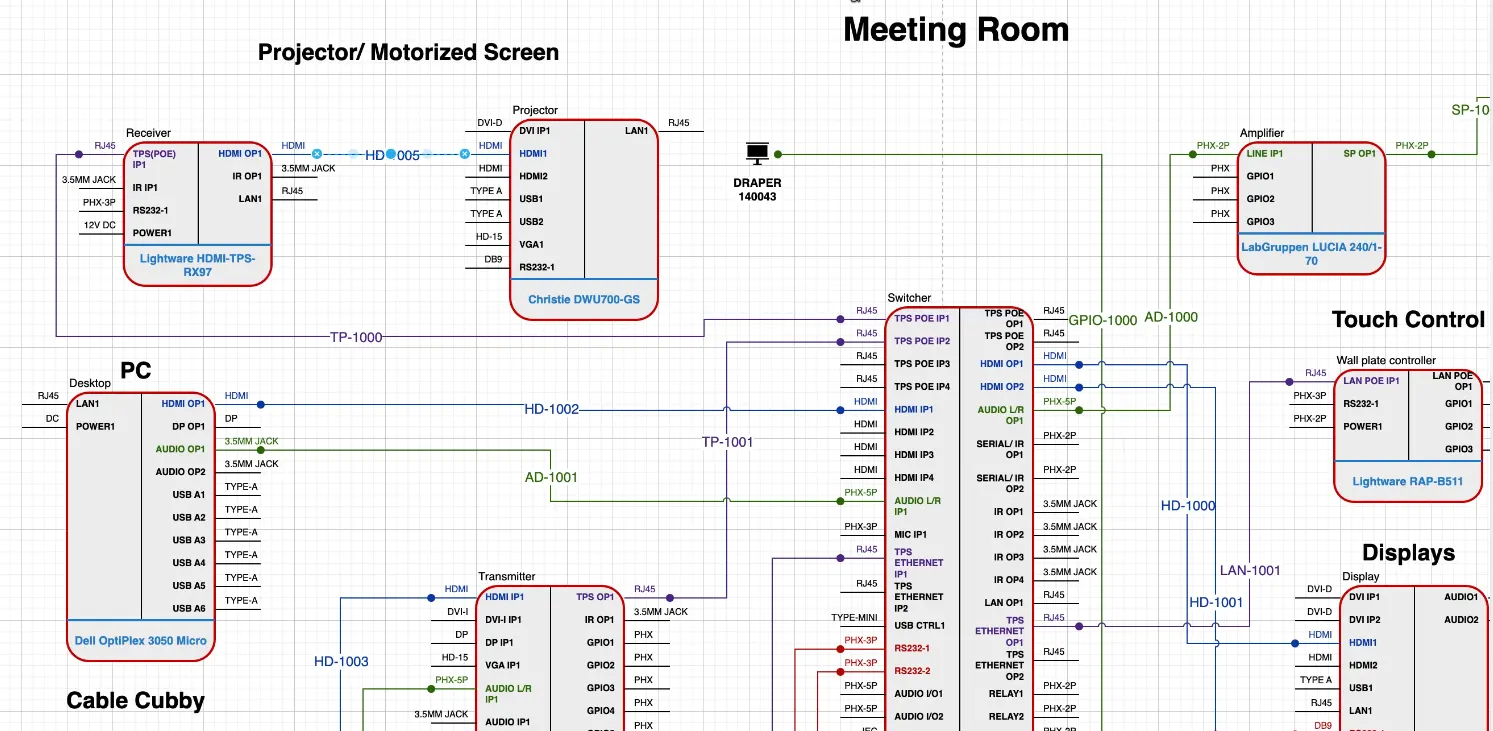
Once your BOM is confirmed, XAVIA builds your complete schematic package inside X-DRAW automatically:
- Line Schematics: Every device, connection, and signal path in one clean drawing
- Signal Flow Diagram: Audio and video signal routing from source to destination
- Rack Layout: Physical rack diagram with correct RU spacing, PDU placement, and device sequencing
- Cable Schedule: Complete cable list with types, lengths, connector specs, and labels
Unlike Visio or AutoCAD, X-DRAW was built specifically for AV system design.
Step 4: Review and Edit in Real Time
The XAVIA system allows users to edit all content or documentation it generates to suit their needs. Users can drag DSP elements to the bottom/upper sections of the rack. The system syncs all documents with the ongoing updates and modifies their information in the BOM.
Step 5: Export Everything in One Click
Your complete AV documentation, including line schematics, signal flow diagrams, rack layout, cable schedule, and BOM, is exported with one click in your preferred formats, including PDF for client presentations. DWG for CAD workflows. Excel for procurement and subcontractor handoffs.
The all-in-one solution for your AV needs
Transform your audio-visual experience with XTEN-AV.
No Credit Card required
Audio Visual System Design Mastery + Winning Proposals = 10x Productivity!
- ✔ Automatic Cable Labeling & Styling
- ✔100+ Free Proposal Templates
- ✔ Upload & Create Floor Plans
- ✔1.5M Products from 5200 Brands
- ✔ AI-powered ‘Search Sense'
- ✔Legally Binding Digital Signatures

The Future of AV Schematics Is Already Here
The AV industry moves fast. The client demands more work in less time, while project expenses increase because of document errors. Creating schematics in Visio by hand requires multiple days of work, resulting in wasted time, lost business opportunities, and reduced project budgets.
This shift isn’t theoretical. It’s already changing how quickly AV firms deliver proposals and handle revisions. Teams still relying on manual workflows aren’t just slower, they’re becoming less competitive on every project cycle.
See how fast your next AV schematic can be generated. Start your free trial or book a free demo.
FAQ's
Yes. Modern AI schematic-diagram software, such as XAVIA, is trained on AV device libraries, signal types, and industry-standard design logic. The software creates 4 types of diagrams: precise line schematics, signal-flow diagrams, rack-elevation diagrams, and cable-schedule diagrams. The software detects network conflicts before fieldwork starts.
The best AV schematic diagram software depends on your workflow needs. To meet AV-specific demands, the best software for AV workflow is XAVIA by XTEN-AV. The platform is a comprehensive solution that enables users to create audiovisual systems with its built-in design tools, without relying on manual Visio or AutoCAD processes.
Yes. The XAVIA platform enables users to create custom device libraries that include proprietary and regional equipment not found in the standard database. The AI maps these devices correctly based on the signal types, connector specifications, and rack unit profiles you define.
XAVIA is designed to fit into existing workflows. The system provides export functions to PDF, DWG, and Excel formats that meet client deliverables, subcontractor handoffs, and the project management tools used by AV integration firms. You don’t have to rebuild your entire process around it.
Absolutely. XAVIA scales from single-room setups to multi-zone enterprise installations. The system’s AI engine manages complex Dante audio networks, multi-rack configurations, HDBaseT distribution networks, and synchronized BOMs controlling hundreds of devices. The system operates effectively in corporate campuses and universities as well as in hospitality AV projects.
Explore more by topic
AV Design Mastery + Winning Proposals = 10x Productivity!
- Automatic Cable Labeling & Styling
- 100+ Free Proposal Templates
- Upload & Create Floor Plans
- 1.5M Products from 5200 Brands
- AI-powered ‘Search Sense'
- Legally Binding Digital Signatures

No Credit Card Required
Related Blogs
-
- Posted by Sahil Dhingra
Audio Visual How to Create Audio Visual (AV) Schematic Diagrams 10x Faster...
-
- Posted by Sahil Dhingra
Audio Visual How AV Integrators Cut 60% of AV Design Time with...
-
- Posted by Sahil Dhingra
Audio Visual What Are the Different Types & Components of Access Control...