Top 9 AutoCAD Alternatives for AV CAD Design
July 7, 2025 | LAST UPDATED ON July 7, 2025 BY VIBHAV SINGH
Imagine you are designing a complex AV project worth $450,000 and you’ve to create complex Computer-Aided Designs (CAD). You start using a CAD software but it has an extensive learning curve. Moreover, it is expensive and lacks features that you need for a streamlined workflow for your project.
The situation further worsens if you’re an AV designer or integrator. For AV integrators, designing AV projects with CAD schematics is crucial. But the dependency on AutoCAD for many aspects limits their work. Some of these aspects include CAD drawings, rack elevations, or real-time 2D and 3D schematics. This limitation becomes especially frustrating and costly when better CAD alternatives are available.
Programs like XTEN-AV’s X-Draw, SolidWorks, SketchUp, FreeCAD and Fusion360 are some of the best alternatives for use in current times. These alternatives one-up AutoCAD in price, features, ease of use, cost incurred for subscription or all of the mentioned aspects.
Thus, we bring you a comprehensive guide to the best AutoCAD alternatives. It provides information on the different aspects of AutoCAD alternatives for a better understanding. These aspects include best use, features, pros & cons, pricing, user reviews and their comparison with AV needs.
So, let’s dive into these alternatives for a more productive and efficient AV workflow. But before that, let’s learn a little bit about AutoCAD.
The all-in-one solution for your AV needs
Transform your audio-visual experience with XTEN-AV.
No Credit Card required
What is AutoCAD?
AutoCAD is computer-aided design (CAD) software that can create highly detailed 2D drawings and 3D models. It is a very flexible tool and is used by architects, engineers, AV designers, and other professionals to draw up plans, rooms, products, and even technical layouts.
In AutoCAD, you combine lines, shapes, text, and dimensions to create precise plans that can be sent out to clients, consultants, and installers. DWG and DXF file formats that are commonly used in design and construction are supported by the software.
AutoCAD is powerful but it can also be very complicated and resource-demanding at times. As a result, nowadays, many teams work with it alongside or even instead of more specialized or cloud-based design tools.
Best AutoCAD Alternatives for CAD Drawings
AutoCAD has a huge user base, including AV professionals. But many teams now look for alternatives because of high costs, a steep learning curve, limited industry-specific features, and weak cloud collaboration.
Consequently, such users seek software that is rich in features, easy on the pocket, and user-friendly, particularly in niche markets.
Being available on the go (with the internet) and affordable are significant advantages that AV engineers and designers have when using such software.
These requirements include AV-specific needs, drawing CAD schematics, streamlining workflow, and timely execution in AV projects.
Thus, it is essential to consider these aspects as AutoCAD alternatives for AV designing. The best alternatives to AutoCAD are XTEN-AV’s X-Draw, SolidWorks, SketchUp, ConnectCAD, BricsCAD, LibreCAD, FreeCAD, Draftsight, and Revit.
So, let’s unravel each replacement for AutoCAD with an extensive breakdown, starting with XTEN-AV’s X-Draw.
1. XTEN-AV’s X-DRAW - (A Wining Cloud Based CAD Design Platform)
It should not be challenging to design AV systems. It also does not mean using a tool unfit for the job. Currently, AV technology and audiovisual systems are rapidly evolving. Hence, it is necessary to design AV systems with precision, speed, and real-time collaboration.
This is where XTEN-AV’s X-DRAW shines. It is one of the best CAD software for AV designs, making it a great fit as an AutoCAD alternative. XTEN-AV’s X-DRAW is an AV-oriented software, for AV professionals having a streamlined workflow. Moreover, the software comprises powerful diagramming tools, location-specific templates, and automated workflows.
These aspects come together and simplify the creation of CAD schematics, rack elevations, and AV layouts. Over 20,000 AV integrators, including teams at Apple, Capgemini, WeWork, Samsung, and Harvard University, use X-Draw.
X-Draw seamlessly integrates with popular platforms like AutoCAD and D-Tools. It supports all major file formats, like DWG, for seamless product design. It also has a cloud-based interface, which ensures real-time team collaboration.
Moreover, X-Draw has features like automated cable labeling, built-in error detection, and effortless file sharing. It stands out as a superior CAD solution for AV design. And it allows AV firms to move quickly, maintain precision, and deliver cost-effective and successful projects.
Also, it streamlines the workflow in a way that puts traditional options like AutoCAD in the rearview mirror. On top of it, it includes
AV-specific symbol libraries, automated cable labeling, location-based templates, and tight integration with XTEN-AV’s AI CAD design tool. Thus, X-Draw is a logical choice for AV companies focused on productivity and profits.
Features
XAVIA: Built-In AI Agent for AV Design
XAVIA is XTEN-AV’s built-in AI agent / generative AI assistant that works hand-in-hand with X-DRAW. Instead of starting every project from a blank page, you can describe the room, use case, or system in simple language and let XAVIA suggest devices, layouts, and even starting schematics. It can help you build AV designs faster by proposing product combinations, checking signal paths, and highlighting potential gaps in the system.
Since XAVIA has been trained on AV workflows, it is aware of common areas such as conference rooms, classrooms, training rooms, and auditoriums. You can use it for design improvements, variations generation, or for tasks like BOM suggestions, cable planning, and documentation clean-up. The outcome is a reduction in manual drafting, a decrease in repetitive clicks, and an increase in the time allotted to the AV experience fine-tuning instead of tool wrestling.
AV-Specific Diagramming Tools
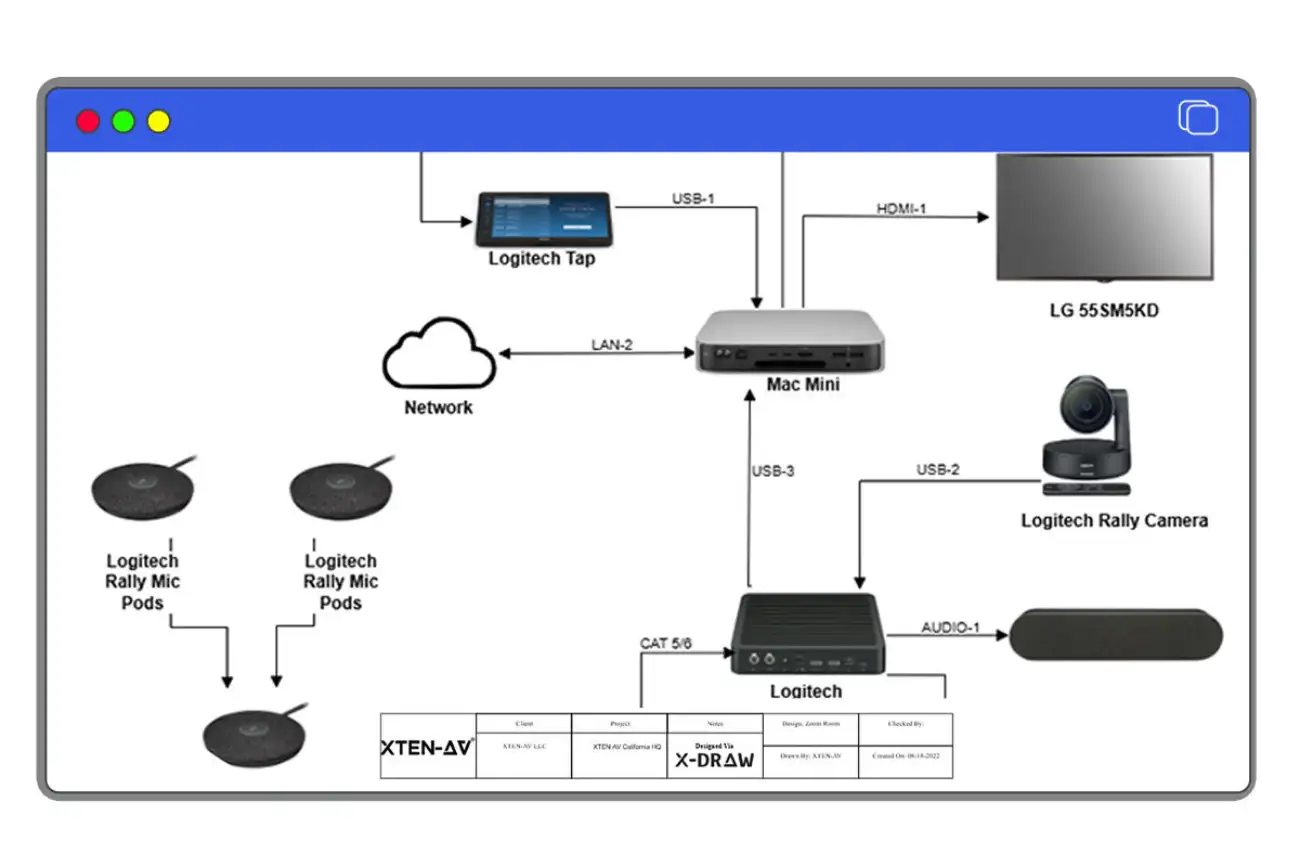
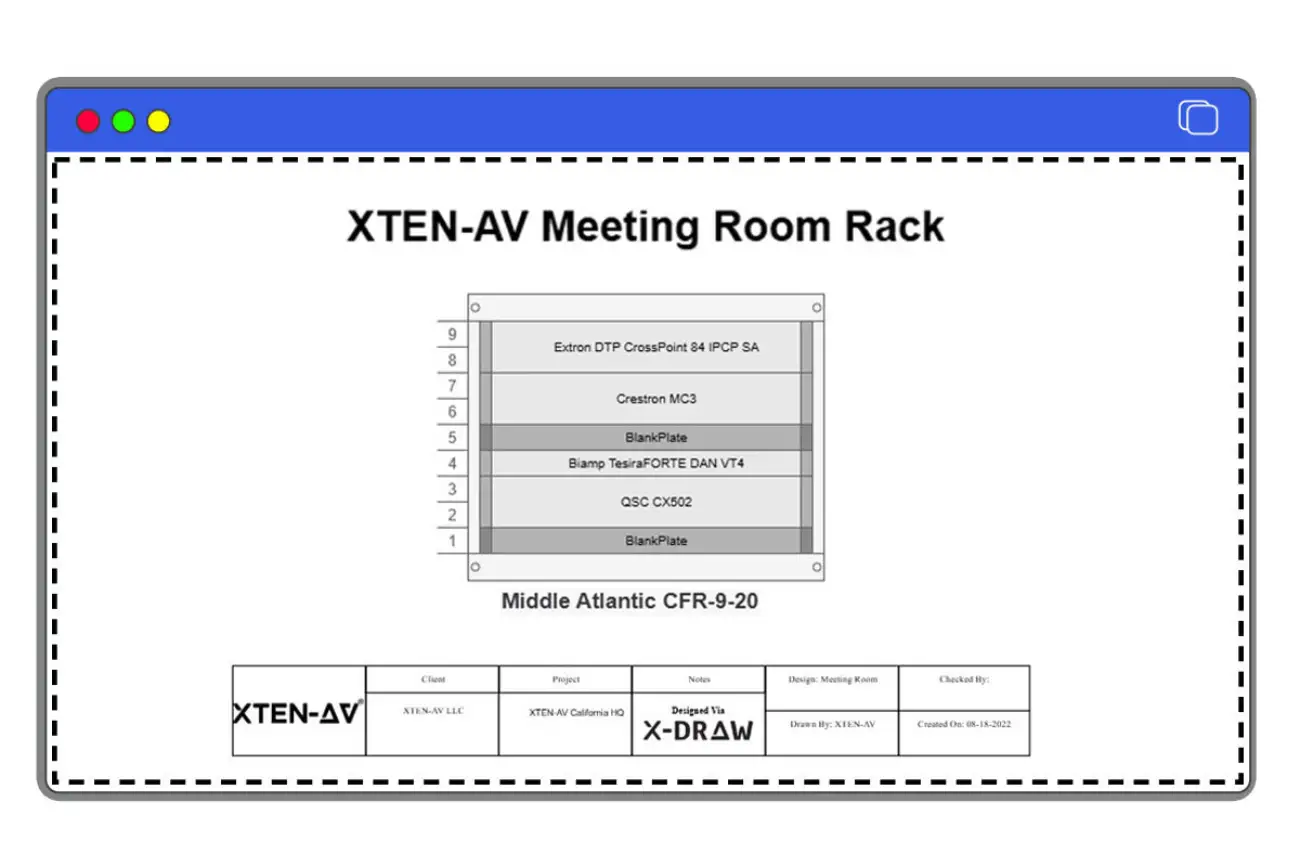
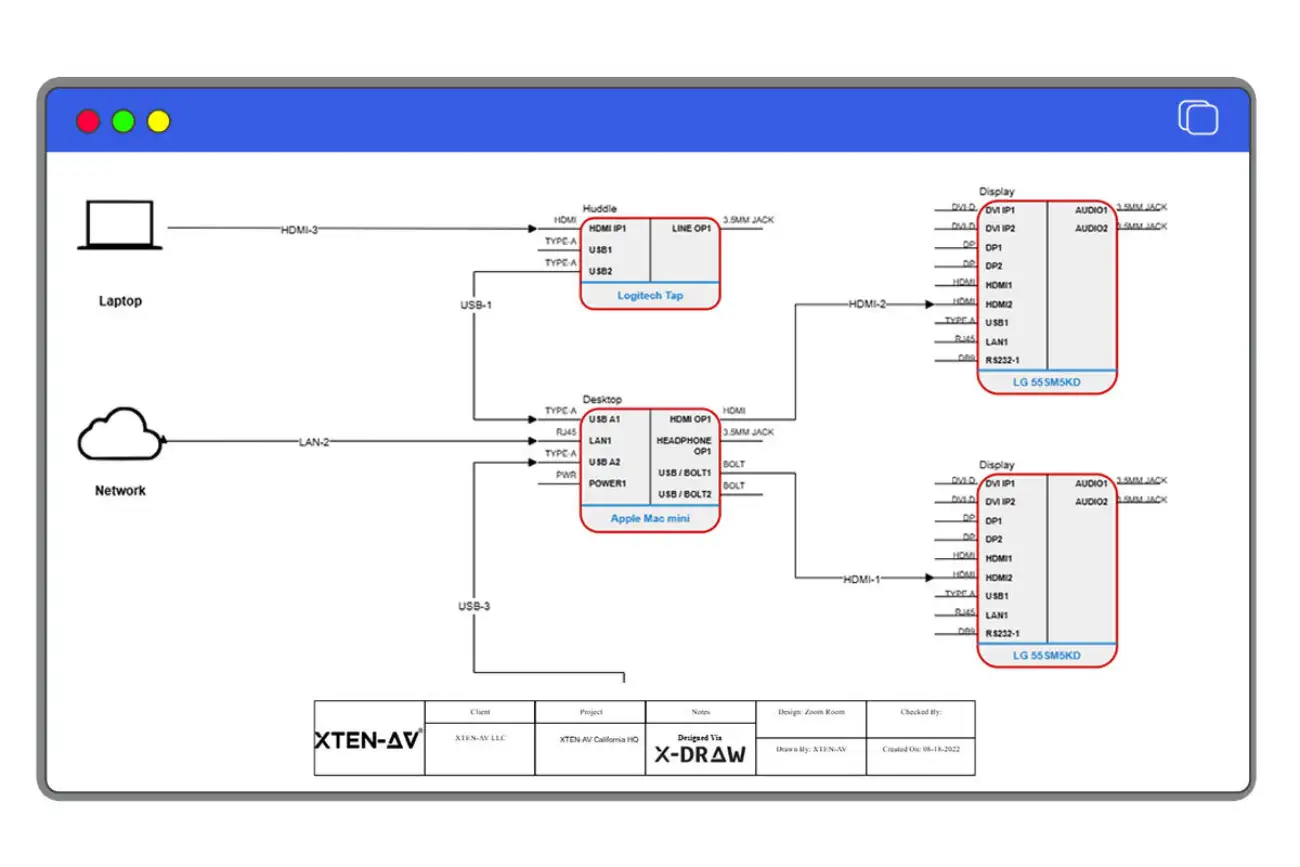
X-DRAW places an AV-centered drawing environment at your disposal rather than a blank CAD canvas. It is a clean, simple interface with a vast symbol library comprising projectors, displays, amplifiers, microphones, DSPs, speakers, control processors, and more.
All symbols are made for AV purposes, so it will be easier for you to drag-and-drop devices into your design rather than creating them from the ground up. This speeds up AV system diagrams, one-line drawings, and signal flow schematics. You can also tap into AI-assisted CAD design through XAVIA, which can auto-place blocks and suggest connections based on your BOM and room context.
Automated Cable Labeling and Styling
X-DRAW automates one of the most painful AV tasks: cable schedules and labels. Once you place devices, the platform can generate cable IDs, prefixes, and color coding based on your standards.
This AI-assisted cable labeling and diagram styling makes drawings clearer for installers and cuts down manual errors. Field technicians spend less time guessing which cable goes where and more time finishing terminations, testing, and sign-off. This is especially ideal for complex AV, broadcast, and extensive enterprise deployments.
Seamless Integration and Collaboration
Because X-DRAW is cloud-based, multiple team members can work on the same project at once. The different team members who can work include AV designers, project managers, sales engineers, and more. Changes appear in real time, which removes version chaos and speeds up reviews.
It supports industry formats like DWG, so you can bring in architectural backgrounds from AutoCAD and share AV cad drawings back out. X-DRAW sits inside the broader XTEN-AV ecosystem, which connects with platforms like D-Tools, CRM tools, and project systems, keeping drawings and documentation aligned.
Customizable Templates and Floor Plans
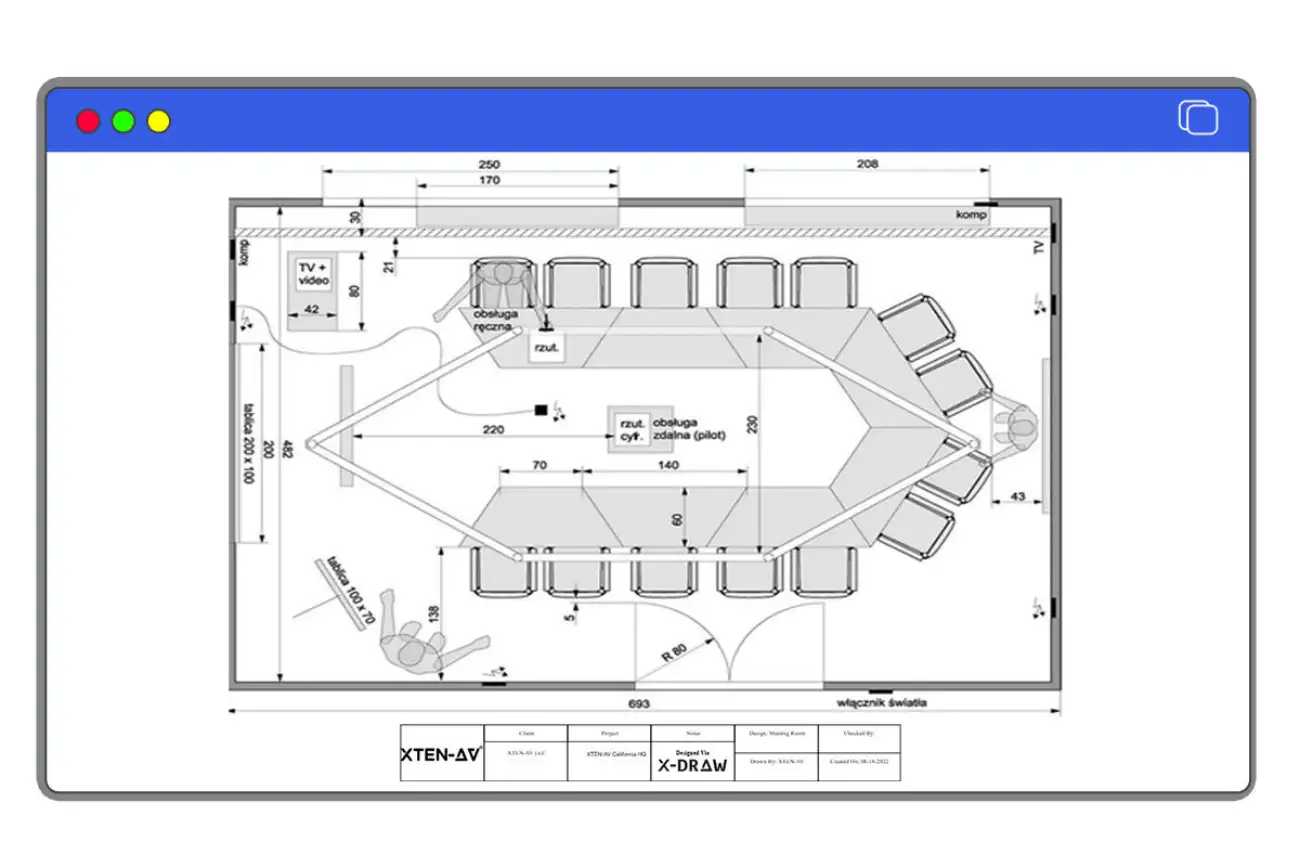
X-DRAW includes templates for common AV spaces, such as conference rooms, training rooms, classrooms, auditoriums, and more. You can upload existing floor plans in DWG or PDF, then edit and annotate them directly in the platform.
This lets AV designers start from a realistic room shell rather than a blank canvas. You can build your own template library over time, so standard conference rooms or lecture halls become quick, repeatable starting points.
No Credit Card required
Pricing
XTEN-AV’s own pricing page lists three core plans for X-DRAW as part of the platform: Basic, Business, and Enterprise. Current list prices in the US are $139, $149, and $169 per user per month, with discounted annual rates where the effective per-month cost is lower.
Optional X-PRO add-ons for office and field users start around $11.25 per user per month on annual billing, and about $15 per user per month on monthly billing.
Pros & Cons
Pros:
X-Draw offers the following pros:
- AV-specific single-line diagrams and layouts that are easy to read in the field
- Intuitive interface with minimal clutter, which keeps onboarding time low
- Cloud collaboration plus AI tools (XAVIA) that speed up AV design and documentation.
Cons:
As per the Capterra reviews, X-Draw is regularly evolving and getting better. However, it lacks actual linework and measurements in X-Draw. This drawback significantly impacts the user experience.
No Credit Card required
2. Solidworks
SolidWorks is an engineering and parametric 3D CAD platform. Thus, it is used in multiple industries, such as
automotive, aerospace, industrial equipment, consumer products, medical devices, and electronics. By adding parameters (dimensions, angles, formulas) and features (extrusion, cuts, fillets, holes), engineers and designers prepare models.
The primary function is solid modeling for detailed assemblies, paired with powerful 2D drawing creation and simulation options. This feature places SolidWorks among the best options in the market for the exact and usable 3D models instead of just ordinary line drawings.
Features
- Parametric 3D modeling and assemblies for detailed mechanical designs.
- 2D drawings linked to 3D models, so edits update all views automatically.
- Cloud-enabled product data management (PDM) for secure storage and version control.
- Cross-team collaboration, allowing engineers to review, comment, and update models from office or field locations.
Pricing
SolidWorks “Design” subscriptions are sold in Standard, Professional, and Premium packages, with quarterly and annual terms. US online pricing currently lists: Standard at $846/quarter or $2,820/year; Professional at $1,038/quarter or $3,456/year; Premium at $1,416/quarter or $4,716/year, excluding local taxes.
Pros
- Strong parametric 3D engine for mechanical and enclosure design.
- A tight link between 3D models and 2D drawings, which helps keep documentation in sync.
- Mature ecosystem of add-ins, simulation tools, and CAM integrations.
Cons
- Pricing and complexity can be high for teams that only need 2D AV layouts or light 3D.
- Overkill for simple AV signal schemes or small room layouts, especially if you do not manufacture your own devices.
SolidWorks works best if your AV company also designs custom hardware, brackets, enclosures, or staging structures and needs precise parametric models. It is less efficient for day-to-day AV schematics, cable lists, and room drawings. Many AV firms use SolidWorks for product engineering and pair it with AV-focused tools like X-DRAW or ConnectCAD for system design.
3. SketchUp
SketchUp is a 3D modeling tool known for its simple interface and quick “push-pull” modeling. Designers use it for architectural concepts, interiors, exhibits, and AV-heavy environments like themed spaces, auditoriums, and retail.
The main feature of this application is its high-speed conceptual 3D drawing that allows you to present rough ideas in clear graphics in no time at all. Then you can adjust the models with materials, lighting, and accessories from the SketchUp Warehouse.
Features
- User-friendly interface that allows non-CAD professionals to do 3D modeling.
- Traditional 3D modeling with push-pull is ideal for designing rooms, stages, and equipment layouts.
- Large extension ecosystem, including rendering, analysis, and industry plugins.
- Ability to import floor plans and quickly extrude them into 3D rooms for AV visualization.
Pricing
SketchUp’s subscription plans are divided into a few levels. The usual US prices show SketchUp Go at about $139/year, SketchUp Pro at $399/year, and SketchUp Studio at $819/year, plus some monthly rates and differences by region.
Pros
- Robust visualizing rooms, stages, and display layouts in 3D
- Gentle learning curve for basic modeling, even for non-technical users
- Strong plugin and content ecosystem for materials, furniture, and scenery
Cons
- Performance can slow down with very large or highly detailed models.
- Not a complete technical CAD system: limited native tools for detailed schematics, wiring, and engineering-grade documentation.
SketchUp is excellent for visual storytelling in AV, showing clients how a room will look with screens, speakers, and lighting. It is less suited for detailed AV schematics, cable schedules, and device-level documentation. Many AV teams use it alongside an AV-specific design tool that covers signal flow and documentation.
4. ConnectCAD
ConnectCAD is a design environment for an AV system, which is a module of the Vectorworks Spotlight or Design Suite. It integrates AV design, rack layouts, and 2D and 3D visualization all inside the Vectorworks framework.
Its hero strength is AV signal-flow design integrated with Vectorworks’ 2D/3D and BIM tools, making it popular for live events, broadcast, performance venues, and installed systems.
Features
AV schematic tools for device blocks, signal routing, and rack elevation drawings
Integration with Vectorworks’ 3D modeling and rendering, so that you can link schematics to room and stage models
Real-time error checking to catch missing connections and mismatched signal types
Shared templates, symbols, and project sharing features for production teams
Pricing
ConnectCAD is an option for purchase along with the Vectorworks Spotlight or Design Suite. The published price for the subscriptions to Vectorworks is approximately $127.50/month or $1,530/year for Architect and Spotlight, with ConnectCAD being the additional module.
Officially, it gets around $183/month or $1,830/year in the US markets, but such pricing depends on the location and the reseller.
Pros
Deep integration with Vectorworks Spotlight for event, theatre, and entertainment design.
Strong tools for AV schematics tied to 3D venue and stage models.
Suitable for organizations already standardized on Vectorworks for scenic or lighting design.
Cons
Requires Vectorworks Spotlight or Design Suite, which adds cost and complexity.
Learning curve can be steep for teams not familiar with Vectorworks workflows.
ConnectCAD is a good fit for production-focused AV, broadcast, and live events, where AV schematics must align with scenic and lighting plans in the same environment. For corporate or education AV that mainly needs quick room standards and quote-to-install flows, a lighter cloud AV platform may be more efficient.
5. BricsCAD
BricsCAD is the DWG-native CAD platform designed to be a versatile option to AutoCAD with AI and machine-learning tools to assist drafting. It is available in different editions like Lite, Pro, Mechanical, BIM, and Ultimate.
The software’s major characteristics include compatibility with DWG, AI tools such as Blockify, and the provision of parametric constraints in the upper versions, which, among other things, make it an excellent alternative for contemporary CAD users who prefer not to part with DWG.
Features
Native DWG support for 2D drafting and 3D modeling
AI-driven tools to recognize and convert repeated geometry into blocks
Multi-core CPU usage to speed up drawing load, detailing, and rendering
Mechanical and BIM editions for parametric parts and building workflows.
Pricing
a) Under single-license:
BricsCAD Lite is available for $314/year, $850/3 years, and $708 for a lifetime.
BricsCAD Pro is available at about $711/year, $1,910/3 years, and $1,596 for a lifetime.
BricsCAD Mechanical at $1,000/year, $2,700/3 years, $2,244 for lifetime
BricsCAD BIM is priced at $1,060/year, $2,860/3 years, and $2,382 for lifetime, and BricsCAD Ultimate is priced $1,180/year, $3,170/3 years, and $2,646 for lifetime.
b) Under Network-License/Multiple Users
BricsCAD Lite is available for $1,416 as a one-time fee
BricsCAD Pro is available for $3,192 as a one-time fee
BricsCAD Mechanical is available for $4,488 as a one-time fee
BricsCAD BIM is available for $4,764 as a one-time fee
BricsCAD Ultimate is available for $5,292 as a one-time fee
Localized pricing and perpetual licenses are also available in some regions.
Pros
Strong DWG compatibility with a more modern licensing model than many legacy CAD tools
Parametric and 3D options in higher editions for mechanical and BIM use cases
Familiar drafting environment for users coming from AutoCAD
Cons
Some users report occasional bugs and inconsistent third-party integration support
AV-specific symbol libraries and workflows are not built in, so AV teams must create or import their own standards
BricsCAD is an excellent fit for your AV business if it is near construction, civil, or mechanical work, and you are looking for a general-purpose DWG platform. On the other hand, since it does not come with AV-centered libraries or cable workflows, AV groups mainly use it for background coordination and depend on other applications for AV-specific drawings.
6. LibreCAD
LibreCAD is a free 2D CAD program that does not limit the operating system to Windows, macOS, and Linux, and its source code is available for users to modify, correct, and improve. Since it is purely 2D drafting oriented, it is a lightweight option for technical drawings.
Its hero strength is simple: zero license cost plus cross-platform 2D drafting, which can be attractive for small teams, students, and experimental workflows.
Features
2D drafting engine for floor plans, mechanical parts, and electrical schematics.
Open-source (GPLv2) with translations into 30+ languages.
Community-maintained documentation and plugins.
Pricing
LibreCAD can be downloaded and used entirely free of charge. There are no license fees or subscription tiers.
Pros
No licensing cost, which is ideal for small shops and educational use.
Lightweight and fast for straightforward 2D drafting tasks.
Works across major desktop operating systems.
Cons
No native DWG support, which makes collaboration with DWG-heavy partners harder.
Limited formal documentation and fewer features compared to commercial CAD tools.
No AV-specific libraries or automation; everything must be built manually.
LibreCAD can be helpful for basic line drawings, simple rack outlines, or quick markups when budgets are tight. For complete AV workflows, it becomes too manual and time-consuming compared to AV-oriented platforms. The workflows include cable labeling, device libraries, room templates, and integrated documentation.
7. FreeCAD
FreeCAD is a free software and open-source 3D modeling program based on parameters. The software is widely accepted in the field of mechanical design, prototyping, and even engineering analysis.
The main advantage of it is parametric modeling: every time you change the dimensions or constraints, the model is rebuilt instantly. It also includes workbenches for 2D drafting, simulation, and export to manufacturing formats.
Features
Parametric 3D modeling and solid modeling for precise mechanical components.
Ability to create 2D sketches as the basis for 3D models.
Workbenches for finite element analysis (FEA), drawings, and BOM export.
Support for exporting to 3D printing and CNC machining formats.
Pricing
FreeCAD is a totally free and open-source software; there are no commercial levels at all. The development is done by the community and is supported by the contributions of users and sponsorships.
Pros
Powerful parametric engine at no license cost.
Good fit for engineers who need control over modeling history.
Growing ecosystem of add-ons and community macros.
Cons
Interface and documentation can feel less polished than commercial tools.
Learning curve for parametric concepts and workbenches can be steep.
No out-of-the-box AV libraries or workflow templates.
FreeCAD is a strong option if your AV business also designs custom mechanical parts, brackets, or housings, and you want a zero-cost parametric tool. For pure AV system design, it requires too much setup and manual work to compete with AV-specific diagram tools.
8. Draftsight
DraftSight is a professional 2D CAD solution designed for DWG workflows. It targets users who want robust 2D drafting without a full AutoCAD license and integrates into Dassault’s ecosystem.
Its hero feature is DWG-centric 2D drafting with familiar commands, plus scripting and automation support (including AutoLISP) for power users.
Features
Create, view, and edit DWG, DXF, and DGN files.
Complete set of 2D drafting and annotation tools with automation options.
Sheet Set Manager for large drawing packages.
PDF import and batch printing to speed up documentation.
Pricing
DraftSight is sold in Professional, Premium, and Enterprise tiers. Recent Dassault and reseller materials quote DraftSight Professional at around $299/year and DraftSight Premium at around $599/year, with enterprise/network pricing starting higher and sold via partners.
Pros
Familiar DWG workflow for users coming from AutoCAD.
Good value for pure 2D drafting compared to some competitors.
Automation support for repetitive tasks via scripts and macros.
Cons
Some users report bugs and occasional data issues in specific releases
3D capabilities are limited compared to complete CAD/BIM systems
No native AV-specific feature set; AV symbols and standards must be built manually.
DraftSight works well as a 2D DWG editor for AV firms that receive and return architectural backgrounds. However, for AV-specific tasks, it behaves like a generic CAD tool and will need extra time and standards to match AV requirements. These tasks include device libraries, signal flow, cable labeling, and integrated project workflows.
9. Revit
Revit is Autodesk’s flagship BIM (Building Information Modeling) platform. It is heavily used in architecture, structural engineering, and MEP design to coordinate full buildings.
Revit’s central feature is parametric BIM modeling: walls, doors, ducts, and other 3D objects know their properties and relationships, and Revit can produce schedules, quantities, and construction documents all from one model.
Features
Multidisciplinary BIM environment for architecture, structure, and MEP
Central models with real-time collaboration and worksharing
Integration with analysis tools and external datasets for performance and code checks
Detailed scheduling and cost tracking tied directly to model elements.
Pricing
Third-party and Autodesk-aligned sources list Revit subscriptions around $335/month or $2,675/year for a standard single-user license, with three-year options and Flex tokens for usage-based access. Regional pricing and tax can vary.
Pros
Strong BIM engine that links 3D models, schedules, and documentation.
Excellent for large projects where AV must coordinate with structure, HVAC, power, and life safety.
Widely adopted in AEC, which eases collaboration with architects and engineers.
Cons
Steep learning curve and complex BIM workflows for AV-only teams.
Higher license cost than many lighter CAD tools, especially if you only need AV diagrams.
AV device and signal libraries require customization or third-party content.
Revit is powerful when AV needs to be deeply integrated into BIM, for example, in hospitals, airports, or big campuses, where coordination with other trades is critical. For everyday AV design, sales proposals, and small to mid-size projects, it can be more tool than you need and may work best in combination with an AV-focused CAD layer on top.
How does XTEN-AV simplify AV CAD system design compared to AutoCAD?
XTEN-AV is a CAD solution for AV integrators. It has several advantages over AutoCAD. Its main advantage is that it is user-friendly and has an interface designed specifically for designing AV systems.
This reduces the learning curve and enables experienced AV integrators to pick up quickly. XTEN-AV has automated tools for simplified schematics creation with great cable runs detail that it is providing. It calculates the automatic length of cables and also has dynamic routing, thereby saving time being correct in the designs produced.
Additionally, the library of AV equipment and components available with XTEN-AV is enormous. The library is constantly updated with the latest products in the market, which makes integrating new technology into your designs easy. It supports industry-standard file formats for easy integration with other CAD software and tools. XTEN-AV also lets you standardize your design process by offering customizable templates and reports. XTEN-AV’s niche features and streamlined workflow enable it to be a powerhouse alternative to AutoCAD for integrating AV systems.
AV Design Mastery + Winning Proposals = 10x Productivity!
- Automatic Cable Labeling & Styling
- 100+ Free Proposal Templates
- Upload & Create Floor Plans
- 1.5M Products from 5200 Brands
- AI-powered ‘Search Sense'
- Legally Binding Digital Signatures
No Credit Card Required
What qualities define a strong AutoCAD alternative?
A strong AutoCAD alternative comprises several essential qualities. These qualities include user-friendly design, affordability, and AV professional-centric efficient CAD solutions.
Irrespective of the profession, the right AutoCAD alternative offers the best tools for 2D drafting and 3D modeling. This includes a free AutoCAD alternative as well. It also provides seamless real-time collaboration and compatibility with standard file formats.
Here’s a detailed description for better understanding.
1. Extensive 2D and 3D Capabilities
A good AutoCAD substitute provides 2D drafting and 3D modeling. FreeCAD and XTEN-AV, for instance, provides parametric 3D modeling, so users can modify designs by modifying their measurements. LibreCAD offers 2D drafting and has an interface similar to AutoCAD. These software’s focus on multiple aspects, such as addressing basic schematics and advanced 3D projects.
2. DWG File Compatibility
Any good AutoCAD alternative will comprise a feature that ensures DWG file compatibility. Thus, users can seamlessly collaborate and share files and won’t experience issues related to file conversion.
For example, BricsCAD and XTEN-AV’s X-DRAW offers DWG file compatibility, ensuring users can open and edit AutoCAD cad drawings files seamlessly. As a result, the project workflow is consistent and efficient.
3. User-Friendly Interface
User-friendly interface is essential for seamless onboarding. SketchUp and XTEN-AV is famous for its user-friendly interface, which allows professionals to visualize concepts rapidly without extensive training. This usability is crucial for teams that are required to boost their productivity.
4. Cost-Effectiveness
A CAD design software must be cost effective to be a good substitute for AutoCAD.
For example, XTEN_AV, FreeCAD and LibreCAD are free CAD software with substantial features. Therefore, many startups or individual professionals prefer them over tools which offer subscription services.
5. Cross-Platform Support
A good AutoCAD alternative must offer services on multiple or every operating system to boost the accessibility. Software, such as XTEN-AV’s X-Draw, FreeCAD, and LibreCAD are available on Windows, macOS, and Linux. As a result, users can use the AutoCAD substitute on their preferred platforms without compatibility issues.
6. Customization and Extensibility
Customization and extensibility are crucial for specialized workflows. BricsCAD features LISP programming and provides APIs which can help you to customize AV design at any stage. As a result, users can select the software to meet their specific needs.
7. Active Community and Support
An active user community and customer support ensures effective problem-solving and continuous learning. For example, alternatives like FreeCAD, LibreCAD and XTEN-AV’s X-DRAW features a vast community and an active customer support. As a result, users can get help from active communities that provide tutorials, forums, and regular updates.
8. Specialized Features for AV Design
For AV professionals, tools like XTEN-AV offer features tailored to audio-visual system design. These features include automated cable labeling and extensive product libraries, streamlining the design process.
Why are AV Integrators looking for Autocad alternatives for CAD Design?
AV integrators are increasingly exploring AutoCAD alternatives for CAD design. It is because of the specific challenges and limitations they experience with AutoCAD in the context of audio-visual (AV) system integration.
While AutoCAD is a powerful and versatile CAD software, it may not fully address the unique requirements of AV professionals. As a result, many integrators and designers seek out specific tools, which offer AV design-oriented features and workflows.
1. Lack of AV-Specific Features
AutoCAD is a general-purpose CAD tool and lacks built-in AV-specific features. These features include pre-defined symbols for AV equipment, signal flow diagrams, and rack elevations.
Users have to manually create these elements due to the absence of these features. As a result, AV project designing takes more time has high chances for errors.
Nonetheless, AV-specific software resolves this issue with extensive product and symbol libraries along with the tools tailored for AV system components.
2. Complexity and Steep Learning Curve
AV integrator’s primary focus is on AV system design rather than general drafting. Hence, they experience a steep learning curve while using AutoCAD. This learning curve significantly reduces productivity and can lead to issues such as project delay, budget overrun, client dissatisfaction and more.
This is a critical issue for teams that require quick turnaround times. In contrast, AV-specific CAD programs often offer more intuitive interfaces aligned with AV workflows.
3. Inefficient Workflow Integration
challenging. AutoCAD lacks specialized tools for documentation, review cycles, and approvals that AV projects specifically require.
These issues lead to inefficiencies and project delays. On the other hand, AV-focused CAD solutions often provide integrated workflow management features. AV professionals can use these features efficiently to streamline the workflow.
4. High Cost of Licensing
AutoCAD has costly licensing fees which can be costly for small to medium-sized AV integration firms. Compared to its costly licensing fee, it does not offer sufficient AV-specific functionality. These reasons collectively push AV professionals to not use it.
As a result, AV integrators incline towards free or more affordable CAD programs tailored for AV design offer a cost-effective alternative. These alternatives do not compromise on essential features as well.
5. Limited Collaboration Capabilities
AutoCAD’s collaboration features may not fully support the real-time, cloud-based collaboration needs of modern AV projects. Such issues can become challenging for AV organizations and AV teams, especially when teams are at different locations.
This limitation can significantly lower efficient communication and project coordination. However, certain AV-specific CAD tools like XTEN-AV’s X-DRAW include robust collaboration features. As a result, any team member associated with the AV project can seamlessly remain up-to-date on any changes, ensuring seamless teamwork.
Why is AutoCAD so expensive?
AutoCAD is expensive because of its advanced capabilities and specialized industry applications. It comprises tools for 2D and 3D CAD design. But, its high cost limits its access to many users.
As a result, professionals look for more affordable or free CAD programs. Understanding the factors behind AutoCAD’s pricing can help users assess its value and consider suitable AutoCAD alternatives. Here is the breakdown of reasons why AutoCAD pricing is so expensive for better understanding.
Here is the breakdown of reasons why AutoCAD is so expensive for better understanding.
1. Complex Development and Maintenance
AutoCAD is a sophisticated CAD solution requiring continuous development, updates, and maintenance, which incurs significant costs.
2. Shift to the Subscription Model
Autodesk transitioned from perpetual licenses to a subscription-based model, leading to higher long-term expenses for users.
3. Specialized User Base
AutoCAD caters to a niche market of professionals, resulting in a smaller user base and higher per-user costs.
4. Comprehensive Feature Set
The software offers an extensive array of tools and functionalities, justifying its premium pricing compared to free CAD software.
5. Limited Volume Discounts
Autodesk discontinued multi-user subscriptions, reducing cost-saving options for businesses requiring multiple licenses.
Here is the table for a better understanding of each AutoCAD alternative and its pricing.
S.No | Software | Features | Pricing |
1 | XTEN-AV | AV-Specific CAD Diagramming Tools Automated Cable Labeling and Styling Seamless Integration and Collaboration Customizable Templates and Floor Plans | Basic: Annual subscription costs $49.50 each month, monthly subscription costs $66 per month. Business: The annual subscription costs $54 each month, monthly subscription costs $72 per month. Enterprise: Available only for annual subscriptions, and it costs $85 per month. |
2 | Solidworks | Real-time Cross-team Collaboration Cloud-based Product data management 3D Modeling and 2D Drawings: | Standard: It costs $846 USD/quarter and $2,820 USD/year Professional: Costs $1,038 USD/quarter and $3,456 USD/year Premium: It costs $1,416 USD/quarter and $4,716 USD/quarter |
3 | SketchUp | User-Friendly Interface 3D Modeling Large Community and Extensions | Go: Available on Ipad & Web only, it costs $119/year or $17.99 per month Pro: Costs $279.20/year and $49.99 /month Studio: Annual subscription is available for $599.20/year Let’s Talk: Comprises of volume purchasing and it involves contacting sales teams for further information Higher Education: Costs $55/yr for students and educators and is available at tiered pricing for universities |
4 | ConnectCAD | Advanced rendering tools for 3D visualizations of architectural designs Transform rough sketches into smart objects Real-time updates and inter-team collaboration | Cost varies for different models and license types |
5 | BricsCAD | Cost-effective and flexible subscriptions DWG-compatible file format Intuitive interface for ease of access Uses multi-core CPUs to accelerate drawing loads, speed up detail view creation and rendering | Cost varies for different models and license types |
6 | LibreCAD | Affordability because of no cost Open Source and GPLv2 Availability in over 30 languages with cross-platform support | Free of Cost |
7 | FreeCAD | Create designs in real-world units from microns, kilometers to inches and feet Create, share, and edit solid, full-precision models, Share them for 3D printing or CNC machining Create 2D drawings and views of your models, Analyze different aspects, such as Finite Element Analyses, Export model data such as quantities or bills of materials. | Free of Cost |
8 | DraftsSight | Create, view, and edit DWG, DXF, and DGN files Complete set of edit, design, and automation tools (incl. Autolisp) Manage large 2D drawing sets with Sheet Set Manager Save time with PDF Import and batch printing | Professional: $299 per year Premium: $599 per year Network: $399 per year |
9 | Revit | Effective creation and collaboration Real-time update to keep all team members on the same page Integration with data analysis tools, multiple datasets, and file types for efficient and productive design Sustainable design with detailed data for seamless design and project management | Daily-Flex: $300 for 100 tokens with 10 tokens for use each day Monthly: $380 Annual: $3005 |
Conclusion
When considering AutoCAD alternatives, it’s essential to recognize the strengths of various CAD programs tailored to specific needs. Therefore, XTEN-AV’s X-Draw emerges as the best AutoCAD alternative for AV CAD designer and engineers seeking a comprehensive, affordable solution.
It combines essential CAD features with AV-specific tools, ensuring efficient design workflows. X-Draw’s affordability and tailored functionalities make it an ideal choice for AV system design. So What are you waiting for?
Sign up for a 15-day trial and get 15 days access for free or book a free demo to learn all about X-Draw and its features.
FAQ
There are situations where an AutoCAD substitute can be a no-cost tool, but not in all scenarios. FreeCAD and LibreCAD cover most of the 2D and 3D requirements of small workshops, students, or internal projects. On the other hand, free options may lack DWG support, powerful collaboration and enterprise features, etc. If you need to deal with native DWG files as per the client’s requirements or if the industry standards are rigorous, then AutoCAD or a paid alternative will still be necessary for you.
For AV system design, X-DRAW is generally a better fit than AutoCAD. It gives you AV-specific symbol libraries, rack and signal-flow tools, automated cable labeling, and room templates for conference spaces, classrooms, and auditoriums.
It is because it runs in the cloud that sales, design, and install teams can share the same project space. That makes AV projects faster to draft, easier to understand, and more reliable onsite.
SolidWorks is generally the most favored option of professional teams for 3D mechanical design because it is very powerful. It provides advanced parametric modeling, assemblies, simulation, and detailed 2D drawings that are automatically linked to your models.
Fusion 360 is another good option if you require cloud access, integrated CAM, and a lower initial investment. FreeCAD can also work, but it is more suitable for small and very specialized teams.
If the specific professional application is indeed 3D mechanical design, FreeCAD can be looked at as a asle professional tool next to AutoCAD. It is also a great help for smaller firms as well as solo workers to lower their expenses since it is reliable, versatile, and free.
Still, it does not compare with AutoCAD in terms of 2D features, user interface, and user manuals. If you are in heavy production drafting or working in big offices, you may still need some AutoCAD features.
The best AutoCAD alternative is a matter of your specific needs. BricsCAD is a good option as it offers DWG compatibility and a user-friendly interface. DraftSight is a strong contender for 2D and 3D drafting, providing good support. FreeCAD is a parametric 3D modeling software that can be used for a wide variety of design needs.
ZWcad possesses almost the same features as AutoCAD, and the two software are compatible with DWG and have a similar interface. It may come at a slightly lower price, but still, AutoCAD is the king in this area with a broader feature set backed by good support.
The difficulty of learning CAD software varies from one program to another. The most accessible ones are Tinkercad and SketchUp, whereas FreeCAD is powerful but still has a challenging learning curve. While AutoCAD takes time to master its entire toolset.
BricsCAD gives you a similar usability to DWG and a well-known interface. DraftSight includes excellent 2D and 3D drawing performance. LibreCAD is a free, open-source 2D CAD application. FreeCAD gives you parametric 3D modeling, which makes it an appropriate tool for all types of design projects.
FreeCAD is one of the best free open-source CAD programs known for its parametric modeling feature. LibreCAD is a free, open-source 2D CAD application that is ideal for creating technical drawings. Blender is another open-source program that provides 3D modeling and rendering functionalities. BRL-CAD draws on another solid modeling software for open-source.
Blender is an application for 3D artists and AV professionals to create and render models, animate, and so forth. It may be used indirectly, though, in some CAD operations. Still, accuracy-wise, it does not match AutoCAD at all, nor does it possess comparable features. When it comes to exact CAD applications, switching instruments like FreeCAD or LibreCAD is recommended.
AutoCAD is generally used for 2D and 3D drafting, irrespective of the purpose. Fusion 360 not only provides cloud-based collaboration but also is a product design software. FreeCAD, though an open-source alternative, has parametric modeling capabilities. SketchUp, being easy to use, is perfect for architectural and interior design projects.
Currently, the software that is the most popular behind the scenes in production is AutoCAD, SolidWorks, CATIA, and Fusion 360. Additionally, FreeCAD is slowly but surely getting recognized as an open-source alternative among the others.
SketchUp continues to be a leading software in the domain of architectural and interior design projects. BricsCAD and DraftSight can also be added to the list. XTEN-AV’s X-Draw is another popular CAD software that is particularly favored for AV designs.
For pure 2D CAD drawings for buildings, AutoCAD and XTEN-AV’s X-DRAW is still the most widely used choice in architecture and construction. It offers precise 2D drafting, strong DWG support, and a huge ecosystem of blocks, templates, and training.
If the budget is tight, tools like AutoCAD LT, BricsCAD, DraftSight, or nanoCAD can also work well, but if your clients expect DWG files and industry-standard workflows, AutoCAD and XTEN-AV’s X-DRAW remains the safest bet.
XTEN-AV’s X-Draw, ConnectCAD, LibreCAD, FreeCAD, SketchUp, Revit, and BricsCAD can be named, among others, as possible substitutes for AutoCAD.
The choice of the best software is solely dependent upon your individual requirements. AutoCAD is an all-rounder for both 2D and 3D drafting. CATIA is considered the best in complicated surface modeling and is highly suitable for the aerospace and automotive industries. SAP is an enterprise resource planning software, not a CAD tool, and is fit for business management.
XTEN-AV’s X-Draw is the best cad software for commercial and industrial AV designs and projects. However, SolidWorks is famous for its parametric modeling and simulation capabilities for general industrial design.