






Best Cloud-Based Audio Visual (AV) Project Cost Estimating Software

Sahil Dhingra
Published 22 April 2026


AV integrators often start with a defined project scope, but evolving system requirements quickly make cost planning difficult to manage. Spreadsheets and disconnected tools struggle to keep up with updates in BOMs, resource allocation and vendor pricing.
Quote accuracy becomes challenging as inputs, procurement data and installation schedules continue to shift across teams. Lack of workflow alignment creates gaps in cost visibility and limits insights about the project expenditure.
In this blog, we will explore the best project cost estimating software for Audio visual (AV) integrators. Discover how the right tools can streamline estimation, reduce errors and improve financial control across projects.
Key Takeaways
- The 5 Best Project Cost Estimating Software for AV Integrators includes XTEN-AV (X-PRO), Jetbuilt, D-Tools, ProjX360 and Specifi.
- X-PRO by XTEN-AV is a cloud-based AV project management platform that connects estimation with execution. It ensures real-time alignment between planned and actual costs, improving financial predictability and control across project delivery.
- D-Tools is a project cost estimating tool used in AV workflows to create budgets from system design data. It improves accuracy through structured breakdowns and enables job costing and change order tracking throughout projects.
- Jetbuilt is a web-based AV estimating and quoting platform that builds budgets from equipment and labor inputs. It improves cost accuracy throughout the entire project lifecycle.
- ProjX360 is a project management platform with built-in cost estimating capabilities. It connects budgets, resources and time tracking to keep costs aligned with field installation work.
- Specifi is an AV business management platform that integrates estimating, CRM, proposals and procurement. It optimizes quoting, improves cost control and streamlines project execution.
What is Audio visual (AV) Project Cost Estimation Software?
AV Project Cost Estimation Software is a specialized tool that enables system integrators to plan accurate project budgets by combining BOM, equipment pricing and labor costs in a single workflow. Expenses are organized into a cost breakdown structure. This includes direct, indirect, fixed and variable costs. Alignment with scope and system requirements is maintained.
Estimate vs actual tracking improves visibility into project spend. On-budget monitoring keeps costs under control. Change order management handles scope adjustments efficiently. Integrated quoting and job costing reduce deviations, supporting accurate planning and profitable delivery.
However, many AV teams still rely on manual estimation workflows. This often delays proposal turnaround and increases the risk of errors. If you’re facing these challenges, read How Generative AI Transforms AV Project Estimation & Proposals to see how you can accelerate estimates and improve proposal accuracy.
The all-in-one solution for your Audio visual (AV) Project needs
Transform your audio-visual experience with XTEN-AV.
No Credit Card required
Key Features to Look for in Audio visual (AV) Project Cost Estimating Software
Did you know that, according to AVIXA, the global professional AV industry is projected to grow from $332 billion in 2025 to $402 billion by 2030? As project scope expands and system complexity rises, precise budgeting becomes more important than ever. That’s why choosing the right AV labor cost estimating software is essential. It improves planning accuracy, strengthens cost visibility and maintains financial control across every stage of delivery.
The all-in-one solution for your AV needs
Transform your audio-visual experience with XTEN-AV.
No Credit Card required
Here are the essential features to consider:
Automated BOM Generation with Accurate AV Equipment Pricing
When engineers rely on manual AV BOM creation, necessary equipment can be overlooked, leading to pricing gaps across displays, DSPs, speakers and control systems. This impacts budget accuracy in complex AV projects. Selecting modern estimating software automates BOM generation with integrated pricing, enhancing scope visibility and structuring a cost breakdown structure (WBS) for stronger cost control across delivery stages.
Gain Full Visibility into Direct and Indirect Project Costs
AV project budgets often lose accuracy when supporting expenses are not organized early. Costs such as travel, site coordination and documentation are frequently excluded from the main estimate, creating gaps during project management. A reliable platform should clearly separate direct, indirect and variable costs within a centralized structure. This improves financial clarity, reduces budget uncertainty and strengthens overall cost control across the project lifecycle.
Improve AV Labor Cost Estimation Across Project Phases
Even small errors in AV workforce planning can lead to budget inconsistencies during project delivery. A structured system maps effort across design, installation, integration and deployment phases, aligning roles with defined responsibilities. This enables more accurate cost forecasting and stronger control.
Streamline AV Proposals and Change Order Management
AV project requirements often change. Costs can quickly go off track without proper tracking. The platform should connect estimating and quoting. It should also support change order cost tracking. This keeps pricing accurate and aligned with the project scope.
Track Estimate vs Actual Costs for Better Budget Control
Without visibility into actual costs, budgets become difficult to manage. Estimate vs actual cost tracking software enables project managers to compare planned and actual spend in real time. It focuses on on-budget tracking and improving the overall accuracy in future estimates.
5 Best Project Cost Estimating Software for Audio Visual (AV) System Integrators
If AV budgets are difficult to control, you’re not alone. Many teams face challenges in aligning equipment, labor, logistics and execution costs while maintaining clear visibility throughout ongoing work.
Without effective change order cost tracking software, even small-scope updates can affect margins and reduce the accuracy of cost planning. That’s why we’ve compiled leading estimating tools to improve planning, streamline tracking and strengthen overall control.
X-PRO by XTEN-AV
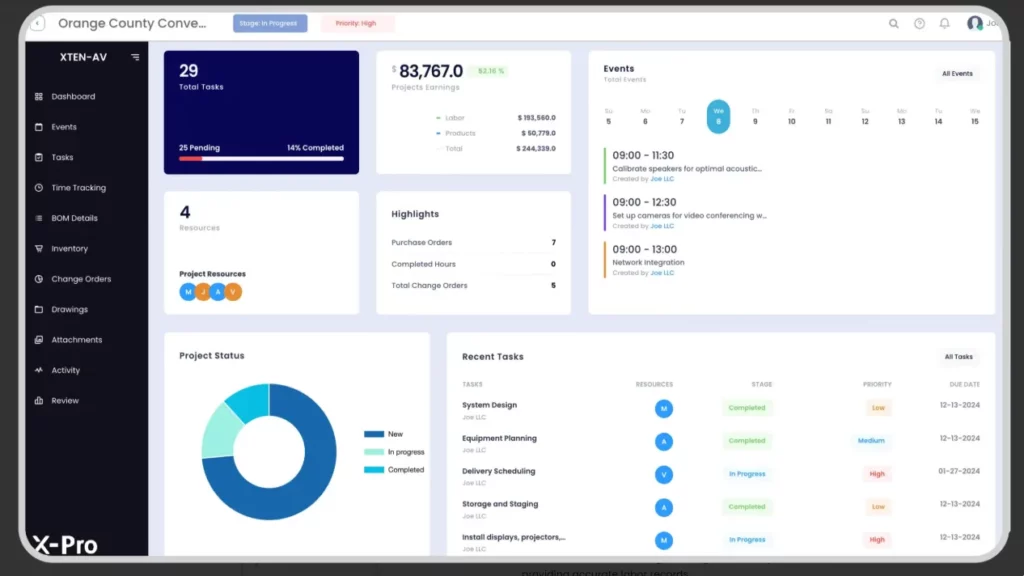
X-PRO is a cloud-based AV project management software built for project managers who need strong control over execution and project costs. It offers clear visibility into estimate vs actual tracking, along with real-time monitoring of project spend, labor allocation and procurement activities. With clear control over change orders and site progress during installation and commissioning. It keeps delivery aligned, schedules predictable and costs under control.
Features of X-PRO by XTEN-AV
- Real-Time Cost Control Across Projects:
X-PRO provides continuous visibility into project expenditure across equipment, labor and site operations. This enables proactive cost control and allows for maintaining financial alignment throughout project delivery. - Structured Cost Breakdown for AV Workflows:
Project budgets are organized into a structured cost framework aligned with the AV scope and deliverables. This ensures accurate resource allocation during estimation and execution planning. - Live Estimate vs Actual Monitoring:
Planned costs are continuously compared with actual project expenditure. This enables early detection of gaps, supports better financial decision-making and provides project ROI insights. - Change Order Cost Alignment:
Scope changes are automatically reflected in updated cost estimates, keeping project budgets aligned with real execution conditions. - Labor and Resource Cost Tracking:
Onsite workforce activity is tracked and linked to project tasks. This improves accuracy in labor cost estimation and resource planning for installers, integrators and deployment teams. - Procurement and Material Visibility:
Equipment such as displays, DSPs, speakers, control systems, racks and cabling can be tracked within project budgets. This enhances procurement planning and reduces delays caused by missing materials.
Pros
- Aligns budget planning with real AV delivery progress for tighter control.
- Enhances visibility across equipment, labor and onsite spending.
- Provides clear insight into cost performance at every stage of delivery.
- Reduces cost overruns through continuous monitoring.
Cons
- May require a short learning curve for new users.
Integration:
It integrates easily with many popular business apps such as HubSpot, QuickBooks, Salesforce, Zoho, Microsoft Dynamics and many others.
User Reviews:
Users highlight improved cost visibility, stronger project control and better financial control across AV delivery workflows.
Still wondering how X-PRO can simplify your AV projects? Book a Demo to see it in action!
XTEN-AV Pricing Plans
- Free Trial
XTEN-AV offers a 15-day free trial.
- Basic Plan
$104.25 per user/month (billed annually)
- Business Plan
$111.75 per user/month (billed annually)
- Enterprise Plan
$126.75 per user/month (billed annually)
- Project Management Plan (X-PRO Add-On)
$11.25 per user/month (billed annually, optional)
D-Tools
D-Tools is a well-established AV cost estimating software built for precise system design, product specification and project budgeting. It supports structured planning by mapping equipment, labor and materials within a clear cost breakdown structure or WBS. The platform focuses on early-stage workflows such as design, estimation and pre-installation planning rather than field execution. It improves budget visibility while maintaining alignment across project requirements. D-Tools SI for on-premise use and D-Tools Cloud for cloud-based workflow, providing flexibility across various operational needs.
Key Features of D-Tools
System-Based Estimating:
Builds AV estimates using integrated product data, labor inputs and pricing within a connected workflow.
Structured Cost Planning:
Organizes equipment, labor and installation scope into a clear cost breakdown for accurate budgeting.
Budget Tracking & Control:
Compares planned budgets with actual job spend to maintain cost visibility and support better decisions.
Proposal & Quoting:
Converts estimates into professional AV proposals and client-ready quotations with aligned pricing output.
Pros:
- Cloud access enables remote visibility into AV project cost and progress.
- Built-in design tools support system layout creation and proposal development.
- Reporting capabilities provide clearer insight into budgeting and tracking.
- Integrates with third-party tools for a smoother AV workflow.
Cons:
- New users might have difficulty using its complex software and face a steep learning curve to get familiar with it.
- Technical support is slow and inconsistent according to user feedback.
Integration:
Supports integration with QuickBooks, HubSpot and Xero. Also, enables seamless syncing between D-Tools SI and D-Tools Cloud.
User Review:
Users value its accuracy and in-depth estimation capabilities but find it less intuitive for first-time users.
Looking for similar AV system design platforms? Explore our D-Tools Alternatives guide.
D-Tools Pricing Plans
- Free Trial / Demo
D-Tools offers a free demo, while trial options vary by plan.
- D-Tools Cloud – Solo
Plan starts from $99/user/month (Billed monthly or annually)
- D-Tools Cloud – Duo
Plan Starts at $179/user/month (more users & features)
- D-Tools Cloud – Team & Enterprise
Custom pricing based on team size.
- System Integrator (D-Tools SI)
From $1,800/user/year (on-premise, quote required)
- Add-Ons & Support
Offers optional add-ons such as additional field users and premium support at an extra cost.
Jetbuilt
Jetbuilt is a web-based AV project estimating & quoting software built to simplify cost planning in the early stages of projects. It helps create accurate quotes, develop professional proposals and present clear pricing to clients. With a smooth approval process and structured documentation, it supports better cost clarity and faster project sign-offs.
Key Features of Jetbuilt
Fast AV Quoting:
Generates project estimates using a large product database with dealer pricing for accurate cost planning.
Lead & Project Management:
Centralizes leads, bid comparison and AV project setup to streamline early-stage estimation workflows.
Client Portal & Communication:
Gives clients access to proposals, approvals and project updates in one place.
Installation & Service Tracking:
Supports AV project tracking, inventory visibility and service workflows to maintain control across delivery stages.
Pros
- Speeds up proposal and estimate creation for early project costing.
- Easy-to-use interface designed for AV estimation workflows.
- Flexible templates for accurate system proposals and pricing.
- Improves efficiency across the AV sales and quoting process.
Cons
- The pricing may be a concern for small teams with limited budgets.
- Occasional bugs may disrupt AV project workflows.
- The system might experience performance issues with large, complex projects.
Integration:
Jetbuilt integrates with platforms such as HubSpot and Salesforce to enhance client management.
User Review:
Users appreciate Jetbuilt for its speed and ease of use, but some reviews highlight concerns around pricing and limited real-time integration support.
Jetbuit Pricing Plans
- Free Trial
Free Trial available for 2 weeks.
- Lite:
$69 per user/month for the first 3 users.
Also, $59 additional per user for budgeting and proposal tools.
- Enterprise:
$137 per user/month for the first 5 users.
Also, an additional $127 for access to Jetbuilt’s advanced features.
- Optional Add-Ons:
AI-generated schematics/rack plans from $45 per month
Client management from $25 per month
Still unsure about Jetbuilt pricing? Check our Jetbuilt Pricing Guide for a quick breakdown of plans, add-ons and real costs for AV integrators.
Specifi.io
Specifi.io is project cost estimation software specifically designed for small- to mid-sized AV teams. It integrates CRM, proposal creation, purchasing, inventory and client communication within a single platform to streamline workflows. The system simplifies sales, procurement and coordination while focusing on speed, ease of use and smooth vendor collaboration.
Key Features of Specifi.io
Design-Linked Cost Estimation
Build system designs and get accurate pricing instantly using real product data.
Integrated CRM and Proposal Workflow
Manage leads, create proposals, and track opportunities without switching tools.
Procurement and Order Management
Convert proposals into purchase orders and track supplier orders in one place.
Time Tracking for Labor Costing
Log site hours against projects to improve visibility into labor costs.
Invoicing and Client Portal
Handle billing and give clients access to project updates.
Pros
- Offers clear visibility into costs, approvals and billing through a centralized client portal.
- Enables smooth team coordination and task management across locations with mobile access.
- Maintains pricing accuracy with integrated supplier data, supporting faster procurement.
- Improves proposal quality with built-in branding and customization tools.
Cons
- Limited support for external third-party integrations.
- The platform requires first-time users to complete onboarding to access all features.
Integration
Specifi.io offers integration support for platforms including Google Workspace, Microsoft 365, QuickBooks and Xero. It delivers real-time insights and helps AV teams manage workflows smoothly.
User Review
There is no review available on Capterra and G2-based review platforms.
Specifi.io Pricing Plans
Free Trial
14-day free trial (no credit card required)
Individual
£89 per month (billed monthly) / £80 per month (billed annually)
Team (Most Popular)
£219 per month (billed monthly) / £197 per month (billed annually)
Company
£449 per month (billed monthly) / £404 per month (billed annually)
Optional Add-Ons
White-label portal, SEO Toolkit, Specific Echo (prices vary per add-on)
ProjX360
ProjX360 is a SaaS-based platform for managing project costs alongside schedules, resources and timelines. It connects budgeting with time tracking, work orders and inventory to improve cost visibility. Built-in CRM organizes the sales pipeline, while project tracking tools support coordination and timely delivery.
Features of ProjX360
Project Stage Tracking
Tracks progress across key phases such as AV design, procurement, installation and handover with proper task visibility.
Estimation & Proposal Support
Prepares detailed quotes with system specifications and pricing, enabling faster approvals and clearer cost visibility.
Work Order Management
Organizes AV installation and service tasks to keep scope and schedule aligned.
Timeline & Resource Planning
Defines schedules, assigns responsibilities and monitors milestones to keep delivery on track and within budget.
Pros
- Mobile access keeps updates available during onsite execution
- Custom reports provide clear insight into costs and performance
- Updated product pricing supports accurate estimation.
- Warranty tracking simplifies post-project service management.
Cons
- There is no fixed public price. Pricing depends on the options selected.
- A newer brand with a limited user base and a less established track record.
Integration
- ProjX360 allows third-party integration support with platforms like D-Tools, Portal and QuickBooks.
User Review
- There is no review available on Capterra and G2-based review platforms.
ProjX360 Pricing Plans
- Starter Plan
$229/month (billed annually, save 10%)
Includes 2 full users and 3 tech users, extra users can be added separately.
Also, the one-time setup costs $445 and includes 6 onboarding hours.
- Growth Plan (Most Popular)
$449/month (billed annually, save 10%)
Includes 4 full users and 6 tech users, extra users can be added separately.
Also, the one-time setup costs $695 and includes 8 onboarding hours.
- Professional Plan
$789/month (billed annually, save 10%)
Includes 8 full users and 12 tech users, extra users can be added separately.
Also, the one-time setup costs $1,395 and includes 12 onboarding hours.
- Enterprise Plan
$1,199/month (billed annually, save 10%)
Includes 16 full users and 24 tech users, extra users can be added separately.
Also, the one-time setup is around $1,995 with 20 onboarding hours.
Platform | Best Fit | How It Addresses AV Integrator Challenges | Pricing |
XTEN-AV | Teams managing multi-phase AV projects | XTEN-AV is a complete AV project software. X-PRO extends it with task management, mobile field access, clock-in/out, inventory and purchase order handling, and real-time ROI insights, while tracking estimates versus actual costs across all AV phases. | XTEN-AV offers a full AV Ecosystem at 139 USD per user /Month.
X-PRO add-on 15 USD per user/month. |
Jetbuilt | Field-focused integrators needing fast execution | Jetbuilt simplifies scheduling, dispatch, and onsite coordination. It monitors direct and indirect costs, manages change orders, and keeps resources aligned throughout installation, programming and commissioning stages. | Starts at 69 USD per user /month. |
D-Tools | Design- and documentation-driven teams | D-Tools connects system design, proposals, procurement, and installation workflows. It supports job costing, WBS, budget oversight, structured change management, and estimate versus actual tracking across all project stages. | D-Tools SI starts at 150 USD per user /month.
D-Tools Cloud starts at 99 USD per month. (plan-based) |
ProjX360 | Field teams managing onsite labor and installations | ProjX360 optimizes technician scheduling, labor allocation and budget tracking. It monitors estimate versus actual performance, manages change orders and ensures smooth execution from staging to commissioning. | Starts at 229 USD per month, billed as a company plan. |
Specifi.io | Teams integrating CRM-led sales with project workflows | Specifi.io combines proposals, cost estimation, labor and equipment tracking and change order processing. It supports budget monitoring and reporting while aligning sales and execution workflows. | Starts at 89 GBP per month, billed as a company plan. |
AV Design Mastery + Winning Proposals = 10x Productivity!
- ✔ Automatic Cable Labeling & Styling
- ✔100+ Free Proposal Templates
- ✔ Upload & Create Floor Plans
- ✔1.5M Products from 5200 Brands
- ✔ AI-powered ‘Search Sense'
- ✔Legally Binding Digital Signatures

How Audio visual (AV) Pros can choose the Right Project Cost Estimating Software
Following is a quick checklist for AV integrators to choose the right cost estimating software based on capabilities, accuracy and workflow needs:
Software That Aligns with the Complete AV Workflow
Disconnected tools across design, estimation and execution create inefficiencies.
Choose a solution that supports system design, BOM generation, installation, programming, and commissioning. This keeps AV teams aligned.
Support for Complete AV Cost Components
Missing cost elements lead to incomplete estimates. Ensure the platform includes equipment, labor roles, indirect expenses and contingency planning.
Better Resource Planning and Labor Allocation
Inefficient planning causes scheduling conflicts and increases project costs. The system should help assign technicians and installation teams based on project stages and required skills.
Budget Tracking and Change Order Management
Scope changes are common in AV projects and impact overall costs. Look for tools that offer budget visibility and change-order cost tracking to maintain accuracy.
Easy to Use and Scalable for Growing Projects
Complex tools reduce adoption and push teams back to manual processes.
Choose software that is easy to use, integrates with existing workflows, and scales with project complexity.
Conclusion
Budget overruns, missed timelines, and limited visibility often disrupt project delivery, making financial control difficult across project stages. Without structured AV project budget tracking, teams lose clarity on project spend and struggle to maintain alignment across key execution phases. X-PRO by XTEN-AV addresses these gaps by consolidating task management, time tracking, and project monitoring into a single system. This improves coordination, strengthens execution control and delivers more predictable project outcomes.
See How AV Integrators Simplify Cost Estimation and Streamline Projects with XTEN-AV.
FAQs
It is a tool used by AV teams to calculate project costs for equipment, labor and installation with higher accuracy and consistency.
Start with a clear scope, detailed AV BOM and updated pricing data. By using estimating tools and cost libraries allows users to enhance accuracy while reducing manual errors.
Break down all AV requirements into a detailed cost structure before finalizing the estimate. Carefully review vendor quotations to identify any missing components such as workforce, logistics or onsite technical support.
Note:
The content in this blog is based on publicly available information and AV user feedback from sources such as G2, Capterra and Reddit. All product names and trademarks belong to their respective owners.
Explore more by topic

AV Design Mastery + Winning Proposals = 10x Productivity!
- Automatic Cable Labeling & Styling
- 100+ Free Proposal Templates
- Upload & Create Floor Plans
- 1.5M Products from 5200 Brands
- AI-powered ‘Search Sense'
- Legally Binding Digital Signatures
No Credit Card Required
Related Blogs
-

- Posted by Sahil Dhingra

Audio Visual What Is an AV Connection Check and Why Does It...
-
- Posted by Sahil Dhingra
Audio Visual Preferred Manufacturer Lists in AV: How to Keep AV BOMs...
-
- Posted by Sahil Dhingra
Audio Visual Multi Room-Wise AV BOM Management Guide Sahil Dhingra Published 24...
