





Pretend that you are in the process of an AV installation, such as a conference room, auditorium, or corporate campus, and every cable, speaker, and connection has to be exact. A minor error in the signal path or equipment location can hold up the project and give the client frustration. For AV professionals, accuracy and speed are not luxuries but necessities for success.
Applications such as System Surveyor have gained traction since they enable integrators to design floor plans, layout equipment, and model signal paths, thus making complex projects easier to handle. But as AV installations grow in size and complexity, many of the industry professionals are looking for tools that do more than simple design capabilities. They are looking for tools that save time, reduce errors, and enable scalable, future-proof system designs.
In this blog, we will explore five System Surveyor alternatives in 2025. We will look at XTEN-AV, D-Tools SI, Stardraw, Vectorworks, and Lucidchart, covering their features, pricing, advantages, and disadvantages to help you choose the right tool for your AV projects.
Key Takeaways:
- System Surveyor alternatives offer integrators smarter, scalable solutions for large-scale AV projects, enhancing accuracy and minimizing workflow errors.
- Tools such as XTEN-AV, D-Tools SI, Stardraw, Vectorworks, and Lucidchart all have special strengths in design and documentation.
- XTEN-AV is special with the scope of work automation, signal flow diagram software, BOM automation, and AI-based XAVIA recommendations.
- The use of the correct tool guarantees quicker project delivery, effective collaboration, future-proof AV systems, and easy maintenance across several sites.
The all-in-one solution for your Security System Design & Installation needs
Transform your audio-visual experience with XTEN-AV.
No Credit Card required
What Is a System Surveyor and Why Do Professionals Use It?
Have you ever attempted to coordinate an AV project with multiple rooms, dozens of devices, and miles of cable without a clear visual plan? It can get overwhelming very fast.
System Surveyor is a cloud-based AV system integrator software that caters to the needs of professionals to make complicated projects easier. It enables them to draw floor plans, position equipment, and illustrate signal paths in a systematic, visual manner. For integrators handling everything from single conference rooms to large corporate campuses, it provides a clear overview of device locations and system connections, including rack elevations, camera schedules, and door schedules for integrated security.
AV professionals rely on System Surveyor because it reduces errors and saves time. Rather than tediously drawing layouts or tracking devices in spreadsheets, users can drag and drop gear, assign functions, and watch signal flow diagrams in real-time. Collaboration is also supported, allowing design teams to stay aligned during projects, even when managing PoE budgets, VLANs, and ONVIF devices.
Another significant advantage is documentation. Integrators can generate extensive reports, export layouts in DWG/DXF/PDF, and maintain accurate BOMs and scope of work automation. This simplifies installation, troubleshooting, and long-term maintenance.
While System Surveyor is dependable for most routine projects, it has limitations with AI security design tools (2025), advanced rack elevation diagram tools, and large-scale AV project management software. These gaps explain why many professionals are exploring smarter, faster, and more scalable security system design software and AV solutions.
Why Should You Look for System Surveyor Alternatives?
Even the greatest tools have their weaknesses, and System Surveyor is no different. Picture yourself developing an extensive AV project with hundreds of rooms, thousands of devices, and several team members. Although System Surveyor assists with floor plans and simple signal flow diagram software, it can become constraining when projects get complex.
One shared issue is automation. System Surveyor involves a lot of manual labor, from setting up equipment to recording cabling. For integrators managing multiple projects or tight deadlines, this can slow AV project management software workflows and lead to errors. Cable management is another limitation. Modern AV systems require meticulous planning to preserve signal integrity, proper thermal management in racks, and neat patching. Without sophisticated rack elevation diagram tools, maintenance and troubleshooting can become tedious and prolonged.
Scalability is also an issue. System Surveyor suits small and medium-sized projects, but more extensive installations need features supporting multi-floor designs, advanced signal routing, scope of work automation, and real-time documentation across teams. Integrators need platforms that grow with their projects and offer future-proof AV rack design.
Lastly, integration with other applications and reporting features can be limited. Professionals often prefer a single platform that handles security system proposal software, design, digital signatures for proposals, documentation, and collaboration without constantly switching programs.
These are the gaps for which most AV professionals are exploring System Surveyor alternatives. In the following sections, we will explore the top five tools in 2025, showing how they save time, reduce errors, and ensure more consistent AV system integrator tools performance.
Top 5 System Surveyor Alternatives for Security System Design & Documentation
If you’re seeking solutions beyond System Surveyor basics, there are a number of solid choices in 2025. These solutions provide deep automation, improved cable management, real-time documentation, and scalable features for large projects. In the section below, we highlight five top alternatives that will enable AV professionals to streamline their workflow and enhance project reliability.
1. XTEN-AV
XTEN-AV is fast becoming the go-to platform for AV system integrator tools integrators who require more from System Surveyor. While System Surveyor is good for floor plan creation and simple signal flow diagram software, it may fall short when dealing with sophisticated projects, advanced cable management, and massive collaboration.
XTEN-AV fills these voids by offering automation, real-time documentation, and smart workflows that save time and minimize mistakes. Its cloud-based platform enables teams to work together effortlessly, from drafting signal flows to producing in-depth proposals and scope of work automation, as well as equipment lists.
The all-in-one solution for your AV needs
Transform your audio-visual experience with XTEN-AV.
No Credit Card required
Features
- Draw detailed floor plans and signal flow diagrams instantly so that teams can accurately visualize complex AV systems.
- Organize and label cables automatically, create documents, and minimize errors for neater, more dependable AV installations.
- Efficiently plan AV racks by controlling weight distribution, airflow, and space to produce maximum system performance.
- Quickly create professional proposals and comprehensive reports, condensing client presentations and project documentation to secure approval and implementation.
- Work in real-time with distributed teams and multiple team members, keeping everyone in sync on design changes and project updates.
Pros
- Automation saves time and reduces errors.
- Scalable for large, complex projects.
- Cloud-based collaboration for teams.
- Comprehensive design and documentation tools.
Cons
Work only with internet connectivity.
Pricing
XTEN-AV offers three subscription plans: Basic ($104/user/month), Business ($111/user/month), and Enterprise ($126/user/month), with custom quotes for larger teams.
User Reviews:
Users on Capterra commend XTEN-AV for its ability to streamline workflows, make client communication easier, and facilitate quicker project delivery, especially in multi-site projects.
2. D-Tools System Integrator (SI)
D-Tools System Integrator (SI) is a data-driven, powerful software solution for AV system integrators needing a robust platform to manage the entire life cycle of a project, from estimating and design through installation and service management. Although System Surveyor provides useful tools for system design and site surveying, D-Tools SI takes these capabilities to the next level by adding in-depth AV project management software, procurement, and service tracking to a single platform.
Features
Gain access to a broad product catalog with dealer-specific pricing to enable effective and accurate proposal generation.
Leverage the use of Gantt charts, task scheduling, and resource assignment to manage projects in control and on budget.
Develop and manage service plans, monitor service requests, and efficiently dispatch field technicians.
Pricing
D-Tools SI has scalable pricing beginning at $150 per user, offering both hosted and on-premises options. Pricing is custom for the size and type of your business.
Pros
Supports the entire project life cycle, minimizing the need for a variety of separate tools.
Create comprehensive reports and proposals to communicate better with clients and increase project transparency.
Ideal for any business size, from small teams to large organizations.
Cons
The advanced features might take time and learning to maximize.
The cost might be more than in simpler tools, which may be a factor for small businesses.
User Reviews
Reviewers like its full set of features and integration functionality. But some mention the initial learning curve and maintenance requirements.
3. Stardraw
Stardraw has long been trusted by professionals in the AV system integrator tools field, especially those who prefer to use local software instead of cloud-based systems.
Unlike System Surveyor, which is focused on team collaboration and cloud storage, Stardraw is built for people who need precise tools to create rack elevation diagrams, signal flow diagrams, and detailed schematics for their projects.
Features
Stardraw offers various symbols from major manufacturers, making it easy to create accurate and standard AV schematics.
It makes it simple to plan rack layouts and system designs without needing complex CAD skills.
All your drawings, reports, and data are kept in one place, making it easier to track your projects.
Pricing
Stardraw is available through an entry-level pricing of $550/user/year and professional pricing of $2100/user/year.
Pros
It runs efficiently without an internet connection or cloud servers.
It includes a vast collection of symbols corresponding to real-world hardware.
It contains features that assist you in designing in-depth rack and schematic layouts with simplicity.
Cons
It lacks support for real-time collaboration, which may not be ideal for teams that work remotely.
Its reporting and interface feel outdated compared to newer web-based applications.
User Reviews
Stardraw is praised by users for its high reliability and precision when producing large-scale AV documentation, particularly structured cabling and rack planning. Yet, most say the absence of real-time collaboration makes it less ideal for teams that are developing multiple projects in remote locations.
4. Vectorworks
Vectorworks is well-liked among AV and lighting designers due to the fact that it integrates architectural design, security system planning, device library automation, and 3D visualization all under one umbrella.
In contrast to System Surveyor, which is generally used for system documentation and device mapping, Vectorworks includes more capabilities with its precision CAD and BIM (Building Information Modeling) functionality, which is excellent for complicated installations, code-compliant designs, and collaborating with other experts.
Features
It enables you to design with 2D drawings, 3D models, and BIM workflows in one application.
It’s specifically designed for AV, lighting, and electrical system design, enabling you to link devices and plan signal paths accurately.
You can check how your design appears in 3D to identify errors with layout, sightlines, and cable paths before installing anything.
Pricing
Vectorworks offers several yearly subscription plans to suit different design needs. Vectorworks Fundamentals is available for $3333 per year, while specialized editions like Vectorworks Architect, Landmark, and Spotlight each cost $3750 per year. For those seeking the complete package, the Vectorworks Design Suite is priced at $4166 per year.
Pros
It features intensely detailed 2D and 3D tools for creating professional-level AV documents.
It features functionality for presenting your designs more effectively to clients and enhancing project coordination.
It seamlessly fits into BIM workflows, allowing you to synchronize your designs with architectural drawings.
Cons
It has a greater learning curve, particularly for individuals who are new to CAD or BIM.
It requires a powerful system to handle 3D rendering and massive files to run without trouble.
User Reviews
Professionals value the depth of features and the ability to use it across different industries, especially in AV and lighting. However, many find the interface too complex for smaller AV firms that need simple tools for basic documentation instead of full CAD modeling.
5. Lucidchart
Lucidchart is a cloud-based platform used in many industries for visual collaboration and process mapping.
For AV system integrator professionals, it’s a good alternative to System Surveyor because it’s easier to use for creating quick layouts, security camera plans, signal flow diagrams, and team documents, without needing to know much about CAD software. While it doesn’t have built-in AV libraries or templates for NVR systems, its flexibility makes it useful for creating visual plans, managing project scope, and documenting systems.
Features
You can quickly create flowcharts, rack layouts, and signal maps with a simple and easy-to-use interface.
Multiple people can work on the same document and add comments in real time, improving teamwork across different teams.
It has customizable templates for project workflows, floor plans, and system documentation.
Pricing
Lucidchart starts as low as $9 per user per month for individual plans and $10 per user per month for team plans.
Team and Enterprise plans offer more features like advanced collaboration, admin control, and better integrations with other tools.
Pros
It’s very easy to use with almost no training needed.
Real-time editing and commenting improve teamwork.
It works well with business and project management tools.
Cons
It doesn’t have specialized AV symbols or automation features.
It doesn’t offer advanced 3D visualization or in-depth documentation options.
It needs a stable internet connection to work properly.
User Reviews
Users often praise its ease of use and the flexibility it offers for making quick system diagrams and visual documentation. However, AV professionals say it’s best for creating ideas or presentations rather than detailed engineering drawings.
How Do You Choose the Right System Surveyor Alternative for Your Projects?
Choosing the optimal System Surveyor replacement makes a significant impact on the effectiveness and precision of your AV project management tool. The secret lies in assessing the tool in terms of your project size, complexity, and the features your team requires.
First, look at automation capability. Solutions such as XTEN-AV support scope of work automation, BOM automation, and real-time updates, which eliminate errors and save time on mass deployments. If your projects consist of multiple floors, hundreds of devices, or intricate rack elevation diagrams, prioritize tools that can manage signal flow diagram software and comprehensive device library management.
Then consider integration and cooperation. Proposal software that enables digital signatures, security system proposal software, and cloud access by the team can make coordination between designers, installers, and project managers easier. When doing security projects, make sure the platform integrates with security system design software, CCTV design tool, access control design software, and NVR system design templates to maintain all systems on the same page.
Lastly, look at scalability and future-proofing. Your AV software should be compatible with AI security system design tools, PoE budgets, VLANs, and ONVIF standards, which will keep your designs current as technology changes. Ease of reporting, exporting DWG/DXF/PDF markups, and the ability to keep accurate camera schedules or door schedules are also important to ensure easy installation and maintenance.
Selecting the proper System Surveyor alternative guarantees your process is quicker, more precise, and completely ready for current and future AV endeavors.
Why Are AV and Security Integrators Switching from System Surveyor to XTEN-AV?
XTEN-AV is a favorite among AV professionals since it surpasses the minimum functionality of System Surveyor and other System Surveyor competitors. Integrators love that it combines AV system integrator functionality, sophisticated automation, and cloud collaboration into one simple-to-use platform.
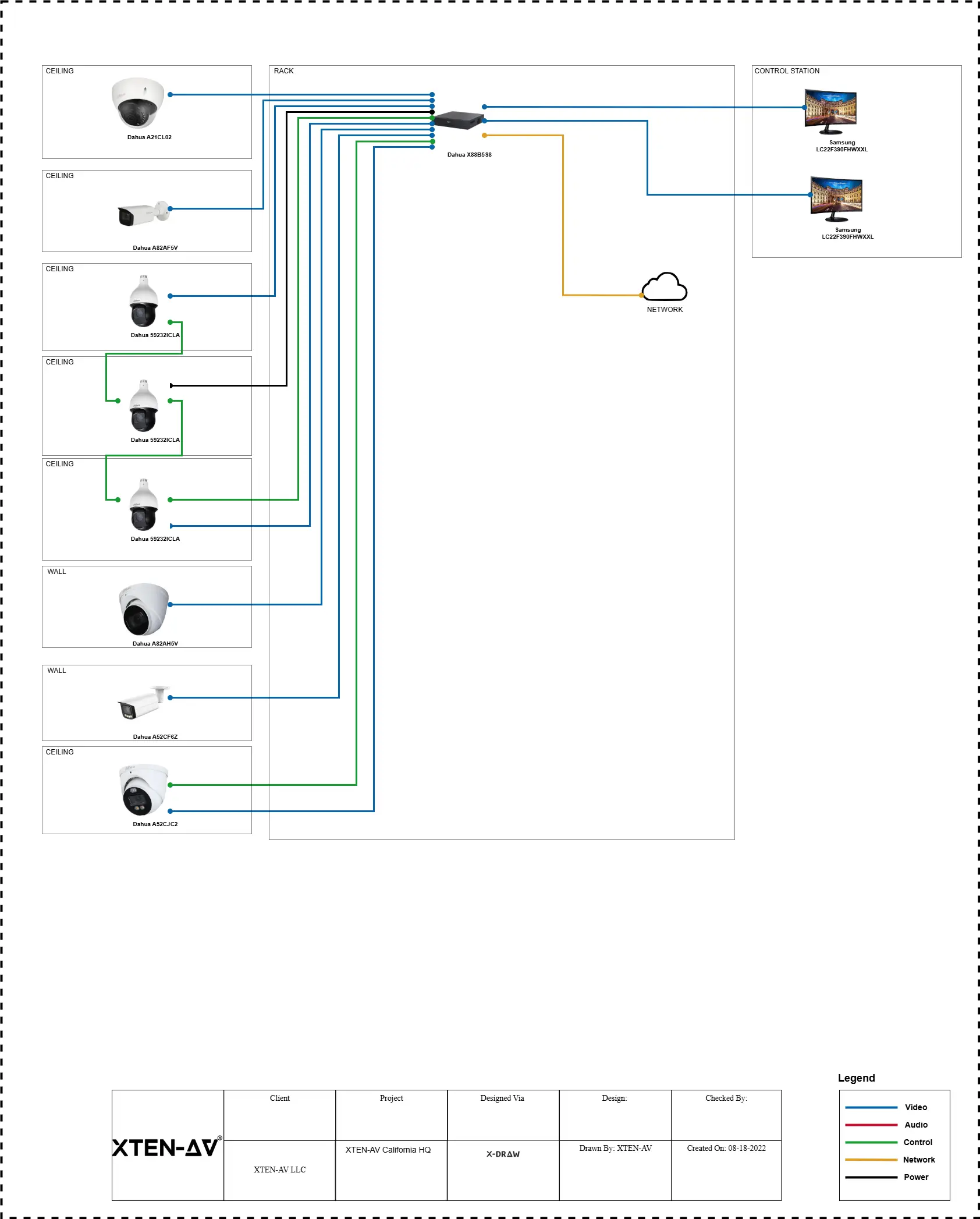
One of the most notable features of XTEN-AV is X-DRAW, where users can design detailed floor plans, signal flow diagrams, and rack elevation diagrams with live updates. This expels human error, provides effective thermal management, and tracks all PoE budgets, VLANs, and ONVIF devices. For advanced security system design software projects, X-DRAW also accommodates CCTV design tools, access control design software, and security camera layout planners, enabling integrators to see device coverage, cone of vision, and placement accuracy on large sites.
X-DOC makes documentation and reporting easy, generating Bill of Materials (BOM), extensive scope of work (SoW) automation, and exportable layouts in DWG, DXF, or PDF formats. Integrators can also produce professional security system proposal software with built-in digital signatures for proposals, accelerating client approvals and reducing administrative hold-ups.
For group collaboration, X-PRO allows several users to collaborate on a project together, with real-time updates across floors or even between several sites. In turn, XAVIA, XTEN-AV’s AI assistant, takes automation to the next level.
For instance, you can type in a prompt such as: “Design a camera layout for a 10-room office with 8 PTZ and 12 fixed dome cameras, with complete coverage and PoE budget adherence.”
In less than a second, XAVIA reviews your specifications, suggests ideal camera placement, updates security camera layout planners, and even creates a BOM automatically. This eliminates guesswork, accelerates design iterations, and guarantees correct signal flow diagrams and scope of work automation without human intervention.
AV Design Mastery + Winning Proposals = 10x Productivity!
- ✔ Automatic Cable Labeling & Styling
- ✔100+ Free Proposal Templates
- ✔ Upload & Create Floor Plans
- ✔1.5M Products from 5200 Brands
- ✔ AI-powered ‘Search Sense'
- ✔Legally Binding Digital Signatures

Conclusion
Selecting the proper System Surveyor substitute can revolutionize your AV projects with enhanced precision, productivity, and teamwork. Although software such as D-Tools SI, Stardraw Design 7, Vectorworks, and Lucidchart are all useful in their own right, XTEN-AV leads the pack with its built-in AV system integrator tools, signal flow diagram software, automated scope of work, and AI-driven XAVIA assistant. From automated BOM generation to real-time documentation and sophisticated rack elevation diagramming tools, XTEN-AV saves integrators time, minimizes errors, and future-proofs their systems.
Ready to simplify your AV design process? Learn more about XTEN-AV today and find out how it can transform your projects.
FAQ's
Top System Surveyor alternatives include XTEN-AV, D-Tools SI, Stardraw, Vectorworks, and Lucidchart. These tools offer features like signal flow diagram software, rack elevation diagram tools, and scope of work automation to simplify complex AV projects.
Yes, XTEN-AV supports security system design software, CCTV design tools, access control design software, and security camera layout planners. Its XAVIA AI assistant can generate optimized layouts while considering PoE budgets and device coverage.
With XAVIA, X-DOC, and X-PRO, XTEN-AV automates BOM generation, creates a detailed scope of work (SoW) automation, and supports digital signatures for proposals, making client approvals fast and error-free.
Absolutely. D-Tools SI provides robust AV project management software, handling estimating, procurement, and service tracking while integrating rack elevation diagrams and device libraries for complex installations.
Yes. Many alternatives, especially XTEN-AV, support AI security design tools (2025), real-time documentation, and scalable layouts to accommodate evolving technology, ONVIF devices, and multi-site projects.
Explore more by topic

AV Design Mastery + Winning Proposals = 10x Productivity!
- Automatic Cable Labeling & Styling
- 100+ Free Proposal Templates
- Upload & Create Floor Plans
- 1.5M Products from 5200 Brands
- AI-powered ‘Search Sense'
- Legally Binding Digital Signatures
No Credit Card Required
Related Blogs
-

- Posted by Sahil Dhingra

Audio Visual How AV Integrators Cut 60% of AV Design Time with...

-
- Posted by Sahil Dhingra
Audio Visual What Are the Different Types & Components of Access Control...
-
- Posted by Sahil Dhingra
Audio Visual Top 5 Project Management Software CRM & Invoicing Tools for...
