How Can AV Integrators Migrate Accounts, Contacts, Projects, and Products Without Losing Data?

Sahil Dhingra
Published 18 June 2026
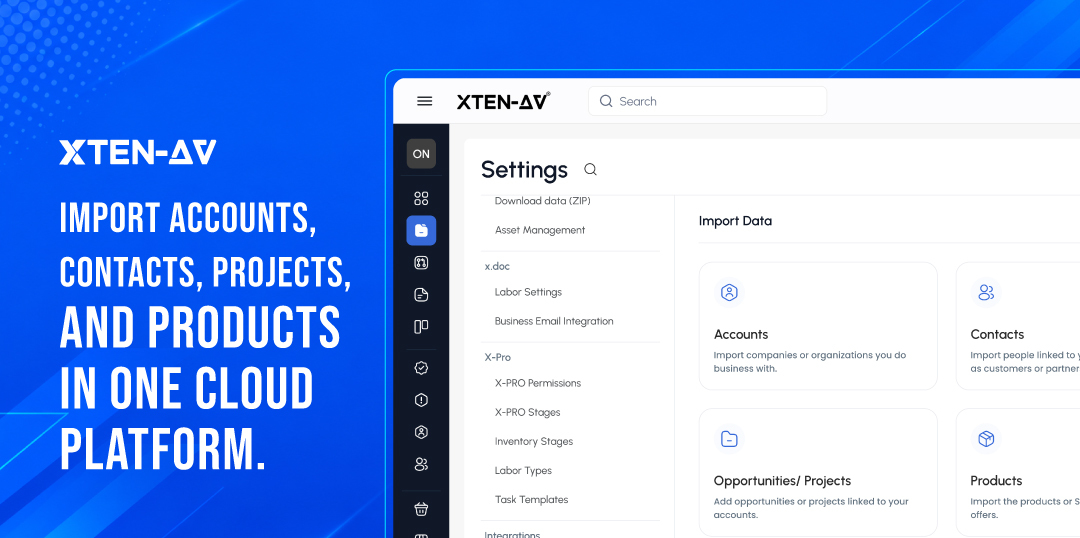


AV integrators lower data-loss risks by:
- Auditing source records
- Creating backups
- Standardizing data
- Testing imports
- Validating outcomes before platform switches
AV migrations go beyond customer records. Active projects, product libraries, BOMs, and procurement data all depend on accurate information. A migration that works but makes it hard for teams to find the right project, contact, or product leads to weeks of cleanup after go-live.
This guide covers how to prepare accounts, contacts, projects, and products for migration while keeping operations running.
Key Takeaways
- Audit before you import. Know where your records live, who owns them, and which ones are worth moving.
- Order matters. Migrate accounts first, then contacts, then active projects, then products.
- Clean the source file. Duplicate names, inconsistent manufacturers, and missing fields cannot be fixed by the import tool.
- Back up everything. Keep the original export files untouched and retain legacy-system access until validation is complete.
- Run a pilot. Test with representative records before moving the full dataset.
- Product data needs its own plan. Manufacturer name inconsistencies create BOM errors that show up months after go-live.
- Active and historical projects are different problems. Treat them separately.
- Reconcile after every import. Compare source counts with created, skipped, and flagged outcomes before going live.
- Measure success by usability, not row count. Teams need to find the right records and resume work from day one.
- A monitored importer reduces friction. Preparation and validation determine the outcome.
The all-in-one solution for your Audio Visual (AV) Project Design & Documentation needs
Transform your audio-visual experience with XTEN-AV.
No Credit Card required
What is AV Integrator Data Migration?
AV integrator data migration moves customer accounts, contacts, project records, and product data. This transfer happens from spreadsheets or old platforms to a new AV workflow system. It keeps essential information for daily operations intact while moving records into a connected AV workflow platform such as XTEN-AV, helping teams preserve the information needed across design, delivery, and service operations.
Why Is AV Software Data Migration More Complex Than a Basic CRM Upload?
Most CRM migration guides focus on contacts and company names. For AV firms, that is just the starting point.
One customer account can connect to many project locations. It can link to room designs. It connects to product choices, procurement records, installation milestones, and service commitments. Those records are linked to each other.
When that data lives across spreadsheets, a legacy CRM, and a shared drive, moving it cleanly takes more than a file upload.
Gartner Data Quality Insights says that poor data quality costs organizations about $12.9 million each year.
New Experian Data Quality Research found that 91% of businesses say poor data quality hurts operational performance. For AV integrators, this means duplicate customer records slow down quoting. It also leads to inconsistent manufacturer names that disrupt BOM searches. Plus, active projects often come in without enough context to continue work.
When records break during migration, teams lose track. They miss project history, equipment choices, and customer context.
The goal is not to transfer records. It is to preserve the relationships that keep projects moving. If those break during migration, teams spend weeks rebuilding context instead of delivering work.
What Data Is Commonly Lost During AV Software Migration?
AV firms rarely lose customer names during migration. More often, they lose operational context.
Common examples include:
- Project notes
- Product pricing records
- BOM line items
- Custom product fields
- Opportunity history
- Installation milestones
- Service records
- Internal comments
- Attachments and drawings
- Manufacturer-specific categorization
Before migrating, figure out which records need to stay accessible. Then, decide which ones you can archive as separate items. This reduces the risk of discovering critical gaps after go-live.
Which AV Business Records Should You Migrate First?
Start with accounts. Then contacts. Then active projects. Then products. Historical records come last, and some may not need to move at all.
The order matters because downstream records depend on upstream ones. A contact without a parent account is harder to use. A project without a linked customer loses context. A product record with inconsistent manufacturer data will cause problems in BOM creation months after the migration is complete.
Record Group | Migrate First When | Archive or Review When | AV Workflow Relevance |
Accounts | Customer is active, recently quoted, or under service | Organization is obsolete or duplicated | Customer and project context |
Contacts | Stakeholder is active or tied to project approvals | Record is incomplete, outdated, or duplicated | Communication and account relationships |
Opportunities & Projects | Deal or project is open, recent, or strategically important | Record is old, inactive, or structurally incompatible | Pipeline and delivery continuity |
Products | Item is reusable, current, and correctly identified | Manufacturer, model, or category data is inconsistent | BOM, design, proposal, and product-library continuity |
How Should AV Integrators Audit Source Data Before Migration?
A source-data audit identifies where records live, which fields matter, who owns each file, and which records should be migrated, corrected, archived, or excluded. The audit should happen before any import. A destination platform cannot fix inconsistencies it inherits from poorly prepared source files.
List Every Source System
Before touching a single export file, map where your data actually lives. Common sources for AV firms include:
- CRM platform
- Spreadsheets in shared drives
- Quoting or estimation software
- Project management tools
- Product catalog files and dealer-pricing sheets
- Email-based approval logs
- Accounting or ERP exports
Most firms discover during this step that the same customer exists in three places with three different account names. That discovery is the audit working as intended.
Assign Ownership
Each data object needs a named owner for export, cleanup, import, and validation. Without ownership, cleanup stalls.
Data Object | Source System | Export Owner | Cleanup Owner | Import Owner | Validation Owner |
Accounts | – | – | – | – | – |
Contacts | – | – | – | – | – |
Projects | – | – | – | – | – |
Products | – | – | – | – | – |
Classify Records
Sort every record group into four buckets: migrate, clean before migration, archive, or rebuild manually. This step alone prevents the majority of post-import cleanup issues.
Data Cutoff Date A data cutoff date is when teams stop updates in the legacy system. This helps ensure that the final migration files stay current during transfer. |
Set a data cutoff date before exporting. If your team keeps updating the legacy system after the final export, you’ll import records that were already old when you uploaded them.
How Can Teams Back Up AV Business Data Before Importing It?
Before importing anything, export and store a secure backup of the original source files. This is not optional. If a mapping error moves five hundred product records into the wrong category, the backup is what gets you back to a clean starting point.
A practical backup checklist:
- Export each object type separately
- Preserve the original untouched file. Do not work in it directly.
- Create a separate working copy for cleanup
- Record the export date, file name, and record count
- Restrict access to the backup files to authorized team members
- Retain legacy-system access until post-import validation is complete
- Document separately whether attachments, notes, and custom fields will be handled
Do not assume the destination platform creates a source-system backup. It does not. That responsibility sits with your team.
How Should Accounts and Contacts Be Prepared Without Breaking Customer Context?
Accounts and contacts depend on each other. A contact with no parent account is harder to use in daily workflows.
The most common account problem is naming inconsistency. One customer can appear four different ways across source files:
- ABC Audio Visual
- ABC AV
- ABC Audio-Visual Ltd.
- A.B.C. AV
When that happens, sales may quote against one record while service updates another. Reporting splits. Outreach duplicates. Customer history fragments.
Fix those records before import. Duplicate cleanup after the fact takes longer and carries more risk.
For contacts, check email addresses, phone formats, and parent account links. Flag any contact that appears more than once under a slightly different name.
One practical rule: if a contact has no active account link and no communication in the past twelve months, review it before moving it forward.
How Should Active and Historical AV Projects Be Handled?
Active projects and historical projects are not the same migration problem. One of the most common migration mistakes is treating all project records equally.
A project that’s currently in procurement has different operational needs than one from five years ago. This becomes especially important when using AV project delivery and resource visibility tools like X-PRO or other forms of AV project management software for system integrators.
Historical projects may only require reference access for warranty, service, or reporting purposes.
For many AV integrators, project records also affect procurement, installation, and service workflows. Teams should check if they need to keep project notes, equipment details, service obligations, and warranty info during migration.
Active Projects
Any project that is open, in procurement, under installation, or waiting for commissioning must come to the new platform with enough background.
That means:
Project owner is assigned
Status reflects the actual stage
Key equipment records are linked or referenced
Customer account is present
Approval contacts are accessible
If a project record cannot carry that level of context into the new system, it may be better to recreate it manually than to import a shell.
Historical Projects
Older projects often lack complete records. Their fields can be inconsistent, and their structures may not fit well with a new platform. Before migrating historical projects, check if the team needs those records or not.
Many AV firms choose to move old projects to read-only exports or archived files. They do this instead of importing them. That is a valid choice. Importing incomplete historical records just to hit a higher row count creates long-term cleanup debt.
Structural Differences Between Platforms
One system may organize projects by room, another by phase, another by system type. Those structural differences need to be understood before field mapping begins. A project record that imports correctly but lands in the wrong stage or with the wrong owner is harder to fix than one that was flagged during a pilot import.
Why Do AV Product Records Need Their Own Migration Plan?
Product libraries are where AV migrations most often go wrong months after the fact.
Product libraries touch proposals, BOMs, procurement, and project margins. Small naming errors create problems that are hard to trace back to the migration later.
Product data problems rarely show up during import. They surface later when designers search for equipment, estimators build BOMs, or procurement teams compare selections across projects. By then, duplicate records have already spread into live workflows.
When the same DSP appears under three manufacturer names, designers may pick the wrong item during BOM creation. That problem usually shows up months after migration. By the time it does, it has already affected proposals and confused purchasing.
Standardize Manufacturer Names
The same manufacturer can appear in many ways in source files:
- Shure / Shure Incorporated / Shure Inc. / SHURE
- QSC / QSC Audio / QSC, LLC
- Crestron / Crestron Electronics / Crestron Electronics, Inc.
- Biamp / Biamp Systems / BIAMP
Choose one standard name for each manufacturer before importing. Use it for every product record.
Validate Model Numbers and Part Numbers
Free-text fields produce variations that look the same to humans but fail in search. A Sony display named “FWD-55X80H” in one file and “FWD55X80H” in another will show as two products. This happens on most platforms.
Check for spacing gaps, stray characters, and obsolete models before migration. Where the platform supports it, separate accessories from parent equipment.
Review Categories
Consistent categories improve search, filter, and BOM workflows. Common AV categories include:
- Display / Projector
- Audio DSP / Amplifier / Loudspeaker / Microphone
- Switcher / Control Processor
- Mounting Hardware / Cable / Accessory
If your source catalog uses inconsistent category names or no categories at all, standardize before import. Rebuilding categories after a product library is live is time-consuming.
Accurate product libraries support AV system design and diagramming workflows within X-DRAW, helping teams build reusable designs and BOMs with greater consistency. That is why this step deserves its own plan.
What Is Field Mapping and Why Does It Matter During AV Data Migration?
A technically successful upload can still produce unusable records. In AV environments, field mapping errors can affect more than contact data. Incorrect mappings may place products in the wrong category, assign projects to the wrong stage, break customer relationships, or disrupt reporting workflows used by sales, operations, and service teams.
Field Mapping Field mapping is the process of matching columns in a source file to fields in a destination platform so imported values appear in the correct location. |
Field mapping needs to happen before the full import. If the source file uses “Customer Company” and the destination platform expects “Account Name,” those fields need to be aligned before uploading.
Source Column | Destination Field | Transformation Needed? | Required? |
Customer Company | Account Name | Standardize naming | Yes |
Primary Contact Email | Contact Email | Lowercase, remove duplicates | Yes |
Project Status | Opportunity / Project Stage | Map legacy statuses to new values | Confirm |
Manufacturer | Product Manufacturer | Standardize aliases | Confirm |
Model Number | Product Model | Remove inconsistent spacing | Confirm |
Dealer Price | Product Pricing | Verify format and currency | Confirm |
Required fields must be populated for a record to import successfully. Optional fields that are left empty may create gaps in workflows later. Unmapped fields may be excluded entirely from the import.
Document your mapping decisions before the pilot import. If something goes wrong, you need a clear record of what was mapped to what.
Should Teams Use Only Create or Update and Create?
Import mode determines what happens to records that already exist in the destination platform.
- Only Create adds new records. It does not intentionally update existing entries.
- Update and Create adds new records and updates eligible existing entries where a match is found.
The right choice depends on the state of your destination database and the quality of your source file.
Scenario | Recommended Mode | Why |
First import into an empty destination | Only Create | Reduces complexity on the first pass |
Add a new set of product records | Only Create | Appropriate when existing records should not change |
Refresh previously imported accounts after cleanup | Update and Create | Supports updates while adding new records |
Re-import a corrected project file | Confirm with product team | Matching and overwrite behavior should be validated first |
Import a file with uncertain duplicates | Clean first, then import | Import mode is not a substitute for source-data review |
One practical note: Update and Create requires that the platform can reliably match an incoming record to an existing one. That usually depends on a unique identifier in the source file. If your source records do not have consistent unique identifiers, confirm matching behavior with the platform documentation before using this mode.
Why Should AV Teams Run a Pilot Import Before Moving the Full Database?
A pilot import is where most migration problems are caught. That is the point.
Pilot Import A pilot import is a smaller test migration used to identify formatting, mapping, duplicate, or required-field issues before moving the complete dataset. |
The pilot should include representative records, not just the cleanest ones. Use:
- One simple account
- One account with multiple contacts
- One active project
- One historical project
- One manufacturer with consistent product records
- One manufacturer with naming variations
- One custom product
- One incomplete record
- One potential duplicate
If the pilot passes without issues, the full import has a much higher chance of success. If you find mapping errors, inconsistent fields, or skipped records, you’ve caught problems early. This prevents issues from affecting hundreds or thousands of rows.
Teams that skip the pilot often spend more time on post-import cleanup than the pilot would have taken.
How Should Teams Monitor and Reconcile Import Results?
After an import, the work is not finished. It has entered a new phase.
Review the import status. Compare expected source-file counts with destination outcomes. Identify which records were created, skipped, flagged, or placed into an error state before treating the destination data as your new operational source of truth.
Post-Import Reconciliation Post-import reconciliation is the process of comparing expected source records with created, updated, skipped, flagged, or error outcomes after migration. |
Record Type | Source Count | Created | Updated | Skipped | Flagged / Errors | Reviewed By | Approved? |
Accounts | – | – | – | – | – | – | – |
Contacts | – | – | – | – | – | – | – |
Projects | – | – | – | – | – | – | – |
Products | – | – | – | – | – | – | – |
Import statuses to review: Completed means the import finished processing. Queued means the import is still in progress. Errors means records were not processed and need attention.
Within a completed import, check created counts, skipped counts, and flagged counts against your source-file row total. A discrepancy between expected and actual counts needs a resolution before go-live.
XTEN-AV’s One-Click Data Importer provides a monitored workflow for operations and IT teams. They can import core business records like accounts, contacts, opportunities, projects, and products. The import history view shows progress and outcomes.
This allows teams to review results before using the destination data as their active source of truth.
What Should Teams Validate After the Import Is Complete?
Record counts confirm presence. Validation confirms usability.
Area | Validation Check |
Accounts | Customer names are standardized. Active customers are present. Required fields are populated. |
Contacts | Contact details are usable. Critical stakeholders are present. Account relationships are intact where applicable. |
Projects | Active projects are searchable. Status fields are correct. Project owners are assigned. |
Products | Manufacturer names are consistent. Model numbers are searchable. Key reusable equipment records are present. |
Team Adoption | Users can find expected records. Admins document known exceptions. Old-system access is restricted per transition plan. |
Schedule a post-launch review date at the time of go-live, not after problems are reported. That discipline separates clean migrations from ones that create ongoing cleanup work.
How Does XTEN-AV Reduce AV Platform Onboarding Friction?
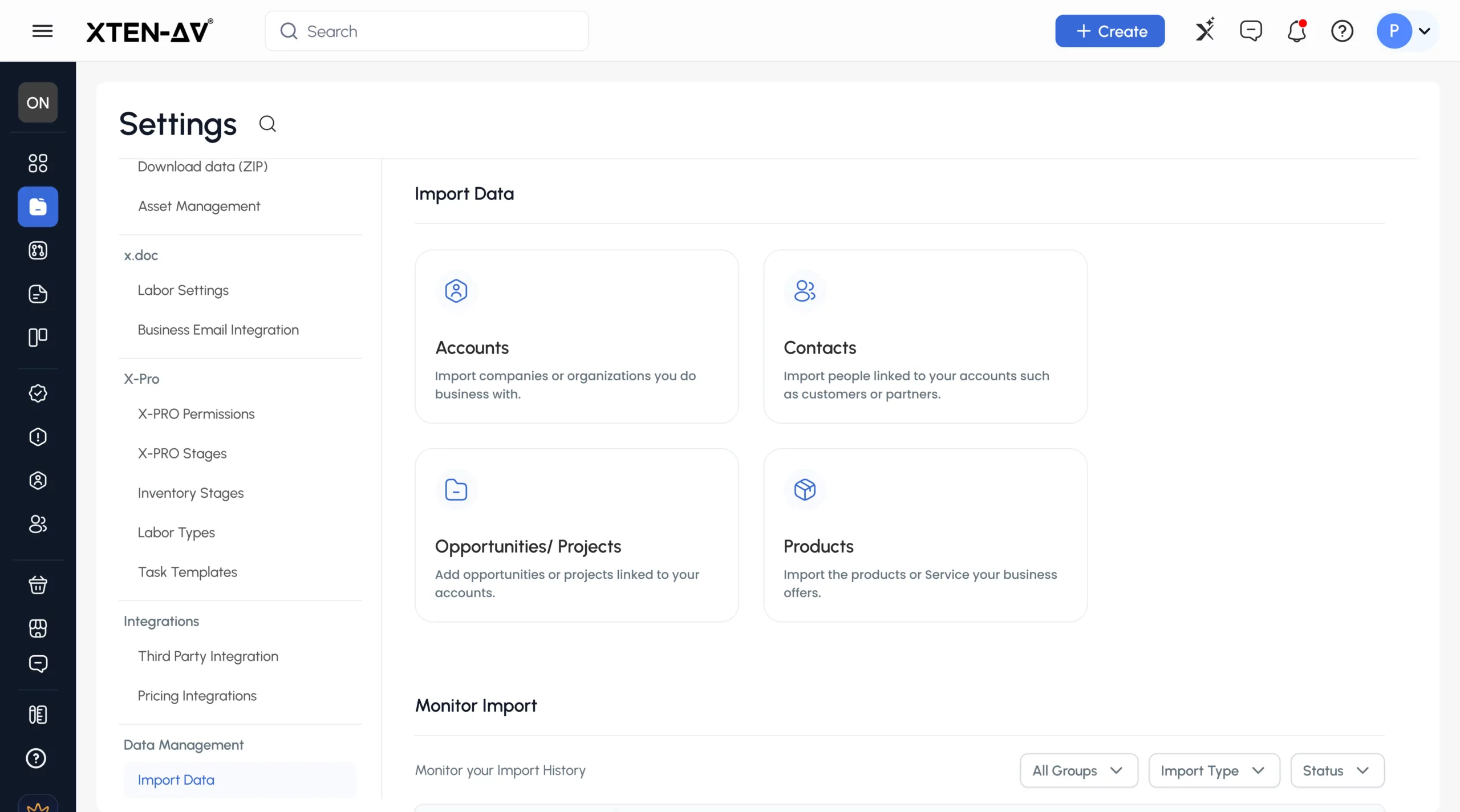
The biggest migration challenge for most AV firms is not the import itself. It is knowing what actually happened after it ran.
XTEN-AV’s One-Click Data Importer helps teams bring in accounts, contacts, opportunities, projects, and products. Teams can also learn how to import data into XTEN-AV using the platform’s migration resources and onboarding documentation.
It provides a monitored workflow for smooth data handling. Teams can import using CSV or XLSX files prepared from their existing source systems.
Two import modes are available. Only Create adds new records without touching existing ones. Update and Create adds new records and updates existing ones where a match is found.
Import history shows progress at the object level. Status tracking shows whether an import is Completed, Queued, or in an Error state. Within each completed import, teams can check created, skipped, and flagged record counts.
That visibility lets operations managers and CRM administrators review results before treating imported data as live.
Once records are in the platform, teams can use them across AV design, BOM creation, AV proposals and documentation with X-DOC, project delivery through X-PRO, and AI-powered AV workflows enabled by XAVIA. That removes the manual handoffs that pile up when teams work across disconnected tools.
To see how the import workflow works with your existing data, book a data migration walkthrough with the XTEN-AV team.
The all-in-one solution for your AV needs
Transform your audio-visual experience with XTEN-AV.
No Credit Card required
Audio Visual System Design Mastery + Winning Proposals = 10x Productivity!
- ✔ Automatic Cable Labeling & Styling
- ✔100+ Free Proposal Templates
- ✔ Upload & Create Floor Plans
- ✔1.5M Products from 5200 Brands
- ✔ AI-powered ‘Search Sense'
- ✔Legally Binding Digital Signatures

What Questions Should You Ask Before Switching AV Integrator Software?
Platform evaluation committees often focus on features. Migration readiness questions are just as important. A platform that cannot accept your current data in a usable form will create onboarding delays regardless of how strong its feature set is.
- Which record types can we import?
- Which file formats are supported?
- Are required-field templates available?
- How are records matched during Update and Create imports?
- How are duplicates handled?
- Can we create new records without updating existing records?
- How are import errors displayed?
- Can failed records be retried?
- Can an import be rolled back?
- How are custom fields handled?
- How should active projects be migrated?
- Are products and dealer-pricing files handled together or separately?
- How long should the old system remain accessible?
- What onboarding support is available?
- Which validation steps should happen before go-live?
What Does a Successful AV Data Migration Look Like?
A successful migration is not measured by import completion alone.
For AV integrators, success means:
- Sales teams can find customer records immediately
- Designers can locate approved products and build accurate BOMs
- Project managers can continue active installations without interruption
- Procurement teams can access standardized product information
- Service teams can review customer history and equipment records
The best migrations keep operations running across departments. Moving data is only part of the job. Teams need to be able to work from day one.
Measure success by what happens after go-live. Focus on user adoption, project continuity, accurate reporting, and fewer duplicate records.
Conclusion
A successful migration is not measured by rows uploaded. It measures if teams can find the right accounts, reach contacts, continue projects, and reuse product records without starting over.
A monitored importer reduces friction. But preparation, testing, reconciliation, and clear ownership still determine the outcome.
The firms that get it right are not always the ones with the cleanest data. They are the ones that took time to understand what they had, decided what was worth moving, and checked the results before going live.
Book a data migration walkthrough with XTEN-AV to see how the import workflow fits your onboarding plan.
FAQ's
AV integrator data migration involves moving customer accounts, contacts, project records, and product data. This data shifts from spreadsheets or old systems to a new AV workflow platform. The goal is to preserve the records teams need daily, not just transfer as many rows as possible.
Start with accounts. Then contacts. Then active projects. Then products. This order keeps business context intact at each step. A contact without a parent account is harder to use. A project without a linked customer loses meaning fast.
Yes. Most AV firms keep records in spreadsheets alongside a legacy CRM. Before uploading, standardize field names, remove duplicates, and format values to match the destination platform’s required fields.
XTEN-AV supports CSV and XLSX files. Most CRM platforms, quoting tools, and spreadsheet applications can export in both formats.
Only Create adds new records without touching existing ones. Update and Create adds new records and updates existing ones where a match is found. Only Create is safer for a first import. Update and Create works better when existing records need refreshing.
Clean duplicates in the source file before import. Check account names, contact emails, and manufacturer names for variations that represent the same record. Choosing an import mode does not fix duplicate data.
A backup gives you a clean reference point if something goes wrong. Mapping errors, formatting issues, or unexpected outcomes can affect imported records. Keep legacy-system access open until post-import validation is complete.
No. Active projects need an assigned owner, correct status, linked customer, and key equipment references. Historical projects should be archived as read-only exports. This is especially true when their structure doesn’t fit well with the new platform.
Inconsistent names create duplicate product records that are hard to spot after import. If the same Crestron processor appears under two manufacturer names, designers may pick the wrong item in BOM creation. That problem usually shows up months later, not during migration.
Compare source-file counts with created, skipped, and flagged outcomes. Spot-check records to confirm required fields are filled and data is usable. Verify that active customers, key contacts, open projects, and core product records are searchable before going live.
No. The One-Click Data Importer does not remove duplicates from source files. Duplicate cleanup is the migration team’s responsibility and should happen during source-data preparation before any import begins.
Not always. Fields without a matching destination field may not import. Custom fields, attachments, notes, and service histories may need separate handling. Confirm which fields are supported before building your migration plan.
Statuses show whether an import is Completed, Queued, or in an Error state. Within a completed import, teams can check created, skipped, and flagged record counts. That information makes reconciliation easy. It shows how many records were processed compared to those in the source file.
Before switching, ask about:
- Which record types can be imported.
- Supported file formats.
- How duplicates are handled.
- Whether existing records can be updated.
- How errors are shown.
- How to treat active projects.
- What onboarding support is available.
Explore more by topic

AV Design Mastery + Winning Proposals = 10x Productivity!
- Automatic Cable Labeling & Styling
- 100+ Free Proposal Templates
- Upload & Create Floor Plans
- 1.5M Products from 5200 Brands
- AI-powered ‘Search Sense'
- Legally Binding Digital Signatures
No Credit Card Required
Related Blogs
-

- Posted by Sahil Dhingra

Audio Visual AV Cables Guide: Types, Connectors, Uses and Wiring Diagrams for...
-
- Posted by Sahil Dhingra
Audio Visual Courtroom Audio Visual (AV) Systems: A Complete Guide for Courts...
-
- Posted by Sahil Dhingra
Audio Visual 10 Best draw.io Alternatives for AV Professionals Sahil Dhingra Published...