








How XTEN-AV Helps Manage AV Service Calls After Installation

Sahil Dhingra
Published 15 July 2026
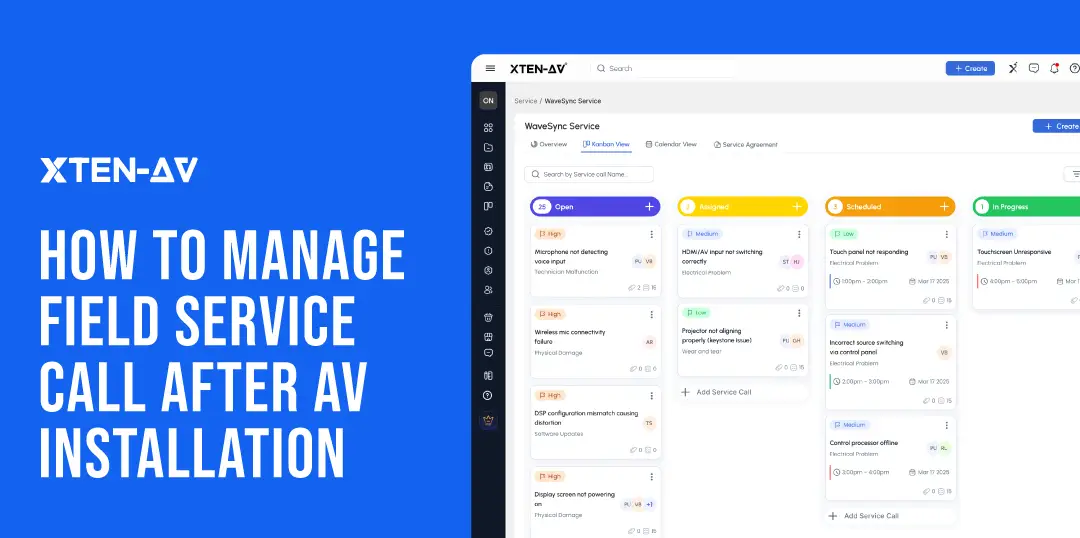
Organizations looking to manage AV service calls after installation need more than a ticketing system. They need a centralized platform that combines scheduling, documentation, technician updates, billing, and client communication into a single workflow.
XTEN-AV X-PRO Service is purpose-built for XTEN-AV service-call management and helps integrators streamline AV service-call management across the entire support lifecycle. From issue intake and technician dispatch to invoicing and service history, the platform provides a complete AV service-call workflow for post-installation support.
Post-installation service is no longer an afterthought for AV integrators. It’s a revenue line. And like any revenue line, it needs a structure behind it.
Right now, many AV firms manage service through a mix of disconnected tools. A ticket here. A project file there. A technician calendar that nobody else can see. A billing process that starts three days after the visit ends. That mix creates delays. It creates return visits. And it quietly eats into service profitability without anyone pinpointing exactly where.
A structured workflow fixes that. When service tickets, project documentation, technician assignments, and billing all connect in one place, the whole operation moves faster and costs less to run.
Commercial Integrator, using NSCA industry data, noted that recurring sales make up about 14.2% of integrator revenue. Maintenance agreements and managed services are driving that number. More AV firms are building recurring-revenue models now. That shift changes what matters operationally. Getting the installation right is still the foundation. But managing what comes after it is what keeps the revenue flowing. A structured service workflow is the difference between a profitable service operation and one that’s always playing catch-up.
Key Takeaways
- Post-installation service is a revenue line. NSCA data puts recurring sales at 14.2% of integrator revenue. It needs a structure behind it.
- Disconnected tools are the real problem. Spreadsheets, inboxes, and calendars don’t talk to each other. Every handoff loses context.
- AV service calls are more complex than other trades. One microphone issue has five possible causes. Without project documentation, technicians guess.
- The differentiator is project context. X-PRO Service keeps every call connected to X-DRAW diagrams, the BOM, and installation records.
- Repeat visits are rarely the technician’s fault. Firmware updates, undocumented swaps, and client-side changes cause them. Original records help find what changed.
- Clean billing starts at clock-in. Separating commute fees from service labor keeps invoices accurate from the start.
- Visit logs and build service history. Every issue, action, and image stays attached to the call. The next technician arrives informed.
- Analytics turn service into a business. Utilization, revenue, close rate, all visible without a separate reporting tool.
- A contract without a workflow is just a document. Contract is the promise. Service call is the delivery. History is the proof.
- The right evaluation question isn’t which FSM tool looks best in a demo. It’s which platform was built for AV work after installation.
Why Do AV Service Calls Become Difficult to Manage After Installation?
Without dedicated AV service-management software, most integrators piece things together. A spreadsheet for call tracking. An inbox for client issues. A calendar for technician visits. It works until it doesn’t.
The cracks show up fast. A call gets logged in the spreadsheet but the technician never gets the full details. A client follows up and nobody has a clear status. A second visit gets scheduled for a problem the first technician already diagnosed. Same issue. Different day. Wasted time.
As the installed base grows, the volume of calls grows with it. More calls mean more rows in the spreadsheet. More rows mean more chances for something to slip. Response times slow down. Technicians arrive without the right information. Productivity drops, not because the team isn’t capable, but because the tools they’re using don’t connect.
That’s the real cost of disconnected processes. Not one big failure. A hundred small ones that add up quietly.
Disconnected Service-Call Workflow
|
Disconnected Tool |
Problem It Creates |
|
Shared inbox |
Calls may be missed or duplicated |
|
Spreadsheet |
Status updates go stale between shifts |
|
Calendar |
Appointment is disconnected from the service-call record |
|
WhatsApp or text |
Photos and notes can’t be audited |
|
Timesheet |
Labor entries arrive late or incomplete |
|
Accounting software |
Invoice lacks the full work context |
|
Shared folder |
Drawings and installation documents are hard to find fast |
AV integrators face challenges that go beyond what generic FSM software can solve. HVAC and electrical service calls have simpler documentation needs. A plumber fixing a leak doesn’t require knowledge of the original signal-flow design. In contrast, an AV technician troubleshooting a control processor or re-routing signals does. They need the original design intent, not just a job description on a work order.
There’s also an economic cost many integrators don’t consider. Each unnecessary return visit adds up: technician labor, travel time, fuel, and scheduling overhead. Plus, it means lost opportunities for other billable calls. Often, better documentation improves service efficiency more than hiring another technician.
What Is the AV Service-Call Lifecycle in X-PRO Service?
X-PRO Service provides a structured service-call lifecycle that helps teams monitor progress from issue creation through scheduling, onsite resolution, invoicing, and long-term support.
Here’s how each stage maps to real operational activity:
|
Stage |
What Happens |
|
Open |
Client issue is logged with category and priority |
|
Assigned |
Technician is connected to the call |
|
Scheduled |
Visit date and time window are confirmed |
|
In Progress |
Technician begins onsite work |
|
Completed |
Resolution is documented in the visit log |
|
Invoice |
Billing record is generated from the call |
|
Service History |
Call record remains accessible for future support |
This isn’t a static status board. When the technician updates the stage from Field View on mobile, the office sees it in real time. No follow-up call needed. No chasing someone to update a spreadsheet.
As installed bases grow, tracking open calls across a shared inbox and a spreadsheet means someone is always a step behind. A visual Kanban tied to real technician activity closes that gap and gives the service manager a defensible answer when a client calls asking for a status update.
How Does XTEN-AV Centralize the Audio Visual Service-Call Record?
The checklist, schedule, work summary, invoice, account details, and service history are all in one place. When a client calls with a follow-up question, the answer is already there. No digging through files. No searching old message threads. No opening a second calendar app.
Think about what happens without that. A client calls to check on a recurring audio issue. The person who picks up wasn’t on the original call. They ask the client to explain the problem again. The client has already done that twice. They’re frustrated before the conversation starts.
That’s the moment service relationships start to break down. Not during the visit. On the follow-up call when nobody has the full picture. When service history is incomplete, every visit starts with the same questions. The client loses confidence even when the technician is fully capable of resolving the problem.
With a connected service-call record, the second technician opens the call, reads the previous visit log, reviews what was found, sees what was done, and checks the internal notes. They arrive informed. The client gets faster support without re-explaining anything.
Service-Call Record Elements:
|
Record Element |
Purpose |
|
Checklist |
Keeps required actions visible before and during the visit |
|
Schedule Service tab |
Connects the call with the confirmed visit plan |
|
Work Summary |
Captures what was completed onsite |
|
Invoice |
Links billing directly to the service record |
|
Site address |
Gives the technician the correct service location |
|
Billing address |
Supports clean administration |
|
Timestamped history |
Preserves the full audit trail |
How Does XTEN-AV Help Service Managers Assign and Schedule Technicians?
X-PRO Service helps managers:
- Assign technicians to service calls.
- Set time windows.
- View planned visits on a calendar.
- Review technician utilization.
This replaces the manual coordination done via email, phone, and personal calendars. Only one person usually can access these.
Effective AV technician scheduling is key in AV field service management. Service managers need to see technician workloads, open calls, and planned visits. This helps maintain service levels and reduce response times.
Calendar View shows scheduled calls with time windows and technician assignments. A manager planning the week can see who’s fully booked and who has room for a newly reported call. That visibility is hard to get when scheduling lives in a calendar the service manager controls alone.
Utilization percentage helps leadership see field capacity clearly. If one technician is highly utilized while another has a lot of open time, this imbalance is noticeable. It prevents service backlogs and avoids burnout for one technician while another is underused.
Rescheduling can happen in the field, too. If a technician arrives and the site contact isn’t available, they can reschedule directly from Field View on mobile. This update shows up across the platform without needing a call back to the office.
For teams exploring options, the best field-service scheduling software for AV integrators should allow for this two-way update. It’s not just about scheduling from a manager’s desktop.

How Does Field View Help AV Technicians Manage Calls From Mobile?
Field View is the technician’s mobile home base. It shows today’s calls and the full week ahead. Each call has the issue details, current status, time window, site address, and client contact. From the same screen, the technician can open the site map, check the issues checklist, clock in, update the visit log, review logged time, and reschedule if plans change. Everything for the day. One screen.
As part of a broader AV field-service management strategy, Field View gives technicians access to schedules, project records, issue details, and service updates from anywhere.
Mobile access is essential for efficient AV service operations because technicians often need project information, site details, and service history while working in the field.
Technicians often arrive onsite with incomplete information. This isn’t due to a lack of data but because it’s spread across systems that aren’t connected to the field.
The service manager may have issued details in email. The project manager may have installation records in a shared drive. Field View reduces that disconnect by surfacing everything in one place before the technician leaves for the site.
Field View functions as an AV field-technician app, giving technicians mobile access to service calls, project documentation, labor tracking, and visit logs while onsite.
Built-in technician time tracking ensures labor hours and commute fees are accurately recorded for billing and reporting purposes.
Here’s the mobile workflow in order:
Today’s Calls → Weekly Calls → Site Map → Issues Checklist → Clock In → Diagnose → Visit Log → Reschedule if Needed → Complete
This connected mobile field-service workflow eliminates the need to switch between multiple apps while completing service tasks.
Start with today’s list. Each call shows the issue name, category, status, time window, date, address, and client contact. The technician knows what they’re walking into before they get in the van.
The Site Map gives the exact service location.That matters on large sites. A corporate campus, a hotel property, a multi-floor office building, the reception desk and the AV rack room are rarely in the same place. The site map gets the technician to the right door.
The Issues Reported checklist tells them what the client described. Take a microphone failure. The checklist might show which mics stopped working, what the control panel displayed, and whether the problem started after a firmware update. The technician reads that before they touch anything. They already have a starting point when they walk in.
When the visit starts, the technician clocks in. When they finish, they complete the visit log. When they leave, the office already knows the call is done.
See how XTEN-AV X-PRO Service keeps service calls connected to the original AV project.
The all-in-one solution for your Audio Visual (AV) Project Design & Documentation needs
Transform your audio-visual experience with XTEN-AV.
No Credit Card required
How Does XTEN-AV Give Technicians Original AV Project Context?
X-PRO Service keeps every service call connected to the original AV project. Unlike generic field service tools, purpose-built AV service management software must provide access to AV drawings, project BOMs, installation records, and service history from a single platform.
AV service calls are different from other trades. An HVAC technician doesn’t need a signal-flow diagram to fix a faulty unit. A plumber doesn’t need to know firmware versions. AV technicians do. A microphone issue in a conference room could come from the microphone itself. Or the DSP. Or the control processor. Or the network switch. Or a firmware update pushed last week. There are five possible causes before the technician touches a single cable. Without the original project documentation, they work through all five by guessing. Guessing takes time. Guessing also creates new problems.
Here’s what it looks like in practice. A technician gets a call about a signal path issue in a boardroom. They open the X-DRAW diagram before they arrive. They can see exactly how the sources feed into the matrix switcher. They can see how the outputs route to the displays. They can see where the DSP sits in the chain. They walk in knowing where to look. Without that diagram, they walk in hoping.
The BOM works the same way. A technician needs to update firmware on a control processor. They need the exact model number before they start. The BOM has it. They don’t need to open the rack cabinet and read labels one by one. They don’t need to call the project manager. They check the BOM, confirm the model, and get to work.
Why AV Service Calls Become Repeat Visits Without Proper Documentation?
Repeat visits are a direct cost. They happen for reasons that are rarely the technician’s fault:
- Firmware updates pushed by manufacturers change DSP behavior or control processor logic after installation
- Room modifications by the client, new furniture, relocated displays, added endpoints, change the system without updating the original documentation
- Undocumented device replacements where a component was swapped without updating the BOM
- Network changes made by the client’s IT team that affect AV system connectivity
- Client-side changes to room configurations that weren’t communicated to the AV team
In every one of these cases, a technician with access to the original project records and a full log of previous service visits can identify what changed faster than one working blind.
Consider these realistic scenarios:
- A technician responds to a recurring audio dropout in a conference room. The previous visit log shows the DSP output level was adjusted three months ago. The X-DRAW diagram shows the exact signal routing. Together, those two sources let the technician test the specific path that was changed, not the entire system.
- A technician visits a rack room for a control processor replacement. The original BOM confirms the model number. The installation documentation confirms the input/output configuration. The swap takes 45 minutes instead of three hours of reverse engineering.
- A technician is called for a boardroom display showing no signal. The X-DRAW diagram shows the HDMI distribution path. The previous service history flags that the HDMI board in the matrix was noted as borderline six months earlier. The technician brings a replacement board on the first visit.
That last example is the difference between a first-time fix and a return visit. It’s also the difference between a satisfied client and one who starts questioning the maintenance agreement.
Generic best field-service management software for AV integrators won’t replicate this. Most FSM tools connect to a CRM or an ERP. Very few connect to original design files and BOMs specific to each installed system. That’s the gap X-PRO Service is built to close.
How Does XTEN-AV Track Labor Time and Commute Fees?
Field View lets technicians clock into a service call two ways. They can use a running timer or enter time manually. Either way, they pick the call name and the labor type before they start. That second step matters more than it sounds.
AV teams bill for different types of work as part of their broader AV service operations. Standard service labor is one category. Commute fees are another.
Here’s what happens. A technician drives an hour to a remote campus. They spend two hours onsite. If both entries are combined, the invoice shows three hours of service labor. The client sees it and questions it. Finance has to go back, separate the entries, and reissue the invoice. The billing cycle slips by a week. The client relationship takes a small hit.
For integrators running maintenance agreements, that friction adds up. Recurring revenue depends on clean, predictable billing. One unclear invoice doesn’t end a contract. But several of them create doubt. Field View keeps the categories separate from the start so the invoice is right the first time.
Logged-Time Record Elements:
|
Element |
Why It Matters |
|
Call name |
Links the time entry to the correct service record |
|
Labor type |
Separates service work from commute fees |
|
Duration |
Shows total time spent on the call |
|
Start time |
Supports auditability and client billing |
|
End time |
Confirms labor visibility for finance |
|
Weekly view |
Helps technicians review their own logged activity |
Technicians can review their weekly logged time from Field View without needing access to a back-office system. That reduces the late and incomplete timesheet entries that create billing delays downstream.
How Do Visit Logs Preserve AV Service History?
Visit Logs create a clear record of onsite activity. They capture the call stage, issues found, actions taken, next steps, internal notes, and images. This helps future technicians and office teams see what happened during each visit. It’s more than just a status change in a spreadsheet.
An accurate AV service history lets technicians spot past problems and solutions. It also helps them understand ongoing challenges before they arrive.
With a clear visit log, the next technician doesn’t need to call the previous one before going to the site. The history is already in the record. This context supports the goal of improving field-service technician utilization. Time spent recovering information is time lost for resolving issues.
Visit-Log Fields:
|
Field |
Purpose |
|
Change Stage |
Updates call progress in the Kanban |
|
Issue Found |
Records the diagnosed problem |
|
Action Taken |
Records the resolution step |
|
Next Steps |
Preserves follow-up requirements |
|
Internal Notes |
Adds operational context for the team |
|
Images |
Provides visual records of the onsite state |
Images deserve a specific mention. Photos protect everyone. A technician who photographs the rack before and after a repair has proof of what the system looked like on that visit. Three months later, if the same fault comes back and the client questions what was done, the images answer that question. No dispute. No guessing. Just a timestamped record of exactly what the technician found and what they left behind.
The field-service metrics AV integrators should track including resolution completeness and re-visit rate depend entirely on having structured visit data. Unstructured notes in a shared inbox don’t support that kind of analysis.
How Does XTEN-AV Generate an Invoice From the Service Call?
X-PRO Service lets AV teams create an invoice straight from the service-call record. This invoice links to the work summary and parts used. It cuts down on the manual steps between technicians, service managers, and finance teams that delay billing.
By generating an AV service invoice directly from the service-call record, teams can reduce administrative work and speed up billing cycles.
Here’s how many integrators currently operate: a technician finishes a visit and messages the office with a summary. Then, the service manager tries to piece together the work details, hands it to finance, and finance creates the invoice days later. Each handoff risks losing details, misreading info, or causing delays.
When the work summary and parts are noted in the service-call record, the invoice can be made faster and with fewer mistakes. The work is documented. The time is logged. The parts are listed. The invoice comes directly from the record, no relay chain needed.
How Does XTEN-AV Help Leadership Track Service Performance?
X-PRO Service Analytics gives AV leaders visibility into service performance without a separate reporting tool. Successful AV service operations depend on tracking technician utilization, service revenue, labor revenue, response times, and recurring maintenance activity.
Approved Service Analytics Metrics:
|
Metric |
Why It Matters |
|
Total Calls |
Shows overall service demand |
|
Open Calls |
Shows unresolved workload |
|
Scheduled Calls |
Shows planned visit activity |
|
Completed Calls |
Shows throughput |
|
Calls Completed This Month |
Shows recent resolution activity |
|
Technician Utilization |
Shows field-capacity usage |
|
Service Revenue |
Shows service-business contribution |
|
Labor Revenue |
Shows labor contribution separately |
|
Closed Sales |
Shows value of accepted service agreements |
|
Close Rate |
Shows agreement-conversion visibility |
|
Sales Cycle |
Shows how quickly agreements close |
For AV firms building recurring-revenue streams, service analytics isn’t a reporting feature, it’s a business-management tool. It answers the questions that matter: Is our service operation profitable? Are we using field capacity efficiently? Are maintenance agreements closing at a healthy rate? Without structured data, those questions get answered with gut feel instead of evidence.
For more on what to measure, the field-service metrics AV integrators should track covers this in depth.
How Do Service Contracts Connect with Service Calls?
Service contracts define the support relationship after installation. X-PRO Service provides a centralized view of maintenance and support agreements so teams can search, filter, and track contract status while managing the service calls connected to ongoing client support.
The relationship is straightforward:
- Contract = Promise. The signed agreement defines what the integrator will deliver.
- Service Call = Delivery. Each dispatched visit is the fulfillment of that promise.
- Service History = Proof. The logged visits, visit logs, and invoices show that the promise was kept.
- Analytics = Visibility. The dashboard shows whether delivery is profitable and sustainable.
A contract that isn’t tied to a trackable delivery workflow is just a document. A workflow that isn’t tied to a contract is reactive support with no financial structure. The two need to be connected for a service operation to scale.
For help structuring service agreements before they become service calls, how to write an AV service contract covers the pre-workflow side.
How Does XTEN-AV Connect Installation and After-Sales Service?
XTEN-AV connects after-sales service with the same platform used for AV design, proposals, documentation, and project delivery. This creates a complete AV service workflow that connects project delivery with long-term support and maintenance.
The full lifecycle in XTEN-AV:
X-DRAW Design → X-DOC Proposal → X-PRO Installation → X-PRO Service Call → Field View Visit → Invoice → Service History → Analytics
Most AV platforms and most generic FSM tools don’t span this range. The design tool is separate from the proposal tool. The project management tool is separate from the service tool. After installation, the integrator hands off to a service team that has no access to what the design team created.
In XTEN-AV, the X-DRAW diagrams, BOMs, and installation documentation created during the project phase are still accessible when the first post-installation service call comes in six months later. That context doesn’t get lost at handoff. It stays connected to the system record and to every service call that follows.
This is what makes XTEN-AV a genuine AV system-integration software for the full operational lifecycle, not just a point solution for one project phase.
For teams evaluating the broader category, the AV service-management software overview covers the full landscape. For XTEN-AV’s specific module, X-PRO Service Management covers the feature set in detail.
Is XTEN-AV Suitable for AV Integrators Evaluating Field-Service Software?
XTEN-AV X-PRO Service is made for AV integrators looking at field service management software for AV integrators. It brings together technician scheduling. It also includes project documentation, service history, invoicing, and mobile access. All these features are in one platform. Unlike generic service-call-management software, X-PRO Service focuses on AV integrators. It gives them access to project drawings, BOMs, installation records, and service history.
If you want AV service management software, look at XTEN-AV. It helps improve service-call tracking. You can also build a scalable after-sales process. XTEN-AV has everything to manage your service needs.
Most generic FSM tools can’t. They handle dispatch and scheduling. Some handle mobile updates. Very few connect back to the original design files. That gap shows up fast when a technician is standing in a boardroom trying to trace a signal path without the original X-DRAW diagram. Or in a rack room trying to confirm an installed DSP model without the BOM. Conference rooms, auditoriums, control rooms, complex systems need that original context. Without it, troubleshooting takes longer. Return visits happen more often.
Here’s a simple test. Does your service team regularly arrive onsite without knowing what’s installed? Does your service history live in spreadsheets and email threads? If yes, the problem isn’t the technician. It’s the platform.
The right question isn’t which FSM tool looks best in a demo. It’s which platform was built for the specific work AV integrators do after installation. The best field-service management software for AV integrators closes the gap between the project and the service call. That’s the only standard worth applying.
Audio Visual System Design Mastery + Winning Proposals = 10x Productivity!
- ✔ Automatic Cable Labeling & Styling
- ✔ 100+ Free Proposal Templates
- ✔ Upload & Create Floor Plans
- ✔ 1.5M+ Products from 5200 Brands
- ✔ AI-powered 'Search Sense'
- ✔ Legally Binding Digital Signatures

Conclusion
Managing AV service calls after installation is hard enough. It gets harder when every piece of information lives in a different place. Inboxes, spreadsheets, calendars, text messages, timesheets, project folders, none of them talk to each other. Every handoff between those tools is a chance to lose context. And lost context means slower fixes, return visits, and clients who stop trusting your service team.
XTEN-AV X-PRO Service keeps everything in one place. Calls, technicians, schedules, field updates, labor time, invoices, service history, and analytics all stay connected from the first report to the final resolution. But the real difference is what sits behind each call. The X-DRAW diagrams, the project BOM, and the installation records don’t disappear after handoff. They stay linked to every service call that follows. A technician can pull them up before walking into a rack room. They don’t need to call the office. They don’t need to guess.
For AV firms evaluating AV service management software, the biggest advantage is keeping service calls connected to the original AV project. Access to drawings, BOMs, installation records, and service history helps technicians resolve issues faster and reduces unnecessary repeat visits.
See how XTEN-AV service-call management can help your team reduce repeat visits, improve technician productivity, and deliver better post-installation support.
FAQ’s
AV integrators start by logging the client issue. They give it a priority level and a category. Then they assign a technician and set a visit time window. The technician gets access to AV project context before arriving onsite. During the visit, they track their work through Field View. After the visit, they record the resolution in a visit log. An invoice is generated from the service record. The full call history stays saved for future support.
X-PRO Service is XTEN-AV’s service-management module for AV firms. It handles service contracts, service calls, and technician scheduling. It includes Calendar View for planning and Field View for mobile access in the field. Technicians can clock in, log labor, and complete visit logs from their phones. Invoices are generated directly from the service record. Everything stays connected to the original AV project, including X-DRAW diagrams, project BOMs, and installation records.
X-PRO Service uses a visual Kanban board to track every call. Each call moves through five stages: Open, Assigned, Scheduled, In Progress, and Completed. The service manager can see the priority, category, assigned technician, and time window for each call. When a technician updates a call stage from Field View, the office sees the change right away. No follow-up calls needed.
Yes. Field View gives technicians everything they need from their phone. They can see today’s calls and their weekly schedule. Each call shows the issue details, status, time window, site address, and client contact. They can open the site map, review the issues checklist, clock in, complete a visit log, and reschedule if needed. They don’t need to call the office for any of it.
Yes. When a technician clocks in through Field View, they choose the labor type. They can select standard service time or commute fees as separate entries. This keeps billing clean from the start. Finance doesn’t need to sort through combined entries after the fact. For integrators billing under maintenance agreements with set labor structures, this separation matters a lot.
Yes. Every service call in X-PRO Service stays connected to the original AV project. Technicians can pull up X-DRAW signal-flow diagrams, the project BOM, and installation documents straight from their phone. No calls to the office. No searching for a shared folder. When a DSP is behaving unexpectedly or a signal path isn’t routing correctly, the original design files are right there.
Yes. X-PRO Service generates an invoice directly from the service-call record. It pulls the work summary and the parts used during the visit. That’s it. The technician doesn’t hand notes to the service manager. The service manager doesn’t hand a summary to finance. The invoice is built from what’s already in the record. Billing gets done faster and with fewer mistakes.
The Service Analytics dashboard covers call volume and resolution. It shows Total Calls, Open Calls, Scheduled Calls, Completed Calls, and Calls Completed This Month. It also tracks Technician Utilization, Service Revenue, and Labor Revenue. For service agreement performance, it shows Closed Sales, Close Rate, and Sales Cycle length. Leaders can see how the service operation is running without pulling data from a separate tool.
Every call keeps a full record. Timestamped status changes, work summaries, visit logs, technician notes, images, and invoices all stay attached to the service call. When a different technician visits the same client later, they open the record and read the history. They see what was found. They see what was done. They see what still needs attention. They walk in informed. The client doesn’t have to repeat themselves.
No. X-PRO Service doesn’t offer automated route optimization. Scheduling is handled by the service manager through Calendar View. Technicians can see their assigned calls, check the site map, and reschedule from Field View if plans change in the field. The platform supports site maps, technician assignment, time logs, and commute-fee tracking but routing decisions stay with the manager.

Explore more by topic
Related Blogs
-

- Posted by Sahil Dhingra

Audio Visual AV Cables Guide: Types, Connectors, Uses and Wiring Diagrams for...
-
- Posted by Sahil Dhingra
Audio Visual Courtroom Audio Visual (AV) Systems: A Complete Guide for Courts...
-
- Posted by Sahil Dhingra
Audio Visual 10 Best draw.io Alternatives for AV Professionals Sahil Dhingra Published...





