








How AV Service Managers Can Improve Field Service Technician Utilization

Sahil Dhingra
Published 15 July 2026
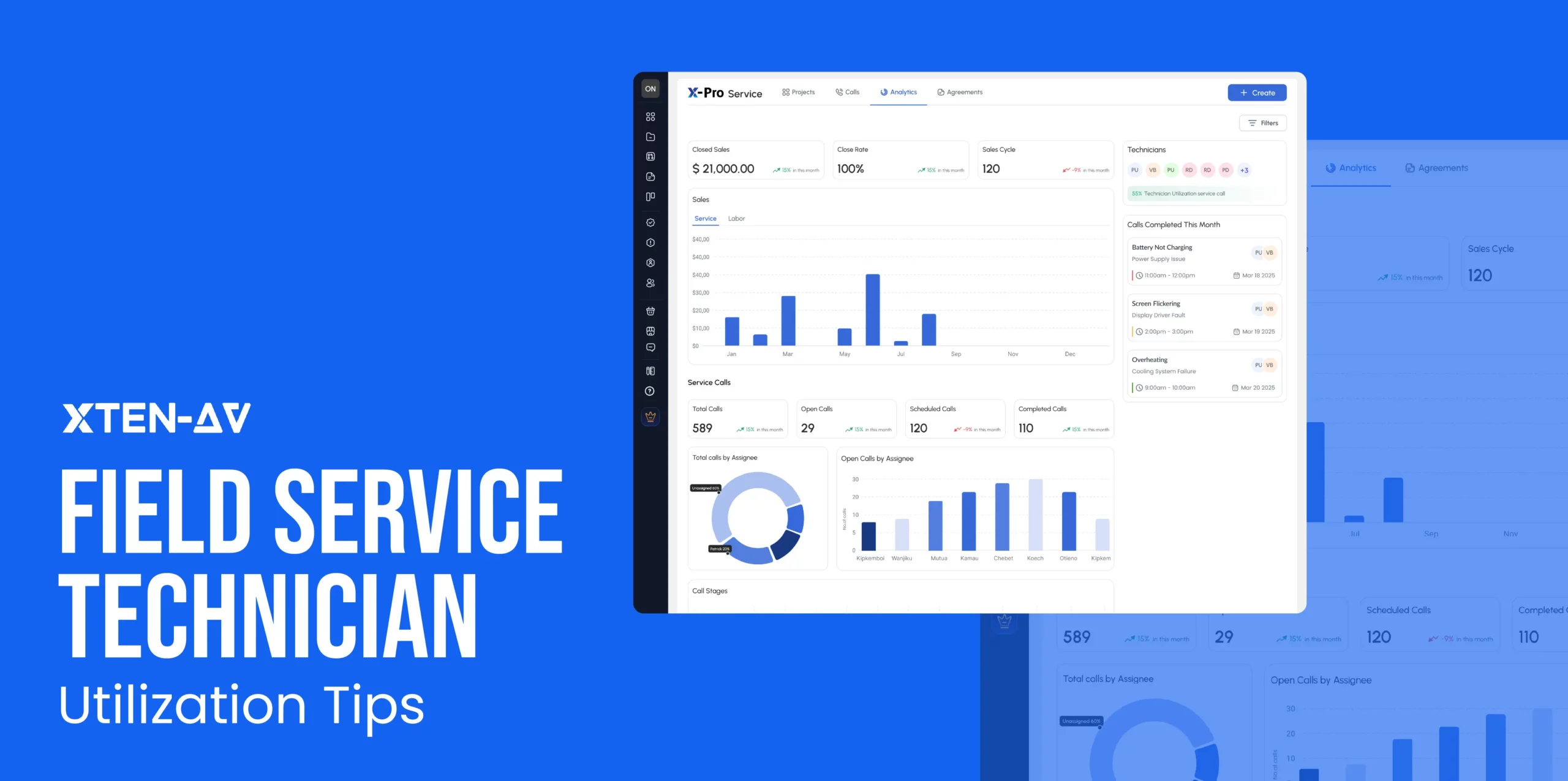
AV maintenance and support services involve a wide range of activities beyond resolving issues on onsite visits. AV technicians need to review service call details, access schematic drawings, travel between client sites, maintain proper equipment records, document necessary completed work and coordinate updates across various teams.
The amount of time allocated to these activities can be a major factor affecting overall service capacity. According to Gomocha field service benchmarks, technician utilization typically ranges from 65% to 80%, with the remaining time lost to travel, administrative work and coordination delays.
In this blog, we will discover the most common operational factors that affect the field service technician utilization. Also, identify the necessary implementation approaches that an AV service manager can use to make better use of available technician time.
Key Takeaways
- Field service utilization improves when avoidable delays are eliminated from technician’s daily work.
- Clear schedules, time windows and workload visibility allow service managers to use technician capacity more effectively.
- AV Technicians resolve service calls faster when drawings, BOMs, install records and service history are available before the visit.
- Separate tracking for service labor and commute time provides a clearer view of cost, billing and profitability.
- X-PRO Service integrates service calls, assignments, mobile updates, time logs, visit records and analytics into a centralized AV-native workflow.
What Is Field Service Technician Utilization?
Field service technician utilization is the process of measuring the percentage of productive work time as compared to the total available working hours. It allows AV project managers to identify whether the technician’s capacity is effectively utilized or lost due to scheduling, traveling, communication gaps and administrative delays.
Let’s check the formula for calculating the technician utilization rate:
Technician Utilization Rate =
Productive or Billable Service Hours ÷ Total Available Working Hours × 100
If an AV technician has 40 available working hours and spends 30 hours on productive service work:
30 ÷ 40 × 100 = 75% technician utilization
This means 75% of the technician’s available time was spent on productive service activities.
Technician Utilization vs Productivity vs Efficiency: What Is the Difference?
Technician Utilization is responsible for measuring how much available time is used for service-related work. At the same time, productivity focuses on calculating the amount of useful work completed during that time period. Lastly, efficiency mainly focuses on ensuring the work is completed with the right balance of time, cost, quality and overall client satisfaction.
Here, the comparison table given below highlighting the difference between Technician utilization, productivity and efficiency:
| Metrics | What It Really Signals in the Field | Why It Matters | Real-World Example |
| Technician Utilization | How much of a technician’s available time is converted into billable or assigned work | Exposes idle time, scheduling gaps, and capacity leakage | 30 billable hours out of 40 working hours in a week |
| Productivity | How many service outcomes are completed within working hours | Shows execution volume, not effort intensity | 12 service calls resolved in a week |
| Efficiency | How smoothly work is completed with minimal waste (travel, rework, delays) | Reveals operational friction hidden inside “busy” teams | Fewer repeat visits and faster job completion cycles |
| First-Time Fix Rate | How often are issues resolved in a single visit | Direct indicator of preparedness and diagnostic accuracy | Issue fixed without follow-up visit or escalation |
| Workload Balance | How intelligently jobs are distributed across technicians | Impacts burnout, response times, and service consistency | Even distribution of jobs across skilled technicians |
Struggling with delayed dispatch, missed updates, or low technician visibility? Learn the field service management challenges AV integrators face.
Why Does Technician Utilization Matter for Audio Visual Service Managers?
AV technician utilization matters for service managers because it simplifies understanding of how effectively labor capacity is being used to support client requests, maintain system uptime and generate essential recurring service revenue. Low utilization can be one of the major causes of increased operating costs, delayed response times and reduced overall field service productivity.
A technician may be occupied throughout the day while spending a major part of their time on travel, administrative work and resolving issues related to incomplete service details. These hidden inefficiencies may reduce billable capacity and complicate workload planning. With the help of utilization data, managers can identify where time is being lost and how to distribute assignments effectively to ensure consistent service performance without overloading field teams.
How Does X-PRO Service by XTEN-AV Help Project Managers Improve Technician Utilization?
X-PRO-Service by XTEN-AV is an AI-powered cloud-based after-sales service management platform specially built for AV businesses. It connects scheduling, service calls, contracts, agreements, analytics, technician assignments and labor tracking in a single centralized workflow. With proper insights, project managers gain better visibility into technician workloads and balance resources more effectively.
The following are the key capabilities that streamline technician utilization:
Service Call Kanban Board
Tracking and organizing service requests becomes easier through a kanban workflow (Open → Assigned → Scheduled → In Progress → Completed). By providing better visibility into active work, this approach allows the AV operations manager to prioritize tasks, minimize coordination delays and enhance overall field service technician productivity.

Clock-In, Clock-Out and Labor Tracking
Site Engineers and AV technicians can record labor hours directly during service calls using the built-in clock-in and clock-out features. This enables accurate technician time tracking, enabling teams to clearly understand how field hours are utilized and identify where productive time is being lost or underutilized.
Monitor Utilization Through Service Analytics
To gain meaningful insights, X-Pro Service has built in AV service analytics to identify capacity gaps, workload imbalances and opportunities to enhance technician utilization.
Create and Track Service Agreements
Users can use x.doc by XTEN-AV, which is a smart proposal and documentation platform to streamline creation and handling of professional AV maintenance agreements with pricing details, digital signatures, approval tracking and ready-to-use templates for different scenarios. It also improves drafting and approvals while enabling real-time visibility of agreement status across stages (Draft → Sent → Viewed → Accepted).
Access Original AV System Design Data
To offer valuable project insights and allow technicians to troubleshoot faster, X-DRAW by XTEN-AV can be useful as an AV Design and Diagramming platform for accessing schematic drawings, BOMs, rack elevation diagrams and cable labeling details throughout the service activities.
Need better visibility into technician workload and service operations? Explore how X-PRO Service by XTEN-AV connects scheduling, time tracking, service history, and utilization insights in a single platform.
What Causes Low Field Service Technician Utilization in AV?
Low field service technician utilization in AV is usually caused by scheduling gaps, excessive travel, missing system context, scattered communication, manual paperwork, weak service history and limited visibility into technician workload. These gaps reduce billable service time and make it harder for service managers to plan capacity accurately.
The table below highlights the key field productivity gaps that reduce AV technician utilization and how X-PRO Service helps address them:
Utilization Leak | Field Impact | AV Service Example | X-PRO Service Fix |
Scheduling gaps. | Creates idle time and last-minute coordination. | Two calls are booked far apart. | Assign technicians, set time windows, and track call stages in a single calendar view. |
Missing AV context | Slows down the diagnosis before work even starts. | The tech cannot check the boardroom signal flow. | Connect service calls to X-DRAW diagrams, BOMs, and install docs. |
Scattered communication | Turn every update into another call or message. | The tech calls the office for site or issue details. | Field View shows calls, contacts, maps, checklists, and status updates on mobile. |
Mixed labor data | Hides billable time, travel time, and lost capacity. | Commute and service work are logged together. | Track clock-in, labor type, logged time, and commute fees separately. |
Manual records | Delays closeout, billing, and follow-up. | Notes are written after the visit. | Capture issue found, action taken, next steps, images, and stage updates onsite. |
Weak service history | Forces technicians to repeat old troubleshooting. | A second tech checks the same microphone fault again. | Keep visit logs, images, time entries, and next steps in the service record. |
Limited analytics | Makes workload planning a guessing game. | Managers cannot see who is idle or overloaded. | View utilization, service revenue, labor revenue, and open, scheduled, and completed calls. |
Let’s explore the major causes of low utilization of field service technicians in AV separately.
Scheduling Inefficiencies Create Gaps in Technician Utilization
Scheduling inefficiencies lower AV technician utilization when calls are assigned without clear time windows, workload visibility or priority context.
Real Life Example:
A technician finishes a display troubleshooting call in the morning but has no nearby scheduled work until late afternoon.
X-PRO Service helps managers assign technicians, set call priorities, define categories, schedule time windows, and track calls through the Open, Assigned, Scheduled, In Progress and Completed stages. This helps teams see technician workload more clearly and reduce avoidable idle time.
Missing AV System Context Slows Service Resolution
AV Technicians lose productive time when they arrive onsite without the original AV design, BOM, rack details, signal flow, or installation notes.
Real Life Example:
X-PRO Service gives service managers a clear overview of upcoming site visits, technician commitments and proper workload distribution. This simplifies service window management and reduces coordination efforts, improving technician utilization.
Struggling to control project costs and protect profit margins? Learn how AV project budget tracking prevents cost overruns.
Fragmented Communication Reduces Field Service Productivity
Scattered communication reduces utilization when updates are spread across phone calls, texts, email threads or WhatsApp messages rather than a single service record.
Real Life Example:
The office calls the technician multiple times to ask whether the site visit has started, what issue was found, or whether a follow-up is needed.
Field View gives technicians mobile access to today’s service calls, weekly calls, site maps, client contacts, issue checklists, status updates, and mobile rescheduling. Office teams can see field updates without having to chase technicians for every change.
Untracked Labor and Commute Time Obscure Utilization Trends
Utilization becomes unclear when service labor, commute time, waiting time, and administrative work are mixed.
Real Life Example:
A technician logs eight hours in a day, but the manager cannot tell how much time was spent onsite versus traveling between AV service locations.
Field View supports clock-in, timer mode, manual time entry, labor categories, logged-time views, and separate commute-fee tracking. This helps managers see where technician time is actually going.
Manual Recordkeeping Delays Service Workflows
Manual paperwork slows technicians down when service notes, photos, time logs, and next steps are completed after the visit instead of during the visit.
Real Life Example:
An AV technician fixes a classroom projector issue but completes the work summary later, delaying billing and follow-up planning.
X-PRO Service Visit Logs let technicians capture Change Stage, Issue Found, Action Taken, Next Steps, Internal Notes, and Images from the field. This creates a cleaner service record while the details are still fresh.
Incomplete Service Records Drive Repeat Troubleshooting
A weak service history leads technicians to repeat work already completed by others.
Real Life Example:
A microphone issue returns two weeks later, but the new technician cannot see what was checked, replaced, or recommended during the first visit.
X-PRO Service keeps visit logs, images, service history, logged time, issue notes, and next steps connected to the service call. This helps the next technician continue from the last known service record instead of starting over.
Limited-Service Analytics Restricts Workload Optimization
Service managers cannot improve technician utilization without visibility into workload, open calls, completed calls, labor time, commute time, and service revenue.
Real Life Example:
A manager sees that service revenue is low but cannot quickly identify whether the issue is idle time, incomplete calls, long commute windows, or low labor billing.
X-PRO Service provides service analytics, including technician utilization, service and labor revenue views, and call metrics such as total, open, scheduled, and completed calls. This helps AV teams review workload and make better capacity decisions.
The all-in-one solution for your Audio Visual (AV) Project Design & Documentation needs
Transform your audio-visual experience with XTEN-AV.
No Credit Card required
Field Service Technician Utilization Checklist for AV Integrators
Improving field service technician utilization requires a structured methodology that helps in balancing efficiency, travel time and service quality. AV professionals can use this checklist for identifying critical gaps and optimizing performance across service management:
Standardize Utilization Measurement Framework
Define an organized procedure to improve technician utilization by tracking billable hours and establishing clear operational benchmarks for ensuring proper service performance.
Optimize Scheduling and Work Allocation
Enhance workforce planning through proper technician scheduling, minimizing idle time, balancing job assignments and also improving overall field execution efficiency.
Strengthen Pre-Visit Job Readiness
Always ensure that AV technicians receive a complete AV service context, issue history and critical documentation before dispatching to achieve first-time resolution rates and minimize repeat site visits.
Enable Onsite Access to AV Service Data and documentation
Enable field technicians to access AV drawings, BOMs, schematics, and installation records in real time, allowing faster troubleshooting and reducing dependency on the remote support team during service operations.
Looking for a better way to manage service teams? Compare the best field service management software for AV integrators to improve technician utilization and overall service efficiency.
Align AV Technician Utilization with Field Service Metrics and Quality
Track utilization alongside key field service metrics, such as resolution rate and service quality indicators, to maintain consistent performance and ensure service outcomes are not compromised.
Audio Visual System Design Mastery + Winning Proposals = 10x Productivity!
- ✔ Automatic Cable Labeling & Styling
- ✔ 100+ Free Proposal Templates
- ✔ Upload & Create Floor Plans
- ✔ 1.5M+ Products from 5200 Brands
- ✔ AI-powered 'Search Sense'
- ✔ Legally Binding Digital Signatures

Conclusion
Improving technician utilization begins with avoiding delays that occur before, during and after every service visit. When schedules, project details, assignments, time logs, commute records, visit notes and service history stay connected, project managers get better control over field capacity and performance. To address these challenges, AV businesses can use X-PRO Service by XTEN-AV, a cloud-based AV field service management platform that streamlines service calls, technician scheduling, Field View updates, labor tracking, visit records and analytics into a single connected workflow.
Book a demo to see how X-PRO Service helps improve technician utilization and service performance.
FAQ’s
Field service technician utilization is the percentage of available technician time spent on billable service work.
Technician utilization rate = Billable service hours ÷ available work hours × 100. Example: 6 billable hours ÷ 8 available hours × 100 = 75% utilizations.
No, Utilization measures time spent on billable work. Productivity measures how efficiently the work is completed.
Low utilization is caused by poor scheduling, long travel time, unclear tickets, missing documents, parts delays and admin work.
AV Scheduling improves utilization by reducing travel gaps, avoiding conflicts, and assigning the right technician to the right service call.
Original project documentation enables AV technicians to understand the system faster, diagnose issues correctly and reduce repeat visits.
Yes, Commute time should be tracked separately because it affects billing, labor cost, and true service profitability.
Service managers must track open calls, scheduled calls, completed calls, response time, close rate, service revenue, labor revenue and first-time resolution.
X-PRO Service supports utilization tracking with technician assignment, calendar scheduling, mobile clock-in/out, labor-type tracking, commute tracking and service analytics.

Explore more by topic
Related Blogs

-

- Posted by Sahil Dhingra

Audio Visual AV Commissioning Checklist & Best Practices for Integrators Sahil Dhingra...
-
- Posted by Sahil Dhingra
Audio Visual AV Cybersecurity Best Practices: Securing Networked Audiovisual Systems Sahil Dhingra...
-
- Posted by Sahil Dhingra
Audio Visual 7 Best Floor Plan Software for AV System Integrators Sahil...





