6 Best Field Service Management Software for AV Integrators

6 Best Field Service Management Software for Audio Visual (AV) System Integrators

Author Image

Sahil Dhingra

Published 30 June 2026

Field Service Management Software for Audio Visual (AV) System Integrators
When we discuss the best field service management software, Most AV platforms enable teams to manage service calls, technician scheduling, on-field mobile updates, various service contracts, invoices, service history and recurring revenue after the installation stage. Traditional FSM tools are limited to work orders and the dispatch process. But AV firms also need to access original AV drawings, BOMs, installation documents and client-site contexts.
According to NSCA industry insights, the average AV integrator signed 75 contracts in 2025, representing a 13% increase over the previous year. This shows that as contract volumes grow, post-installation support is becoming more complex. Missing project details can further lead to slower resolution, repeated site visits and limited visibility across ongoing customer engagements.
In this blog, we will compare the leading field service management software for AV system integrators. Also, evaluating unique features, strengths and ideal use cases to streamline the process of identifying the right solution for after-sales activities, enhancing overall visibility and providing support for installed AV systems more efficiently.

KEY TAKEAWAYS

The leading field service management software platforms for AV integrators are X-PRO Service by XTEN-AV, D-Tools, Jetbuilt Service, ProjX360, Specifi and Praxedo.
X-PRO Service by XTEN-AV is a cloud-based field service management software built for AV system integrators. It allows teams to manage service calls, technician scheduling, contracts, invoicing, analytics and AV project documentation from a single connected platform.
D-Tools is a field service and business management platform for systems integration companies. It supports service planning, dispatch, service orders and project-linked workflows, enabling AV firms to manage post-installation support more efficiently.
Jetbuilt Service is a field service management solution designed for AV companies using the Jetbuilt ecosystem. It enables teams to handle service requests, technician scheduling, support workflows and ongoing customer service operations.
ProjX360 combines project oversight with long-term customer support management. Its location-centric framework centralizes service history, recurring issues, and account activity across multiple client sites.
Specifi focuses on field execution and technician productivity. Mobile access to schedules, site details, documentation and status updates keeps field personnel connected while onsite.
Praxedo is a workforce coordination and dispatch platform built for service-driven organizations. Automated scheduling, resource allocation and operational visibility support efficient management of high-volume field activities.

The all-in-one solution for your Audio Visual (AV) Project Design & Documentation needs

Transform your audio-visual experience with XTEN-AV.

No Credit Card required

What is Field Service Management Software for AV Operations Manager?

Field service management software for AV Operations Manager enables structured handling of post-installation service work by connecting service requests, scheduling AV technicians, tracking service calls, managing onsite work, documentation, invoicing and maintenance agreements in a centralized workflow. It ensures that every service call is traceable, so support activities are streamlined, organized and connected to the installed system context.
For Example
In a corporate meeting, if the display in the conference room setup is not working, the issue is logged, an technician is assigned, and it is resolved using the onsite details and past service history.

Why Do AV Service Managers Need Industry-Specific Field Service Software?

AV service Managers require industry-specific field service software, as service work depends heavily on system context, not just on ticket-tracking methodology. Field technicians often need to access schematic drawings, AV BOMs, rack elevation diagrams, service history details and follow issue-specific checklists to understand the setup before diagnosing or resolving a fault.
Let’s understand the difference between Generic FSM vs AV Service Requirements in Real AV Service Operations.
Generic FSM Capability What AV Service Managers Actually Need
Create and assign a task.
Link each service call to the exact AV system and room setup.
Schedule technician visits
Assign technicians based on site familiarity and system complexity.
Calendar-based dispatch
Room-level context, such as display, audio, control, and network setup
Mobile service updates
Access to AV drawings, rack layouts, and installation notes onsite
Standard time tracking
Separate labor, travel time, and service effort clearly
Basic invoicing after job closure
Billing tied to service history, parts used, and issue details
Asset list tracking
Live AV system documentation reflecting real-world changes
General performance reports
Insight into recurring issues, service patterns, and technician efficiency
Need better control over people, tasks and project timelines? See how AV project resource management software helps.

How Should Service Operations Managers Evaluate Field Service Management Software?

AV Service Operations Managers need to assess field service platforms by how well they support real-world service execution after installation is complete. The main aim is not just about task management, but about how effectively the system integrates scheduling, technicians, contracts, billing and AV system context into a unified operational workflow.
Let’s discover various evaluation criteria for service operations:
Core Evaluation Criteria for Service Operations
Evaluation Criteria What Service Operations Managers Should Look For
Service workflow structure
Ability to manage the full-service lifecycle from request intake to completion without operational gaps
Service-call transparency
Real-time visibility into status, ownership, priority, and progress tracking
Technician deployment efficiency
Smart assignment, workload balancing, and reduced travel or idle time
Field execution support
Mobile access to job details, site information, checklists, and live updates
System/context awareness
Retention of installation context, such as AV system design, documentation, and site history
Contract and agreement handling
Structured tracking of service coverage, entitlements, and renewals
Time and labor capture
Accurate logging of technician time, travel, and onsite activity for billing accuracy
Invoice generation flow
Seamless conversion of completed service activity into billable invoices
Service history continuity
Easy access to past issues, resolutions, and recurring site patterns
Performance analytics
Visibility into utilization, response time, revenue contribution, and service efficiency
Parts and resource tracking
Tracking of required components to reduce repeat visits and delays
System integrations
Connectivity with CRM, ERP, and finance systems for unified operations
Scalability readiness
Ability to support growing sites, technicians, and service volumes without workflow breakdown
Cost and pricing alignment
Transparent pricing that aligns with usage, team size, and operational scale
If workload planning feels unclear, review this guide on resource allocation in AV project management.

Quick Comparison of the Best Field Service Management Software for AV Project Managers

Selecting the right field service management software involves more than managing schedules and dispatch methodologies. AV project managers require clear visibility into AV documentation , service agreements, maintenance records and operational insights to ensure continuity after installation.
Here is the quick comparison of the leading field service management software given below
Quick Comparison of the Best Field Service Management Software for AV Project Managers
Software Best For Why AV Teams Consider It
X-PRO Service by XTEN-AV
End-to-end AV service management
Keeps service calls connected to drawings, BOMs, contracts, technicians, and project history.
D-Tools
Structured service operations
Brings scheduling, dispatch, service orders, and project information into a controlled workflow.
Jetbuilt Service
Connected service delivery
Combines QR-based service requests, AI-assisted support, and technician scheduling.
ProjX360
Multi-site support environments
Organizes service activity around customer locations, making repeat visits easier to manage.
Specifi
Mobile-first field execution
Gives technicians the tools to document, track, and complete work directly from the field.
Praxedo
Workforce and dispatch optimization
Helps service teams improve scheduling efficiency, technician utilization, and field visibility.
Now, we will be discovering each field service management software separately, understanding how each platform supports real-world AV service workflows:
1. X-PRO Service By XTEN-AV
X-PRO Service by XTEN-AV is a cloud-based AV field service management software built to streamline after-sales operations for Service Managers and field teams. It provides service calls, technician scheduling, maintenance agreements, site visits and invoicing within a single, unified, connected workflow. It also delivers service analytics for clearer operational visibility while linking every after-sales activity back to original AV project documentation, so precise design records, installation details and complete system context across the service lifecycle guide each service interaction.
Best For
AV service managers and project managers who need technician scheduling, service tracking and access to project documentation from a centralized platform.
Pros (Key Strengths)
  • Keeps AV service requests tightly aligned with schematic drawings, BOMs, and installation documentation, ensuring complete project traceability across every service interaction.
  • Empowers AV field technicians with full project context, enabling faster diagnosis and more accurate onsite resolution.
  • Maintains continuity across commissioning, warranty support, preventive maintenance and ongoing service activities without information gaps.
  • Replaces fragmented tools like spreadsheets, email threads, and shared drives with a single, centralized source of project data.
  • Strengthens long-term management of AV systems across multi-room, multi-site, and recurring maintenance environments through structured service alignment.
Cons (limitations)
  • May require a short learning curve for new users.
Unique Features of X-PRO Service
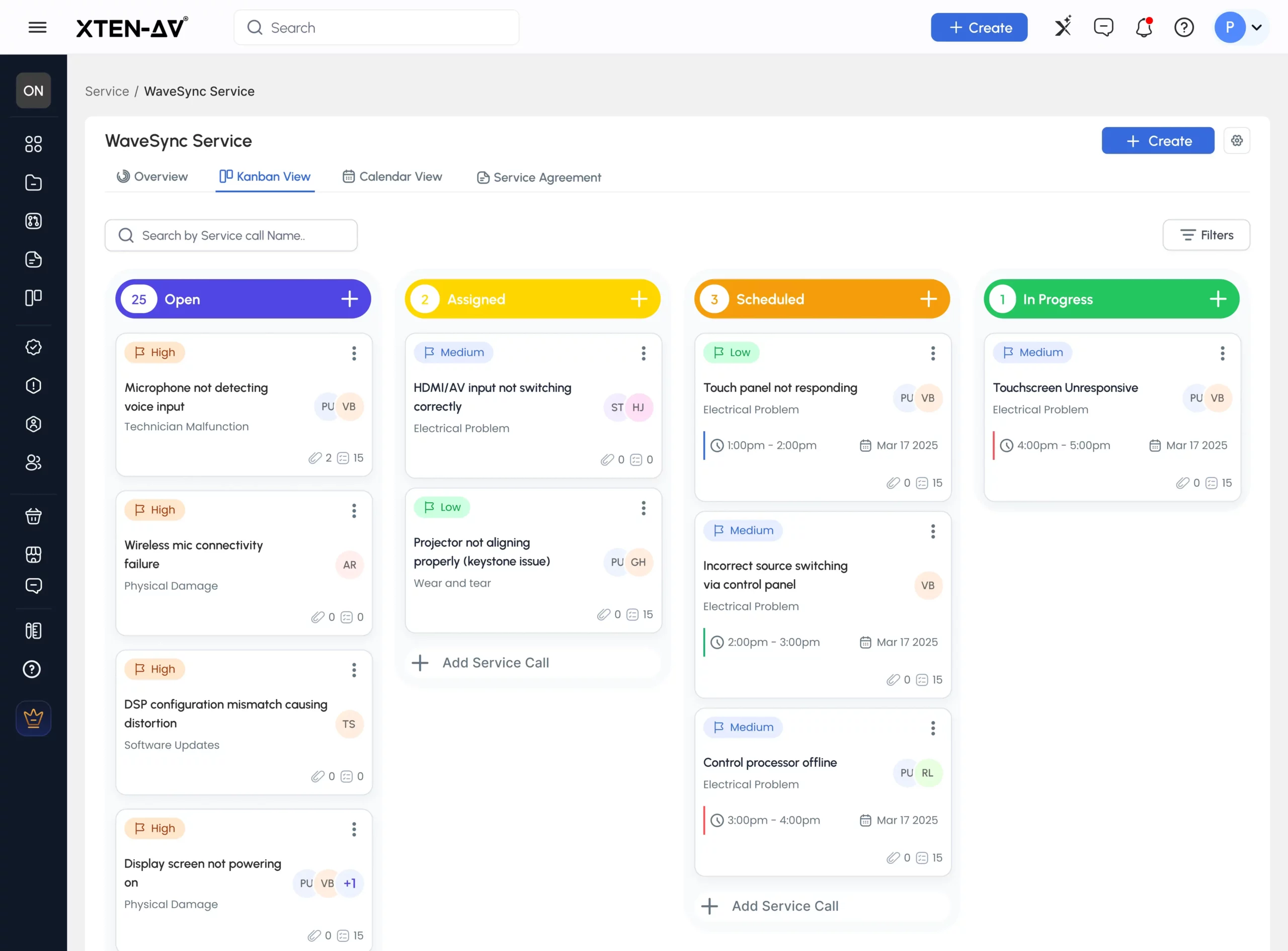
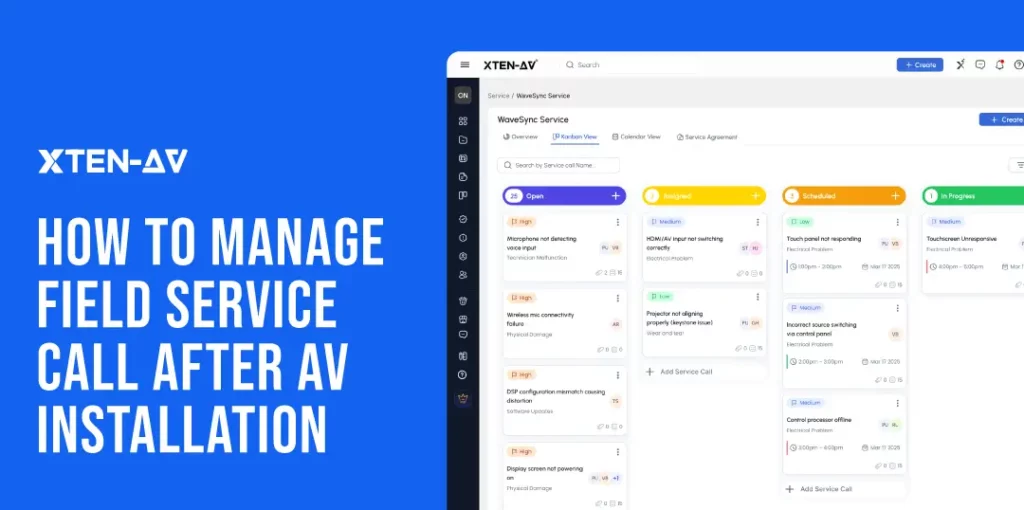
  • Visual Service Tracking with Kanban Workflow
    Track every request from Open to Completed through a structured service pipeline.
  • Smarter Technician Assigning
    Assign the right technician to the right task while monitoring resource utilization.
  • Schedule Calls with Greater Visibility
    Manage appointments through a dedicated calendar view with technician assignments and time windows.
  • Keep Field Teams Connected Onsite
    Offer AV technicians access to schedules, site maps, checklists, visit logs, clock-ins, and rescheduling tools.
  • Centralized Service Contract Management
    Store, search, and manage maintenance and support agreements from a single location.
  • Digital Service Agreements with X-DOC
    Create, send, track, and sign service agreements with X-DOC through a built-in document workflow.
  • Faster Invoice Generation
    Convert completed service work into invoices using work summaries and parts information.
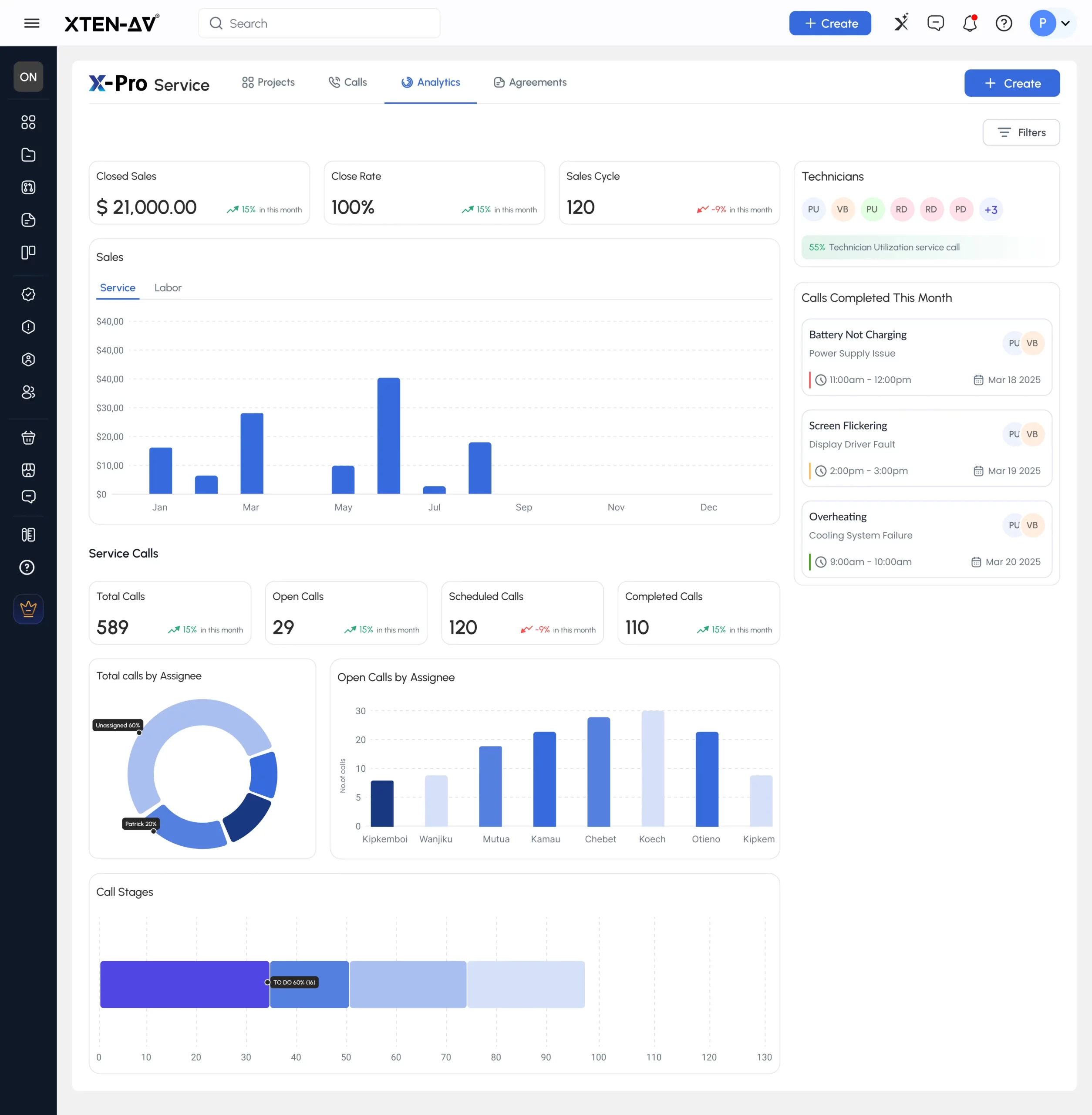
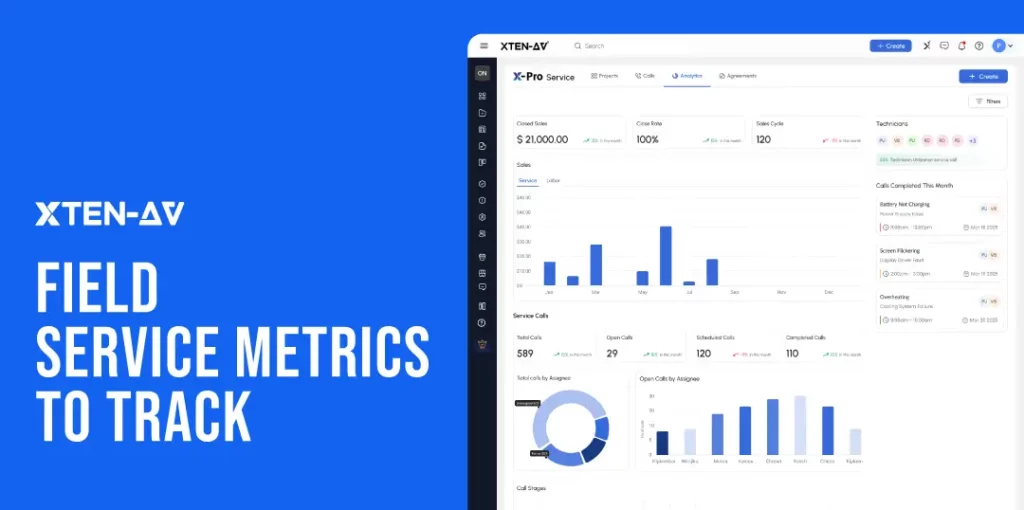
  • Turn Operational Data into Actionable Insights
    Monitor close rates, sales cycles, technician utilization, revenue performance, and call activity.
  • Access AV Documentation During Service Calls
    Open X-DRAW diagrams, BOMs, and installation records directly from the service workflow.
Still wondering how X-PRO Service can streamline your AV projects?
Book a Demo to see it in action!
XTEN-AV Pricing Plans
  • Free Trial
    15 days of free trial (no credit card required)
  • Basic
    $104.25 per user/month (billed annually)
  • Business
    $111.75 per user/month (billed annually)
  • Enterprise
    $126.75 per user/month (billed annually)
  • Project Management (X-PRO Add-On)
    $11.25 per user/month (billed annually, optional).
Why AV Integrators Should Evaluate It
Many service platforms primarily focus on technician scheduling and work order management. X-PRO Service extends beyond those functions by connecting after-sales activities with the AV project lifecycle. This allows teams to maintain continuity between project delivery and long-term customer support.
2. D-Tools
D-Tools is a well-established platform that supports structured service execution for system integration teams through field service scheduling software capabilities, including planning, scheduling, dispatch, communication, task collaboration, mobile access, project details, time tracking, service plans and service orders. It is specially designed to bring clarity and control to field operations, ensuring every service activity stays aligned with defined project and system details across installation, maintenance and ongoing support workflows.
Best For
D-Tools is best suited for Service Managers and AV operations teams handling coordinated scheduling, dispatch and service order workflows. It supports structured field execution linked with project data and ongoing maintenance activities.
Pros (Key Strengths)
  • Structured workflow for planning, AV scheduling, dispatch and service orders, helping to bring consistency and control to field execution
  • Mobile access that keeps technicians aligned with schedules, tasks, project details, and time tracking while onsite
  • Clear coordination between office and field teams through streamlined communication and task handling
  • Organized management of service plans and service orders, supporting predictable maintenance and service delivery
  • Strong connection between field activity and project information, ensuring service work stays context-aware and traceable
Cons (limitations)
  • The wide range of functions across planning, scheduling, dispatch, service plans, and service orders can feel complex for teams that only need basic field execution tools.
  • Some workflows may need setup or customization to match specific service processes and internal ways of working.
  • The platform is better suited for structured integration environments, which may feel less flexible for smaller or simpler service setups.
Unique Features of X-PRO Service
  • Service Planning Framework
    Enables structured planning of service activities with clear assignment and execution flow.
  • Scheduling & Dispatch Control
    Supports organized technician allocation based on availability, workload, and service requirements.
  • Service Orders Management
    Provides a structured system for creating, tracking, and completing service requests.
  • Mobile Field Access
    Gives technicians access to project details, service information, and updates while onsite.
  • Time Tracking System
    Records labor activity to improve visibility into service execution and reporting accuracy.
  • Project-Linked Service Context
    Connects service activity with underlying project and system information for better continuity.
Struggling with D-Tools for scheduling and technician coordination? Explore our D-Tools alternatives guide to discover field service scheduling software that better fits AV service demands.
D-Tools Pricing Plans
  • Free Trial / Demo
    D-Tools offers a free product demo. (Trial plan availability varies depending on the selected plan.)
  • D-Tools Cloud – Solo
    Plans start at $99/user/month, billed either monthly or annually.
  • D-Tools Cloud – Duo
    Plans start at $179/user/month and include additional users and advanced features.
  • D-Tools Cloud – Team & Enterprise
    Custom pricing is available based on your team size and business requirements.
  • System Integrator (D-Tools SI)
    Pricing starts from $1,800/user/year for the on-premise solution. A custom quote is required.
  • Add-Ons & Support
    Optional add-ons, including additional field users and premium support, are available at an additional cost.
Why AV Integrators Should Evaluate It
D-Tools is preferable for organized service operations where scheduling, dispatch, and service orders need structured control, while keeping field activity aligned with project details, service plans and ongoing execution tracking.
3. Jetbuilt Services
Jetbuilt extends its platform with a Service module that brings post-installation support into the same project environment through structured service requests, scheduling, and workflow tracking. It also includes Jetbot Service Desk, an AI-enabled support layer that lets end users troubleshoot issues via QR access and escalate them into technician visits when needed. This creates a continuous flow from issue reporting to resolution within a single system, positioning it as AV service management software ocused on connected service delivery and project continuity.
Best For
Service and operations teams using Jetbuilt who need a connected way to handle service requests, scheduling and maintenance packages within the same workflow environment.
Pros (Key Strengths)
  • Offers a strong linkage between service cases and project data, reducing back-and-forth during issue diagnosis.
  • QR-based intake and guided support streamline how service requests enter and move through the system.
  • Structured case flow improves visibility across open, pending, and completed service activities.
  • Direct scheduling from service cases reduces coordination gaps between request intake and technician dispatch.
  • Centralized tracking improves control over ongoing service workload and case progress.
Cons (limitations)
  • It works best only when AV projects are already built inside Jetbuilt, which can limit flexibility for teams not fully operating within its ecosystem.
  • Advanced service workflows may depend on consistent asset and project data setup, which requires discipline during onboarding and configuration.
  • AI-assisted support performs more effectively when detailed project and equipment information is available, but troubleshooting depth can feel limited.
Unique Features of Jetbuilt Service
  • QR-Based Service Requests
    Enables instant service case creation by scanning project or asset QR codes, removing manual entry and accelerating request intake.
  • Jetbot Service Desk (AI Support Layer)
    Delivers guided troubleshooting using project and equipment context, with seamless escalation into technician-assigned visits when required.
  • Service Case Tracking Dashboard
    Provides a structured view of all service cases with clear status flow, enabling consistent visibility across ongoing and completed activities.
  • Project-Linked Service Context
    Attaches each service case to relevant project, system, and equipment data, helping teams interpret issues with full installation context.
  • Technician Scheduling Support
    Allows direct assignment and coordination of onsite visits from service cases, aligning technician availability with service priorities.
Not sure if Jetbuilt is the right fit? Explore our Jetbuilt Alternative Guide to compare AV design, proposals, project management and service features.
Jetbuilt Pricing Plans
  • Jetbuilt Service starts at approximately $33/user/month (public pricing)
  • Annual billing includes potential savings (around 10% as publicly stated)
  • Pricing varies based on modules, usage, and organizational setup
Still unsure about Jetbuilt pricing? Check our Jetbuilt Pricing Guide for a quick breakdown of plans, add-ons and real costs for AV integrators.
Why AV Integrators Should Evaluate It
Jetbuilt Service integrates QR-based service intake, AI-guided troubleshooting, and appointment scheduling into a single workflow, keeping service requests moving from capture to resolution without switching systems. End users initiate requests by scanning project or asset QR codes, while Jetbot Service Desk enables contextual troubleshooting and, when required, escalation to technician visits. This creates a continuous service flow that stays aligned with the installed system and project data across the service lifecycle.
4. ProjX360
ProjX360 supports AV and custom integration workflows with a single environment for scheduling, service management, time tracking, invoicing and documentation. Its main focus is location-based tracking, where every service activity remains tied to the client site, helping maintain continuity across repeat visits and ongoing support cycles.
Best For
Teams managing recurring service across multiple client sites where location-based history is essential for tracking and follow-up work.
Pros (Key Strengths)
  • Keeps all service activity linked to client locations for clearer historical tracking.
  • Brings scheduling, time logs, and invoicing into a connected flow.
  • Improves access to past service records during repeat site visits.
  • Supports consistent handling of multi-technician service activity at the same location.
  • Maintains visibility across ongoing service engagements without fragmented records.
Cons (limitations)
  • Depends on consistent data entry to maintain accurate site-level history.
  • Setup and configuration may be required before workflows feel fully aligned.
  • Delivers strongest value when service operations are structured around defined client sites.
Unique Features of Jetbuilt Service
  • Location-Centric Service Mapping
    Every service case is tied directly to a client site for continuous tracking.
  • Unified Service Workflow
    Scheduling, execution, and completion are managed within one connected workflow.
  • Integrated Time Capture
    Technician work hours are logged against each service activity.
  • Centralized Service Records
    Documentation, notes, and updates remain stored within the same system.
  • Site-Based History View
    Each location maintains a complete history of past issues and resolutions for easier service continuity.
ProjX360 Pricing Plans
  • Starter Plan
    $229/month (billed annually, save 10%). Includes 2 full users and 3 tech users, with additional users available for purchase separately. A one-time setup fee of $445 includes 6 hours of onboarding.
  • Growth Plan (Most Popular)
    $449/month (billed annually, save 10%). Includes 4 full users and 6 tech users, with additional users available for purchase separately. A one-time setup fee of $695 includes 8 hours of onboarding.
  • Professional Plan
    $789/month (billed annually, save 10%). Includes 8 full users and 12 tech users, with additional users available for purchase separately. A one-time setup fee of $1,395 includes 12 hours of onboarding.
  • Enterprise Plan
    $1,199/month (billed annually, save 10%). Includes 16 full users and 24 tech users, with additional users available for purchase separately. A one-time setup fee of $1,995 includes 20 hours of onboarding.
Why AV Integrators Should Evaluate It
ProjX360 fits environments where service work depends on understanding what has happened at a specific site over time. By keeping all activity tied to location, it reduces scattered records and makes recurring service work easier to track, review, and manage.
5. Specifi.io
Specifi is built around field execution. Its platform centers on helping technicians receive, manage, document, and close service work directly from mobile devices. For AV integrators with distributed field teams, the platform emphasizes reducing administrative friction between dispatch, onsite work and job completion while maintaining visibility for office staff.
Best For
AV service teams that rely heavily on mobile technicians and need work orders, site information, field documentation, and job updates to move seamlessly between the office and the field.
Pros (Key Strengths)
  • Gives technicians access to critical job information while onsite.
  • Reduces communication gaps between dispatchers and field personnel.
  • Improves service documentation through real-time field updates.
  • Accelerates work-order completion and administrative processing.
  • Creates greater accountability through time tracking and audit trails.
Cons (limitations)
  • Success depends on technician adoption and consistent field updates.
  • Organizations with highly customized processes may require configuration.
  • Focuses more on field execution than broader service contract management.
Unique Features of Specifi
  • Mobile Work Order Management Mobile-first work order management for field technicians
  • Customizable Job Stages Configurable job stages that reflect real service workflows
  • Time Tracking and Technician Activity Logging Integrated time tracking and technician activity logging
  • Onsite Photo Capture and Customer Sign-Offs On-site photo capture, annotations and customer sign-offs
  • Integrated Dispatch-to-Invoicing Workflow Connected workflow from dispatch through invoicing.
Specifi.io Pricing Plans
  • Free Trial
    14-day free trial with no credit card required.
  • Individual
    £89 per month when billed monthly or £80 per month when billed annually.
  • Team (Most Popular)
    £219 per month when billed monthly or £197 per month when billed annually.
  • Company
    £449 per month when billed monthly or £404 per month when billed annually.
  • Optional Add-Ons
    White-label portal, SEO Toolkit, and Specifi Echo are available as optional add-ons. Pricing varies depending on the selected add-on.
Why AV Integrators Should Evaluate It
Many service delays occur because AV technicians arrive without the latest project information or because office teams lack visibility into field progress. Specific addresses that challenge by putting work orders, documentation and field reporting at the center of the service workflow. Teams looking to modernize technician execution rather than overhaul their entire business system may find it a practical fit.
6. Praxedo
Praxedo is designed for organizations where service efficiency is driven by technician utilization, scheduling accuracy and operational visibility. Rather than focusing on AV project documentation, the platform concentrates on workforce coordination, automated dispatching, maintenance workflows, and field reporting.
Best For
AV contractors managing high service volumes, large technician teams, and recurring maintenance programs that require strong scheduling and operational oversight.
Pros (Key Strengths)
  • Improves technician utilization across large service operations.
  • Strengthens scheduling consistency and dispatch efficiency.
  • Provides operational visibility into active field work.
  • Helps reduce travel inefficiencies through smarter resource planning.
  • Supports scalable service delivery across multiple locations.
Cons (limitations)
  • Less focused on AV-specific project documentation workflows.
  • Does not emphasize design-to-service continuity as a core differentiator.
  • Some AV integrators may require additional systems for project-level documentation management.
Unique Features of Praxedo
  • Automated Technician Dispatch and Scheduling
    Automates technician dispatch and scheduling workflows to improve service efficiency and resource allocation.
  • Real-Time Field Activity Tracking
    Provides real-time visibility into field activity, technician status, and job progress.
  • Route Optimization and Workforce Planning
    Optimizes technician routes and workforce planning to reduce travel time and improve productivity.
  • Service Reporting and Field Documentation
    Generates structured service reports and maintains complete field documentation for every job.
  • Maintenance Service Request Management
    Supports maintenance-focused service request management with organized tracking and execution.
Praxedo Pricing Plans Plans
  • Free Demo
    Personalized product demo available.
  • Basic
    £35 per user/month (minimum 5 users).
  • Advanced
    £59 per user/month (minimum 5 users).
  • Optimized
    £89 per user/month (minimum 5 users).
  • Automated
    £129 per user/month (minimum 5 users).
  • Enterprise
    Custom pricing based on business requirements.
  • Optional Add-Ons
    Customer Portal, Appointment Booking, Video Assistance, ERP/CRM Integrations, and API Connectors are available as optional add-ons. Pricing varies depending on the selected add-on.
Why AV Integrators Should Evaluate It
For many AV contractors, the biggest service challenge is not documenting systems but coordinating people. Praxedo is strongest when technician scheduling, dispatch optimization, and service productivity are the primary priorities. Organizations seeking tighter control over field operations and workforce performance may find more value here than in platforms built primarily around AV project documentation.

AV-Native FSM Software vs Generic Field Service Software

The major differences between generic FSM software and AV-native FSM software depend on how the service context is structured and used during execution. The generic platform is mainly built around managing jobs, assets and workforce activities. In contrast, AV-native platforms are built around the installed AV system itself, where every service action is linked to design, installation and system history.
The following are the key differences that matter in platform selection:
Area Generic FSM Software AV-Native FSM Software
Core design focus
Jobs, assets and workforce management
Installed AV system and service context
Technician’s work view
Task-based service orders
System-linked service calls
Information access
Basic job details and attachments
System design, install data, and service history
Troubleshooting support
Manual interpretation
Context-aware diagnosis support
Documentation flow
Stored separately or loosely linked
Continuously tied to the service workflow
Service continuity
Fragmented across tools
Maintained from installation to service

Which FSM Software Is Best for Different AV Integrator Needs?

The following is the table described below for streamlining the FSM software selection process:
Service Requirement Platform to Evaluate First
AV system-linked service with design, BOM, and install context
XTEN-AV X-PRO Service
Existing D-Tools project & service ecosystem
D-Tools Cloud / SI
Jetbuilt-based project and service workflows
Jetbuilt Service
Location-based service tracking and site history
ProjX360
Mobile-first field execution and reporting
Specifi
Dispatch-heavy scheduling and workforce control
Praxedo

How to Choose the Right Field Service Management Software for Your AV Business

Choose field service management software by mapping it directly to your after-sales service workflow, including contract management, service-call intake, technician scheduling, onsite execution, time tracking, invoicing, service history, analytics and renewals. The right platform is the one that improves service efficiency while preserving AV system context across every stage of service delivery.
Key Evaluation Criteria for AV Field Service Management Software:
1. Service Workflow Coverage
Ensure the software supports the complete service lifecycle from service request intake to completion. This reduces process gaps between scheduling, execution and closure.
2. AV Technician Scheduling & Dispatch Efficiency
Look for strong technician scheduling software capabilities, including calendar visibility, workload balancing, and easy rescheduling, to improve field efficiency and response time.
3. Mobile Field Execution & Technician App Support
A reliable field service app for technicians should enable onsite updates, issue logging, checklists, time tracking, and real-time status updates from the field.
4. AV Project Context & Service History Access
The platform should retain AV service history, installation records, and system documentation so technicians can diagnose issues with full context rather than fragmented data.
5. Invoicing, Time Tracking & Revenue Control
Evaluate how well the system handles service time tracking, labor vs travel cost separation, and automatic invoice generation from completed service calls.
6. Service Analytics & Operational Visibility
The software should provide field service analytics, including technician utilization, service revenue tracking, response times, and performance of recurring maintenance.
7. Service Contracts & Recurring Revenue Management
Strong capabilities in service agreement and service contract management software are essential for managing maintenance contracts, renewals, and recurring revenue streams.

Why XTEN-AV X-PRO Service Supports Every Stage of an AV Project

X-PRO by XTEN-AV is a cloud-based AV contract and field service management software built for system integrators to manage end-to-end after-sales operations. It centralizes service contracts, service calls, service agreements, technician scheduling, site visits, and invoicing while keeping every activity linked to the original AV project documentation for better continuity and visibility. Its dedicated module, X-PRO Service, integrates service contracts, service calls, agreements, and analytics into a single system, helping teams streamline post-installation workflows, improve coordination between office and field teams, and maintain consistent service execution across projects.
Key X-PRO Service Capabilities for AV Service Contract Management:
Centralized Contract Visibility
Store all AV maintenance contracts and service agreements in one repository. This helps teams track coverage, renewal dates, and active commitments without scattered records or manual follow-ups.
Structured Service Call Management
Service calls follow a clear workflow (Open → Assigned → Scheduled → In Progress → Completed). Each stage remains connected to scheduling, updates, documentation, and billing to improve operational control.
Create and Track Service Agreements
With x.doc , teams can build AV service agreements using templates, pricing structures, and digital signatures. Agreements move through stages (Draft → Sent → Viewed → Accepted) ensuring clarity and faster approvals.
AV Technician Scheduling and Site Visits
A centralized calendar helps assign technicians, plan visits, and manage workload distribution. This improves scheduling accuracy and supports preventive maintenance planning across multiple sites.
Field Support and Mobile Access
Technicians can access checklists, service details, visit logs, images, and time tracking on mobile. This improves onsite accuracy, reduces reporting delays, and strengthens the quality of field documentation.
Service-to-Billing Workflow
Completed service calls can be converted into invoices directly from the service record. This ensures accurate labor tracking, cleaner billing cycles, and improved revenue visibility.
Service Analytics and Performance Tracking
The platform provides insights into key metrics such as call volume, technician utilization, close rates, and recurring revenue. This helps teams monitor service performance and optimize the profitability of maintenance contracts.
Access to AV Project documentation
With X-DRAW , AV technicians can access schematics, BOMs, rack layouts, and installation records during service execution. This improves troubleshooting speed and keeps every service call connected to the original project context.

Conclusion

Selecting field service management software for an AV business is not just about scheduling technicians. It is about preserving the information technicians need when a client calls months after installation. For integrators that want service calls, contracts, invoices, analytics, drawings, BOMs, and installation records to remain connected, X-PRO Service by XTEN-AV is one of the strongest platforms to evaluate. It helps transform after-sales support from a disconnected activity into a structured, repeatable service business.
Connect service calls, contracts, invoices and project history with X-PRO Service by XTEN-AV.

Audio Visual System Design Mastery + Winning Proposals = 10x Productivity!

  • Automatic Cable Labeling & Styling
  • 100+ Free Proposal Templates
  • Upload & Create Floor Plans
  • 1.5M+ Products from 5200 Brands
  • AI-powered ‘Search Sense'
  • Legally Binding Digital Signatures
Laptop Mockup

FAQ’s

Field service management software enables AV Project Managers to manage service calls, technician scheduling, work orders, maintenance agreements, site visits, invoicing, and service history from a single centralized platform.

The best field service management software for AV integrators includes X-PRO Service by XTEN-AV, D-Tools, Jetbuilt, ProjX360, Specifi.io, Praxedo, ServiceTitan, Dynamics 365 Field Service and Salesforce Field Service.

AV field service software connects service activities with AV drawings, equipment records, installation details, project documentation, and maintenance agreements. Generic FSM software focuses mainly on scheduling and work order management.

Yes, AV field service software allows service managers to assign technicians, schedule site visits, manage workloads and track field activities in real time.

Yes, X-PRO by XTEN-AV Service enables AV teams to manage service calls and work orders from request to resolution, including technician assignment, site visit tracking, maintenance agreement details, invoicing and service history.

AV Field Technicians work onsite. Mobile access lets them view job details, update status, add notes, track time, and stay connected.

Track response times, call volume, technician use, repeat issues, agreement status, invoice status and service profitability.

Yes, it helps in managing maintenance agreements, scheduled visits, renewals, repeat calls, and service invoices more consistently.

XTEN-AV

Manage Multiple Audio Visual (AV) Projects with XTEN-AV

Share Article

Explore more by topic

Related Blogs
Field Service Management Software for Audio Visual (AV) System Integrators
  • Sahil Dhingra
  • Posted by Sahil Dhingra
June 30, 2026

Audio Visual 6 Best Field Service Management Software for Audio Visual (AV)...

Audio visual AV Connection Check for accurate signal flow diagram & schematic drawings
  • Sahil Dhingra
  • Posted by Sahil Dhingra
June 26, 2026

Audio Visual What Is an AV Connection Check and Why Does It...

XTEN-AV Brand Preference Management in XAVIA for enterprise AV integrators
  • Sahil Dhingra
  • Posted by Sahil Dhingra
June 25, 2026

Audio Visual Preferred Manufacturer Lists in AV: How to Keep AV BOMs...

Sahil Dhingra
Sahil Dhingra
Sahil Dhingra is Co-Founder and CEO of XTEN-AV, a cloud-based Audio Visual (AV) system design & integration software for system design, proposals, project management, and post-installation service. With 10+ years of experience in software development, business analysis, and product leadership at companies including Apple, HP, and Cisco, Sahil leads XTEN-AV’s product vision for connected AV project lifecycle management. He focuses on building AI-assisted SaaS workflows that help AV teams reduce manual effort across system design, BOM creation, proposals, documentation, project delivery, reporting, and after-sales service.

Leave a Reply

Your email address will not be published. Required fields are marked *

This website stores cookies on your computer. Cookie Policy