Projector Screen vs Wall: Which Is Better for Image Quality

Sahil Dhingra
Published 10 June 2026
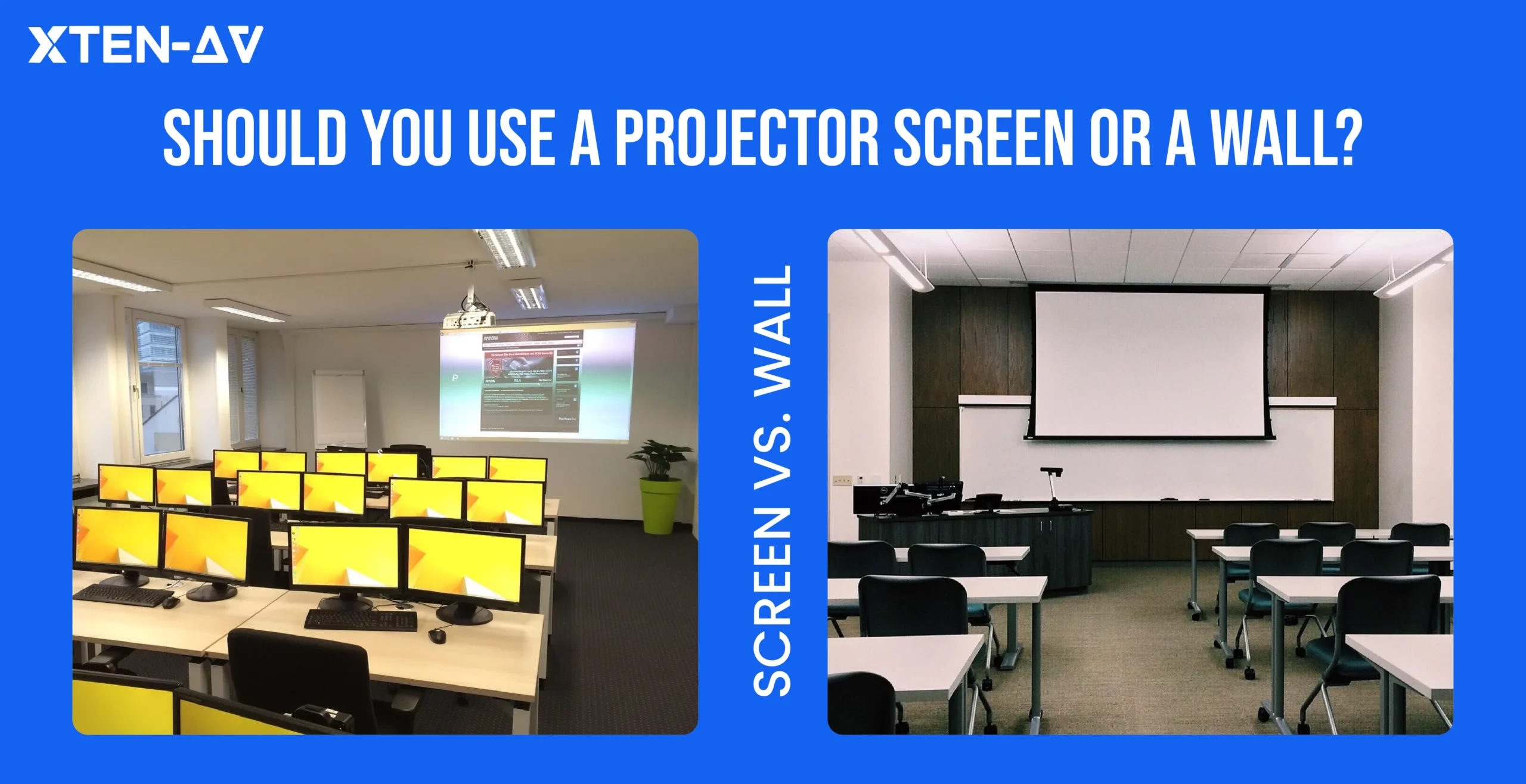


Most AV professionals will tell you the same thing. A projector screen beats a wall in almost every professional AV environment. It gives you a sharper image. Colors look right. Brightness stays even across the whole surface. Contrast is stronger too. dark scenes retain shadow detail while bright scenes stay clear and punchy
A wall can work for casual projection in a dark room. But the limitations become obvious in conference rooms, classrooms, churches, and other commercial AV spaces where image clarity actually matters.
Professional environments need a surface designed specifically for projection. That is exactly what a dedicated projector screen provides.
This guide covers:
- Projector screen vs wall image quality
- Screen gain and brightness differences
- How wall texture affects projection
- When a wall is acceptable
- When AV professionals should always specify a screen
Key Takeaways
- A projector screen delivers better brightness consistency, contrast, sharpness, and color accuracy than a wall.
- Wall texture becomes highly visible on large projected images over 100 inches.
- Screen gain directly affects brightness and viewing angles.
- ALR screens maintain contrast in bright conference rooms and classrooms.
- 4K projectors expose wall imperfections more aggressively than 1080p models.
- Projection paint improves reflectivity but cannot eliminate wall texture issues.
- Commercial AV installations should always use a dedicated projection screen.
- AV integrators rely on rated screen gain to validate lumen calculations and seating coverage.
The all-in-one solution for your Audio Visual (AV) Project Design & Documentation needs
Transform your audio-visual experience with XTEN-AV.
No Credit Card required
Is a Projector Screen Better Than a Wall?
Yes. A projector screen delivers better image quality across every key metric.
Walls are not made for projection. Most wall surfaces scatter light instead of reflecting it evenly. That reduces brightness. It also weakens contrast, the visible difference between bright and dark areas in the image.
Color accuracy suffers too. Even a smooth white wall with matte paint carries a slight tint. That tint shifts every color the projector sends. Blues look cooler. Whites look off. Skin tones look wrong. A dedicated projector screen uses a color-neutral surface. It reflects light without changing hue.
Wall imperfections make things worse. The small bumps and dried paint marks together with the uneven wall surface produced different light patterns. Even minor texture flaws become visible on the 100-inch image. Edges soften and Image clarity drops.
A projector screen solves all of this. It provides a smooth, engineered projection surface built to reflect light uniformly, consistent brightness, cleaner contrast, and accurate colors every time.
When Is a Wall Acceptable for Projector Use?
A wall works in a few specific situations.
- The setup is temporary or portable
- The room has a tight budget
- The use is casual: home movie nights, gaming, background content
- The room can be fully darkened
- The wall is smooth white with matte paint.
Even then, accept the trade-off. You lose image clarity and color accuracy. A wall is acceptable only when image precision is not critical.
When Should You Use a Projector Screen?
Use a screen any time image quality actually matters.
- Conference rooms and boardrooms
- Classrooms and training rooms
- Home theaters
- Churches and auditoriums
- Client-facing AV spaces
- Any commercial AV installation.
In these environments, you cannot afford inconsistency. The audience expects a clear, sharp image. A fixed frame screen, motorized screen, or ALR screen gives you exactly that. Professional spaces need a professional projection surface.
How Does Wall Texture Affect Projector Image Quality?
Textured walls scatter projected light before it reaches the viewer. On images over 100 inches, that scatter visibly softens edges and reduces sharpness, especially on fine text and graphic detail.
The most common problem is orange-peel texture, a surface pattern common in drywall finishing. It looks fine under room light, but under a projected image, the projector magnifies every ridge and bump. On a 120-inch image, even a small surface flaw creates soft spots where edges lose definition.
Roller lines and brush strokes do the same thing. Each ridge breaks up the reflection. Text edges go soft. Fine lines blur.
And it compounds with scale. At 60 inches, a textured wall might get away with it. At 120 inches, you see every roller mark, every paint seam, every old touch-up patch.
Matte Paint vs Glossy Paint
Neither fixes the problem. But glossy paint makes it significantly worse.
Glossy reflects light like a mirror, straight back at you from one spot. Hot patch in the center, dark edges around it. Any ambient light in the room bounces back too. The image washes out fast.
Matte spreads light more evenly. No hotspots. That is the better choice if you are stuck with a wall. Just do not confuse better with good. A painted wall is never engineered for projection. A screen is.
What Is Screen Gain and How Does It Affect Brightness?
Screen gain is a single number which shows the amount of light that a projection surface reflects back to viewers.
The gain of 1.0 provides equal distribution of light through all directions which results in approximately uniform brightness for all viewing positions.
Move off to the sides and brightness drops faster. Every seat in the room has a different experience based on that number. That is why AV professionals spec screen gain before they spec the projector.
Walls have no gain rating. Reflectivity shifts with paint color, sheen, and texture. Nothing to calculate against. Nothing to validate.
A rated screen changes that. The number is consistent, measurable, and feeds directly into lumen planning and AV design documentation.
How common projection surfaces compare:
Feature | White Wall | Matte Screen | ALR Screen |
Brightness Consistency | Poor | Excellent | Excellent |
Contrast | Weak | Strong | Very Strong |
Ambient Light Handling | Poor | Moderate | Excellent |
Color Accuracy | Inconsistent | Accurate | Accurate |
Texture Visibility | High | None | None |
Commerical AV Use | Not Recommended | Recommended | Best for Bright Rooms |
Professional AV teams do not spec projection systems by guesswork.
The brightness and sharpness of the image depend on screen gain, ambient light levels, the throw distance, room dimensions and the seating layout. The entire calculation will change when you modify any single variable.
Most projection mistakes happen before the projector is ever ordered. Wrong gain for the room. Throw distance never checked. Lumen numbers never run. The client signs off and it falls apart on installation day.
XTEN-AV closes that gap. Use the projector brightness calculator to confirm lumen requirements against your screen gain. Run the projector calculator to verify throw distance and placement. Every number on record before the equipment ships.
Does a Projector Screen Improve Contrast?
Yes. A screen reflects the projector’s output uniformly. Bright areas stay bright. Dark areas stay dark. But on a wall, reflection is uneven, dark scenes go murky, bright scenes wash out.
Wall color adds to the problem. Cream shifts warm and grey shifts cool. A screen’s neutral surface reflects light without touching the signal.
Ambient light is the third factor. A wall cannot reject it, everything bounces back at the viewer. An ALR screen blocks off-axis light from windows and ceiling fixtures. In a moderately lit room, a standard wall washes out where an ALR screen holds contrast.
For dark rooms, a matte screen handles contrast well. For bright rooms, ALR is the right call. See how the two interact in our projector contrast ratio guide.
Does a 4K Projector Need a Screen?
Yes, well beyond the standard HD projector.
The effect played by a 4K projector is four times more detailed than an HD projector. But that detail would need a surface to occupy the space, not a textured wall.
Orange-peel texture, roller marks, and paint grain all scatter fine detail before it reaches the viewer’s eyes. On a 100-inch or larger image, that scatter is clearly visible. Edges soften. Fine text loses definition. The 4K resolution advantage disappears.
A smooth matte screen preserves that resolution. The surface is engineered to be flat and uniform. Every pixel lands where it should.
Short throw 4K projectors are even more sensitive to this. The steep projection angle hits the surface at a sharper incline. Small surface irregularities create more visible distortion than they would at a longer throw distance.
The proper screen must be used with the 4K projector which you will select for your conference room training room and auditorium display needs. Projecting onto a wall wastes the resolution you paid for.
Projector Screen vs Wall for Conference Rooms
Walk into most conference rooms and you will spot the problem immediately. Overhead lights, windows, screens and devices throwing light from every direction.
If you point a projector at a painted wall in that environment and the image suffers.
What happens on a wall:
- Ambient light bounces straight back at the viewer
- Contrast drops, dark areas look grey, not black
- Text gets harder to read
- Spreadsheet columns blur at the edges
- Presentation slides look flat and washed out
Even a standard matte projection screen dramatically improves readability in conference rooms because the reflected light stays more uniform across the image. In a moderately lit room, the difference in text sharpness alone is worth it.
An ALR screen goes further. It rejects light coming in from windows and ceiling fixtures. Only the projector’s beam reflects toward the viewer. The image stays sharp even when the lights stay on.
Huddle rooms have their own issue. Wall space is tight. There is always something in the way, a door, a light switch, a cable run. A fixed frame or motorized screen puts the image exactly where it needs to be, every time.
Hybrid rooms need it most. Remote participants are already watching a compressed video feed. A soft, low-contrast image on a wall becomes unreadable on the far end. A proper screen keeps enough sharpness to survive the compression.
What Are the Pros and Cons of Using a Wall?
Pros of Using a Wall | Cons of Using a Wall |
✓ No extra screen cost | ✗ Lower brightness consistency |
✓ Easy temporary setup | ✗ Texture reduces sharpness |
✓ Works for casual viewing | ✗ Paint color shifts image tone |
✓ No installation required | ✗ Not suitable for commercial AV environments |
A wall saves money upfront. For a casual home setup or a one-time event, that trade-off can make sense. A smooth white wall with matte paint in a fully dark room produces an acceptable image.
But a wall gives you no guarantees. You cannot calculate screen gain. You cannot predict how ambient light will affect the image. You cannot validate brightness levels for a specific seating position. For any professional or repeatable AV setup, those gaps matter.
What Are the Pros and Cons of Using a Projector Screen?
Pros of Using a Screen | Cons of Using a Screen |
✓ Better image sharpness | ✗ Adds cost to the installation |
✓ Predictable gain rating | ✗ Requires mounting or installation |
✓ Better contrast and black levels | ✗ Needs correct sizing for the room |
✓ Better color accuracy | ✗ Must match room lighting conditions |
Ask any AV integrator why they spec a screen over a wall. The answer is usually the same, predictability.
- A fixed frame screen has a rated gain.
- A motorized screen has a documented viewing angle.
- An ALR screen tells you exactly how it handles ambient light.
- Even a portable screen ships with specs you can put in a design document.
A wall gives you none of that. You paint it, point the projector at it, and hope the numbers work out.
With a screen, nothing is left to hope. You know the gain before the projector arrives, which seats get a usable image, show the client exactly what to expect, and back it up with manufacturer data.
That is what makes the installation defensible. Not just good-looking.
Can You Paint a Wall for Projection?
Yes. But know what you are getting into.
Projection paint improves reflectivity over standard emulsion. Some formulas add a light grey base to lift contrast in dark scenes. Better than plain matte white, but only if the wall underneath is clean and flat.
That is the catch. Orange-peel texture, roller marks, uneven plaster, the paint sits on top of all of it. The irregularities stay. The image still scatters.
A proper result means skim-coat, primer, then careful application. Cut corners and you end up worse than plain matte white. Factor in materials and labour and the total often lands close to a mid-range fixed frame screen, one that is purpose-built and moves with the room if things change.
Projection paint also cannot reject ambient light. No painted surface replicates ALR properties. In any room that is not fully dark, an engineered screen wins.
For permanent commercial AV work, projection paint is a workaround. Not a solution.
Which Is Better for AV Professionals: Projector Screen or Wall?
A projector screen is always the better choice for a large-format projection environment.
AV integrators need installations they can stand behind. That means knowing the image quality before the projector arrives. It means the right surface, the right lumens, the right placement — all validated before anyone picks up a drill.
A wall makes none of that possible. No rated gain. No documented viewing angle. No color neutrality you can verify. There is nothing to calculate against and nothing to put in a design document.
A screen gives you all of it. Gain feeds into brightness calculations. The viewing angle tells you which seats work. Manufacturer data backs the design. The whole specification becomes defensible.
This is where XTEN-AV fits, and it goes beyond the calculator.
Lock down the numbers first. Lumen requirements, throw distance, gain rating, seating coverage. The projector brightness calculator and projector calculator handle that in one place.
Then the project keeps moving. The proposal reflects the spec. The documentation supports it. The complete process of engineering, procurement and client sign-off operates using one validated design which eliminates any possibility of version conflicts or unexpected developments.
That is what XTEN-AV is built for. The full workflow, from first spec to final sign-off.
Not sure on screen size? The projector screen size guide walks you through it.
Still on lumens? Start with how many lumens you need for a projector.

The all-in-one solution for your AV needs
Transform your audio-visual experience with XTEN-AV.
No Credit Card required
Audio Visual System Design Mastery + Winning Proposals = 10x Productivity!
- ✔ Automatic Cable Labeling & Styling
- ✔100+ Free Proposal Templates
- ✔ Upload & Create Floor Plans
- ✔1.5M Products from 5200 Brands
- ✔ AI-powered ‘Search Sense'
- ✔Legally Binding Digital Signatures

Conclusion
A projector screen outperforms a wall on every measure that matters. Brightness, contrast, color accuracy, sharpness, a wall cannot compete in any professional AV environment. For casual use in a dark room, a wall gets the job done. For everything else, it is the wrong surface.
But choosing the right screen is only the first decision. The actual work begins when you need to confirm that the projector, room and installation system all function together with the projection screen. That means validated brightness numbers. A documented design. A proposal the client can read and sign. Coordination between engineering, procurement, and install.
XTEN-AV handles all of it. The workflow should begin with the first lumen calculation which requires the use of both the projector brightness calculator and the projector calculator until the client signs off on the project.
Stop speccing by guesswork. Start your AV design on XTEN-AV.
FAQ's
Yes, a smooth white wall with matte paint works in a fully dark room. It will not give you accurate colors, consistent brightness, or a measurable screen gain. For any professional AV space, use a dedicated screen.
Yes. A screen gives you better sharpness, accurate colors, and predictable performance. AV professionals also need a rated gain value to calculate projector brightness correctly. A wall gives you none of that.
It makes brightness more consistent. Rated screen gain ensures even light reflection across the surface. A wall reflects unpredictably, the same projector looks brighter in some spots and dimmer in others. An ALR screen also rejects ambient light, which improves perceived brightness in lit rooms.
Flat matte white. Glossy paint creates hotspots, bright patches where light bounces directly back at you. Off-white, cream, and grey all shift color accuracy in different ways. Even a clean, well-prepped white wall still cannot match what a neutral screen surface gives you.
Yes and more than most people expect.
Texture scatters projected light before it reaches the viewer. The large image displays all of the orange-peel finish and paint marks and uneven plaster. A small bump that is invisible at arm’s length becomes obvious at 100 inches.
Yes. Short throw projectors are actually more sensitive to surface problems, not less.
The steep projection angle hits the wall at a sharp incline. That angle makes every surface irregularity more visible. A flat, smooth screen matters more here than it does with a standard throw setup.
It is a number that tells you how much light a surface reflects back toward the viewer.
A gain of 1.0 reflects evenly in all directions. Go higher and more light comes forward — but the effective viewing angle gets narrower. AV professionals use the gain rating to work out exactly how many lumens a projector needs for a given room.
Yes. Every time.
Conference rooms have windows, ceiling lights, and devices all throwing ambient light around. A matte screen handles that better than a wall. An ALR screen handles it best — it blocks off-axis light from windows and fixtures and only reflects the projector’s beam toward the viewer. Contrast stays high even with the room lights on.
Yes, 4K resolves four times the detail. That detail needs a surface that can hold it. Wall texture scatters fine detail before it ever reaches your eyes. A smooth matte screen keeps every pixel where it belongs. Projecting 4K onto a textured wall is like buying a high-res image and printing it on sandpaper.
You can. But go in with clear expectations.
Projection paint improves reflectivity over standard emulsion. What it cannot do is fix the texture underneath. The paint material fails to resolve the underlying issue when surface materials display orange-peel texture or uneven plastering. You still need to skim-coat, prime, and apply carefully. By the time you add up materials and labour, the total often lands close to the cost of a decent fixed frame screen.
Explore more by topic

AV Design Mastery + Winning Proposals = 10x Productivity!
- Automatic Cable Labeling & Styling
- 100+ Free Proposal Templates
- Upload & Create Floor Plans
- 1.5M Products from 5200 Brands
- AI-powered ‘Search Sense'
- Legally Binding Digital Signatures
No Credit Card Required
Related Blogs
-

- Posted by Sahil Dhingra

Audio Visual Overhead Paging System Guide: Components, Design & Best Practices for...

-
- Posted by Sahil Dhingra
Audio Visual 5 Gantt Chart Software for AV Project Management: A Complete...
-
- Posted by Sahil Dhingra
Audio Visual 5 House of Worship AV Installation Mistakes that Cause Poor...