

Choosing an AV project sales and management platform is a strategic workflow decision, not one based on assumptions and guesswork. AV consultants and integrators need a solution which combines quoting, engineering documentation, installation tracking and client deliverables together. This ensures optimized workflows, precise execution and reliable delivery of complex AV projects.
Jetbuilt is a popular choice for this purpose because it integrates proposals and project management into a single cloud-based platform. This procedure helps to manage all project details in one place easily.
However, Jetbuilt may not always meet the needs of AV teams looking for detailed reporting or flexible project workflows. Costs can rise as teams add modules such as drawings, stock, installation, service, portal or lead tracking.
That’s why many AV professionals are exploring other options as well. In this blog, we will explore the leading Jetbuilt alternatives for 2026 and help you choose the best fit.
Key Takeaways:
The top 6 Jet built alternatives for AV workflow include XTEN-AV, D-Tools, Portal.io, Quoteworks, Pandadoc & Proposify.
XTEN-AV offers a complete AV ecosystem by unifying automation, drawing, documentation and project management into a single cloud-based platform.
D-tools is suitable for AV integrators who need deep estimation and strong reporting requirements while handling multi-phase AV projects.
Portal.io works well for AV teams that want fast and client-friendly proposals. This is suitable for streamlining the sales workflow and making it easy for the clients to understand.
Quoteworks is suitable for companies who want a quoting engine that integrates with their existing CRM, accounting or PSA tools.
PandaDoc is suitable if you need better proposal templates, eSign and document tracking. It’s a proposal platform, not a full AV workflow platform.
Proposify is suitable when AV teams want branded proposals. It also shows when clients open and engage with them.
The all-in-one solution for your AV Project Management & Installation needs
Transform your audio-visual experience with XTEN-AV.
No Credit Card required
What is Jetbuilt?
Jetbuilt is a web-based project sales and delivery platform designed for professionals in AV, IT, security and the structured cabling industry. It helps AV integrators create accurate quotes and client-ready proposals while keeping workflows organized. With a large product library and dealer pricing, quoting becomes faster. Teams can create proposals and RFPs effortlessly.
For automation, Jetbuilt has its own AI assistant known as Jetbot. It has the capability to create AV schematics from your BOM and scope details. For post-installation support, Jetbot Service Desk lets clients scan QR codes to start troubleshooting, log service cases and quickly schedule appointments.
Why Do AV Teams Look for Jetbuilt Alternatives?
AV teams start exploring Jetbuilt substitutes when software limitations begin to impact project planning, tracking and delivery.
Let’s find various reasons for looking beyond Jetbuilt:
Rising Costs with Expanding Workflow Needs
Jetbuilt works well when there are a limited number of users and departments. However, when there is a need for team expansion and additional features are required to be added. The overall cost increases significantly, compelling AV companies to evaluate alternatives.
Limited real-time budget tracking
When a project is active, AV Project Managers often need to see how much money has been spent as compared to the actual budget. Since Jetbuilt doesn’t provide real-time cost syncing capabilities, teams may need to update budgets manually or track costs separately.
Risk of losing unsaved scope changes
When AV teams draft or update the scope in Jetbuilt, autosave is a critical aspect to prevent losing edits. According to reviews, many users have reported that scope changes may not be auto-saved while they work. This resulted in rework and the loss of updates.
Limited Proposal Customization
As per user reviews, Jetbuilt provides proposal templates. But has limited layout control to meet client-specific formats. Due to these limitations, users need to make manual edits outside the platform to meet unique AV project requirements.
Accounting Workflow Can Feel Disconnected
After an AV proposal is approved, the teams require estimates and change orders to smoothly transfer into their accounting systems so billing and project costs stay aligned. As per user feedback, merging multiple change orders in Jetbuilt can cause QuickBooks Online exports to fail or produce errors in billing.
Note: This section is primarily based on user feedback from Capterra, Reddit discussions and relevant publicly available product documentation.
How to Choose the Right Jetbuilt Alternative?
Choosing a Jetbuilt replacement means evaluating how a platform supports your AV workflows, team collaboration and overall operations.
The checklist below describes essential factors which will help you to identify the right AV system integration and design software which streamlines system design, installation and project management:
Look for the Right Workflows:
Start by mapping your current Jetbuilt workflows. Currently, Jetbuilt positions itself as an AV platform for managing leads, project building, client coordination and payment collection. Use these details as your baseline, then shortlist the alternatives which support the same project lifecycle without forcing extra tools.
Check Quoting Accuracy and Margin Control:
Your replacement platform should align with AV equipment pricing, dealer costs and labor rates to improve the quote accuracy and protect overall margins.
Confirm Project Execution and Field Usability:
Ensure the platform supports on-site readiness with mobile access for Field Technicians. For better labor tracking, the platform should have clock-in and clock-out features. Most importantly, it should provide ROI insights with real-time visibility into AV project performance.
Manage Scope Changes with Clear Approvals:
Scope changes are an important aspect which AV project Managers need to deal with while handling complex projects. To stay properly aligned with the client requirements, a Jetbuilt substitute should log every change, show its impact and must send them through a proper approval workflow with a clearly assigned owner.
Validate Integrations with Your Stack:
The AV platform which you have selected should offer seamless integrations with existing tools and leading business applications. This helps to ensure smooth data workflow across AV systems.
Automated Insights and Reporting:
Reporting should not rely on manual updates or spreadsheets. The Jetbuilt alternative should have AI-powered capabilities to track tasks and provide BOM updates. It should highlight workload and budget shifts. This process helps to track project delays early.
Compare the Total Cost of Ownership:
Do not pick a Jetbuilt alternative by just seeing the monthly pricing. Evaluate costs across the full project lifecycle, not just subscription costs. Calculate the full rollout cost, including seats, required add-ons, onboarding, support and the time needed to get the platform fully live and used by the team.
Top 6 Jetbuilt Competitors to Consider for AV Integrators in 2026
In 2026, the AV industry is continuously evolving, integrators are looking for platforms which simplify the entire project workflow. From quoting and BOM management to installation, approvals and accounting, every step matters.
Here, we will be exploring the top 6 Jetbuilt competitors, which will help teams to manage AV project scope, equipment, procurement and installation tasks efficiently:
1. XTEN-AV
XTEN-AV is an AI-driven cloud-based av design software specially designed for AV integrators, designers and sales teams to eliminate the manual workflow and use of fragmented tools. The platform is used to simplify the complete AV project lifecycle by combining automation, schematics, documentation and project management in a centralized system. XTEN-AV keeps drawings, BOMs and documentation aligned through every revision, powering $3B+ in proposals and trusted by 30,000+ AV professionals worldwide.
XAVIA
Xavia is the AV industry’s first AI agent, capable of transforming simple voice or chat-based prompts into project-ready deliverables. It helps in generating accurate AI-powered BOMs tailored to room specifications, automates CAD designs and produces bid-ready proposals to simplify the procurement and installation process. XAVIA’s unified approach enhances AV workflows, allowing teams to work more efficiently, increase accuracy and complete projects on schedule.
X-Draw
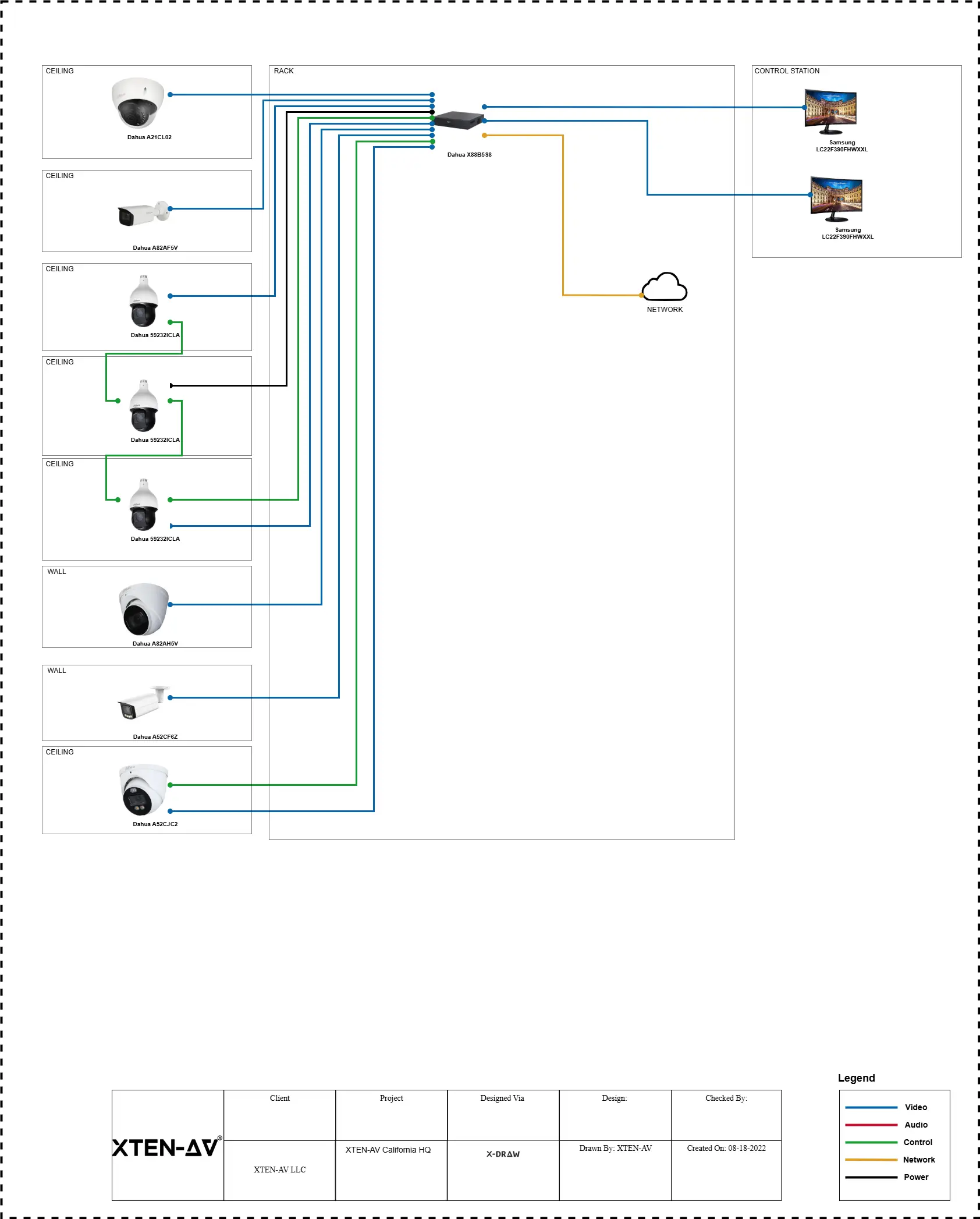
X-Draw is a modern AV schematics and diagramming solution built to create precise system designs with minimal CAD rework. It helps AV Engineers to create floor plans, map signal flows, place devices and generate wiring diagrams with automated cable labeling. Using AI-assisted search and structured drawing elements, it speeds up equipment placement while keeping schematics and documentation up to date as designs evolve, reducing errors and rework.
X.DOC
X.DOC is a smart AV proposal software specially designed for AV professionals. The solution helps AV designers to create smart proposals, accurate quotes and contracts using pre-designed templates with automatically updated project data. It also includes digital signature capabilities to speed up document approvals, enabling AV professionals to deliver polished, client-ready proposals efficiently with confidence.
X-PRO
X-PRO is an advanced AV project management software which helps to streamline the entire project lifecycle. It organizes schematics, proposals, equipment and timelines in a single project management platform. Monitor project progress and performance effortlessly with clock-in/clock-out, inventory tracking and Project ROI insights. X-Pro helps to keep projects aligned, productive and profitable from installation to execution.
The all-in-one solution for your AV needs
Transform your audio-visual experience with XTEN-AV.
No Credit Card required
Features
Offers Complete AV Ecosystem:
XTEN-AV brings automation, AV drawing, smart documentation and Project management into a single workflow. Helping to solve the issue of fragmented tools.
AI-Powered AV Workflow:
With its built-in AI agentic platform XAVIA, automates tasks such as BOM generation, AV schematics, proposal drafting, reporting and project tracking through voice or chat-based prompts.
AV Schematics and System Design:
With X-Draw, AV teams can create floor plans, signal flow diagrams, wiring diagrams and system layouts using a structured drawing methodology which keeps designs consistent and aligned as projects evolve.
Pre-Designed Templates and Documentation:
X.DOC streamlines the proposal creation process through a wide variety of pre-designed templates, live project data integration, real-time tracking and digital signature support.
Project Tracking and Execution:
X-PRO centralizes task planning, inventory, labor tracking, mobile access and ROI insights in a single AV project management platform.
Designed to Scale with AV Teams:
XTEN-AV can adapt to varying team sizes and project scopes. Making it suitable for both smaller AV teams and enterprise-level organizations.
Native Cloud Platform with Mobile Access:
By offering a cloud-based platform with mobile access support, it helps ensure that designs, documents and tasks remain accessible to teams working on-site or remotely.
Pros
- It offers an intuitive interface for effortless navigation.
- Reduces design time through standardized and reusable templates.
- XTEN-AV delivers complete project visibility from initial planning to final project delivery.
- Centralizes AV workflows to reduce tool switching and manual handoffs.
Cons
May require a short learning curve for new users.
Pricing
Free Trial
15 days of free trial (no credit card required)
Basic
$104.25 per user/month (billed annually)
Business
$111.75 per user/month (billed annually)
Enterprise
$126.75 per user/month (billed annually)
Project Management (X-PRO Add-On)
$11.25 per user/month (billed annually, optional)
Integration:
XTEN-AV has the capabilities to easily integrate with popular business apps such as
HubSpot, QuickBooks, Salesforce, Zoho, Microsoft Dynamics and many others.
User Reviews:
Users appreciate XTEN-AV for reducing manual effort and enabling smoother collaboration across AV teams.
Why AV Teams Prefer XTEN-AV Platform
For AV integrators, standalone platforms make it difficult to keep quoting, system design, procurement, installation workflows aligned when CRM and accounting systems are not properly integrated.
While Jetbuilt works well for AV proposals, but its CRM and accounting connections often depend on third-party plugins rather than native synchronization. This can require additional setup, limit real-time visibility and create manual data checks across ongoing projects.
XTEN-AV addresses these limitations by offering built-in integrations support with widely used platforms such as HubSpot, QuickBooks, Salesforce, Zoho and Microsoft Dynamics.
Instead of relying on third-party plugins, it enables direct data synchronization across sales, engineering, procurement and finance. This reduces setup complexity, enhances real-time visibility and minimizes manual data validation across AV projects.
2. D-Tools
D-Tools is an AV business management software platform adopted by integrators handling complex system design and want a structured project workflow. It supports detailed proposals, product specifications and engineering documentation, which is helpful for meeting the needs of a commercial AV environment. The solution is available as D-Tools SI for on-premise infrastructure and D-Tools Cloud for cloud-based workflow. By using this software, AV engineers and consultants can control installation schedules, log technician hours, track change orders, coordinate purchasing and review AV project performance.
Features of D-Tools
- Cloud-Based Access
Give users the ability to access the project management details from any device, anywhere.
- Field Service Management
Offers real-time tracking of project budgets to prevent overspending and ensure financial accountability.
- Automated Proposals
Supports automated proposal creation to reduce manual effort and save time.
- Product Library
Contains an extensive AV product library for quick design and project estimation, helping to minimize time on sourcing.
Pros
- D-Tools Cloud offers a dedicated mobile app for remote project management.
- Includes integrated design tools which help in creating professional AV system layouts and proposals.
- Reporting tools of the platform simplify budget management and the project tracking process.
- Supports third-party integration for simplified project workflow management.
Cons
- New users might face difficulty in using its complex software and require a steep learning curve to get familiar with it.
- Technical support is slow and inconsistent according to user feedback.
D-Tools Pricing Plans
Free Trial / Demo
D-Tools provides a free demo, while trial options depend on the selected plan.
D-Tools Cloud – Solo
Plan starts from $99/user/month (Billed monthly or annually)
D-Tools Cloud – Duo
Plan Starts at $179/user/month (more users & features)
D-Tools Cloud – Team & Enterprise
Custom pricing based on team size.
System Integrator (D-Tools SI)
From $1,800/user/year (on-premise, quote required)
Add-Ons & Support
Offers optional add-ons such as additional field users and premium support at an extra cost.
Integration
D-Tools supports integration with QuickBooks, Hubspots and Xero. Also, enables seamless syncing between D-Tools SI and D-Tools Cloud.
User Review
Users praised D-Tools for its solutions focused towards project tracking, scheduling and system building. But also highlighted the issues of slow performance during peak usage time, resulting in affecting productivity.
Large-scale AV projects often involve handling multiple installation phases, extensive equipment inventories and strict timelines. Without a structured AV platform, ensuring precision across documentation, procurement and project execution can be challenging and time-consuming.
In such scenarios, Jetbuilt can fall short. When a project requires detailed documentation, phased procurement, precise tracking of budgets and labor. Teams often end up relying on extra tools or manual processes to maintain overall control.
Platforms like D-Tools and XTEN-AV are built to address these challenges. They optimize procurement planning, budget tracking and overall project documentation. This ensures every system component meets project requirements and that milestones are achieved on schedule.
By streamlining project workflows, these tools help AV teams minimize errors, stay on schedule and maintain clear visibility at every stage of a project.
3. Portal.io
Portal.io is designed specifically for AV, IT and security integration companies to streamline sales and procurement workflows. It has an AI proposal builder which helps users to create detailed AV proposals instantly by describing the project details in simple language. The platform has dedicated collaboration capabilities for internal and client collaboration purposes. With built-in collaboration tools and e-signature support, Portal.io ensures faster approvals, smoother collaboration and seamless execution of complex AV installations.
Features of Portal.io
Fully Managed Product Catalog
Provides a wide variety of product catalogs with real-time dealer pricing.
Proposal Collaboration
Offers dedicated tools for ensuring internal reviews and client approvals. This procedure helps reduce communication gaps and increase overall productivity.
CRM Integration
Portal.io has its own custom CRM tools for tracking customer interactions.
Payment Processing
Offers Integrated payment solutions to streamline financial transactions for users.
Pros
Offers a user-friendly interface for AV professionals.
Portal.io provides an extensive catalog of AV equipment and system components.
Includes built-in collaboration tools for seamless collaboration between AV integrators and clients.
Reduce manual workflow through its AI proposal solution.
Cons
New users need proper training to understand all Portal.io features.
Portal.io Pricing Plans
Free Trial / Demo
Free Trial for 14 days
No credit card required
Lite
$29/month
This plan includes 1 user
For additional active users: $9/month each.
Pro
$89/month
This plan includes 2 users
For additional active users: $19/month each
Premium
$179/month
This plan includes 5 users
For Additional active users: $29/month each.
Unlimited
$349/month
Unlimited users included.
Integration
Portal.io offers integration support for platforms such as QuickBooks, Zapier, iPoint, Stripe and Square.
User Review
Users often mention using Portal.io for most smaller projects because it helps them quote faster and turn proposals around quickly.
AV teams managing fast-paced sales environments require faster proposal turnaround and quick client approvals. While Jetbuilt is more focused on documentation and large-scale AV projects. Some integrators and consultants consider Jetbuilt less flexible for smaller or high-volume projects where quicker response times and efficient execution are critical.
To tackle such scenarios, a modern AV platform is needed which provides speed, clarity and streamline sales execution. To meet these requirements, Portal.io and XTEN-AV can be better options, as they support real-time product catalogs, offer proposal automation and include built-in collaboration tools to meet the needs of AV sales consultants. Using these tools helps teams to speed up the approval process and close projects more efficiently.
4. QuoteWerks
QuoteWerks is a professional quoting and proposal solution used by AV professionals to create and manage sales documents. It can streamline workflows through integrations with CRM, PSA and accounting tools. Through the quoting process, teams can streamline forecasting, purchasing and reporting workflow without replacing the current stack. QuoteWerks focuses on small to medium enterprises which require solutions related to AV sales quoting and proposals.
Features of QuoteWerks:
1. Quote Creation:
Users have the facility to create and edit quotes easily with template-based AV customization.
2. Reporting:
Contains advanced reporting and analytics features to simplify the quoting process and AV performance metrics.
3. Email Integration:
QuoteWerks offers users the ability to send quotes directly through email. This helps to enhance overall communication with clients.
4. Multi-Currency Support:
Facilitates international transactions by supporting multiple currencies.
Pros
Known for strong integration support across key business tools.
Users like the software’s efficiency in generating the quotes.
QuoteWerks syncs quotes with Autotask and speeds up purchase order creation.
Cons:
The user interface feels basic and outdated according to modern standards.
QuoteWerks Pricing Plans
Free Trial/demo:
Trial access is available for QuoteWerks Web Version, while desktop pricing is provided separately.
QuoteWerks Desktop (billed monthly per user)
Standard: $15 per user/month (or $199 one-time license).
Professional: $21 per user/month (or $279 one-time license).
Corporate: $30 per user/month (or $419 one-time license).
Licensing note (important for budgeting)
Desktop licensing is calculated based on concurrent usage, potentially reducing the number of licenses required.
Common add-on
VendorRFQ:
This plan starts at $20 per user/month.
Integration
QuoteWerks seamlessly integrates with CRM and PSA tools such as HubSpot, Salesforce, Microsoft Dynamics, ConnectWise, Autotask and Zoho. Also, with accounting systems such as QuickBooks and Sage 50.
Reviews
Users like the integration and quoting features of QuoteWerks but find the user interface very basic.
AV companies handling complex equipment lists, vendor-specific pricing and project-based cost structure often require strict control during the quote preparation stage. While Jetbuilt is specially designed to manage a comprehensive AV project lifecycle, some firms find it less flexible in terms of detailed pricing control, tailored approval processes and closer financial review during the quoting stage.
In such scenarios, when AV quotes are reviewed by procurement, finance and management teams, clear version control and audit visibility are essential. Through this process, it helps AV teams to maintain accuracy and compliance for reducing revisions and financial discrepancies.
As these requirements are unable to be fulfilled with Jetbuilt, AV engineers can prefer solutions such as QuoteWerks and XTEN-AV, which have dedicated support for controlled approval workflows, customizable templates, detailed reporting tools and concurrent licensing flexibility. In this way, these solution helps AV firms to prioritize pricing precision, internal governance and ensure controlled quote management.
5. PandaDoc
PandaDoc is known for offering proposal and eSignature platform which help AV Sales Consultants to quickly create, send, track professional proposals. In this way, it helps to ensure faster approvals, clean templates and interactive pricing tables. Users of PandaDoc get the facility to access the smart analytics and get notifications for monitoring overall document performance. For better collaboration, it facilitates real-time editing and commenting to support teamwork.
Features of PandaDoc
- Document Creation
Users have the option to create the document from scratch or upload an existing file for editing. - E-signature
Offers the facility to legally bind an e-signature into the document workflow. - Analytics
The platform provides meaningful insights about document performance and user interactions. - Collaboration Support
For ensuring proper teamwork, it has the facility of editing and commenting.
Pros
- Interactive and user-friendly interface.
- Pandadoc simplifies the process of sending proposals and collecting eSignatures.
- Fast proposal creation using ready-to-use templates.
Cons
- Offers dedicated Phone calling support for premium plans only.
- Some users feel the pricing of accessing advanced features is costly.
PandaDoc Pricing Plans
- Trial: PandaDoc offers a 14-day free trial and no credit card is required.
- Free Version: $0 per month, unlimited seats (includes 60 documents per year).
- Launch: $9 per month, unlimited seats (includes 60 documents per year, then $3 per additional document).
- Starter: $19 per seat per month (start a free trial, no credit card required).
- Business: $49 per seat per month (request a demo).
- Enterprise: Custom (per-seat or per-document pricing).
Integration:
PandaDoc is easily integrated with platforms like HubSpot, Salesforce, Pipedrive, QuickBooks Online, Slack, Microsoft Teams, Stripe and PayPal.
Reviews:
Users find PandaDoc’s interface easy to use but highlight that it takes time to master its advanced features.
Jetbuilt is designed to streamline AV system configuration and project workflows, but it is not able to meet contract management and document automation requirements. AV designers who require advanced proposal formatting, reusable legal templates and standardized contract workflows may find its document flexibility limited outside core AV quoting functions.
To address these limitations, AV Teams can choose PandaDoc and XTEN-AV, which have dedicated digital signature support, customizable templates, support real-time editing, give proper reporting and engagement insights. In this way, document control and approval visibility become simplified. This speeds up decision making process and helps AV organizations to provide a better experience to their clients.
6. Proposify
Proposify is an online proposal-based platform specifically designed for AV sales teams for creating professional proposals, tracking client engagement and collecting e-signatures in a single workflow. It’s useful for teams which want brand consistency and offers template creation for sales requirements. Integrators prefer Proposify for client-facing proposals while relying on other specialized platforms for detailed quoting and AV system design.
Features of Proposify:
- Customizable Templates
Users can create professional and visually appealing proposals using a wide range of templates. - Performance Tracking
It offers detailed analytics to monitor how clients interact with proposals, including the details of time spent on each section. - API Access
Developers have options to build custom integrations to expand Proposify’s functionality. - Content Library
Contains a comprehensive library of reusable content to help users save time and maintain consistency across proposals
Pros
- Users appreciate its ability to track engagement metrics, which helps in understanding client interests.
- Offers a drag-and-drop editor with an interactive user interface.
- Proposify’s automation capabilities help to reduce time spent on repetitive tasks.
Cons
- Editing and formatting in the platform might require extra effort.
- Limited flexibility is available for page design and customization-based requirements.
Proposify pricing plans:
- Free Trial/demo: Offers a 14-day free trial (Basic and Team).
- Basic: $19 per user/month (billed annually) or $29 per user/month (billed monthly).
- Team: $41 per user/month (billed annually) or $49 per user/month (billed quarterly).
- Business: Starts at $3,900 per year (billed annually) and includes 5 users.
For Additional users: $780 per year.
Integration:
Proposify seamlessly integrates with HubSpot, Salesforce, Microsoft Dynamics, Pipedrive, Zoho CRM, QuickBooks Online, Stripe and Zapier.
Reviews:
Users like the ability of Proposify to create professional proposals and offer a huge variety of templates to meet client requirements. Editing and formatting in the platform can take extra effort, which results in a time-consuming process.
In user reviews on various platforms, users have highlighted the limitations of Jetbuilt in providing an interactive AV interface and it contains limited editing functionalities. Due to these issues, it takes time for the teams to adopt and require the need of separate tools to meet various tasks and AV project requirements.
To solve these challenges, Proposify and XTEN-AV can be used. As these platform offers visual content library, streamlined navigation and an interface designed for frequent use without heavy training. These AV platforms can help in providing a smoother, more engaging user experience, which accelerates everyday interactions.
Comparing Top AV Software Alternatives of Jetbuilt
AV professionals have multiple options beyond Jetbuilt. This comparison table provides a quick comparison of the leading AV platforms, an alternative to Jetbuilt:
Tool name | Best fit for | Why AV teams use it | Pricing model and starting price |
XTEN-AV | Teams that want a complete AV ecosystem | One platform for AV design, drawings, proposals, BOM, collaboration, and project workflows | Plan starts at 139 USD per user per month (full platform). |
D-Tools | Integrators with complex estimating and structured delivery | Strong estimating and documentation depth for larger AV projects | D-Tools SI plan starts at 150 USD per user per month. |
Portal.io | Small to mid-size teams that need fast proposals | Proposal-first workflow built for quick quoting and approvals | Plan starts at 29 USD per month, billed as a company plan |
QuoteWerks | Teams that want a quoting engine that plugs into their stack | Strong quoting plus CRM, PSA, and accounting integrations | Plan starts at 15 USD per user per month |
PandaDoc | Teams that need proposals and eSign, not full AV ops | Templates, approvals, eSign and document tracking | Plan starts at 9 USD per user per month (billed annually) |
Proposify | Teams that want premium proposals with client tracking | Branded proposals with engagement tracking to time follow-ups | The plan starts at 19 USD per user per month (billed annually). |
6 Steps to Switch from Jetbuilt to Another Tool
The following are the 6 steps mentioned below to ensure a smooth transition from Jetbuilt to another tool:
Step 1: Decide what you will migrate
The first step is to understand the AV team’s daily requirements. This includes active projects, equipment lists, system details, pricing rules and major client records. Try to move older projects only if they support service work or reporting.
Step 2: Create a migration inventory
Before migrating, always document users and their roles, templates, catalogs and the details of active AV projects. After that, confirm integrations and reporting needs.
Step 3: Export and clean your data
Now remove duplicates, outdated pricing and unused templates. This process reduces errors and speeds up the adoption process in the new AV platform.
Step 4: Rebuild templates and workflows early
This step involves setting up the proposal formats, scopes, terminologies, options and approval rules before onboarding the full AV team.
Step 5: Validate with live projects
In the validation stage, try to move one or two live AV projects first. Then confirm quoting, approvals, project updates and reporting in real workflows.
Step 6: Roll out in phases and standardize the workflow
Finally, roll out in phases so that AV teams can adapt without disruption. Start with new deals in the new tool, then move to active installation. Keep Jetbuilt read-only until the new workflow is running smoothly.
AV Design Mastery + Winning Proposals = 10x Productivity!
- ✔ Automatic Cable Labeling & Styling
- ✔100+ Free Proposal Templates
- ✔ Upload & Create Floor Plans
- ✔1.5M Products from 5200 Brands
- ✔ AI-powered ‘Search Sense'
- ✔Legally Binding Digital Signatures

Conclusion
When the project workflow is interrupted by Jetbuilt’s limitations, AV Engineers and Consultants need to find alternative platforms to meet future requirements. The Jetbuilt substitute should keep quotes, proposals, drawings and BOMs aligned whenever the scope changes, without requiring manual fixes across documents. To meet the modern needs of AV professionals, XTEN-AV is the right choice, as it offers a complete AV unified workflow to ensure revisions remain consistent from initial scope to final installation.
FAQ's
AV companies look for Jetbuilt alternatives due to high costs, limited budget tracking, poor proposal customization and disconnected accounting workflow.
XTEN-AV is the easiest Jetbuilt alternative, combining automation, AV schematics, smart documentation and AV project management in a single platform.
The best Jetbuilt alternatives in 2026 are XTEN-AV, D-Tools, Portal.io, QuoteWerks, PandaDoc and Proposify.
Explore more by topic

AV Design Mastery + Winning Proposals = 10x Productivity!
- Automatic Cable Labeling & Styling
- 100+ Free Proposal Templates
- Upload & Create Floor Plans
- 1.5M Products from 5200 Brands
- AI-powered ‘Search Sense'
- Legally Binding Digital Signatures
No Credit Card Required
Related Blogs
-

- Posted by Sahil Dhingra

Audio Visual 7 Task Management Methods for AV Integrators to Keep Projects...
-
- Posted by Sahil Dhingra
Audio Visual Top 5 Alternatives to AlarmCAD for AV System Integrators Sahil...

-
- Posted by Sahil Dhingra
Audio Visual 5 Best BOM Management Platforms for AV System Integration Sahil...