






Top 5 AV Project Management Software with CRM and Invoicing (2027)

Sahil Dhingra
Published 16 Nov 2026
Managing an AV integration business involves coordinating several activities, from handling customer enquiries and preparing proposals to designing systems, purchasing equipment and managing installations. The challenge is that these activities don’t always happen in the same place. Sales teams may use a CRM, designers work with AV design software, project managers rely on spreadsheets or task management applications, and finance teams prepare invoices through separate accounting tools.
This arrangement might work when a business is handling a few projects. But as the number of installations grows, keeping everyone on the same page becomes increasingly difficult. A change in equipment selection, for example, can affect the BOM, project cost, procurement schedule and installation plan. If that information doesn’t reach the right people, delays and unnecessary follow-ups become part of everyday operations.
This is why more AV integrators are evaluating software that brings customer management, proposals, project execution and invoicing closer together. In this guide, we’ll look at 5 AV project management software platforms worth considering in 2027: XTEN-AV (X-PRO), D-Tools, Jetbuilt, ProjX360 and Specifi. We’ll compare their features, strengths and limitations to help you decide which one fits your business requirements.
Key Takeaways
- AV project management software with CRM and invoicing helps integrators manage customer relationships, proposals, project execution, billing while reducing reliance on disconnected applications.
- Top 5 platforms worth evaluating in 2027 are XTEN-AV, D-Tools, Jetbuilt, ProjX360 and Specifi. Each addresses different business priorities, from AV estimation to project coordination.
- The best AV software for integrators should support industry-specific requirements such as equipment selection, Bills of Materials (BOMs), AV drawings, procurement, installation scheduling and change orders.
- CRM, quoting and invoicing capabilities vary by platform. Some offer built-in functionality, while others require third-party integrations or separate applications for customer management and financial processes.
- XTEN-AV is worth considering as an integrated AV platform that brings AI-powered automation, CAD design, proposals, project management, purchasing, invoicing and after-sales service into the XTEN-AV ecosystem.
What Is AV Project Management Software?
AV project management software helps audiovisual integrators manage the different stages of an installation project, from the initial proposal to installation and handover. Unlike general project management applications, AV-specific platforms are designed around the requirements of integration projects. These include equipment selection, bills of materials (BOMs), schematic drawings, procurement, installation schedules, labor tracking and project documentation.

Depending on the platform, these AV tools may include:
- Project planning: Assign AV tasks, manage schedules and monitor project milestones.
- AV system design: Prepare line schematics, signal flow diagrams, rack elevations and equipment documentation.
- Proposal management: Create AV quotations, proposals and change orders.
- CRM: Manage customer information, sales opportunities and follow-ups.
- Procurement: Track equipment requirements, purchase orders and inventory.
- Field management: Coordinate installation teams, work orders and technician time entries.
- Job costing: Compare estimated project costs with actual expenses.
- Invoicing: Prepare invoices and manage billing activities.
- Service management: Organize service requests and post-installation support.
Not every platform offers all these capabilities. Some provide them directly, while others rely on integrations with external applications.
Still juggling project timelines, customer records and invoicing across separate platforms? Explore the top 5 project management software options to compare features and find the right fit for AV professionals.
Why Do AV Integrators Need CRM and Invoicing Alongside Project Management?
Project management doesn’t start when the installation team reaches the customer site. It starts much earlier, often when a potential customer first gets in touch with the business.CRM and invoicing matter because they connect the commercial side of an AV business to its daily tasks.
Explore the following features to understand how CRM and invoicing capabilities complement AV project management software:
- Keep Customer and AV Sales Information Organized
An AV integration project may involve several conversations before a proposal is approved. Sales teams need to track customer requirements, project discussions, budgets and follow-ups. A CRM keeps this information organized. When it connects with project management, the delivery team can access relevant customer and project details without repeatedly asking the sales team for information.
- Carry Approved Proposals into Project Execution
Once a customer approves a proposal, the agreed scope, equipment details and pricing need to reach the project team. Without a connected process, project managers may have to manually transfer information from proposals into project trackers, spreadsheets and procurement documents. A connected platform makes it easier to work from the approved project scope and manage changes as the installation progresses.
- Understand Project Costs Before Margins Disappear
An AV project’s profitability depends on more than the equipment quoted to the customer. Labor, subcontracting, transportation, procurement and additional installation requirements all affect the final margin. Project costing capabilities help management compare the original estimate with actual expenses. This makes it easier to spot cost variations while the project is still underway.
- Avoid Delays in Project Billing
Preparing invoices can become complicated when billing information is scattered across project documents, time entries and change orders. When project managers and finance teams have access to the same information, they can identify completed work, track billable activities and prepare invoices with fewer manual steps.
Wondering how to simplify AV project management, customer tracking and invoicing? Explore pro AV software to discover smarter ways to automate, design, manage and deliver AV projects.
5 Best AV Project Management Software Platforms in 2027
There is no single platform that suits every AV integration business. Some companies prioritize system design and proposals, while others need stronger project scheduling, CRM or financial management.
Here are 5 best project management platforms to consider for AV professionals:
XTEN-AV

XTEN-AV is designed for commercial AV project managers who want to manage more of their business operations through a connected AV ecosystem. Its product ecosystem covers several stages of the AV project lifecycle, including automation, AV drawings, proposals, project management and service.
Key Features:
- XAVIA: An AV AI agent that provides BOM updates, recommendations and project insights through voice or chat-based prompts.
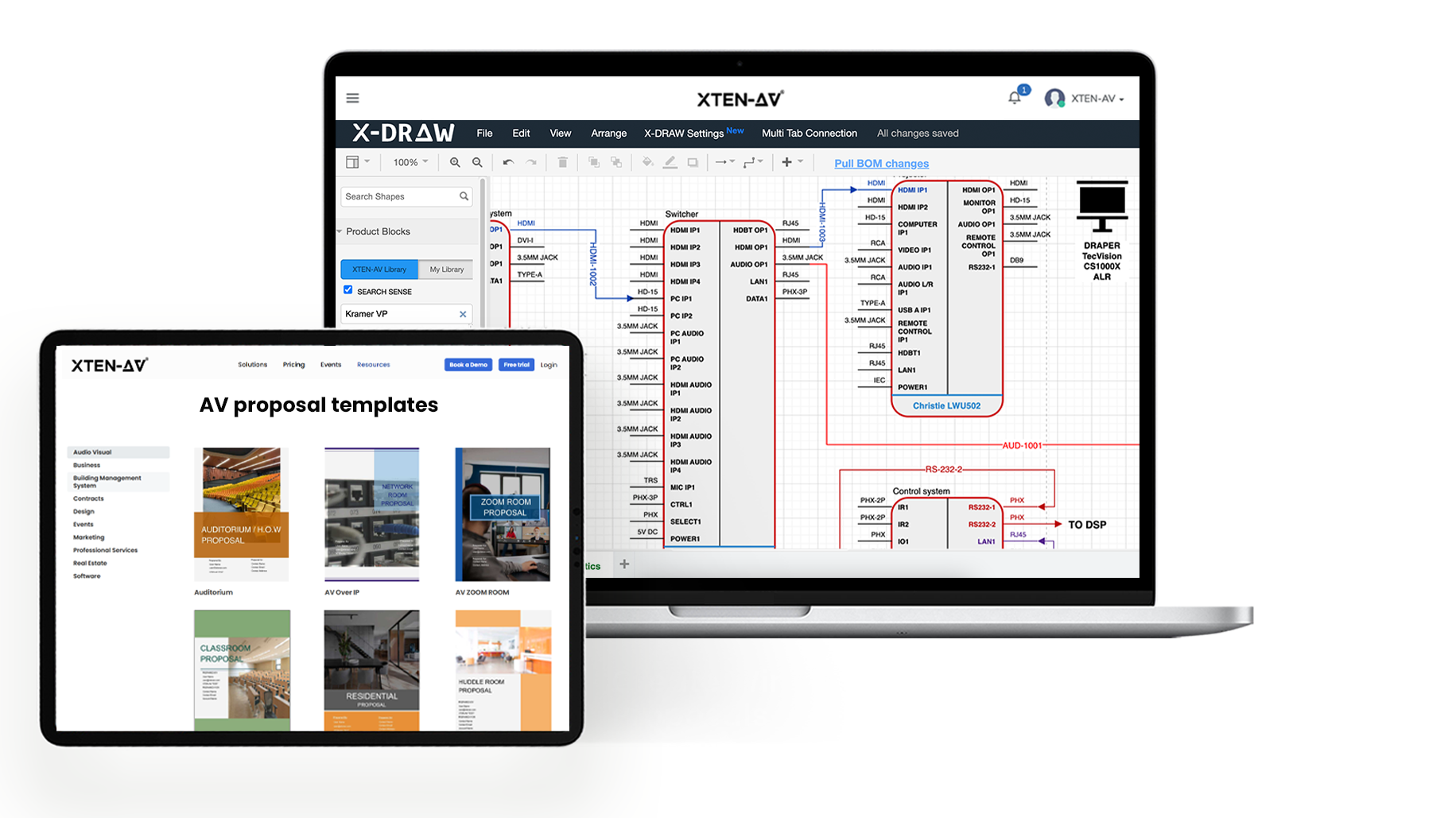
- X-DRAW: Supports AV system design, automates rack elevations, signal flow diagrams, equipment selection and design documentation.
- x.doc: Helps teams prepare proposals, manage digital signatures, track proposal activity and handle customer approvals.
- X-PRO: Provides AV project management capabilities, including task management, kanban and gantt views, event scheduling and after-sales service capabilities.
- Project costing: Helps track project profitability by comparing estimated and actual project costs.
- Field time tracking: Allows teams to record time spent on project activities.
- Purchasing and invoicing: Supports purchase orders and invoice management within X-PRO.
- Service management: Helps teams organize service activities and customer support workflows.
- CRM integrations: Connects with platforms such as HubSpot, Salesforce, Zoho and Microsoft Dynamics 365, depending on integration and subscription availability.
How It Fits into AV Project Execution:
Consider an AV integration company working on a multi-room installation involving displays, speakers, control systems and network equipment. The design team first prepares the system documentation and equipment requirements. Sales then uses the project information to prepare a proposal for the customer. Once approved, the project moves into execution, where the team manages AV installation tasks, schedules, purchasing and field activities.
When these activities are handled through disconnected applications, project information has to be transferred repeatedly. XTEN-AV brings these stages closer together through XAVIA, X-DRAW, x.doc and X-PRO. This gives teams a more connected way to manage the transition from system design and proposals to project execution and service.

Best For:
AV integrators looking to connect AI agent, system design, proposal generation, project management and service within one unified platform.
What to Consider:
AV Project management and advanced CRM integration capabilities may depend on subscription plans and integrations. Businesses should confirm the features included in their chosen plan.
Official Website:
https://xtenav.com/
Ready to manage AV projects more efficiently
and win more business?
D-Tools
D-Tools is an AV business management platform that brings sales opportunity management, system estimation, proposals and project management together. It is designed to support AV integrators across the sales and installation process, from managing customer opportunities to coordinating project delivery.
Key Features:
- Built-in CRM and sales opportunity management.
- System estimation and proposal creation.
- Project scheduling and management.
- Change order management.
- Equipment and inventory management.
- Project invoicing and milestone billing.
- Payment collection.
- Accounting integrations, including QuickBooks and Xero.
How It Fits into AV Project Execution:
For AV companies handling several projects at different stages, keeping sales, purchasing and installation teams aligned is an important part of daily tasks. D-Tools Cloud provides a connected environment for managing opportunities, preparing estimates and coordinating project activities. Its project and billing capabilities can also help teams manage changes and monitor payment progress.
Best For:
Established AV integration businesses looking for a broad AV-focused sales, estimating and project management platform.
Looking for a better way to manage AV project requirements from initial design to final delivery? See how D-Tools vs. XTEN-AV compare in design capabilities, project coordination and overall project management.
What to Consider:
Evaluate the setup process, workflow configuration and available features against your team’s existing processes. A platform with extensive functionality may require time and training to implement effectively.
Official Website:
https://www.d-tools.com/
Jetbuilt
Jetbuilt is a cloud-based platform focused on AV and IT project estimation and proposal preparation. One of its main strengths is its product database and dealer pricing functionality, which can be useful for integrators who regularly prepare equipment-intensive quotations.
Key Features:
- AV and IT product database.
- Project estimation and quoting.
- Dealer pricing integration.
- Client management.
- Proposal creation and delivery.
- Task management.
- Time tracking.
- Inventory management.
How It Fits into AV Project Execution:
Preparing an AV proposal involves more than listing equipment and adding prices. Integrators need to select suitable products, account for quantities and pricing, and present the proposed system in a format the customer can understand.
Jetbuilt focuses on this part of the workflow. Its estimation and proposal capabilities help sales-led teams organize product information and prepare AV quotations. It also offers client management and project-related functionality. However, businesses looking for a complete solution covering project management, accounting and invoicing should assess what additional applications they will need.
Best For:
AV Project Managers who prioritize project estimation, dealer pricing and proposal preparation.
Searching for a better way to handle AV project scheduling, resource allocation and task assignments? Explore Jetbuilt alternatives to discover platforms that support more efficient project planning and execution.
What to Consider:
Jetbuilt’s official reviews indicate that invoicing is not currently handled within the platform. Businesses that need integrated billing should evaluate a separate accounting or invoicing solution.
Official Website:
https://www.jetbuilt.com/
ProjX360
ProjX360 is an AV business management platform that supports AV sales, project operations, service management and financial workflows. Its location-based approach lets businesses organize project information around customer sites, making it ideal for integrators managing multiple installations and service locations.
Key Features:
- Sales CRM and customer management.
- Proposal and change order management.
- Location-based project management.
- Work orders and scheduling.
- Inventory and purchasing.
- Labor and time tracking.
- Service and progress invoicing.
- QuickBooks Online and Stripe integrations.
How It Fits into AV Project Execution:
An AV integration company may be working on several projects for the same customer across different locations. Tracking installed equipment, project progress, service history, and outstanding work at each site can become difficult without a structured process.
ProjX360’s location-oriented approach helps organize this information around customer sites. Its operational and financial capabilities also support project tracking, labor management and billing.
Best For:
AV integration companies that want to manage customer locations, project operations, service activities and financial workflows.
What to Consider:
Its location-first approach may differ from proposal-first project management platforms. Evaluate how well it fits your current sales and installation processes.
Official Website:
https://projx360.com/
Specifi
Specifi offers software for AV integrators to manage customer relationships, proposals and business operations. Its feature set includes CRM, interactive proposals, invoicing and tools for managing customer and project-related information.
Key Features:
- CRM and customer management.
- Interactive proposals and digital signatures.
- Invoicing and card payments.
- Timesheets and task management.
- Client portal.
- Xero integration for relevant financial and business records.
How It Fits into AV Project Execution:
Smaller AV integration companies often need to manage sales, proposals, customer communication and billing without building an unnecessarily complicated software setup.
Specifi brings several of these activities into one environment. This can help businesses organize customer information, prepare proposals and manage invoicing without relying entirely on separate applications.
Best For:
Small and growing AV integration businesses looking for customer management, proposal and invoicing capabilities.
Need a better way to handle customer management, proposals and invoicing in one place? Explore our best Pro AV software guide to compare leading platforms and choose the right fit for your AV business.
What to Consider:
Before selecting Specifi, evaluate the depth of its project management features, its accounting integration and whether it supports the complexity of your installations. A product demonstration can help clarify these requirements.
Official Website:
https://www.specifiglobal.com/
AV Project Management Software Comparison: Which Is Best for Your Business?
Comparing AV software feature by feature is one of the easiest ways to narrow down your options. However, it is important to distinguish between features available within a platform and those that require external integrations.
Following table provides a high-level comparison of the top five platforms:
AV Software | CRM | Project Management | Quoting & Proposals | Invoicing |
XTEN-AV | CRM integrations and proposal pipeline | Yes | Yes | Yes |
D-Tools | Built-in | Yes | Yes | Yes |
Jetbuilt | Client management | Project-related capabilities | Yes | Not currently supported natively |
ProjX360 | Built-in sales CRM | Yes | Yes | Yes |
Specifi | Built-in | Tasks and project workflows | Yes | Yes |
Note:
Feature availability, integrations and subscription requirements can change. Confirm the current AV capabilities directly with each vendor before making a purchasing decision.
Which AV Software Is Worth Considering for Your Business?
The right choice depends on the problems you are trying to solve:
- XTEN-AV: Worth considering if you want to connect AV system drawings, proposals, project management and service in one centralized platform
- D-Tools Cloud: Worth considering if you need a broad AV business management platform with sales, estimation and project delivery capabilities.
- Jetbuilt: Worth considering if estimation, dealer pricing and proposal preparation are your main priorities.
- ProjX360: Worth considering if you need location-based project management, service and financial workflows.
- Specifi: Worth considering if customer management, proposals and invoicing are central to your requirements.
Before making a decision, consider how much of your existing software stack each platform can replace and whether your team can adopt its workflows without significant disruption.
Want to streamline AV project planning and execution? Explore our commercial AV software page to discover capabilities that simplify project management.
AV-Specific Project Management Software vs. Generic Project Management Tools
Applications such as Asana, Trello and Monday.com are useful for managing tasks, deadlines and team collaboration. They can work well for general project coordination. But an AV installation project involves requirements that go beyond assigning tasks and checking off completed activities. For example, a project may involve equipment selection, signal flow diagrams, rack elevations, BOM preparation, purchasing, design documentation and commissioning. Generic project management tools may require additional applications or manual processes to handle these activities.
The key differences between both software types are outlined below:
- Equipment Lists and BOM Management
An AV project can involve dozens or even hundreds of individual components. Displays, speakers, amplifiers, processors, switches, cables and control equipment all need to be accounted for. AV-specific software can support equipment selection and BOM-related workflows, helping teams maintain better control over product details, quantities and project requirements. - AV CAD Drawings and Schematic Design
System design is a major part of AV integration. Teams need to prepare schematics, signal flow diagrams, rack elevations and floor plans before installation begins. AV-focused platforms can support these technical requirements, whereas generic task management applications generally need additional tools to manage design documentation. - Quoting and Change Order Management
A change in equipment selection or installation scope can affect the overall project estimate. For example, replacing a display model or adding additional speakers may change equipment costs, installation requirements and delivery timelines. AV-specific platforms offer proposal and change order workflows designed around these requirements. - Installation Scheduling and Field Service Management
AV projects involve coordination between project managers, AV technicians, subcontractors and customers. Scheduling, task assignments, time tracking and work orders help teams understand what has been completed and what still needs attention.
Managing technician schedules, service requests and onsite support requires the right software. Discover the top field service management software platforms to compare their capabilities and find the right fit for your AV service requirements. - Project Costing and Invoicing
A project may appear profitable at the proposal stage but become less profitable if labor expenses, AV equipment costs or additional work are not tracked properly. Software with job costing and invoicing capabilities helps connect project information with financial activities, giving management better visibility into estimated and actual costs.
How to Choose the Right AV Project Management Software?
Before investing in a new platform, take a closer look at how your business currently handles projects. The best software is not necessarily the one with the longest feature list. It is the one that solves your biggest operational problems and fits the way your teams work.
Following capabilities are worth evaluating:
Identify Where Your Current Workflow Breaks Down
- Start by speaking with your sales, design, project management and finance teams.
- Find out where information gets lost, which activities require repetitive manual work and where project delays usually occur.
- Document recurring issues, such as lengthy AV proposal preparation, outdated BOM details and delays in project invoicing.
Check CRM and Accounting Integrations
- If your business already uses HubSpot, Salesforce, Zoho, QuickBooks or Xero, check whether the new platform integrates with these applications.
- More importantly, understand what information is synchronized and how frequently it is updated.
- An integration that only transfers basic contact details may not solve the workflow issues you are trying to address.
Look Beyond Basic Project Tracking
- Task assignments and project schedules are useful, but AV integrators also need to manage equipment, system documentation, purchasing and change orders.
- Check whether the platform supports these requirements natively or whether additional applications are needed.
- Assess whether the software can accommodate projects as installation requirements grow in size and complexity.
Evaluate Project Costing and Financial Visibility

- Project profitability should be visible throughout the installation, not just after the job is completed.
- Look for ways to track estimated costs, actual expenses, labor entries and purchasing activities.
- This information can help project managers identify cost variations before they affect the final margin.
Consider Implementation and Future Growth
- AV Software adoption involves more than purchasing a subscription.
- Consider onboarding, employee training, data migration, integrations, customer support and the time required to move your existing workflows.
- A platform should be easy enough for your teams to adopt while offering the capabilities your business may need as project volumes increase.
Conclusion
Running an AV integration business requires coordination across sales, design, procurement, installation and finance. When these activities are managed through disconnected applications, teams spend more time transferring information and following up on project updates than focusing on delivery.
The right AV project management software should make these processes easier to manage. Look for a platform that supports your project requirements, connects with your existing applications and gives your team better visibility into project progress and profitability.
If your priority is to bring automation, AV system design, proposals, project management and after-sales service management together in one unified platform, XTEN-AV is worth exploring. Start your free 15-day trial to see how XTEN-AV can fit into your AV integration workflow.
Audio Visual System Design Mastery + Winning Proposals = 10x Productivity!
- ✔ Automatic Cable Labeling & Styling
- ✔ 100+ Free Proposal Templates
- ✔ Upload & Create Floor Plans
- ✔ 1.5M+ Products from 5200 Brands
- ✔ AI-powered 'Search Sense'
- ✔ Legally Binding Digital Signatures
FAQs
The best AV software depends on your business requirements. XTEN-AV connects automation, design, proposals, project management and service in one AV ecosystem. D-Tools, ProjX360, Jetbuilt and Specifi offer different capabilities across sales, estimating and project operations. Compare their features, integrations and billing capabilities before choosing.
Some AV project management platforms include built-in CRM capabilities, while others connect with external applications such as HubSpot, Salesforce and Zoho. CRM integration helps businesses manage customer information, track sales opportunities and carry relevant details into project delivery.
Several AV software platforms offer invoicing and accounting integrations. D-Tools and ProjX360 provide QuickBooks-related functionality, while XTEN-AV supports invoice management through X-PRO and offers CRM integrations. Always verify the exact accounting integration and synchronization capabilities with the vendor.
Yes, AV-specific software can support equipment selection, product information, BOM-related workflows and purchasing. However, the level of functionality varies between platforms. Check whether the software can connect equipment information with system design, proposals and project execution.
Generic project management applications focus primarily on tasks, deadlines and collaboration. AV-specific software is designed around additional requirements such as equipment selection, BOMs, CAD designs, proposals, procurement, installation documentation and service management.
Pricing depends on the number of users, subscription plans, available modules, integrations and implementation requirements. Some platforms offer separate plans for design, project management and CRM-related capabilities. Contact the vendors directly to compare current pricing and the total cost of ownership.
Note:
Product information, key features and suitability details are based on official company websites. All trademarks belong to their respective owners.

Explore more by topic
Related Blogs
-

- Posted by Sahil Dhingra

Audio Visual Why Commercial AV Projects Run Over Budget and How to...
-
- Posted by Sahil Dhingra
Audio Visual Top 5 Pro AV Software to Consider for System Integrators...
-
- Posted by Sahil Dhingra
Audio Visual Transform Campus Learning Spaces with EdTech AV Software Sahil Dhingra...
AV Design Mastery + Winning Proposals = 10x Productivity!
- Automatic Cable Labeling & Styling
- 100+ Free Proposal Templates
- Upload & Create Floor Plans
- 1.5M Products from 5200 Brands
- AI-powered ‘Search Sense'
- Legally Binding Digital Signatures
No Credit Card Required