

AV projects become difficult to manage when timelines shift, and scope changes occur during execution. Multiple active deployments make workforce planning, equipment availability and coordination more challenging.
For delivery teams, the priority is to ensure AV technicians, equipment and each project stage remain in sync. This requires smart resource allocation, clear visibility across procurement, installation and commissioning. Without a proper structure, even a small gap can create delays and workflow disruptions.
That is where the right platform adds value. It streamlines field coordination, enhances operational control and keeps projects on schedule. In this blog, we will explore the best AV project resource management software options to support smooth project delivery across active installations.
Key Takeaways
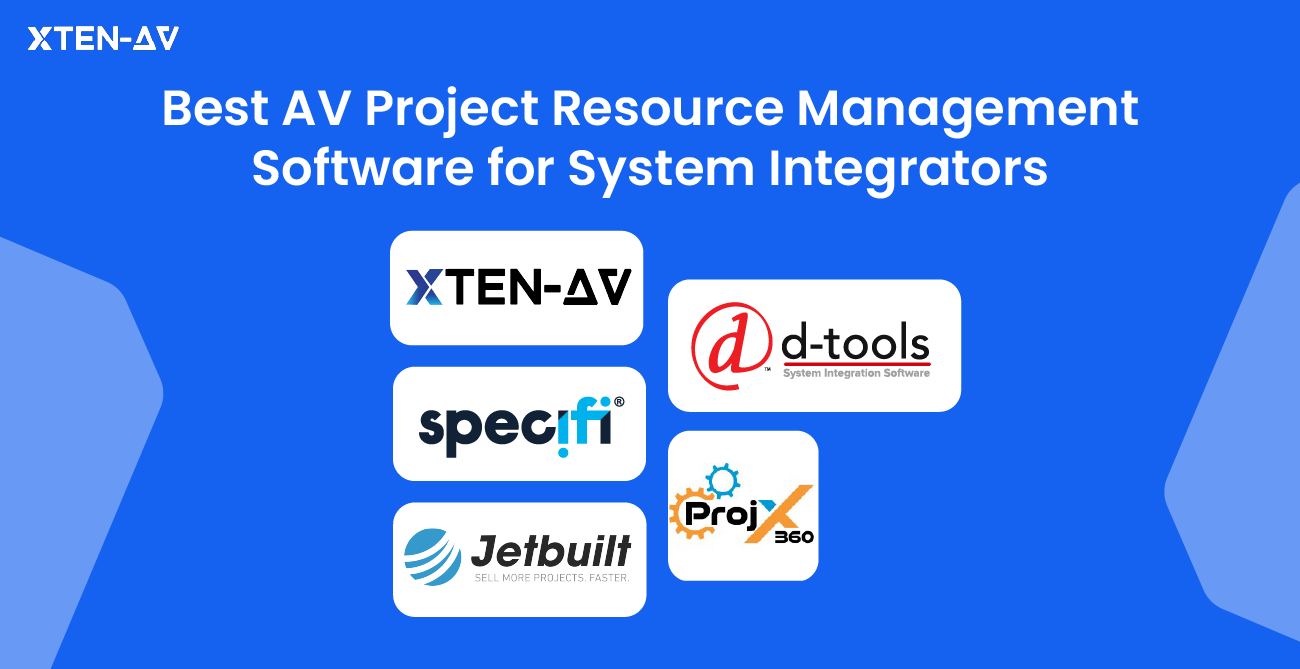
The 5 best AV project resource management software for system integrators include XTEN-AV, Jetbuilt, D-Tools, ProjX360 and Specifi.
XTEN-AV’s X-PRO is a cloud-based AV project resource management software designed specifically for system integrators. The platform connects AV design documentation, project workflows, technician scheduling, and resource planning into a unified ecosystem. By centralizing project data and execution processes, X-PRO improves operational visibility and enhances project efficiency across complex AV installations.
D-Tools is built for AV system design and documentation. It also supports scheduling and time tracking during project execution.
Jetbuilt is a web-based AV platform that helps teams to manage projects, schedule technicians and streamline workflows across project delivery.
Specifi is a cloud AV platform that combines design tools, product data and project tracking to help installation teams efficiently manage resources across small to mid-sized projects.
ProjX360 is a SaaS based AV project resource management software for engineers looking to streamline scheduling, dispatch, technician coordination and time tracking to improve field operations.
What is Audio visual (AV) Project Resource Management Software?
Project resource management software is a tool which allows AV teams to manage labor, materials, timelines and workflows in a single centralized platform. It supports smoother execution at every stage of the project by reducing conflicts and delays.
With real-time updates on resource availability, equipment status and task progress, it allows project managers to make quick adjustments. They can optimize workload, reassign assets and track overall project performance. This ensures complex AV projects remain predictable and cost-efficient.
The all-in-one solution for your Audio visual (AV) Project needs
Transform your audio-visual experience with XTEN-AV.
No Credit Card required
What Should You Look for in Audio visual (AV) Project Resource Management Software?
Evaluating AV resource allocation software begins with how effectively teams can schedule technicians, assign tasks and track inventory availability. The platform should simplify planning, enhance visibility and ensure seamless execution across every stage of the project.
The all-in-one solution for your AV needs
Transform your audio-visual experience with XTEN-AV.
No Credit Card required
Below are the 5 key capabilities which needed to be evaluated:
1. AV Resource Planning & Workload Visibility
Look for the software which delivers clear visibility across all cross-functional AV teams and ongoing deployments. This allows project managers to monitor the workload distribution among technicians, installers, engineers and design teams while supporting capacity planning for multiple active projects.
2. Project Scheduling & Field Technician Coordination
Project scheduling must follow the actual AV workflow rather than a generic task timeline. The system should support task dependencies, optimize resource allocation, coordinate with the field technician during the installation, commissioning and closeout phases. This ensures smooth coordination and on-time completion across every stage.
3. Inventory Management & Deployment Readiness
Resource planning should prioritize equipment readiness, not just task assigning. Use AV inventory allocation software, which easily integrates with project workflows. By this method, equipment is reserved, staged and aligned according to installation schedules. This helps to prevent equipment shortages and on-site delays throughout the project lifecycle.
4. Time Tracking, Change Orders & Resource Utilization
The platform must track field labor hours and their impact on AV project performance. This includes monitoring work progress across project tasks and various phases. It also involves managing change orders with cost and schedule impact. Further, it should provide the details of rework, repeat site visits and utilization vs actual project performance. This will enable teams to improve cost control and resource efficiency.
5. Cross-Team Coordination & Connected Project Workflows
Select a platform that integrates system designs with procurement and on-site activities. Field teams and AV equipment are aligned with each project phase, while the BOM is generated as per requirements. This ensures technicians and components arrive on time, reduces delays and keeps teams aligned throughout the project timeline.
Best 5 AV Project Resource Management Software for System Integrators
Using multiple separate tools for scheduling, resource allocation and onsite coordination can slow down projects and make it challenging to track equipment, field resources and timelines. The right AV workload planning software combines all project data into a single platform. It provides real-time visibility into resource usage, task progress and installation schedules. This enables teams to make quick decisions and keep every project on track.
X-PRO by XTEN-AV
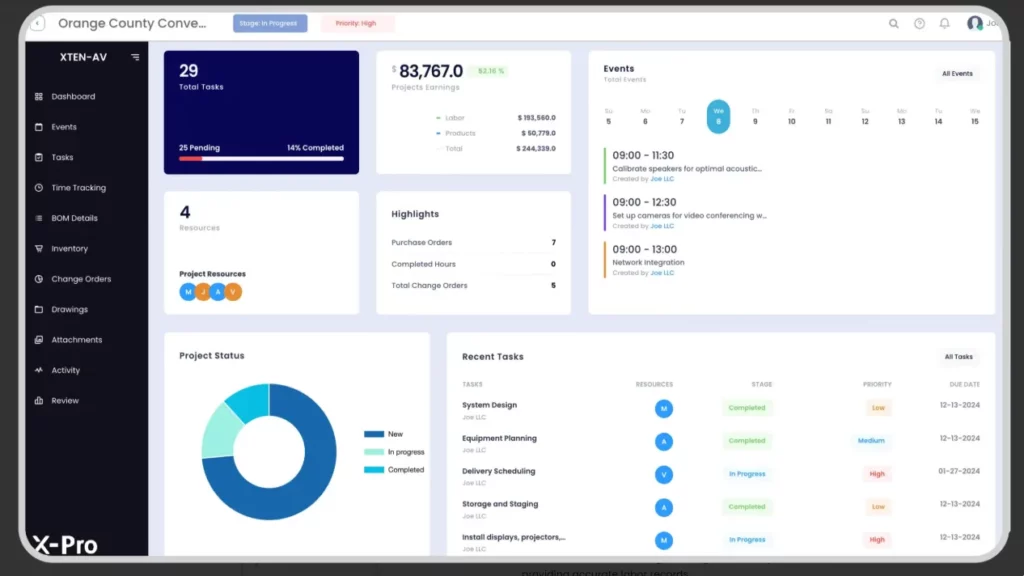
XTEN-AV’s X-PRO is a cloud-based Audio visual (AV) project resource management software for integrators handling complex projects. It organizes tasks, technician schedules, inventory and project hours through a centralized platform. Project managers can use the live dashboard to monitor resource allocation, plan labor deployment and identify potential bottlenecks. Field teams can log hours, update task progress and access project drawings directly from the mobile app.
Features of X-PRO by XTEN-AV
Real-Time Dashboard for Project Control
Monitor installation progress, resource utilization and task status through a real-time dashboard. Identify project delays early and make timely adjustments.
Time Tracking & Labor Management
Capture onsite work hours using clock-in and clock-out capabilities. Measure labor utilization to improve planning accuracy and workforce efficiency.
Resource Planning & Capacity Management
Plan resource allocation across projects, including labor, equipment and materials. Keep workloads evenly distributed and prevent resource conflicts.
Performance Insights & ROI Tracking
Analyze project performance with detailed reports. Identify schedule overruns, control costs and improve planning accuracy.
Cloud-Based Access & Team Collaboration
Access updated project data from anywhere. Ensure teams stay informed with continuous updates and efficient communication.
Pros
- Enhances project delivery by aligning resources, schedules and task dependencies more effectively.
- Built for AV workflows, connecting design, documentation and project management in one centralized system.
- Works well for teams of all sizes, from small AV businesses to large enterprises.
- XTEN-AV offers built-in integration support to streamline installation processes and client collaboration.
Cons
May require a short learning curve for new users.
Integration
It integrates easily with many popular business apps such as HubSpot, QuickBooks, Salesforce, Zoho, Microsoft Dynamics and many others.
User review
XTEN-AV is highly praised by its users for its interactive interface and AI-driven platform, which streamlines project workflows and reduces reliance on multiple tools.
Why do AV professionals prefer this platform?
Managing multiple AV installations is complex when technicians, equipment and project stages must align perfectly. Software like D‑Tools or Jetbuilt relies on multiple separate tools for design, scheduling, inventory, which causes workflow gaps, repeated site visits and commissioning delays.
XTEN‑AV, a complete Audio visual (AV) project scheduling software, streamlines field deployment, task tracking, monitors equipment readiness and logs labor hours. By combining automation, drawings, documentation and project management, it removes bottlenecks while keeping projects on schedule.
XTEN-AV Pricing Plans
- Free Trial
15 days of free trial (no credit card required)
- Basic
$104.25 per user/month (billed annually)
- Business
$111.75 per user/month (billed annually)
- Enterprise
$126.75 per user/month (billed annually)
- Project Management (X-PRO Add-On)
$11.25 per user/month (billed annually, optional).
D-Tools
D-Tools is a project resource management software built for engineers handling multi-phase AV deployments. The platform enables project managers to coordinate field teams, track timelines and maintain a clear workload across each phase. This helps in minimizing bottlenecks such as procurement delays, scheduling gaps and resource conflicts. It is available as D-Tools SI for on-premise environments and D-Tools Cloud for more flexible, cloud-based workflows.
Key Features of D-Tools
Task Management across AV Workflows
Users of D-Tools can create detailed task schedules, checklists and dependencies for every project stage. This streamlines the procurement, installation and deployment workflow effortlessly.
Inventory Allocation for Installation Readiness
Reserve, plan and track all AV equipment for each project to ensure everything is ready on-site. Keep your project resources organized and teams ready for smoother project execution.
Real-Time Project Visibility & Control
Monitoring project progress, tracking execution delays and managing change orders gets simplified through live dashboards.
Reporting Capabilities
Generating detailed reports on project progress, resource utilization to make smarter and faster decision-making.
Pros
- D-Tools offers a dedicated mobile app for remote project coordination, resource scheduling and task management.
- The platform’s reporting tools enable budget control and progress tracking.
- Supports third-party integration for simplified project workflow.
Cons
- New users might have difficulty using its complex software and face a steep learning curve to get familiar with it.
- Technical support is slow and inconsistent according to user feedback.
Integration
Supports integration with QuickBooks, Hubspots and Xero. Also, enables seamless syncing between D-Tools SI and D-Tools Cloud.
User review
Users appreciate D-Tools for efficient AV project execution and resource management. But highlighted a slower update cycle and reported occasional bugs.
Looking for similar AV system design platforms? Explore our D-Tools Alternatives guide.
AV project managers often face delays when scheduling and inventory tools cannot connect with CRM or accounting software. This gap causes misaligned project data, duplicate work and slower decision-making.
D‑Tools and XTEN-AV offer seamless integration with popular business apps, linking system design, proposals, inventory and timelines. By keeping all project details connected, it ensures accurate resource allocation, faster approvals and smoother multi-phase AV deployments.
Explore our XTEN-AV vs D-Tools Guide to compare workflows, design capabilities and project efficiency so you can choose the right platform for your AV operations.
D-Tools Pricing Plans
- Free Trial / Demo
D-Tools provides a free demo, while trial options depend on the selected plan.
- D-Tools Cloud – Solo
Plan starts from $99/user/month (Billed monthly or annually)
- D-Tools Cloud – Duo
Plan Starts at $179/user/month (more users & features)
- D-Tools Cloud – Team & Enterprise
Custom pricing based on team size.
- System Integrator (D-Tools SI)
From $1,800/user/year (on-premise, quote required)
- Add-Ons & Support
Offers optional add-ons such as additional field users and premium support at an extra cost.
Jetbuilt
Jetbuilt is a web-based project management platform for AV teams looking to streamline resource planning, scheduling and budgeting while keeping client communications organized. It centralizes equipment lists, labor tracking, project plans and client interactions in a single platform. This ensures that teams maintain project timelines, optimize resource allocation and manage multiple projects more efficiently.
Key Features of Jetbuilt
Streamlined AV Proposal & RFP Workflow
Create professional AV proposals and manage RFPs efficiently, ensuring accurate documentation and faster client responses.
Automated Dealer Pricing & Budget Management
Access live dealer pricing with automated calculations to produce precise estimates and help teams to control project budgets.
Real-Time Labor & Resource Tracking for AV Projects
Monitor AV technician hours, project costs and resource allocation in real time to optimize scheduling and workforce utilization.
Client Portal for AV Project Collaboration & Approvals
Clients can use a dedicated project portal to monitor progress and access essential files. The portal also allows proposal approvals, increasing transparency and supports faster decision-making.
Pros
- Intuitive platform for AV sales and project teams to manage system designs efficiently.
- Generates professional and client-ready proposals quickly.
- Organizes project files, approvals and asset tracking in one place.
Cons
- The system might face performance issues on large and complex AV projects.
- Pricing may be a concern for small teams with limited budgets.
- Total cost can rise significantly as you add modules such as AI drawings, Portal, Funnel, Install or Service.
Integration
Jetbuilt integrates with platforms such as HubSpot and Salesforce to enhance client management.
User review
Users find Jetbuilt fast and effective for managing daily project workflows, though some noted gaps in live integration support and felt the pricing was high.
AV teams often struggle when resource allocation is inflexible, limiting their ability to adjust technician schedules or reassign equipment during project changes. Traditional tools can slow workflows and cause delays.
Project resource management software like Jetbuilt and XTEN‑AV offers flexible scheduling with real-time updates, allowing managers to reassign tasks, shift equipment and update timelines instantly. This keeps workloads balanced, installations smooth and project delivery predictable.
Jetbuit Pricing Plans
- Free Trial
Free Trial available for 2 weeks.
- Lite:
$69 per user/month for the first 3 users.
Also, $59 additional per user for budgeting and proposal tools.
- Enterprise:
$137 per user/month for the first 5 users.
Also, an additional $127 for access to Jetbuilt’s advanced features.
- Optional Add-Ons:
AI-generated schematics/rack plans from $45 per month
Client management from $25 per month
Still unsure about Jetbuilt pricing? Check our Jetbuilt Pricing Guide for a quick breakdown of plans, add-ons and real costs for AV integrators.
ProjX360
ProjX360 is a SaaS based project management platform specially designed for audiovisual system integrators and installers. It streamlines resource, schedule and team management. The built-in Sales CRM efficiently organizes the sales pipeline. Its project management module provides clear visibility across all stages, ensuring accurate time tracking and on-time delivery.
Key Features of ProjX360
- Customizable Task Checklists
Create tailored checklists to track every stage of the project, helping field teams maintain quality and complete tasks efficiently.
- Professional Proposal Generation
Generate detailed AV proposals with proper system specifications, automated notifications and digital signature capabilities to speed up client approvals.
- Work Order & Field Management
Coordinate installation and service work orders to organize teams effectively and maintain on-time project delivery.
- Scheduling & Phase Tracking
Plan project timelines using phase-based scheduling, assign tasks efficiently and monitor milestones across AV teams.
Pros
- ProjX360 has a dedicated mobile application for both Android and IOS platforms.
- Offers customizable reports that can be saved and accessed later.
- Enables easy product management with automatic manufacturer pricing updates.
- Simplifies the after-sales service process through built-in warranty tracking.
Cons
- There is no fixed public price. Pricing depends on the options selected.
- A newer brand with a limited user base and a less established track record.
Integration
ProjX360 provides third-party integration support with platforms like D-Tools, Portal and QuickBooks.
User review
There is no review available on Capterra and G2-based review platforms.
AV professionals often struggle when reporting provides limited insights. Monitoring field team efficiency, tracking equipment utilization and measuring overall progress is difficult. This can lead to delays, rework and higher costs.
Project management platforms for Audio visual (av) system integrators like XTEN‑AV and ProjX360 offer real-time dashboards with analytics. Teams gain visibility into assignments, resource allocation and workflow. Integrating scheduling, dispatch with task management helps managers optimize resources while maintaining smooth execution.
Projx360 Pricing Plans
- Starter Plan
$229/month (billed annually, save 10%)
Includes 2 full users and 3 tech users, extra users can be added separately.
Also, the one-time setup costs $445 and includes 6 onboarding hours.
- Growth Plan (Most Popular)
$449/month (billed annually, save 10%)
Includes 4 full users and 6 tech users, extra users can be added separately.
Also, the one-time setup costs $695 and includes 8 onboarding hours.
- Professional Plan
$789/month (billed annually, save 10%)
Includes 8 full users and 12 tech users, extra users can be added separately.
Also, the one-time setup is $1,395 with 12 onboarding hours.
- Enterprise Plan
$1,199/month (billed annually, save 10%)
Includes 16 full users and 24 tech users, extra users can be added separately.
Also, the one-time setup is around $1,995 with 20 onboarding hours.
Specifi.io
Specifi.io is a cloud-based solution specially designed for small to mid-sized AV teams. It combines CRM, proposals, purchase orders, inventory and client communication in one place. The software simplifies sales, procurement and project management. Instead of focusing on complex engineering, Specifi.io prioritizes speed, simplicity and easy coordination with vendors.
Features of Specifi.io
- Integrated CRM
Keep all client details in one place for easy access and tracking.
- Vendor Coordination
Connect directly with vendors to manage orders and monitor inventory without delays.
- Proposal Management
Quickly convert leads into proposals and projects with a single click facility.
- Task Management & Client Portal
Assign tasks, track team hours and monitor project progress in real time.
Pros
- The client portal keeps AV project updates and invoices visible to clients.
- Mobile apps let you manage teams and tasks from any location.
- Supplier network ensures accurate pricing and faster AV equipment orders.
- Built-in marketing and branding tools boost business visibility.
Cons
- Limited support for external third-party integrations.
- The platform requires the onboarding of first-time users to access all features.
Specifi.io Pricing Plans
Free Trial
14-day free trial (no credit card required)
Individual
£89 per month (billed monthly) / £80 per month (billed annually)
Team (Most Popular)
£219 per month (billed monthly) / £197 per month (billed annually)
Company
£449 per month (billed monthly) / £404 per month (billed annually)
Optional Add-Ons
White-label portal, SEO Toolkit, Specific Echo (prices vary per add-on)
Platform | Best Fit for AV Teams | Core Resource & Workflow Focus | Pricing |
XTEN-AV’s X-PRO | A leading AV project resource management platform for teams managing complex project integration workflows, Technician scheduling, and resource planning. | Provides a unified ecosystem for design, resource planning, scheduling and project execution. Enables complete workflow visibility, capacity planning, and coordinated delivery across multi-phase AV projects. | XTEN-AV offers a full AV Ecosystem at 139 USD per user /month. |
Jetbuilt | Integrators focused on streamlined project delivery and field operations | Supports scheduling, dispatch and project tracking with emphasis on field resource coordination. | Starts at 69 USD per user /month. |
D-Tools | Structured system design and documentation-driven integration teams | Connects design workflows with proposals, procurement and installation tracking. This helps in controlled resource planning and service delivery. | D-Tools SI starts at 150 USD per user /month.
|
ProjX360 | AV field teams managing installation and on-site workloads | Streamlines technician scheduling, dispatch and field execution for optimal resource use | Starts at 229 USD per month, billed as a company plan. |
Specifi.io | Teams combining CRM-led sales with project execution workflows | Integrates quoting, product details, procurement and delivery with project workflow. | Starts at 89 GBP per month, billed as a company plan. |
AV Design Mastery + Winning Proposals = 10x Productivity!
- ✔ Automatic Cable Labeling & Styling
- ✔100+ Free Proposal Templates
- ✔ Upload & Create Floor Plans
- ✔1.5M Products from 5200 Brands
- ✔ AI-powered ‘Search Sense'
- ✔Legally Binding Digital Signatures

How to Choose the Right Audio visual (AV) Project Resource Management Software?
Projects aren’t just about the schedules. They involve coordination with people, materials and timelines across multiple stages. Whether it’s a corporate office, classroom or auditorium, every venue has its own installation and deployment challenges. By using AV integrator project management software (resource planning) gives project managers clear visibility into team availability, task progress and resource allocation. This method ensures projects are on track and teams are perfectly aligned.
Here are the key considerations for evaluating while selecting the right AV project resource management software:
Strategic Resource Planning
A good AV platform must provide insights like workloads and team availability details. It helps in identifying scheduling conflicts and balancing tasks across installers, designers and engineers. This ensures commissioning is completed as per the project plan.
Technician Scheduling & Coordination
Assign technicians based on their skillset and location. Use AV technician scheduling software, which ensures each specialist is deployed efficiently, reducing errors and avoiding installation delays.
Project Scheduling & Task Management
Track progress across the AV workflow, including approvals, procurement, rack builds, installation and handover. Project tracking allows teams to adjust to change orders or scope updates. This keeps work on schedule and prevents interruptions at each step.
Time Tracking & Performance Monitoring
Choose AV project time tracking software to monitor technician hours and equipment use. The right solution identifies repeat site visits or rework. It also provides insights to improve efficiency and plan future installations.
Resource & Deployment Readiness
Maintain clear visibility of racks, cabling and AV assets. The platform should manage inventory allocation, procurement timelines and pre-installation setup. This ensures installations begin on schedule and meet client expectations.
Conclusion
AV projects often face challenges such as shifting timelines, scope changes and complex team coordination between project managers, field technicians, designers and procurement teams. While several project resource management software exists, the best recommended choice for system integrators is X-Pro by XTEN-AV, a complete AV project resource management, scheduling and tracking software. It provides centralized visibility over workloads, site readiness and commissioning, enabling teams to streamline execution, reduce delays and complete projects efficiently.
Ready to streamline your field deployment and task tracking?
Start your 15-day free trial with XTEN-AV today!
FAQs
AV project resource management software lets teams manage people, equipment, time and tasks in one place. It improves coordination across the entire project lifecycle.
Project management is responsible for controlling tasks and managing project timelines. Whereas resource management manages technicians, equipment and capacity across AV project workloads.
AV software like XTEN-AV, D-Tools and Jetbuilt supports inventory allocation linked to project planning, procurement and execution.
Yes, both D-Tools, Jetbuilt offer AV resource allocation and dispatch for installation workflows. They also support project management and scheduling.
When spreadsheets can’t properly manage AV technicians, equipment and conflicting project timelines.
Scheduling defines when AV project tasks are executed. Whereas resource management ensures the right technician, equipment and materials are available to complete them.
Note:
The content in this blog is based on publicly available information and AV user feedback from sources such as G2, Capterra and Reddit. All product names and trademarks belong to their respective owners.
Explore more by topic

AV Design Mastery + Winning Proposals = 10x Productivity!
- Automatic Cable Labeling & Styling
- 100+ Free Proposal Templates
- Upload & Create Floor Plans
- 1.5M Products from 5200 Brands
- AI-powered ‘Search Sense'
- Legally Binding Digital Signatures
No Credit Card Required
Related Blogs
-

- Posted by Sahil Dhingra

Audio Visual Classroom AV Equipment Guide: Essential Technology for Modern Learning Spaces...
-
- Posted by Sahil Dhingra
Audio Visual How to Choose Town Hall AV Equipment: A Complete Guide...
-
- Posted by Sahil Dhingra
Audio Visual Overhead Paging System Guide: Components, Design & Best Practices for...