5 Best Speaker Placement Calculators for Commercial AV Projects in the USA

Sahil Dhingra
Published 23 July 2026
Commercial AV projects in the USA are becoming more complex as organizations invest in advanced communication, collaboration and audio systems across corporate, education, hospitality and healthcare facilities.
According to AVIXA, the AV industry is expected to grow from $332 billion in 2025 to $402 billion by 2030. As the market expands and project requirements become more complex, manual planning and fragmented design processes can increase the risk of coverage gaps, incorrect speaker quantities, wiring changes, installation delays and unexpected project costs.
Speaker placement tools address a specific part of this challenge by using room dimensions, ceiling height, speaker specifications and coverage requirements to generate a suitable layout. This allows AV designers to assess speaker quantity, spacing, positioning and coverage before installation.
In this guide, we compare the best speaker placement calculators for commercial AV projects in the USA, examining their capabilities for ceiling layouts, coverage planning, SPL analysis, visualization, speaker selection and design documentation.
Key Takeaways
- The 5 best speaker placement calculators for commercial AV projects are XTEN-AV, Extron, Bluesound Professional, AtlasIED and Yamaha.
- Speaker placement tools simplify speaker count, spacing, coverage and layout planning.
- Accurate commercial AV layouts depend on room dimensions, ceiling height, speaker models and coverage patterns.
- Manufacturer-specific speaker data enhances placement accuracy for compatible commercial audio systems.
- AV professionals can prefer XTEN-AV’s cloud-based Speaker Placement Calculator for faster speaker quantity, coverage, spacing and layout planning.
What is a Speaker Placement Calculator?
A speaker placement calculator determines the recommended speaker quantity, spacing, positioning based on room dimensions, ceiling height, listening plane, loudspeaker specifications and coverage requirements. Depending on the AV platform, outputs may also include coverage maps, SPL estimates, amplifier and transformer tap recommendations, placement coordinates and 2D or 3D visualizations.
For commercial AV projects, a speaker coverage calculator supports early-stage distributed audio design across corporate, hospitality, retail, education and other commercial spaces. Some calculation tools also generate exportable layouts for design documentation and installation reference. For complex venues, the calculated layout must be validated against acoustic conditions, manufacturer specifications, architectural plans and engineering requirements before final approval.
If coverage gaps or uneven speech levels could lead to AV redesigns, explore the Commercial Ceiling Speaker Layout Guide to plan speaker selection, spacing and coverage with greater confidence
How Do Speaker Placement Calculators Work?
Most AV tools follow a structured process. Users need to define the space, select a speaker model and enter coverage requirements. The software then applies manufacturer specifications and coverage calculations to generate a recommended layout for in-ceiling speaker placement.
1. Define the room details:
Enter the room dimensions, ceiling height and listening plane height.
2. Select the speaker:
Choose the required speaker model and use its manufacturer-provided coverage data.
3. Set coverage requirements:
Specify the proper coverage angle and desired overlap.
4. Generate the AV layouts:
Now, calculate the recommended speaker quantity and positions.
5. Review the results:
Check spacing, coverage, placement points and available SPL estimates.
Speaker Placement Inputs | Calculated Placement Results |
Room length and width | Recommended speaker quantity |
Ceiling height and listening plane height | Speaker spacing |
Speaker model and coverage angle | Coverage radius |
Desired coverage overlaps | Placement coordinates |
Mounting type | Coverage maps |
Room acoustics, reverberation, ambient noise, and ceiling conditions. | Basic SPL estimates, where supported |
Final commercial AV designs must validate the calculated speaker layout against room acoustics, reverberation, ambient noise levels, ceiling conditions and the manufacturer’s installation guidelines.
For Dolby Atmos ceiling speaker placement, always consider the listening area and selected configuration (example: 5.1.2, 5.2.2 or 7.1.2), rather than spacing overhead speakers uniformly across the ceiling.
Get ceiling speaker positioning right from the start. Discover the Ceiling Speaker Placement Guide for practical spacing, height and room-layout considerations.
How Do You Choose the Right Speaker Placement Calculator for Commercial AV Projects?
For AV Designers, consultants, installation teams and system engineers, selecting the right ceiling speaker placement calculator is an essential aspect for developing professional commercial audio designs. The right tool will help you speed up AV design decisions, enhance team coordination and build a stronger foundation for field execution.
The following are essential factors that should guide your selection:
1. Commercial Audio System Design:
Choose a platform that matches the intended application and the technical requirements of the audio system.
Need the best platform for commercial audio system design? Explore XTEN-AV’s commercial AV solutions.
2. Ceiling Speaker Spacing for Commercial Installations:
The tool should calculate spacing based on the selected loudspeaker’s coverage pattern and the required listening area.
3. Manufacturer Specific Product Data:
Verify support for the required product range and technical specifications when projects specify Extron, QSC, JBL, Bose or Biamp.
4. Architectural Installation Requirements:
Check whether the AV calculation tool supports mounting speakers on the ceiling and other installation formats required by the space.
5. AV Wiring and Coordination:
The output should provide practical information for wiring, equipment coordination and installation handoffs.
5 Best Speaker Placement Tools for Commercial AV System Design
Speaker coverage gaps and inefficient layout planning can lead to design revisions and installation challenges. Explore 5 leading speaker placement calculators built to support faster, more accurate commercial AV design:
1. XTEN-AV
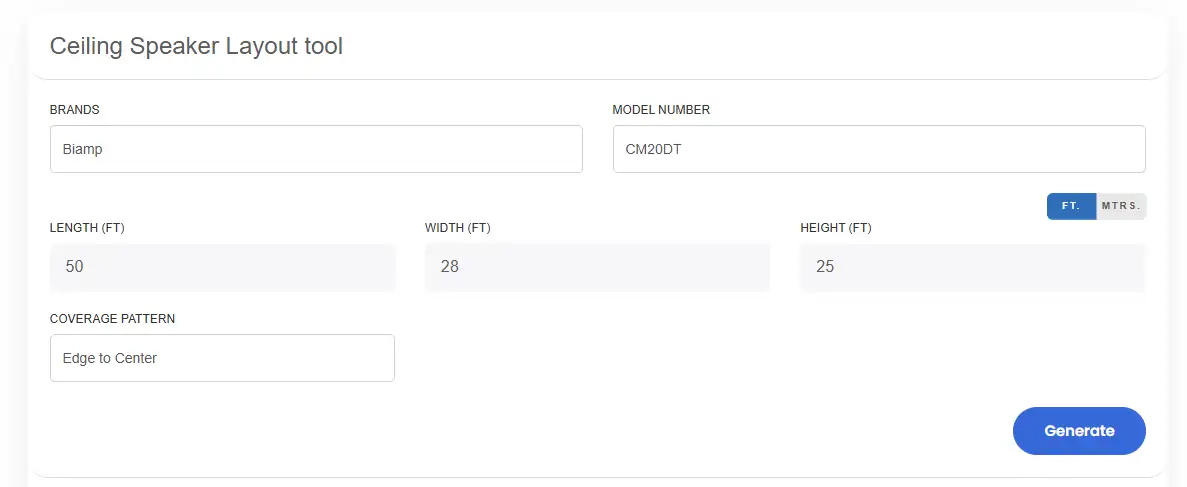
XTEN-AV offers a cloud-based speaker placement calculator built for faster commercial audio layout planning. Enter the room dimensions, select the speaker brand, model and choose a coverage pattern to generate the recommended speaker quantity and placement. Interactive 2D and 3D views, along with downloadable PNG layouts, make the results easy to review and share across project stakeholders.
Need accurate speaker placement for an AV system? Try the XTEN-AV speaker placement tool to calculate proper speaker quantity, spacing and coverage.
Best For:
Multi-brand commercial layouts and visual design documentation.
Key Features
Brand and model-specific speaker selection
Room length, width and height inputs
Manufacturer-provided coverage angle and polar pattern data
Edge to Center, Partial Overlap, and Edge to Edge layout options
Automated speaker quantity calculation
2D and 3D layout views
Feet and meter measurement options
Coverage angle and polar pattern visualization
PNG image downloads for easy sharing and documentation
Pros
Supports multiple brands and speaker models.
Uses manufacturer-specific data for layout calculations
Provides flexible coverage approaches for various room requirements
Makes layout review easier with 2D and 3D visualization
Creates shareable documentation for project coordination
Cons
Focused on coverage-based layout planning rather than full acoustic simulation
Calculation results depend on the data available for the selected speaker model.

2. Extron
Extron’s Ceiling Speaker Calculator is a technical planning tool for configuring distributed audio systems around specific room conditions. It combines loudspeaker selection with room dimensions, listener height, program type, ambient noise, coverage pattern, target SPL and signal-to-noise ratio inputs. The results include speaker quantity, coverage area, tap settings, amplifier power and a printable coverage map, allowing system engineers to give a clear basis for evaluating side speaker placement requirements.
Unique Features
Select from compatible Extron ceiling speaker models.
Define room dimensions and listener height.
Select speech, paging, program or music applications.
Set 6 dB, 9 dB, or 12 dB edge-to-edge isobar coverage.
Choose square or hexagonal coverage patterns.
Enter ambient noise and signal-to-noise ratio values.
Configure low-impedance or 70/100 V speaker systems
Calculate recommended speaker quantity and coverage area
Generate printable coverage maps with speaker rows, columns and spacing
Best for:
Commercial distributed audio coverage and amplifier sizing.
Pros
Links speaker quantity with coverage and amplifier requirements.
Supports different commercial audio applications.
Provides flexible coverage pattern options.
Supports both low impedance and distributed audio systems.
Delivers detailed placement and spacing data.
Cons
Built around compatible Extron ceiling speaker models.
Requires more technical inputs than a basic room layout tool.
3. Bluesound Professional
Bluesound Professional’s BCS Series Ceiling Speaker Calculator takes an interactive approach to commercial audio layout analysis. Enter necessary room dimensions, listener position, target SPL, frequency and spacing parameters to discover coverage through 2D and 3D views with real-time heatmaps. This speaker placement simulator helps identify coverage variations and refine the final loudspeaker arrangement.
Best for:
SPL visualization, coverage refinement and interactive commercial audio layouts
Unique Features
- BCS 250 and BCS 300 loudspeaker selection.
- Room length, width and ceiling height inputs.
- Sitting or standing listener position.
- Edge to Edge, Minimum Overlap, Maximum Overlap, and Custom Spacing options.
- 70V, 100V and low impedance connection options where supported.
- Broadband and frequency-specific analysis.
- 2D and 3D layout visualization.
- Manual loudspeaker repositioning.
- Real-time SPL heatmap.
Pros:
- Combines automated layouts with manual refinement.
- Makes SPL variation and coverage gaps easier to identify.
- Supports multiple coverage strategies.
- Provides frequency-specific analysis.
- Enables photo-based layout alignment.
Cons:
- Designed around the Bluesound Professional BCS Series ecosystem.
- Focused on speaker layout and SPL analysis rather than full room acoustic simulation.
4. AtlasIED
AtlasIED’s Loudspeaker Placement Tool allows you to calculate loudspeaker quantity and positioning for defined room layouts. Enter the room dimensions, listener level, speaker model, and transformer tap to generate ceiling speaker spacing, placement coordinates, direct-field SPL, coverage variance, and amplifier power data for 70V system design.
Best for:
70V distributed audio design, loudspeaker positioning and amplifier power planning
Unique features:
- AtlasIED loudspeaker selection.
- Transformer tap selection.
- Speaker quantity calculation.
- Row and column positioning.
- Speaker spacing.
- X and Y coordinates.
- Direct-field SPL.
- Coverage variance.
- Amplifier power requirements.
Pros:
- Strong fit for 70V distributed audio design.
- Easily connects transformer tap selection with amplifier requirements.
- Offers specific placement coordinates.
- Shows the impact of selected and maximum tap settings.
Cons:
- Limited to compatible AtlasIED loudspeaker models.
- Not suitable for sound masking applications.
Prevent amplifier overload, inconsistent volume and costly site changes. Explore the 70V Ceiling Speaker Layout Guide to plan speaker taps, zones and system load before installation.
5. Yamaha
Yamaha’s Commercial Installation Solutions Speaker Calculator enables AV professionals to estimate loudspeaker requirements and evaluate effective SPL before finalizing a commercial audio design. With support for compatible Yamaha ceiling speakers, surface-mount loudspeakers and subwoofers, it enables designers to assess multiple system configurations for commercial audio projects and surround sound speaker placement.
Best for:
Commercial audio system sizing across ceiling, surface-mount and subwoofer applications.
Unique features:
- Auto and Advanced calculation modes
- Ceiling speaker support
- Surface-mount loudspeaker support
- Subwoofer support
- Listener ear height input
- Target SPL selection
- User-defined speaker layout
- Effective SPL calculation
- Report generation
Pros:
- Supports multiple Yamaha commercial loudspeaker formats.
- Provides AV layout flexibility for ceiling and surface-mount systems.
- Connects speaker quantity with effective SPL estimation.
- Generates report documentation for proposals and design records.
Cons:
- The calculator is designed around supported Yamaha loudspeaker models.
- Less ideal for multi-brand specifications.
Weak stereo imaging or an uneven soundstage? Explore the 2-Channel Speaker Placement Guide to optimize speaker spacing, toe-in, listening position and stereo balance.
Factors to Consider When Choosing the Best Speaker Placement Tools for Commercial AV in the USA
The comparison table below highlights the best tools for ceiling speaker placement, loudspeaker coverage planning, SPL analysis, speaker quantity calculation and commercial audio system design:
Speaker Placement Tool | Best For | Key Capabilities |
XTEN-AV | Multi-brand commercial AV layouts | Brand-specific speaker data, automated quantity calculation and 2D/3D layout visualization |
Extron | Distributed audio and amplifier sizing | Coverage maps, target SPL inputs, tap settings and 70V/100V system planning |
Bluesound | SPL visualization and coverage refinement | Real-time heatmaps, frequency-specific analysis and manual speaker positioning |
AtlasIED | 70V ceiling speaker system design | Speaker spacing, placement coordinates, transformer taps and amplifier power calculations |
Yamaha | Commercial loudspeaker system sizing | Ceiling, surface-mount and subwoofer support with effective SPL calculations and reports |
Why AV Professionals Prefer the XTEN-AV Ceiling Speaker Layout Tool?
There are many speaker placement calculators available for surround sound speaker placement calculations. But to meet the demands of corporate offices, Hotels, shopping centers, education and industrial facilities, more than basic speaker positioning is required. These AV projects demand accurate, clean speaker layouts that account for room dimensions, coverage requirements, speaker spacing and installation constraints. Integrators can prefer the XTEN-AV Speaker Placement Calculator, which automates the process of turning room dimensions into precise ceiling speaker layouts.
Let’s look at the various capabilities of the XTEN-AV ceiling speaker layout tool:
Plan Ceiling Speaker Coverage Based on Room Dimensions
XTEN-AV enables users to place speakers with greater confidence in coverage. Users need to enter room dimensions, ceiling heights and speaker details to map balanced audio coverage across the space.
Design Accurate Ceiling Speaker Layouts with Actual Speaker Specifications
Select the speaker brand and model to create accurate speaker layouts by using coverage angles, polar patterns and manufacturer-provided speaker data. This allows AV professionals to properly plan speaker placement based on the actual performance and real-world characteristics of the selected speakers.
Generate and Export 2D & 3D Ceiling Speaker Layouts
Automatically generate professional 2D and 3D views of ceiling speaker placement based on the completed system CAD design. Then export PNG diagrams for client presentations, smart proposals and installation handoffs. This provides stakeholders with a proper visual reference of the planned audio system before work begins onsite.
Minimize manual calculations and avoid costly AV design errors. Explore XTEN-AV AV calculators for faster speaker layouts, screen sizing, projector planning and equipment selection.

Audio Visual System Design Mastery + Winning Proposals = 10x Productivity!
- ✔ Automatic Cable Labeling & Styling
- ✔ 100+ Free Proposal Templates
- ✔ Upload & Create Floor Plans
- ✔ 1.5M+ Products from 5200 Brands
- ✔ AI-powered 'Search Sense'
- ✔ Legally Binding Digital Signatures

Conclusion
Commercial AV projects rely on accurate speaker positioning to maintain even coverage, strong speech clarity and reliable performance across the listening area. When evaluating a ceiling speaker placement calculator, consultants must consider manufacturer data, room-based coverage analysis, layout visualization, documentation outputs and multi-brand compatibility.
This guide compares leading options available in the USA for system designers, integrators and consultants. For organizations managing multi-brand projects, XTEN-AV offers model-specific product data, automated speaker quantity calculations, interactive 2D and 3D layouts to support accurate CAD design decisions.
FAQ’s
XTEN-AV is a multi-brand speaker placement calculator for estimating speaker quantity, spacing and coverage in commercial AV spaces.
Calculate ceiling speaker spacing using ceiling height, listener level and the speaker’s effective coverage angle.
The number depends on room size, mounting height, speaker dispersion and the required coverage overlap.
A speaker coverage calculator estimates speaker count, spacing, coverage area and potential audio gaps.
Yes, Higher ceilings create wider coverage, while lower ceilings usually require closer speaker spacing.
No, Dolby Atmos ceiling speaker placement should follow official 5.1.2, 5.2.2 or 7.1.2 layout guidance.

Explore more by topic
Related Blogs
-

- Posted by Sahil Dhingra

Audio Visual Top Purchase Order Management Software for AV Project Managers to...
-
- Posted by Sahil Dhingra
Audio Visual How to Streamline Purchase Order Management for AV Projects Sahil...
-
- Posted by Sahil Dhingra
Audio Visual How to Accurately Estimate Fire Alarm System Cost Sahil Dhingra...