How to Streamline Purchase Order Management for AV Projects
Sahil Dhingra
Published 07 SEPT 2026
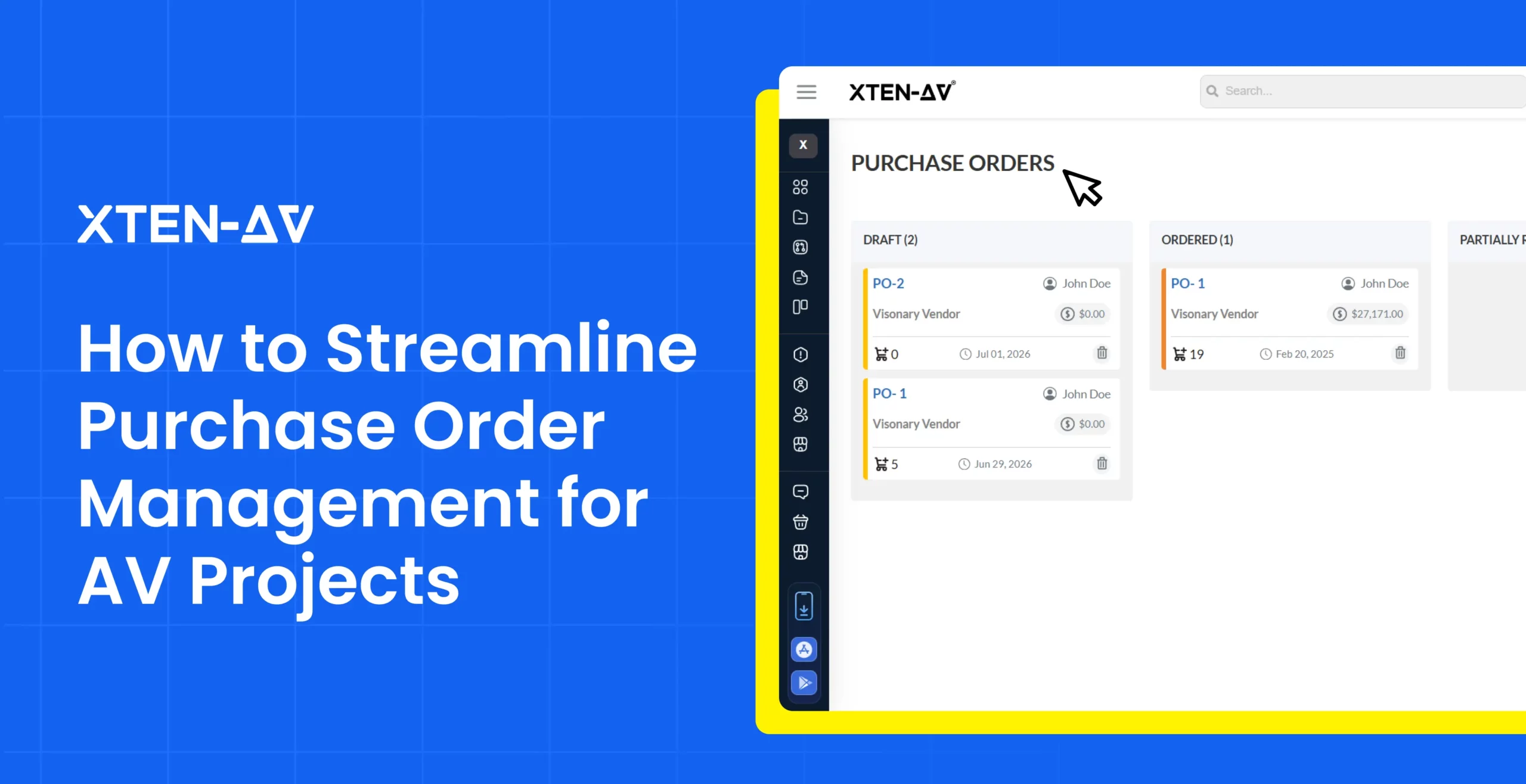
An audio visual (AV) project can look profitable when the estimate is approved and still lose profit margin once purchasing begins. A single Bill Of Material may turn into multiple orders across distributors, manufacturers and vendors, each with different dealer pricing, availability, shipping schedules and equipment substitutions. As these orders move from purchase request to delivery, relying solely on a purchase order creation status creates a blind spot that leads to project delays, unexpected shipping costs and uncoordinated on-site labor.
Therefore, project managers need complete visibility into the entire stages of an order. They need to know what was ordered, what has been received, what is still pending and whether actual purchasing costs are moving away from the budget.
This becomes difficult when teams have to manage purchase orders through disconnected tools like spreadsheets and email threads. This fragmentation forces AV professionals to spend their time searching for data rather than managing procurement.
“Disconnected purchase order (PO) processes, limited visibility, and manual follow-ups slow procurement and increase supply chain risk.”
— Infor
A structured purchase order management helps AV integrators connect purchasing data, improve visibility across equipment orders, reduce manual tracking and maintain better coordination with vendors throughout the process.
In this blog, we’ll explore how AV integrators can manage purchase orders, improve procurement visibility and protect project profitability.
Key Takeaways
- Centralized purchase order management improves visibility across vendors, equipment, orders and project costs.
- Tracking purchase order stages from creation to delivery keeps teams informed about ordered, partially received, delayed and delivered equipment.
- AV projects require proper procurement coordination because multiple vendors, equipment changes and split shipments can affect installation timelines.
- Connecting vendors and purchasing data makes supplier coordination easier and AV professionals don’t have to rely on scattered spreadsheets, emails or vendor portals.
Why Are Purchase Orders Difficult to Manage Across AV Projects?
Managing purchase orders (POs) for large audio visual projects becomes exponentially complex. This is because even a single project requires aligning multi-vendor hardware ecosystems, fluctuating labor rates and unforgiving construction schedules. When a project includes thousands of items from multiple manufacturers, even a minor oversight in a PO can lead to installation delays and budget overruns.
Multiple Vendors and Equipment Orders
An AV system may include displays, control systems, racks, audio equipment, speakers, cables and other crucial AV products from several suppliers. However, without a centralized purchase order management system, teams may find it difficult to track which items have been ordered, received or still pending.
The complexity increases when products are backordered, substituted, split shipments or when equipment is purchased from a different vendor than originally planned. These changes can create gaps between procurement records, project requirements and equipment specifications.
When purchase orders are managed manually through fragmented tools, teams often face duplicate orders, outdated pricing, delayed orders, missing equipment and many more. A connected purchase order management system maintains accurate procurement data, track equipment movement and keeps purchasing decisions aligned with project budgets and installation timelines.
Limited Visibility into Order Status
Creating a PO is only the first step, procurement teams still need to know whether an order has been submitted, confirmed, delayed and partially or fully received to keep AV projects installation on schedule and within budget.
When order tracking is scattered across spreadsheets or vendor portals, professionals may know equipment has been purchased without knowing the order status. This lack of real-time visibility triggers failures like project delays, rushed substitutions and equipment unreadiness.
Purchasing Data Is Kept Separate from Project Costs
Purchase orders affect project profitability, but many AV companies still manage purchasing information separately from project budgets and labor costs. This limits visibility into actual material expenses and overall project performance.
When AV integrators order equipment based on the original estimate and changes in pricing, additional purchases or vendor adjustments can quickly affect the project budget.
Managing purchase orders (POs) through separate systems also makes it difficult to compare planned costs with actual spending. This requires additional time manually updating spreadsheets, verifying invoices and reconciling procurement data.
How Can AV Integrators Manage Purchase Orders, Vendors and Equipment More Efficiently?
Connecting every purchase order directly to its specific audio visual project gives AV integrators a structured process that follows each item from the approved equipment list through purchasing and receiving. This ensures accurate tracking, eradicates duplicate orders and protects profit margins.
Start with Accurate Project Equipment Requirements
Validating equipment details before generating purchase orders prevents expensive order errors and delays. Hence, project managers should confirm model numbers, quantities, pricing and project requirements against the approved BOM.
A clear purchase order request acts as an approval reference between your project management team and the purchasing department. When a PO request maps every item back to a clear technical and structural need, warehouse guesswork, double-ordering and frantic overnight shipping fees are eliminated.
Keep Vendor Information Connected
AV projects usually rely on several distributors and suppliers, which makes vendor coordination a crucial part of purchasing order. Every PO needs to clearly show the vendor, products being purchased, quantities, delivery expectations, agreed pricing and the related project details. When this information is connected with each other, it makes it easier to compare orders, follow up with suppliers and identify which equipment is delayed or unavailable.
This helps project managers to avoid searching through email threads or separate spreadsheets whenever an order update is required.
Track Purchase Orders from Creation to Delivery
Creating a PO is just the start of the process. Having a complete track of an order after it is placed helps the team stay connected and know exactly about pending products, partial shipments, backorders and items that may get delayed.
Purchase Order should be tracked through clear stages:
Created → Ordered → Partially Received → Delivered
Connect Purchased Equipment with Project Inventory
When the project reaches the warehouse or staging area, it needs to become part of the project inventory record. Linking purchased products to specific AV projects enables project managers to have a clearer view of equipment allocation, installation readiness and stock availability.
For AV integration firms managing multiple active projects, inventory and purchase order software can offer a more reliable way to track equipment from receiving through deployment, while keeping purchasing and project data aligned.
How Do Purchase Orders Affect AV Project Costs and Profitability?
POs directly impact AV project profitability by determining how closely actual equipment expense aligns with the original project budget. The equipment cost approved during estimation may drift from the amount paid during procurement due to dealer price updates, substitutions, additional hardware and quantity adjustments.
With effective purchase order management, AV estimators can compare planned cost with actual purchasing activity, identify budget variances earlier and understand how procurement decisions affect profitability.
Compare Equipment Cost Against the Project Budget
The approved BOM acts as a cost baseline, but other purchasing factors can change before equipment is ordered. Required quantities may increase, products may become unavailable or equipment may need to be sourced from other vendors.
Across dozens of line items, these factors can impact the project budget. By tracking purchase orders against the original project estimate, AV procurement teams can find the cost differences early and make better purchasing decisions.
Use Procurement Analytics for Better Purchasing Decisions
Procurement analytics turns raw purchase data into clear insights that help identify cost trends, manage risk and choose better AV distributors. It can help with:
- Tracking vendor pricing changes
- Identifying projects exceeding budgets
- Comparing the gap between estimated and actual project costs.
- Checking expensive rush-order and shipping expenses
- Building better future estimates using past purchasing trends
How Does XTEN-AV’s X-PRO Simplify Purchase Order Management for AV Integrators?
XTEN-AV’s X-PRO Install simplifies purchase order management by integrating procurement directly into a centralized, cloud-based project management platform connected to project design and inventory workflow.
As AV-Specific purchase order management software, X-PRO enables AV integrators to create and send POs, manage vendors, track order stages, maintain inventory, manage invoices and gain visibility into labor costs, material expenses, profitability and project performance metrics.
Create and Send Purchase Orders
AV integration firms can create and send purchase orders instantly based on specific project requirements. AV professionals can select the project, choose the required products and send the purchase orders directly from the platform.
This way equipment purchasing can stay connected with project data, eradicating the need to rebuild product lists manually across fragmented spreadsheets or separate purchase order management tools.
Manage Vendors and Purchasing Details in One Place
Vendor coordination is a crucial part of AV procurement, especially when there is a need to acquire equipment from multiple distributors. Keeping all the details connected with each purchase order helps teams and estimators to maintain better visibility about the supplier, types of equipment and order status.
With X-PRO, adding and managing vendor information is easy which keeps supplier details linked to purchasing records rather than being scattered across emails, spreadsheets or any separate vendor lists. Hence, maintaining accurate procurement records.
Track Purchase Order Progress
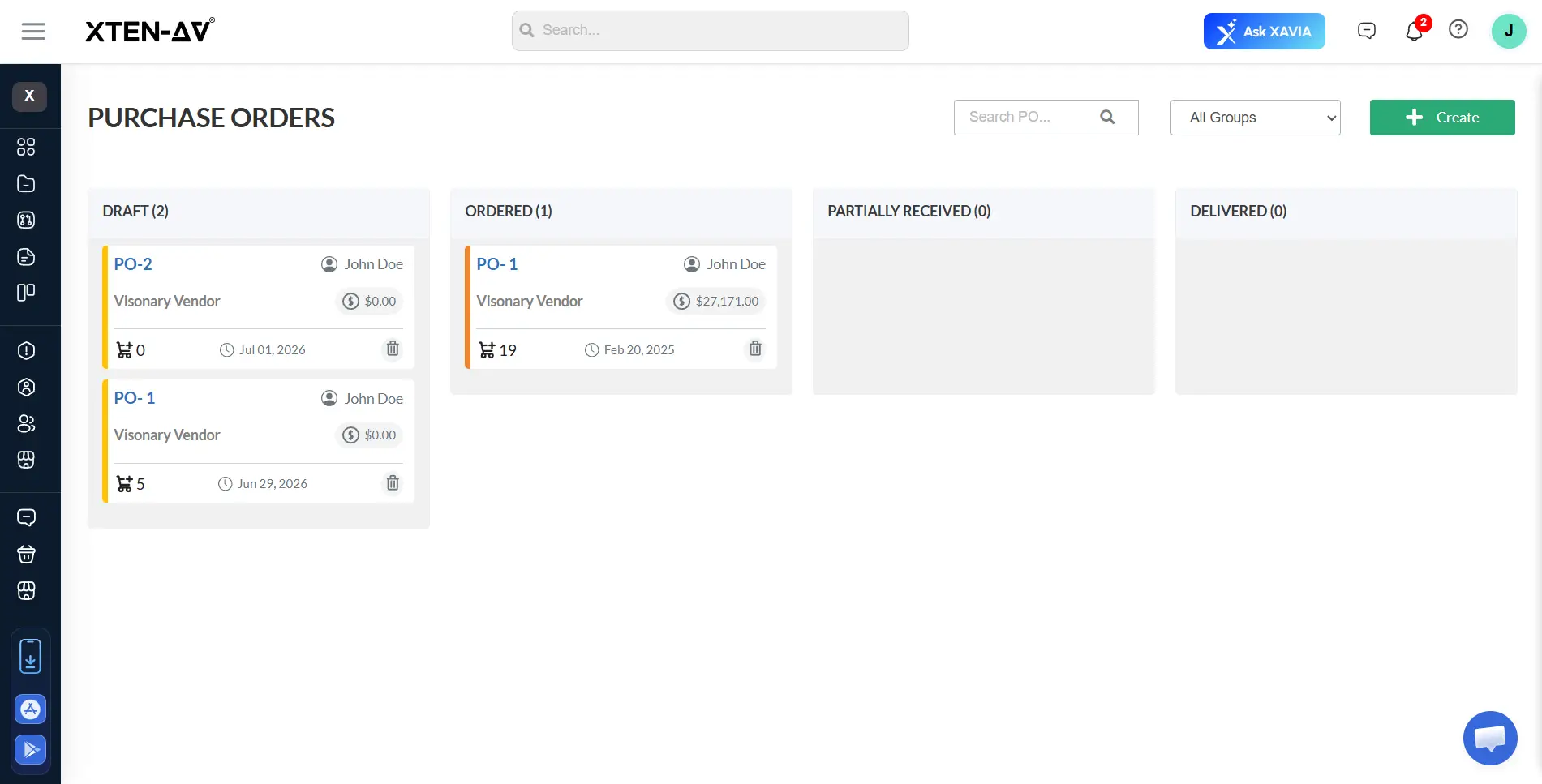
As equipment moves through purchasing, project teams need a clearer way to have a proper understanding of the current status of each order. X-PRO enables AV estimators to track purchase orders through different stages: Draft, Ordered, Partially Received and Delivered.
These stages are useful in providing a simple way to reflect the progress of each PO and where AV equipment stands during the purchasing process can also be tracked.
Audio Visual System Design Mastery + Winning Proposals = 10x Productivity!
- ✔ Automatic Cable Labeling & Styling
- ✔ 100+ Free Proposal Templates
- ✔ Upload & Create Floor Plans
- ✔ 1.5M+ Products from 5200 Brands
- ✔ AI-powered 'Search Sense'
- ✔ Legally Binding Digital Signatures

Conclusion
Purchase order management includes more than creating and sending POs. A successful procurement depends on coordinating equipment, vendors, inventory, project costs and installation throughout the project.
Fragmented purchasing information creates blind spots that can erode project profitability and affect installation timelines. A structured purchase order management can help in tracking procurement progress, maintain accurate equipment records and make better cost decisions.
XTEN-AV’s X-PRO Install brings purchase orders, inventory, invoices and project cost visibility into one unified platform. From creating POs and managing vendors to tracking order stages and gauging performance, it gives teams tighter control over procurement and more confidence at delivery.
FAQ’s
Purchase order management helps in maintaining cost control, tracking equipment availability and keeping procurement aligned with project schedules.
AV integrators can track PO progress through stages such as Draft, Ordered, Partially Received and Delivered to maintain visibility throughout the project.
XTEN-AV’s X-PRO allows AV professionals to create and send purchase orders, track order stages, inventory management and invoices in one platform.
AV integrators often struggle with multiple vendors, changing equipment costs, limited order visibility, and disconnected purchasing records.
Yes, purchase order management software can improve AV procurement by centralizing orders, tracking status, and improving visibility into purchasing activity.
Explore more by topic
Related Blogs
-
- Posted by Sahil Dhingra
Audio Visual How to Streamline Purchase Order Management for AV Projects Sahil...
-
- Posted by Sahil Dhingra
Audio Visual How to Accurately Estimate Fire Alarm System Cost Sahil Dhingra...
-
- Posted by Sahil Dhingra
Audio Visual Best Fire Alarm Estimating Software for Contractors & Estimators in...