







Best Fire Alarm Estimating Software for Contractors & Estimators in 2026

Sahil Dhingra
Published 31 AUG 2026
A fire alarm estimate can appear complete during schematic design review yet reveal gaps once the project moves into the installation stage. Changes in device quantities, cable routing requirements, equipment pricing or testing scope can affect final project costs, create procurement challenges and impact margins for AV estimators and security integrators.
According to AVIXA’s 2026 Pro AV Business Index, 21% of respondents identified rising costs and inflation as a business challenge. This highlights the growing pressure on AV and low-voltage contractors to maintain accurate equipment pricing, labor costing and project scope as requirements change.
In this guide, we compare the best fire alarm estimating software options for costing, takeoffs, proposals and documentation to help contractors identify the right platform for more reliable estimates and stronger project control.
For AV and low-voltage contractors, accurate fire alarm estimates start with clear device counts, realistic labor requirements and a true understanding of jobsite conditions.
~ NSCA
Key Takeaways
- The leading platforms for contractors and estimators include XTEN-AV (x.doc), D-Tools, Countfire, Bluebeam, System Surveyor and QuoteWerks, with each option serving various needs across costing, takeoffs, quoting and documentation.
- Accurate project estimates depend on organized equipment pricing, labor calculations, device quantities, AV BOM data and clear scope details to maintain cost control.
- Each platform offers unique capabilities based on project needs, including device quantity tracking, system planning, proposal creation, revision management and client approvals.
- AV estimators, security integrators and low-voltage contractors should evaluate solutions based on how well they connect technical requirements with commercial processes such as pricing, documentation and project coordination.
- XTEN-AV (x.doc) offers a cloud-based, AI-powered environment for creating professional proposals, managing revisions, tracking client engagement and collecting digital approvals.
What Is Fire Alarm Estimating Software?
Fire alarm estimation software is a tool which helps AV estimators and contractors to create accurate project estimates by calculating equipment, materials, labor, and installation requirements. In this way, it allows low-voltage estimators to properly review project details, organize system components and estimate the cost and materials needed to install a fire alarm system.
Beyond basic calculations, this software helps AV pre-sales teams simplify the bidding process by improving cost visibility, quoting accuracy and project planning. It enables teams to create precise estimates faster while minimizing manual tasks and calculation errors.
How Does Fire Alarm Estimating Software Work?
Fire alarm estimating software helps contractors create accurate bids by organizing project details, calculating costs and generating professional quotes.
1. Review Project Requirements
Understand blueprints, specifications and installation needs to define project scope. Explore how fire alarm system design software helps organize layouts, identify components, and prepare accurate project plans.
- Calculate Costs and Build Estimates
Determine equipment quantities, material requirements, labor costs and pricing details to create accurate project estimates.
- Generate Quotes and Proposals
Convert estimates into professional bids with detailed pricing, scope details and documentation for customer approval.
- Manage Orders and Project Changes
Support purchase order management, change order management to track procurement needs, pricing updates, and scope modifications.
- Connect Estimating With Project Delivery
Maintain project information across installation, service, and support processes through connected Fire and Security Service Management Software capabilities.
What Features Should You Look for in a Fire Alarm Quoting Software?
A reliable quoting platform should help AV estimators, security integrators and low-voltage contractors control costs, quantities and scope before a bid reaches the client. For professionals who estimate security systems, the priority is accurate commercial data, clear documentation and efficient handling of changes.
Following capabilities have the greatest impact on bid accuracy, margin control and client approval:
AV Estimating Criteria | What to Check | Why It Matters |
Equipment & Labor Costing | Product pricing, labor hours, markups and margins. | Helps maintain accurate project costs and profitable bids. |
Device & BOM Accuracy | Device quantities, material lists and BOM updates. | Helps prevent missing equipment and quantity errors. |
Design & Drawing Coordination | Compatibility with fire alarm system design software, floor plans and technical drawings. | Keeps quoted scope aligned with the system design. |
Scope & Revision Control | Version history, alternates and pricing changes. | Makes scope and cost changes easier to track before approval. |
Proposal & Client Approval | Branded proposals, e-signatures and engagement tracking. | Supports clear review, communication and sign-off. |
Fire Protection Project Support | Fire alarm, life-safety and commercial fire sprinkler system requirements, where applicable. | Supports projects involving broader fire protection systems. |
Business System Integration | CRM, accounting, distributor pricing and procurement connections. | Keeps approved pricing and project data available for downstream activities. |
Planning a commercial fire alarm project? Explore this fire alarm system design software guide for AV and low-voltage design guidance.
6 Best Fire Alarm & Security Quoting Tools for Proposals and AV Documentation
For AV estimators and low-voltage contractors who estimate security systems, the right platform can streamline device counts, equipment pricing, labor calculations and bid documentation for more accurate project costing.
Following are the leading fire alarm estimating software platforms to consider for accurate bidding, cost estimation, AV proposals and project documentation:
XTEN-AV (x.doc)
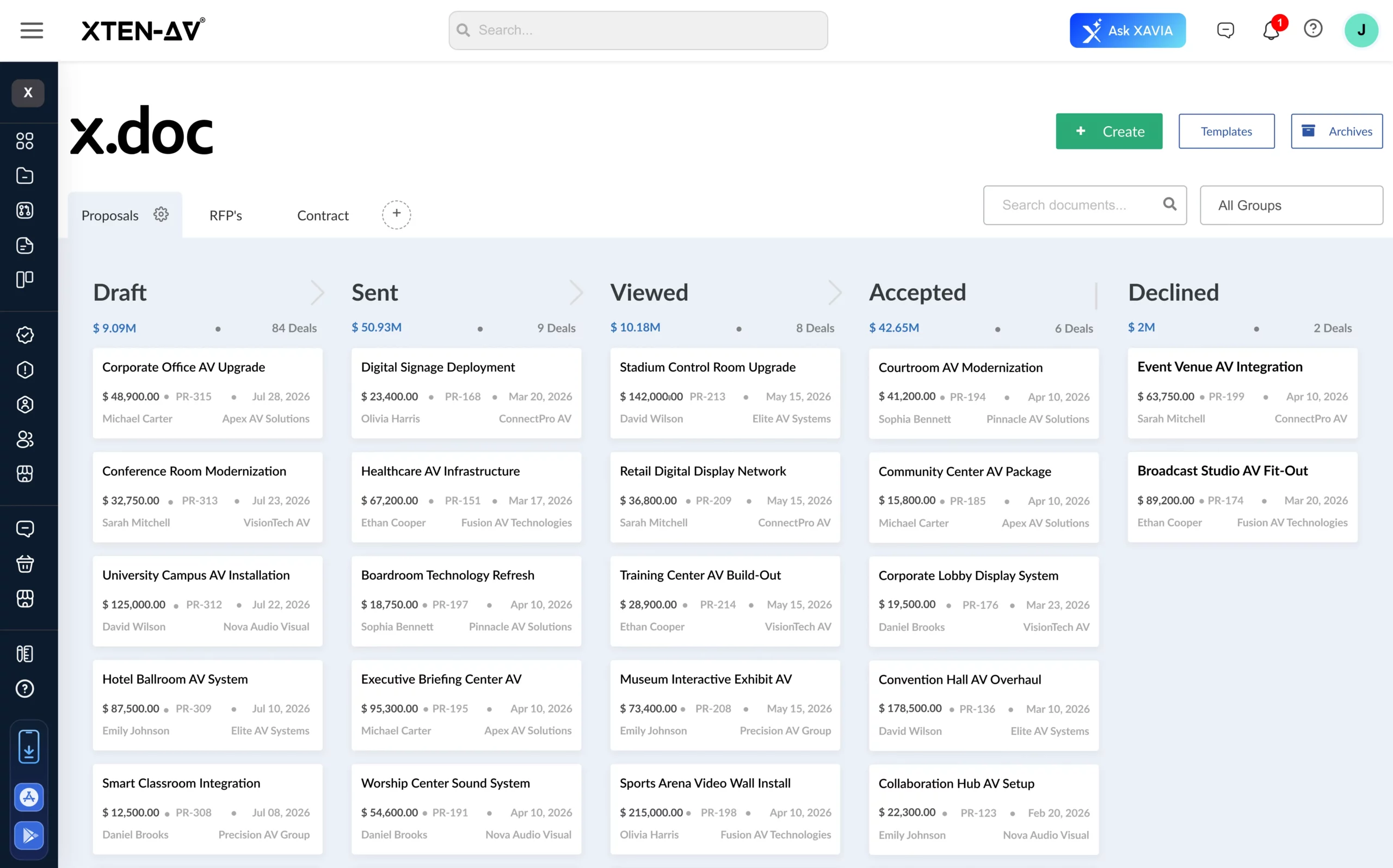
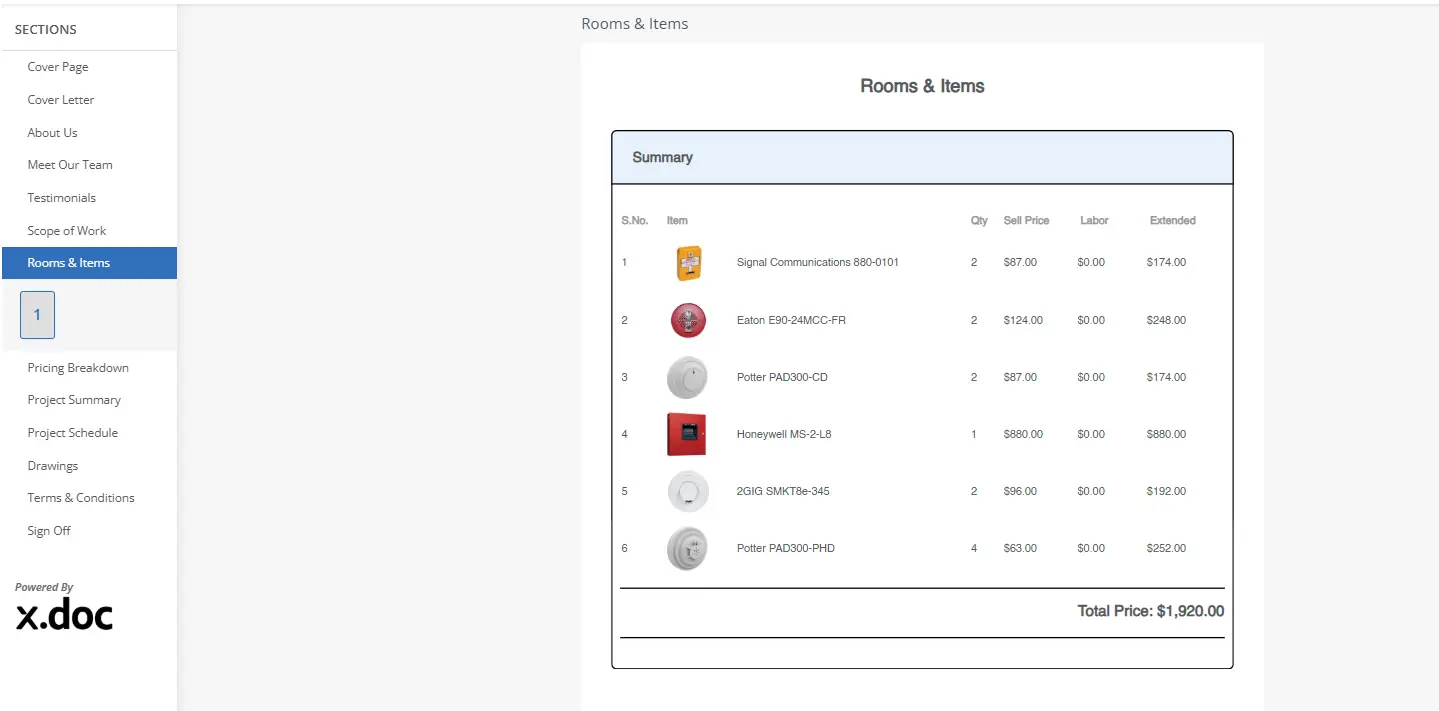
Built for estimators, fire alarm contractors, low-voltage professionals and security contractors, x.doc by XTEN-AV is a smart, cloud-based security system estimating software, specifically designed for RFPs, AV quotes, proposals, cost estimation, equipment pricing and labor calculations. It offers DFY proposal templates for security system projects, flexible customization, proposal tracking, revision control and legally binding digital signatures to keep bids accurate, organized and client ready.
Best For:
AV estimators, fire alarm contractors, security integrators and low-voltage professionals looking for a cloud-based, AI-powered proposal and documentation platform for bids, revisions, client tracking and digital approvals.
Unique Features:
DFY proposal, quote and invoice templates.
RFP and AV quote preparation.
Professional proposal customization.
Trackable proposal URLs.
Proposal revision tracking.
Legally binding digital signatures.
Flexible cost and labor calculations.
Mobile proposal review and signing.
Client-ready AV documentation.
Pros:
Minimizes switching between spreadsheets, document editors and e-sign tools.
Keeps equipment pricing, labor values and scope updates accurate.
Speeds up preparation of client-ready fire alarm bids.
Gives AV sales teams better visibility into buyer engagement.
Standardizes AV and security documentation across projects.
Centralizes costing, revisions and approvals in one cloud workspace.
Turn fire alarm estimates into professional, client-ready AV proposals. Start your XTEN-AV free trial today and manage costing, revisions, tracking and digital approvals in one place.
Cons:
Initial setup may be required to align templates, branding and calculation preferences with company standards.
XTEN-AV Pricing Plans
- Free Trial
XTEN-AV offers a 15-day free trial. - Basic
$104.25/user/month, billed annually. - Business
$111.75/user/month, billed annually. - Enterprise
$126.75/user/month, billed annually. - X-PRO Add-On
$16.88/user/month, billed annually. Available as an optional add-on.
D-Tools
D-Tools is business management software for AV, security and low-voltage integrators, bringing quoting, system design, proposals and technical documentation into one platform. For contractors preparing a fire alarm system cost estimate, D-Tools Cloud supports visual quoting, dealer pricing and labor calculations, while System Integrator (SI) adds BOM-linked engineering drawings and detailed AV project documents. This makes D-Tools a strong fit for complex bids where pricing, system scope and project handoff need to stay aligned.
Best For:
Fire alarm estimators and security integrators handling complex system estimates, dealer pricing, labor costing and engineered bid documentation.
Unique Features:
- Integrated product library.
- Dealer-specific equipment pricing.
- Visual quoting and image markups.
- Equipment and labor calculations.
- Options and alternates.
- Multimedia proposal creation.
- Engineering drawings.
- Change order management.
- Purchase order and inventory tracking.
Pros:
- Keeps estimating, sales and project data connected.
- Supports detailed costing for larger fire alarm bids.
- Maintains consistent dealer pricing across quotes.
- Handles multi-room and multi-system project scopes.
- Carries approved project data into purchasing and installation.
Cons:
- Initial configuration may take time for smaller contractors.
- Broader capabilities may exceed basic estimating requirements.
D-Tools Pricing Plans
- Free Trial / Demo
D-Tools offers a free demo, while trial options vary by plan.
- D-Tools Cloud – Single
The plan starts at $89/month, billed annually.
- D-Tools Cloud – Duo
The plan starts at $161/month, billed annually.
- D-Tools Cloud – Team
The plan starts at $314/month, billed annually.
- D-Tools Cloud – Company
The plan starts at $584/month, billed annually.
- D-Tools Cloud – Enterprise
The plan starts at $1,079/month, billed annually.
- System Integrator (D-Tools SI)
Starts at $1,800/user/year with a minimum of 5 users. Available as a hosted or on-premises solution.
Not sure if D-Tools is the right fit for your team? Discover the best D-Tools alternatives and compare options based on project needs, documentation, pricing, and integration capabilities.
Countfire
Countfire is a fully cloud-based estimating platform for security, fire alarm and life-safety projects. Its intelligent takeoff, specification comparison, accuracy checks and coverage-area tools help contractors identify device quantities, validate project requirements and prepare more consistent bids. Its fire sprinkler estimating software capabilities also support sprinkler counts, coverage measurement and proposal preparation.
Best For:
Security estimators managing drawing-heavy tenders, automated device counts, specification checks and detailed pricing.
Unique Features:
- Intelligent takeoff.
- Automated symbol counting.
- Intelligent estimating.
- Specification comparison.
- Built-in accuracy checks.
- Fire and sensor coverage tools.
- Zone-based quantity breakdowns.
- Previous-price reuse.
- Excel estimate exports.
Pros:
- Minimizes manual counting across large drawing sets.
- Helps catch missed devices before pricing begins.
- Makes drawing revisions easier to evaluate.
- Reuses previous prices for recurring items.
- Supports shared estimating across multiple users.
Cons:
- Price lists and kits require initial setup.
- Paid subscription prices are not publicly displayed.
Countfire Pricing Plans:
- Free Trial
Countfire provides a 7-day free trial. - Paid Plans
Custom pricing. Contact Countfire for current rates.
Bluebeam
Bluebeam Revu is a PDF-based construction platform for quantity takeoffs, measurements, markups and plan review. For fire alarm estimating, it helps organize device quantities and material data directly on project drawings. This supports teams that need to calculate material costs, device counts and labor hours from project blueprints before preparing accurate bids.
Best For:
Low-voltage estimators and contractors using PDF blueprints for device counts, measurements and quantity takeoffs.
Unique Features:
- PDF quantity takeoffs.
- Count and measurement tools.
- Reusable Tool Chest markups.
- Markup list quantity tracking.
- Drawing overlays and comparisons.
- Custom calculation columns.
- Quantity Link with Microsoft Excel.
- Dynamic Fill measurements.
- Studio collaboration.
Pros:
- Works directly with existing construction plan sets.
- Makes device quantities easier to verify visually.
- Supports reusable standards across repeat projects.
- Simplifies comparisons between drawing revisions.
- Connects takeoff data with Excel-based costing.
Cons:
- Not purpose-built specifically for fire alarm estimation.
- Complete project pricing may require another estimating platform.
Bluebeam Pricing Plans
- Free Trial / Demo
Bluebeam offers a 14-day free trial with no credit card required, with access to Max plan capabilities. Product demos are also available. - Basics
Starts at $260/user/year, billed annually. - Core
Starts at $330/user/year, billed annually. - Complete
Starts at $440/user/year, billed annually. - Max
Starts at $590/user/year, billed annually at the current introductory price.
System Surveyor
System Surveyor is a visual system design and site survey platform for security, fire alarm, AV and other low-voltage projects. Its Budget Estimator combines device quantities, equipment pricing, labor hours and labor rates to support a structured fire alarm system installation cost calculation. Teams can review budget ranges, adjust proposed devices and generate BOM-based reports before finalizing the project scope.
Best For:
Fire alarm consultants and security designers who need visual site surveys, device planning, preliminary budgets and installation estimates.
Unique Features:
- Visual Budget Estimator.
- Drag-and-drop device placement.
- Device quantity and pricing inputs.
- Installation hours and labor rates.
- High and low-budget ranges.
- Area-of-coverage boundaries.
- Site survey photo capture.
- Automated BOM generation.
- PDF and Excel reporting.
Pros:
- Connects proposed layouts with early budget planning.
- Shows cost impact when device quantities change.
- Helps stakeholders compare scope options visually.
- Captures project information during site surveys.
- Supports clearer planning before final quoting.
Cons:
- The Budget Estimator focuses on preliminary project costing.
- Detailed commercial proposals may require another platform.
System Surveyor Pricing Plans
- Free Plan / Demo
System Surveyor offers a Starter plan free forever and provides product demos. - Starter
Free forever. - Essentials
Starts at $50/user/month, billed annually at $600/user/year. - Scale
Starts at $70/user/month, billed annually at $840/user/year. - Enterprise
Custom pricing with a 15-seat minimum.
Wondering how much a complete fire alarm installation may cost? Check our fire alarm system cost estimate guide to learn what influences pricing before preparing your next bid.
QuoteWerks
QuoteWerks is CPQ and proposal software for security and alarm businesses that need tighter control over equipment pricing, labor, margins and recurring charges. When paired with fire suppression estimating software or dedicated takeoff tools, it supports the commercial stage through structured quotes, distributor pricing, contracts and client-ready documents. It is best suited once system quantities are confirmed and the next priority is accurate pricing, presentation and approval.
Best For:
Fire alarm and security contractors focused on equipment quotes, labor pricing, margin control, recurring charges and client proposals.
Unique Features
- Equipment and labor quoting.
- Recurring revenue calculations.
- Product and service bundles.
- Guided selling configurator.
- Distributor pricing imports.
- Quote revisions and audit trails.
- Pricing approval controls.
- Online acceptance and e-signatures.
- CRM, PSA and accounting integrations.
- Purchase order management.
Pros:
- Combines hardware, installation and recurring charges.
- Helps maintain consistent margins across sales teams.
- Supports monitoring and maintenance revenue models.
- Connects quote data with existing business systems.
- Carries approved bids into purchasing.
Cons:
- Device takeoff requires a separate drawing application.
- Advanced commercial capabilities depend on the selected plan.
QuoteWerks Pricing Plans
- Free Trial / Demo
QuoteWerks provides a free trial, with product demos available for businesses evaluating the platform. - Essential
$45.83/month per concurrent user, billed annually. - Balanced
$71.50/month per concurrent user, billed annually. - Pinnacle
$93.50/month per concurrent user, billed annually.
Which Fire Protection Estimating Software Is Best for Your Project?
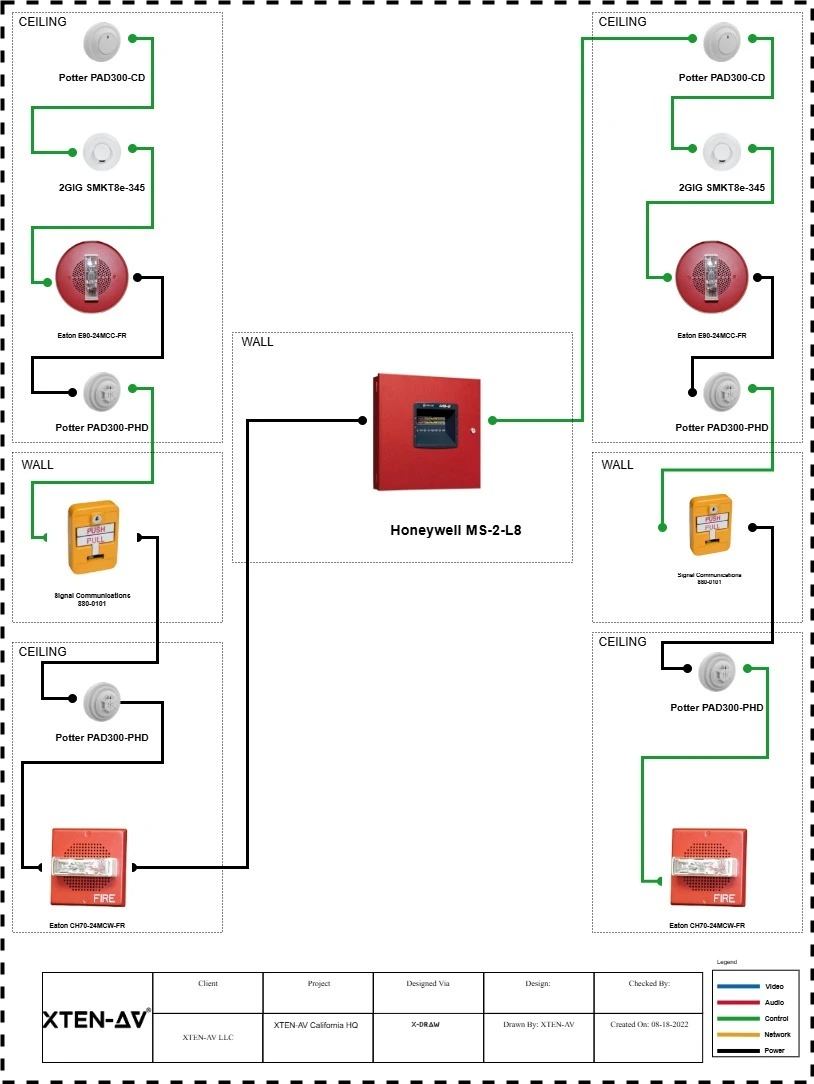
The right platform depends on whether you need drawing takeoffs, device counts, cost estimation, system planning, quotes or client-ready documentation.
Here are the best fire protection estimating software options to compare based on project requirements, estimating needs and core capabilities:
Platform | Best For | Primary Strength | Key Capabilities |
XTEN-AV (x.doc) | AV estimators, fire alarm contractors and security integrators preparing professional bids. | Complete proposal and AV documentation platform. | AI-powered proposals, RFPs, cost and labor calculations, revision tracking, client tracking and digital approvals. |
D-Tools | Contractors handling complex system estimates and larger integration projects. | Detailed project costing and business management. | Dealer pricing, labor costing, visual quotes, engineering documents and procurement. |
Countfire | Fire and security estimators working with drawing-heavy tenders. | Automated takeoff and quantity estimation. | Intelligent takeoff, device counts, specification checks, coverage tools and project pricing. |
Bluebeam | Low-voltage estimators working primarily from PDF construction plans. | Drawing-based quantity takeoffs. | Measurements, markups, device counts, revision comparison and Excel-linked costing. |
System Surveyor | Fire alarm consultants planning layouts and preliminary installation budgets. | Visual system planning and budget estimation. | Site surveys, device placement, labor inputs, budget ranges and BOM reporting. |
QuoteWerks | Security and alarm contractors focused on commercial pricing and customer quotes. | CPQ and quote management. | Equipment pricing, labor charges, margins, recurring revenue, contracts and approvals. |
Audio Visual System Design Mastery + Winning Proposals = 10x Productivity!
- ✔ Automatic Cable Labeling & Styling
- ✔ 100+ Free Proposal Templates
- ✔ Upload & Create Floor Plans
- ✔ 1.5M+ Products from 5200 Brands
- ✔ AI-powered 'Search Sense'
- ✔ Legally Binding Digital Signatures

Conclusion
A fire alarm estimate may appear accurate but still affect margins if equipment pricing, labor and scope changes are not aligned. A reliable fire alarm system installation cost calculation should connect project costing with clear, client-ready documentation. AV estimators, fire alarm contractors and security integrators seeking a cloud-based, AI-powered platform can prefer XTEN-AV (x.doc) to create professional AV proposals, track revisions, monitor client engagement and collect digital approvals.
FAQ’s
The leading fire alarm estimating software options are XTEN-AV (x.doc), D-Tools, Countfire, Bluebeam, System Surveyor and QuoteWerks. They support project estimation, takeoffs, quotes, proposals and AV documentation.
It helps contractors organize device counts, equipment pricing, labor values and system scope before preparing the final estimate.
Look for quantity tracking, cost estimation, labor calculations, quote revisions, proposal support and compatibility with security or low-voltage projects.
Yes, Many platforms support security, life-safety and low-voltage projects for takeoffs, budget estimates, quotes and project documentation.
Yes, XTEN-AV (x.doc) supports cost and labor calculations, DFY templates, trackable proposal URLs, revision management and legally binding digital signatures for client-ready quotes and AV proposals.
Note:
The content in this blog is based on publicly available information and user feedback from sources such as G2, Capterra and Reddit. All product names and trademarks are the property of their respective owners.

Explore more by topic
Related Blogs

-

- Posted by Sahil Dhingra

Audio Visual Courtroom Sound Systems: Design, Components and Speech Clarity Explained Sahil...

-
- Posted by Sahil Dhingra
Audio Visual AV Commissioning Checklist & Best Practices for Integrators Sahil Dhingra...
-
- Posted by Sahil Dhingra
Audio Visual AV Cybersecurity Best Practices: Securing Networked Audiovisual Systems Sahil Dhingra...





