








Top Purchase Order Management Software for AV Project Managers to Streamline Procurement in 2026

Sahil Dhingra
Published 08 SEPT 2026
An AV project can be ready for installation and still face procurement challenges. Equipment availability issues, delayed shipments, unexpected delivery delays or unavailable rack components can disrupt staging, technician schedules, commissioning and client handover.
According to a survey by Commercial Integrator, 61% of integrators identified high costs as one of their top three business challenges. This highlights the need for clearer visibility into vendor pricing, PO status, equipment availability, order fulfillment and overall purchasing costs.
In this guide, we will explore the best purchase order management software options for AV Project Managers, evaluating PO creation, supplier management, order tracking, inventory control and cost visibility for professional AV deployment.
“A single missing AV component can delay staging, installation and commissioning, making equipment availability and purchasing visibility critical to keeping projects on schedule.” ~ Commercial Integrator
Key Takeaways
- The leading purchase order management software for AV Project Managers includes
XTEN-AV (X-PRO), D-Tools, Jetbuilt, ProjX360 and Specifi, each offering different capabilities for AV purchasing, inventory control and project requirements. - AV procurement platforms support critical project requirements, including equipment planning, purchase approvals, inventory tracking, cost monitoring and reporting.
- AV integrators must evaluate key capabilities such as vendor coordination, PO tracking, integrations, change management and procurement analytics before selecting a platform.
- Cloud-based platforms connect equipment data, purchasing activities, installation requirements and financial insights to improve coordination across AV projects.
- XTEN-AV (X-PRO) is a recommended choice for AV businesses looking for a complete cloud-based platform with Inventory, POs & Invoicing, field coordination and after-sales service management.
What Is Purchase Order Management Software?
Purchase order management software enables integrators to create, issue and monitor POs from approved project requirements. It keeps supplier data, quantities, pricing and order status organized in one place, minimizing manual updates across spreadsheets and emails.
For AV procurement teams, purchase order tracking software adds real-time visibility into confirmations, delayed items, received equipment and pending deliveries. This supports better coordination across inventory planning, installation schedules and budget control.
Make AV Purchase Order Management Faster and Easier
Manage POs, vendor orders, inventory, receiving and purchasing visibility in one connected XTEN-AV ecosystem.
How Does Purchase Order and Inventory Management Software Work for AV Projects?
For AV delivery teams, purchasing can become complex when a single AV BOM includes products from multiple suppliers with various lead times, pricing and delivery schedules. Inventory and purchase order software centralizes purchasing, receiving, stock availability, and project cost data, enabling teams to identify supply gaps early and keep installation schedules on track.
Following steps explain how purchase order and inventory management software works across an AV project:
- Create POs From the Approved AV BOMs
Convert product SKUs, quantities, pricing and project details into supplier-ready purchase orders. - Assign Vendors and Issue Orders
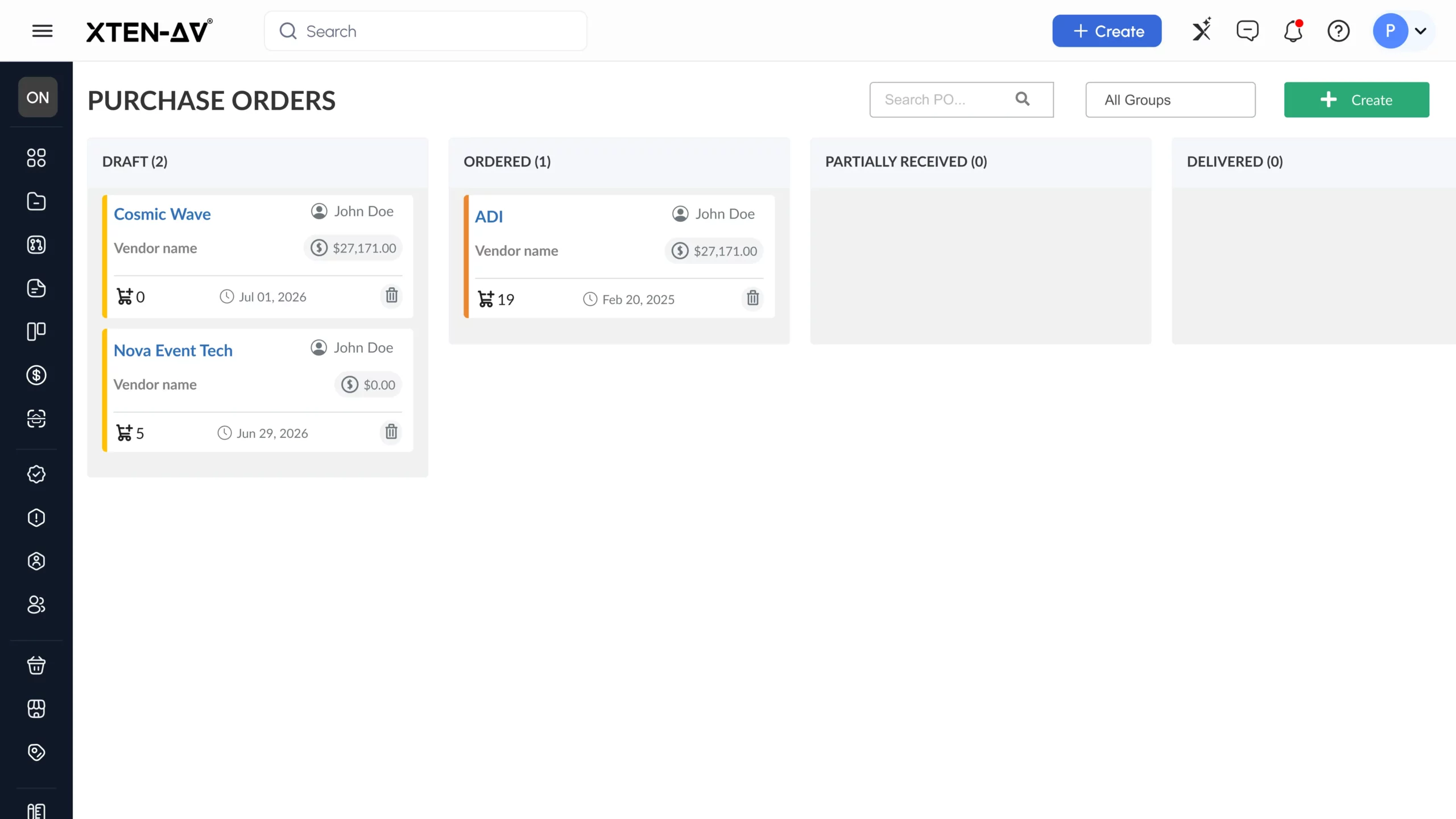
Select the appropriate distributor, verify order details and send the PO for fulfillment. - Track Purchase Order Status
Monitor confirmations, shipment progress, lead times, and outstanding AV equipment across active projects. - Receive Equipment and Update Inventory
Match delivered products against the PO and update stock availability, project allocation and remaining quantities. - Monitor Procurement Costs
Track equipment spend and pricing changes against project budgets to maintain better cost and margin visibility.
A structured purchasing process helps AV integrators stay ahead of vendor coordination, equipment availability and project costs. Explore how to create and handle purchase orders for smoother procurement.
What Should AV Project Managers Look for in PO Management Software?
Choosing the right tool means looking beyond basic order creation. Effective purchase order management must support financial control, team coordination, field activity and project visibility while keeping AV procurement organized and installation requirements on track.
The table below highlights the key capabilities to compare for efficient AV procurement and project control:
| Evaluation Area | What to Look For | Why It Matters for AV Projects |
| Purchase Approval Controls | Multi-level review and authorization before POs are released. | Prevents unapproved purchases and keeps procurement within budget. |
| Vendor & Distributor Management | Centralized supplier records, pricing, contacts and purchase history. | Supports sourcing across multiple AV equipment vendors. |
| Project Cost Tracking | Equipment, labor, purchasing, and budget variance visibility. | Enables tighter control over project spend and margins. |
| Change Order Management | Track approved scope, equipment, labor and pricing changes. | Keeps project financials aligned when requirements change. |
| Technician Time Tracking | Mobile clock-in/clock-out linked to projects and assigned tasks. | Captures installation labor accurately against project activities. |
| Task Management & Event Linking | Connect tasks, milestones, schedules, and project events. | Keeps field execution aligned with equipment readiness and installation timelines. |
| Accounting & Financial Integration | Sync POs, invoices, vendor costs and billing data. | Minimizes duplicate entry and improves financial accuracy. |
| Project Reporting & Analytics | Visibility into purchasing, labor, costs and overall project performance. | Supports faster decisions and stronger cost control. |
Managing multiple distributors, equipment suppliers and project purchases? Learn how vendor management helps AV project managers keep purchase orders accurate and procurement organized.
Ready to Take the Next Step With XTEN-AV ?
Join AV professionals worldwide using XTEN-AV to simplify AV automation, system design, documentation, proposals, project management and after-sales service.
5 Best Purchase Order Tools for AV Project Managers in 2026
AV procurement requires more than placing orders. The right PO management software should enable supplier coordination, approval processes, equipment tracking and cost visibility for smoother AV installations.
Here are the leading purchase order management software options evaluated for AV procurement, supplier workflows, order visibility and purchasing capabilities:
1. XTEN-AV (X-PRO)
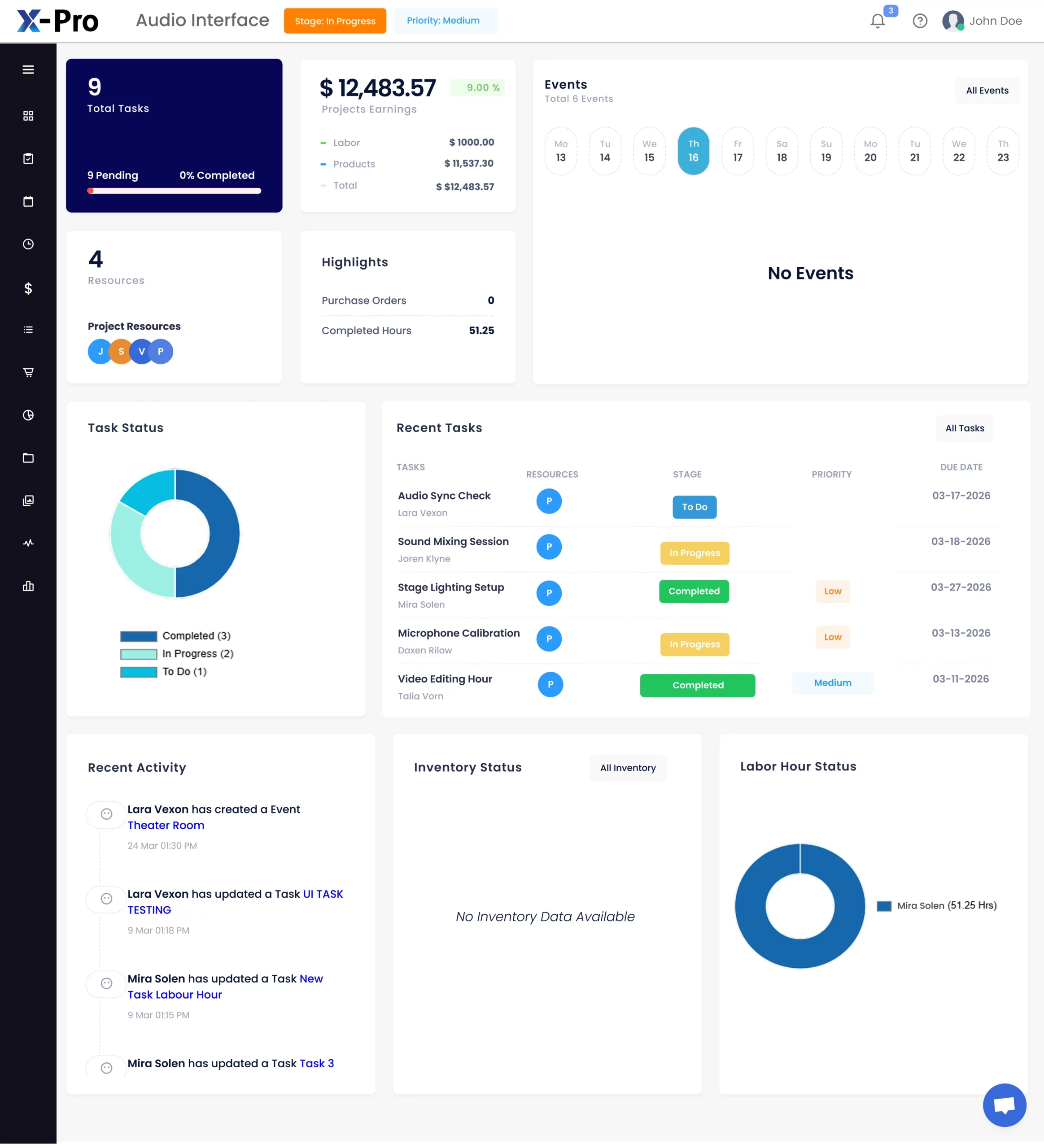
X-PRO by XTEN-AV is a purchase order management software built for AV Project Managers to streamline equipment procurement, inventory and invoicing. This cloud-based AV platform connects POs & Invoicing with equipment tracking, vendor details and project details. Part of the X-PRO suite, X-PRO Installation supports task management, event linking, field crew coordination, clock-in/out and purchase orders. At the same time, X-PRO Service extends after-sales service management with service calls, service agreements, service contracts and analytics.
Best For:
AV Project Managers and procurement teams who need a centralized platform for purchase orders, inventory tracking, vendor coordination, invoicing and AV equipment purchasing.
Unique Features of X-PRO:
- Inventory, POs & Invoicing to track AV equipment, create purchase orders, and maintain billing records.
- Purchase order tracking to monitor order stages and improve purchasing visibility.
- Vendor management to organize supplier details and equipment information.
- Task Management & Event Linking to assign activities, set priorities, and connect scheduled events.
- Mobile app access to view documents, dashboards, approvals, and field updates.
- Clock-In / Clock-Out to capture technician hours and maintain accurate labor records.
- Custom Settings & Smart Templates to configure stages, permissions, labor types, and reusable setups.
- Change Management to track updates and maintain alignment across project requirements.
- Advanced Dashboard & Calendar to monitor schedules, deadlines and team activities.
- Service Calls, Agreements, Contracts and Analytics for after-sales service management.
Pros:
- Connects purchase orders, inventory, invoices, and project data in one cloud-based platform.
- Enables better visibility into equipment requirements and purchasing status.
- Supports installation teams with field access, task coordination, and labor tracking.
- Extends beyond project delivery with after-sales service capabilities.
- Built specifically around AV integration requirements.
Cons:
- New users may need a short learning curve to adapt to a broader AV project and service management platform.
Integration:
X-PRO is part of the XTEN-AV ecosystem with built-in integrations for HubSpot, QuickBooks, Salesforce, Zoho and Microsoft Dynamics, helping to keep CRM, pricing, accounting and project data connected.
XTEN-AV Pricing Plans:
- Free Trial
XTEN-AV offers a 15-day free trial.
- Basic
$104.25/user/month, billed annually.
- Business
$111.75/user/month, billed annually.
- Enterprise
$126.75/user/month, billed annually. - X-PRO Add-On
$16.88/user/month, billed annually. Available as an optional add-on.
2. D-Tools
D-Tools is an AV system integration platform that supports estimating, quoting, proposal generation, system design and business processes for integrators. Its purchase order management system easily connects equipment requirements with vendor details, product data and ordering activities. With a comprehensive product library and project-based tools, D-Tools enables teams to build accurate estimates, prepare client-ready proposals and streamline purchasing decisions.
Best For:
AV system integrators, sales teams, designers and project managers who need connected capabilities for estimating, quoting, system design, documentation and purchasing.
Unique Features of D-Tools:
- Product library with AV equipment specifications, pricing and manufacturer details.
- Estimating tools to calculate labor, materials and project costs.
- Proposal generation for creating client-facing documents.
- Purchase orders linked with approved project requirements.
- Vendor records to organize supplier information.
- System design tools for AV documentation.
- Change order tracking for managing project updates.
Pros:
- Strong estimation and quoting capabilities for AV integrators.
- Maintains consistency between proposals, products and project requirements.
- Supports detailed AV documentation for complex installations.
- Provides industry-focused tools for system integration companies.
- Helps teams organize sales and delivery information.
Cons:
- New users may require time to understand the broader feature set.
- Smaller companies may not need all available capabilities.
Integration:
D-Tools supports integrations with accounting, CRM and business applications to connect customer records, financial data and project details.
D-Tools Pricing Plans:
- Free Trial / Demo
D-Tools offers a free demo, while trial options vary by plan.
- D-Tools Cloud – Single
Plan starts at $89/month, billed annually.
- D-Tools Cloud – Duo
Plan starts at $161/month, billed annually.
- D-Tools Cloud – Team
Plan starts at $314/month, billed annually.
- D-Tools Cloud – Company
Plan starts at $584/month, billed annually.
- D-Tools Cloud – Enterprise
Plan starts at $1,079/month, billed annually.
- System Integrator (D-Tools SI)
Starts at $1,800/user/year with a minimum of 5 users. Available as a hosted or on-premises solution.
Wondering if D-Tools is the right choice for your AV business? Review D-Tools alternatives to compare platforms built for different purchasing and project requirements.
3. Jetbuilt
Jetbuilt is an AV business platform that supports purchase order requests by connecting estimating, equipment selection, proposals and project preparation. Built for system integrators, it helps teams organize product requirements, pricing details, vendor information and project details before equipment moves into the installation phase.
Best For:
AV Project teams and integrators looking for capabilities around project building, equipment selection, proposals and purchasing.
Unique Features of Jetbuilt:
- Purchase order requests to organize required materials and equipment.
- Estimating tools for calculating project costs.
- Proposal creation for customer presentations.
- AV product database for equipment selections.
- Vendor details for supplier records.
- Cost tracking for monitoring project expenses.
- Project preparation tools for upcoming installations.
Pros:
- Connects estimating activities with purchasing requirements.
- Built specifically for AV integration businesses.
- Helps teams prepare accurate proposals faster.
- Keeps product selections organized throughout projects.
- Supports better coordination before installation.
Cons:
- Teams may need initial setup to match internal processes.
- Companies requiring advanced approval controls may need additional tools.
Integration:
Jetbuilt integrates with business applications for managing project data, financial details, and related records.
Jetbuilt Pricing Plans:
- Free Trial
Jetbuilt offers a free 2-week trial.
- Lite Plan
~$69/user/month
- Enterprise Plan
~$137/user/month
- Annual Billing
Discount available when billed annually. - Add-Ons
Optional add-ons are available at an additional cost.
Comparing AV project platforms? Explore Jetbuilt vs XTEN-AV to understand how both tools approach purchasing, project management and equipment tracking.
4. ProjX360
ProjX360 offers a purchase order approval system designed for AV companies that need structured purchasing controls, cost tracking and project-based financial visibility. The platform helps teams organize equipment requests, approvals, inventory details, and project information to support more controlled purchasing decisions.
Best For:
AV companies managing multiple installations that require approval processes, financial tracking and purchasing controls.
Unique Features of ProjX360:
- Purchase order approvals for reviewing and authorizing requests.
- Inventory tracking to monitor equipment availability.
- Vendor records to maintain supplier details.
- Project costing to track budgets and expenses.
- Scheduling tools for coordinating activities.
- Reporting dashboards for business insights.
- Financial tracking for monitoring profitability.
Pros:
- Provides structured purchasing approval processes.
- Connects purchasing decisions with financial data.
- Supports better control over project expenses.
- Helps standardize internal purchasing procedures.
- Designed for AV integration businesses.
Cons:
- Smaller teams may find some capabilities beyond their requirements.
- Initial setup may require configuration based on business needs.
Integration:
ProjX360 easily integrates with accounting and business applications to connect project records, financial data and reporting information.
ProjX360 Pricing Plans:
- Starter Plan
$229/month
Includes 2 Full Users + 3 Tech Users. One-time setup: $445. - Growth Plan
$449/month
Includes 4 Full Users + 6 Tech Users. One-time setup: $695. - Professional Plan
$789/month
Includes 8 Full Users + 12 Tech Users. One-time setup: $1,395. - Enterprise Plan
$1,199/month
Includes 16 Full Users + 24 Tech Users. One-time setup: $1,995.
Annual billing offers 10% savings. Additional users can be added separately.
Struggling with vendor delays, scattered order updates and equipment tracking? See how the right software can help AV integrators manage purchase orders with better control from ordering to receiving.
5. Specifi
Specifi provides purchase order automation software capabilities for AV professionals focused on equipment specification, product selection and ordering accuracy. The platform connects equipment specifications with manufacturer databases, quotations and purchasing activities, allowing teams to create accurate equipment lists and streamline ordering processes.
Best For:
AV designers, consultants, and integrators managing detailed product specifications and equipment selections.
Unique Features of Specifi:
- Automated ordering tools to simplify purchasing preparation.
- AV product database with technical specifications.
- Design tools for creating accurate system selections.
- Quotation features for customer proposals.
- Manufacturer information for product evaluation.
- AV documentation tools for technical requirements.
- Product comparison features for equipment selection.
Pros:
- Strong focus on AV product specification.
- Helps maintain accurate equipment data.
- Supports faster product evaluation.
- Connects design decisions with purchasing requirements.
- Useful for specification-driven AV projects.
Cons:
- Best suited for teams focused on product selection and specification.
- Additional tools may be required for broader business processes.
Integration:
Specifi supports integrations with business applications to sync product data, quoting information and project details.
Specifi Pricing Plans
- Individual: $149/month or $134/month billed annually. Includes 1 Office User and 2 Field Users. Onboarding costs $299.
- Team: $349/month or $314/month billed annually. Includes 3 Office Users and 5 Field Users. Onboarding costs $699.
- Company: $699/month or $629/month billed annually. Includes 7 Office Users and 10 Field Users. Onboarding costs $1,399.
Ready to Take the Next Step With XTEN-AV ?
Join AV professionals worldwide using XTEN-AV to simplify AV automation, system design, documentation, proposals, project management and after-sales service.
How to Choose the Right Procurement Software for AV Integrators?
Selecting the right procurement software requires evaluating more than order creation. Look for tools that support equipment ordering, approvals, inventory control, supplier coordination and procurement analytics to improve purchasing decisions.
Evaluate top procurement platforms for AV integrators with key capabilities across purchasing, inventory, approvals and project execution:
| Platform | Best For | Core Capabilities |
| XTEN-AV (X-PRO) | Complete cloud-based platform for connected AV purchasing, installation and after-sales support. | Purchase orders, Inventory, POs & Invoicing, vendor records, approvals, dashboards, field coordination and after-sales service management. |
| D-Tools | AV businesses manage estimation, quoting, design and purchasing activities. | Product library, estimates, proposals, system design, purchase orders, vendor details and project costing. |
| Jetbuilt | Integrators connecting estimates with equipment ordering requirements. | Estimating, proposals, product selection, purchase order requests, pricing details and supplier records. |
| Specifi | Design-focused professionals handling product specifications and ordering accuracy. | Product database, design tools, quotations, automated ordering, manufacturer data and documentation. |
| ProjX360 | Companies requiring approval controls and financial oversight. | Purchase order approvals, inventory tracking, vendor records, project costing, reporting dashboards and financial tracking. |
Audio Visual System Design Mastery + Winning Proposals = 10x Productivity!
- ✔ Automatic Cable Labeling & Styling
- ✔ 100+ Free Proposal Templates
- ✔ Upload & Create Floor Plans
- ✔ 1.5M+ Products from 5200 Brands
- ✔ AI-powered 'Search Sense'
- ✔ Legally Binding Digital Signatures

Conclusion
When AV Project Managers rely on separate tools for vendor updates, inventory, invoices, and cost tracking, purchasing delays and budget risks can increase. The right inventory and purchase order software should improve visibility across procurement and installation. For AV firms seeking tighter control, XTEN-AV X-PRO is worth considering for managing POs, stock, billing, schedules and field updates within one connected platform.
See how XTEN-AV brings automation, AV design, proposals, project management and service capabilities together in one unified cloud-based platform for AV businesses.
FAQ’s
Leading purchase order management software options include XTEN-AV (X-PRO), D-Tools, Jetbuilt, ProjX360 and Specifi for AV project purchasing and cost control.
Yes, XTEN-AV (X-PRO) enables users to create project-based POs, add products, select vendors and send orders directly from the platform.
Prioritize project-based POs, vendor records, order tracking, inventory visibility, approvals, cost reporting, automation and accounting integrations.
Purchase order tracking software enables managers to monitor equipment that is pending, ordered, partially received or delivered across active AV projects.
Yes, Inventory and purchase order software can track received products, stock availability, project allocation and equipment still awaiting delivery.
Procurement analytics gives Project Managers visibility into purchasing spend, cost variances, supplier activity and budget performance before margins are affected.
Note:
The content in this blog is based on publicly available information and user feedback from sources such as G2, Capterra and Reddit. All product names and trademarks are the property of their respective owners.

Explore more by topic
Related Blogs
-

- Posted by Sahil Dhingra

Audio Visual 7 Best Floor Plan Software for AV System Integrators Sahil...
-
- Posted by Sahil Dhingra
Audio Visual AV Cables Guide: Types, Connectors, Uses and Wiring Diagrams for...
-
- Posted by Sahil Dhingra
Audio Visual Courtroom Audio Visual (AV) Systems: A Complete Guide for Courts...





