








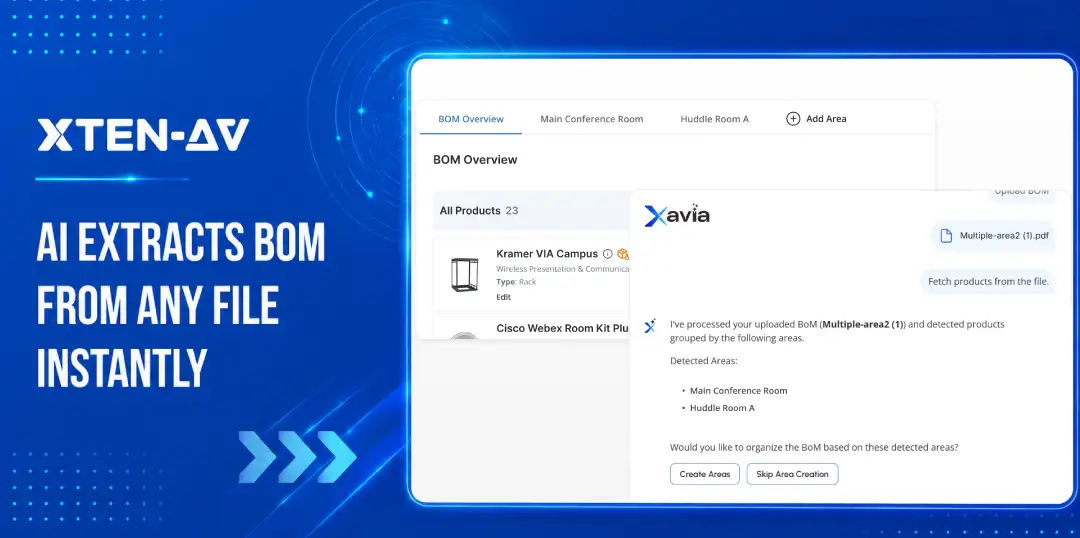


Every AV project starts with an AV bill of materials. Before a BOM can be quoted, designed, or procured, someone usually has to clean up consultant schedules, spreadsheets, and PDFs by hand. That takes time most AV teams do not have.
AI BOM extraction cuts that down. It converts external files into structured, reviewable product data in minutes instead of hours.
AI BOM extraction means using AI to read a bill of materials file, pull out AV products and quantities, and prepare that data for design or proposal workflows. It also flags missing accessories, spots incomplete system components, and connects the reviewed data directly to the design process.
A lot of AV project delays and change orders start with supporting infrastructure that never made it into the original BOM. That is the problem AI BOM extraction is built to catch.
Key Takeaways
- AV BOMs are relationship-driven procurement. A single product entry implies mounts, cabling, power, and control components that rarely appear in the original file.
- The BOM you receive is almost never the BOM you can use. Cleanup happens before quoting, before design, and before procurement, and nobody bills for it.
- AI BOM extraction removes the first layer of manual work. It reads the file, pulls product data, and organizes it for review. The estimator still validates everything.
- Missing accessories are the most expensive BOM problem in AV. Mounts, extenders, rack hardware, and power components get missed in consultant schedules and show up as change orders on site.
- AI suggests. Estimators decide. The right workflow keeps humans in control of what goes into the final BOM.
- Workflow continuity is the real value. An extracted BOM that connects directly to X-DRAW means the same product data doesn’t get rebuilt three times across estimating, design, and procurement.
- XAVIA AI Agent for Audio visual projects designs, BOM and proposal handles inconsistent file formats. Consultant schedules, client lists, and bid package exports rarely arrive clean.
The all-in-one solution for your Audio Visual (AV) Project Design & Documentation needs
Transform your audio-visual experience with XTEN-AV.
No Credit Card required
What Is AI BOM Extraction?
AI BOM extraction is the process of using AI to read consultant schedules, PDFs, spreadsheets, and procurement files. It pulls AV product information out of those files and turns it into a structured bill of materials, ready to review, quote, and use for AV system design.
AV integrators get BOM data from many sources. Consultants. Architects. General contractors. Procurement teams. End users. The formats are rarely consistent.
XAVIA applies AI BOM extraction directly inside XTEN-AV’s design workflow.
How Is AI BOM Extraction Different for AV Projects?
AI BOM extraction software helps AV integrators convert consultant schedules into structured, reviewable product data. Most consultant schedules are specification-focused, not installation-focused.
Manufacturing BOM extraction is built for factories. It handles ERP systems, supply chains, and engineering part numbers. That works fine for a fabricator sourcing raw materials. It has nothing to do with an AV integrator reading a consultant schedule.
AV BOMs are relationship-driven.
A display affects mounting, power, signal transport, control, rack space, and cable infrastructure. A DSP impacts amplification, routing, control integration, and network design.
That’s very different from a manufacturing BOM built around isolated components or raw materials. And it’s why AV-specific AI BOM extraction is a different category.
What Data Should AI Extract from an AV BOM?
The minimum useful extraction covers manufacturer name, model number, product description, quantity, and product category. Those five fields get you most of the way to a reviewable product list.
Beyond that, useful extractions also pull:
- Room, area, or zone labels: when the consultant has organized products by floor or space, that context should carry through.
- Notes and specification references: install conditions, rack position, signal type, or finish requirements are often buried in notes columns.
- Accessory and cable references: some BOMs include these; many don’t. Extracting what’s there helps flag what’s missing.
- Pricing or dealer-cost fields: if the client has included list prices or part numbers, those fields are worth capturing even if they’ll be replaced during quoting.
Real-world examples matter here. A Samsung display entry should be extracted as a display, not a generic “product.” A Crestron controller should be extracted with its model number intact so it can be matched against an accurate product library. A Cat6 cable entry should be extracted with quantity and unit notes. Vague extraction produces vague results.
Why Do AV Teams Need AI BOM Extraction?
Industry organizations such as AVIXA and industry publications like Commercial Integrator have consistently highlighted operational efficiency, workflow standardization, and project complexity as growing priorities for AV integration firms.
AV teams get product lists from clients, consultants, architects, facility managers, and bid packages. Each one arrives in a different format. Some are clean Excel files with consistent columns. Some are PDFs with merged cells and footnotes. Some are Word tables that someone formatted by hand. Some are emails with product names pasted inline.
The estimator’s first job, before quoting anything, is turning that document into a workable list. That means reading every row, verifying model numbers, matching products to a pricing source, checking quantities against room counts, and identifying what’s missing. On a 40-line BOM, that’s an hour of cleanup. On a 200-line consultant schedule, it’s morning.
Nobody budgets for BOM cleanup time directly. Most integrators absorb it into estimating overhead. It doesn’t show on the project estimate. It doesn’t get billed. But it delays proposal turnaround, creates handoff gaps between sales and design, and introduces errors when someone rushes through it.
AI BOM automation for AV projects reduces that first layer of manual work. It doesn’t replace the estimator’s judgment. It removes the part where they’re copying cells and reformatting columns before the real review even starts.
Where Does Manual BOM Entry Create Risk in AV Projects?
The risk shows up in a few consistent patterns.
- Product mismatch. Model numbers copied by hand get transposed. A Biamp TesiraFORTÉ AI gets entered as a different model in the Forte line. The pricing changes. The configuration changes. Nobody catches it until procurement.
- Missing accessories. This is the most common and expensive problem. A consultant schedule lists conference room displays, a ceiling microphone array, and a Crestron control system. No mounts. No HDMI extenders. No rack shelves. No power conditioner. The proposal goes out. The client approves it. The install team arrives and the change order conversation begins.
- Quantity errors. A BOM lists 8 speakers for a room. The estimator copies 6. The floor plan later shows 8 positions. Someone has to find the delta, figure out what happened, and reprice the job.
- Procurement confusion. The larger the project, the harder it becomes to track which spreadsheet version is actually current.
- Proposal pricing gaps. If accessories are missing from the BOM, they’re missing from the quote. Change orders protect margin in theory. In practice, they damage client relationships and slow project closeout.
The field consequences are real, and they affect every stage that AV project cost estimating software is supposed to protect.
An AV install team that shows up without display mounts doesn’t just lose a day. They lose the client’s confidence. Manual BOM entry is where that problem starts.
How Does AI BOM Extraction Work in an AV Workflow?
The workflow itself is simple. The inconsistency inside the files is not.
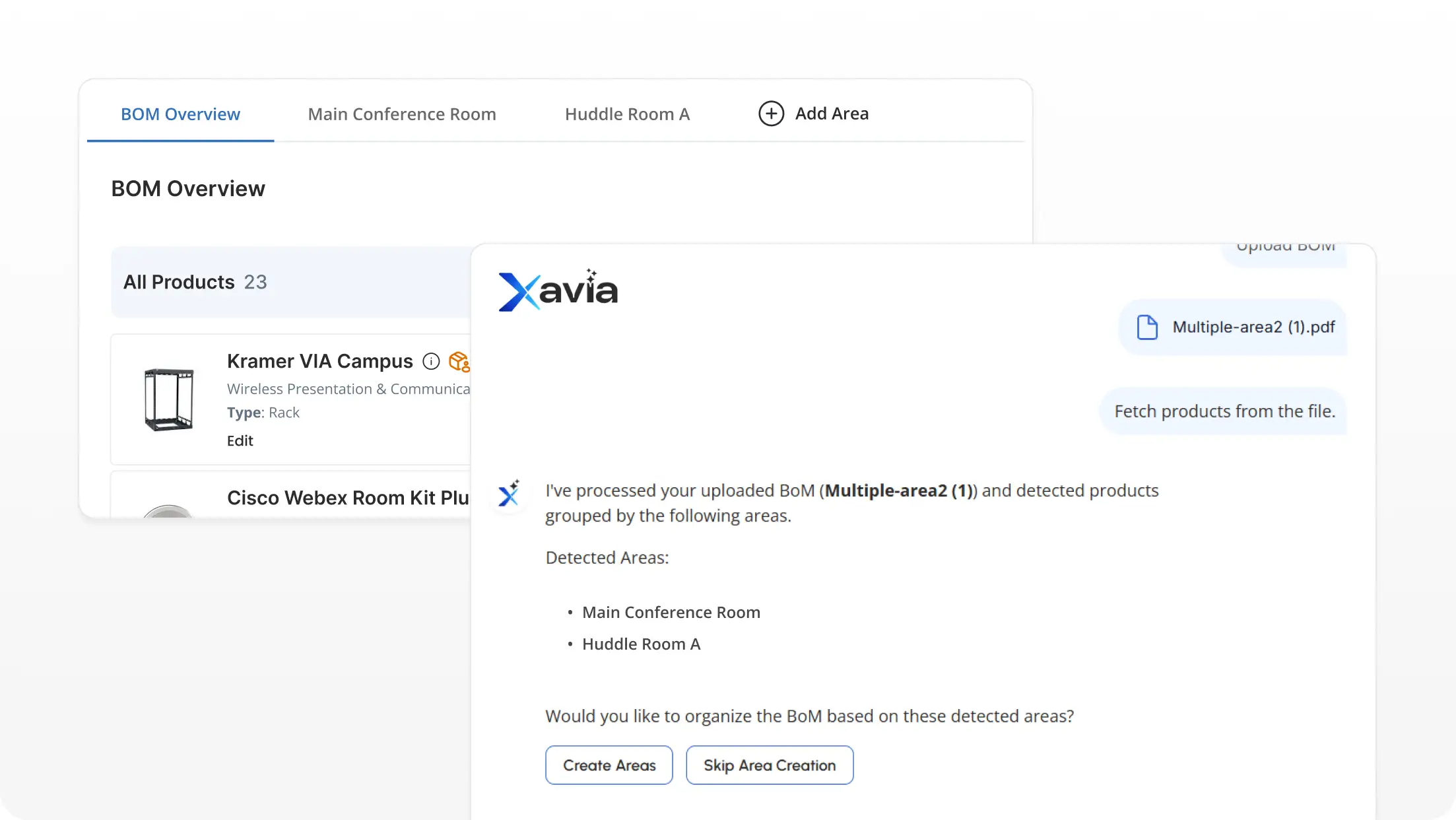
A user uploads a BOM file (Excel, CSV, or PDF) through an AI interface. XAVIA reads the file and identifies product rows, extracting structured AV product data for review. It extracts manufacturer names, model numbers, quantities, categories, and any available notes. It organizes the results into a structured, reviewable format.
From there, the user reviews the extracted list. This is not a step to skip. AI extraction handles the cleanup; the estimator handles the judgment. Are the quantities right? Are the model numbers accurate? Are there items in the original file that didn’t extract cleanly?
Once the list is reviewed and cleaned, it moves into the design or proposal workflow. In XTEN-AV’s environment, that means the reviewed BOM connects to X-DRAW’s AV design workflow, where it supports AI-powered AV schematic diagrams, rack layouts, and system design rather than being rebuilt from scratch.
That handoff from extracted BOM to design workflow is where the real time savings appear. Without that continuity, teams end up rebuilding the same product list multiple times across estimating, engineering, procurement, and design.
What Makes AI BOM Extraction Useful for AV Designers and Estimators?
Different roles feel the value differently.
For estimators, the gain is in pre-quote clarity. Organized product data with accurate model numbers and quantities is the starting point for pricing. The faster they get there, the faster the proposal goes out. AI BOM extraction removes the cleanup pass so they can start from a working list instead of a raw file.
For AV designers, the gain is in workflow continuity. Rebuilding a client’s product list inside design software from scratch is dead time. If the BOM is already extracted, reviewed, and structured, the designer can start placing equipment and routing signal paths instead of re-entering products they were already given.
For pre-sales engineers, the gain is in response speed. A client sends a spec. The engineer needs to respond with a proposal or a design sketch. The faster the BOM converts to usable data, the faster the response.
For operations leaders, the gain is in reducing the gaps between sales, design, and procurement. A consistent extraction workflow means fewer handoff errors and less time spent reconciling product lists across departments.
None of these benefits require replacing anyone. They require removing a specific category of repetitive work that currently falls between the cracks.
How Can AI Suggest Missing Products in an AV BOM?
This is one of the more operationally useful features, and also one that needs clear expectations.
AI doesn’t finalize a BOM. It suggests. The estimator reviews, accepts, or declines each recommendation.
The logic is pattern-based. If a BOM includes a Samsung display but no mount, the AI can flag that and suggest a compatible mounting option. If it includes a DSP but no amplifier, that gap is worth surfacing. If a camera appears without a mounting bracket or cable extension, the AI can recommend complementary products for review.
Common patterns where suggestions add value:
- Display → mount, HDMI cable, wall plate, possibly an extender
- Ceiling microphone array → receiver unit, antenna, cabling
- DSP → amplifier, control interface, cabling
- Camera → mount, power supply, USB or HDMI extension
- Rack equipment → rack shelf, power conditioner, patch cables, cable management
These are the exact line items that go missing from consultant schedules and client-provided lists. The AI doesn’t know the room. It doesn’t know the install conditions. But it knows common system relationships. Surfacing those gaps before pricing is more useful than discovering them on site.
The estimator makes the final call. That’s the right division of labor.
How Does XAVIA Support AI BOM Extraction for AV Projects?
XAVIA is XTEN-AV’s AI Audio visual (AV) agent for AV design, BOM review, and proposal preparation. It handles BOM upload and extraction through a chat-based interface inside X-DRAW.
The workflow is direct. A user opens XAVIA, uploads a BOM file (Excel, CSV, or PDF) and XAVIA reads the file and extracts the product data. The uploaded BOM items appear in XAVIA for review. From there, the reviewed data feeds into the X-DRAW design workflow.
Unlike generic OCR or document extraction tools, XAVIA understands AV product relationships and connects extracted BOM data directly to the X-DRAW design environment.
XAVIA doesn’t need a perfect file. It handles the inconsistent formats AV teams actually receive. Consultant schedules. Client lists. Bid package exports. They rarely arrive clean. XAVIA works with what’s there.
After extraction, XAVIA checks for gaps. It suggests missing accessories and complementary products for the estimator to review. The team decides what stays. XAVIA flags what’s missing.
This matters for firms running multiple project types. Corporate, education, government, hospitality, each one brings different BOM formats. A consistent extraction process means fewer surprises from job to job.
The all-in-one solution for your AV needs
Transform your audio-visual experience with XTEN-AV.
No Credit Card required
Audio Visual System Design Mastery + Winning Proposals = 10x Productivity!
- ✔ Automatic Cable Labeling & Styling
- ✔100+ Free Proposal Templates
- ✔ Upload & Create Floor Plans
- ✔1.5M Products from 5200 Brands
- ✔ AI-powered ‘Search Sense'
- ✔Legally Binding Digital Signatures

How Does XAVIA Support AI BOM Extraction for AV Projects?
Reading a spreadsheet is not the hard part. The hard part is what happens after the file arrives. The estimator cleans it. Engineering rebuilds it. Procurement checks it again. Then revisions start. That repetition is where AV teams lose time.
AI BOM extraction matters because it compresses that gap without disconnecting the people responsible for the project. The reviewed BOM becomes part of the design workflow instead of another spreadsheet living in someone’s inbox.
XAVIA helps AV procurement managers move from raw BOM files to reviewed, design-ready workflows inside X-DRAW without rebuilding the same product data over and over again.
See how XAVIA transforms audio visual project schedules, spreadsheets, and procurement exports into reviewed, design-ready workflows inside X-DRAW.
Book a personalized demo and see AI-powered BOM extraction in action.
FAQ's
AI BOM extraction uses AI to read a bill of materials file and pull out product data. It pulls product names, model numbers, manufacturers, quantities, and categories from the file. Your team gets a clean, reviewable list, ready for design, pricing, and procurement.
AV teams use it to convert client or consultant BOM files into organized product lists. Those lists feed directly into design, proposal, and procurement workflows. The manual cleanup step between receiving a BOM and using it disappears.
Yes. PDFs, Excel files, and CSV exports all work. XAVIA supports all three formats. That covers most of what AV teams receive from clients, consultants, and bid packages.
No. It handles cleanup and organization. The estimator still checks model numbers, reviews quantities, flags missing items, and makes pricing calls. AI removes the repetitive data entry. The judgment stays with your team.
OCR reads text and returns it as-is. AI BOM extraction goes further. It identifies product rows, pulls specific fields, and organizes the data into a usable structure. In AV workflows, it can also flag missing accessories and incomplete system components.
Wrong model numbers. Missed quantities. Missing accessories. Pricing gaps. These errors show up in procurement and on the job site. The most common problem is missing line items: mounts, cables, rack hardware. That nobody caught during manual entry.
XAVIA reads uploaded BOM files through a chat interface inside X-DRAW. It extracts product data, organizes it for review, and suggests missing products for your team to accept or decline. It handles Excel, CSV, and PDF uploads without needing a fixed template.
Explore more by topic

AV Design Mastery + Winning Proposals = 10x Productivity!
- Automatic Cable Labeling & Styling
- 100+ Free Proposal Templates
- Upload & Create Floor Plans
- 1.5M Products from 5200 Brands
- AI-powered ‘Search Sense'
- Legally Binding Digital Signatures
No Credit Card Required
Related Blogs
-

- Posted by Sahil Dhingra

Audio Visual A Complete Guide to Commercial AV Companies: What to Expect,...
-
- Posted by Sahil Dhingra
Audio Visual 6 Best Field Service Management Software for Audio Visual (AV)...
-
- Posted by Sahil Dhingra
Audio Visual What Is an AV Connection Check and Why Does It...
