







AV Project Budget Tracking: Prevent Overruns & Protect Margin

Sahil Dhingra
Published 8 May 2026
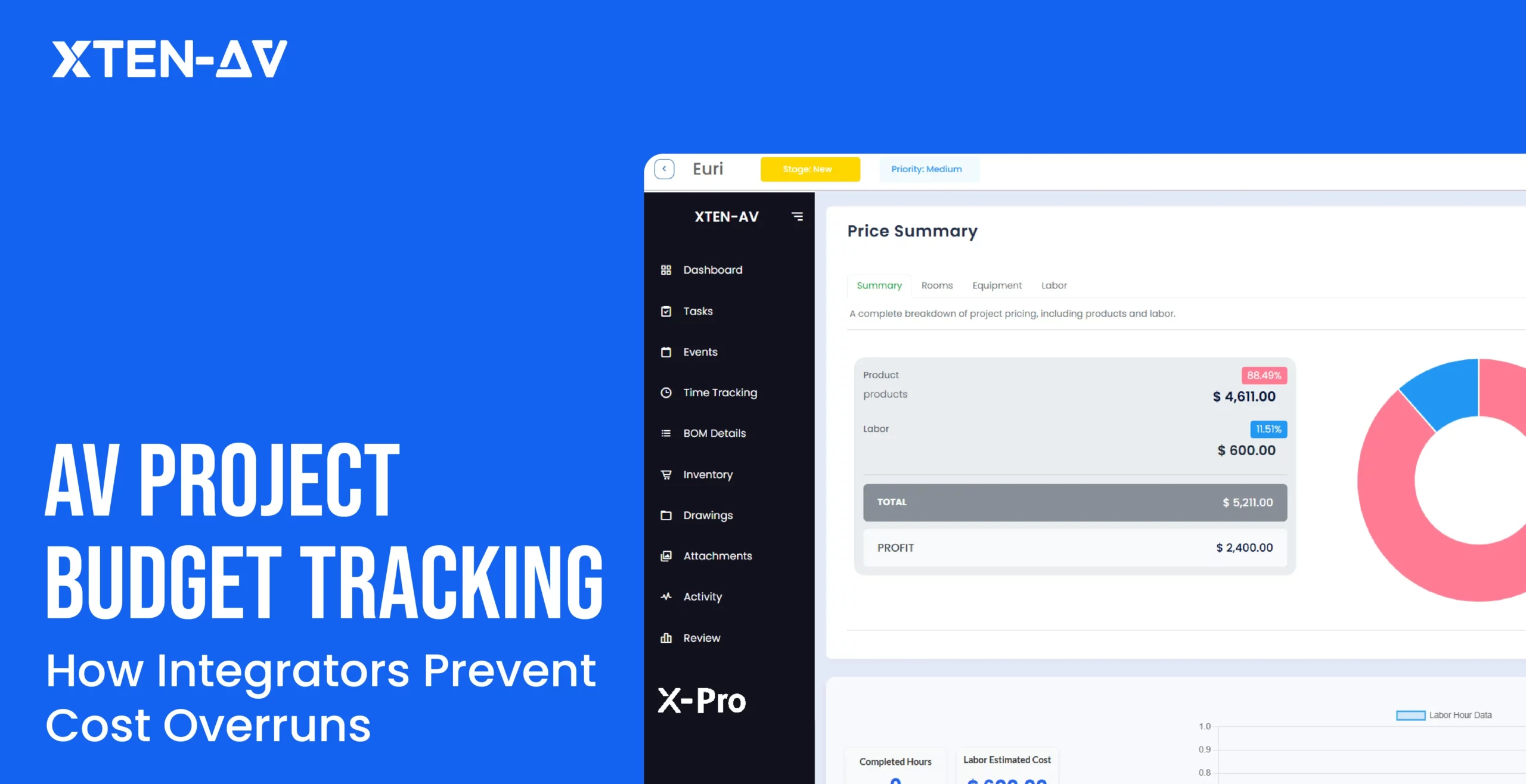


AV project budget tracking is the process of monitoring actual costs against budgeted costs throughout all project stages from design through procurement, installation and commissioning.
The system enables AV integrators to monitor upcoming expenses while managing their personnel costs and safeguarding their project profits throughout the entire project duration.
Here is a scenario every AV integrator knows.
You win a corporate AV upgrade: 12 conference rooms, new displays, a central DSP rack, and full HDBaseT distribution throughout the building. The proposal looks solid. Your estimate is tight. The margin looks healthy.
Three months later you are staring at a final project cost that is 22% over budget. Labor ran long on commissioning. Two change orders slipped through without proper documentation. The procurement team purchased an extra SKU because the BOM was never updated after the design revision.
You are not alone. This is the industry norm, not the exception.
Most AV firms still rely on spreadsheets, email chains, and gut instinct to manage project budget tracking. That gap between what you estimated and what you actually spent is where profitability disappears.
The guide explains project budget tracking methods used in audio-visual projects, identifies the reasons for frequent cost overruns, and describes the features of an integrated budget tracking system.
Key Takeaways
AV projects fail financially because of poor visibility, not poor work. Budget tracking closes that gap.
Budget vs actual project tracking shows you exactly where cost variance is occurring, in real time, by project phase.
Labor cost tracking for AV installations is the single biggest lever for protecting margin.
Change orders, when not formally tracked, are the fastest route to margin erosion on any AV job.
AV-specific project cost tracking software outperforms generic tools because it understands the full AV workflow, from proposal to BOM to commissioning.
XTEN-AV’s X-PRO and X-DOC connect your budget, proposal, procurement, and project management inside one platform.
The all-in-one solution for your Audio Visual (AV) Project Design & Documentation needs
Transform your audio-visual experience with XTEN-AV.
No Credit Card required
What Is AV Project Budget Tracking in an AV Workflow?
Project budget tracking means monitoring every cost against your original estimate, from the first line of a proposal through to the final sign-off on a commissioned system.
In a typical AV project, the workflow moves through these stages:
- Project Proposal: You estimate labor, hardware, and overhead. This is the financial baseline for the entire job.
- Design: Signal flow diagrams (visual maps that show how audio and video signals travel between devices and rooms) are finalized. The BOM gets locked.
- Procurement: Equipment is ordered. Pricing fluctuates. Lead times shift. Substitutions happen.
- Installation: Technicians go on site. Hours are logged. Scope changes arrive unannounced.
- Commissioning: Systems are tested and tuned. Rack elevations (detailed drawings showing physical equipment layout inside AV racks) are verified. Punchlist items add time.
- Billing: Invoices go out. But how accurately do they reflect actual costs?
Budget tracking for projects means connecting all of these stages. It means knowing in real time whether the money you expected to spend matches the money you are actually spending.
An AV project manager lives in this gap. They need cost data by phase, by category, and by team member. Without that visibility, they are making decisions blind.
AV project budget tracking is not just bookkeeping. It is the operational difference between a profitable close and a job that teaches you an expensive lesson about assumptions.
Why Do AV Projects Go Over Budget (5 Common Causes)?
The honest answer: the AV project delivery model is complex, and most firms are not tracking costs at the right level of granularity. The five most common culprits are listed below.
1. Poor Estimate Accuracy
Many AV proposals are built from historical memory, not structured data. If your estimator is pulling labor hours from a similar job done two years ago, they are already working with outdated assumptions. Labor rates change. System complexity grows. Client expectations evolve. Proposals built on anecdotal estimates create budget problems before the project even starts.
2. No Real-Time Cost Visibility
Spreadsheets cannot update themselves. If your project manager has to do cost reconciliation manually each week, it already creates a 7-day delay between actual costs and current financial state of the project.
The data shows a problem only after it has already become costly to the organization.
3. Labor Overruns
Labor typically represents 30-40% of an AV project’s total cost. According to AVIXA’s AV Industry Outlook and Trends Analysis, labor planning and project cost control consistently rank among the top operational challenges for AV integrators globally. When technicians hit site conditions that do not match the drawings: blocked cable paths, late equipment delivery, revised scopes hours spiral fast.
4. Change Orders Without Budget Impact
A client asks for one extra display in a breakout room. The on-site tech says yes. Nobody updates the project budget. That informal “small change” costs three hours of labor and $400 in materials. Multiply this across four or five undocumented additions per project and you can see exactly where the margin goes. Change order budget tracking is one of the most overlooked practices in the industry.
5. Procurement Gaps
Vendor pricing shifts between quote and purchase order. Substitute equipment gets ordered without cross-checking the BOM. Duplicate purchases happen when procurement and design teams are not working from the same live document. AV project cost tracking that does not include procurement is tracking less than half the picture.
Industry Data Point AVIXA’s research consistently identifies project cost management as a top business priority for AV integrators. According to PMI’s Pulse of the Profession, 43% of projects exceed their original budget with an average overrun of 27%. For AV integrators managing multi-phase installations, that gap compounds fast. Firms that implement structured project cost management and dedicated AV project management software see measurable improvement in margin retention across complex installations. |
What to Track in an AV Project Budget (Complete Checklist)?
Good audiovisual project budget tracking covers six core categories. Miss any one of them and your cost picture is incomplete.
Labor Costs:
Track estimated vs actual hours by role: lead technician, apprentice, project engineer, PM. Factor in overtime, drive time, and on-site delays. Labor cost tracking for AV installations should be phase-specific, not just a single project-wide number. Commissioning hours and installation hours behave very differently and need to be tracked separately.
Procurement and Materials:
Every line of the BOM should carry an estimated cost and an actual purchase price. Track the delta. When a 4K display costs $200 more than quoted, that variance should appear immediately in your budget dashboard, not three weeks later when you reconcile invoices.
Overhead and Indirect Costs:
Vehicle costs, tool depreciation, warehousing, and project management overhead all affect final margin. AV project profitability calculations that omit overhead produce a false picture of job health. Include it.
Change Orders:
Every change order approved or informal should be logged with a cost value and linked to the project budget. This includes customer-requested changes and design revisions that originate internally. Change order budget tracking protects margin and creates an accurate record for billing.
Subcontractor Costs:
If you hire subcontractors to perform low-voltage rough-in work, electrical tasks or to provide specialized programming services, all their expenses need to be included in your project budget instead of being documented in an untracked file which remains unaccounted until project completion.
Margin and Profitability:
Your budget tracker should display gross margin on every active project in real time. Not at close-out. If margin is eroding in week three of a six-week installation, you need to know in week three, when you can still do something about it.
The numbers back this up. The Commercial Integrator and NSCA 2023 State of the Industry survey found 57.3% of integrators report hardware margins of 20% or less. Without real-time margin tracking inside your project budget, you won’t know you’ve crossed that line until close-out.
How Do Estimated vs Actual Costs Work in AV Projects?
Budget vs actual project tracking is the core function of any serious AV project cost management system. Here is how it works in practice.
At the proposal stage, every cost category receives a budgeted value. Labor: 120 hours at $85/hour. Display equipment: $14,200. Rack materials: $3,600. These are your estimates, the financial baseline.
As the project runs, actual costs are logged: hours worked, purchase orders processed, change orders approved. Your system compares these against the estimate continuously.
The result is a budget variance report. If your labor estimate was $10,200 and actual logged labor is currently $11,800 with 60% of installation complete, you have a clear problem. You are pacing 55% over on labor with almost half the work still to go.
This is the information that allows a project manager to intervene: reassign tasks, flag scope creep with the client, or renegotiate before the job closes at a loss.
Without budget vs actual project tracking, cost variances are invisible until the invoice goes out. By then, the margin is already gone and there is nothing left to recover.
From the Field AV integrators regularly report that their biggest financial surprises come not from equipment costs that are visible on purchase orders, but from labor and undocumented change orders that were never formally reconciled against the budget. An AV firm noted a 40% labor overrun on a hotel ballroom AV retrofit simply because technicians were logging hours informally and nobody compared them against the estimate until the project closed. By that point, the job had cost the company $18,000 in unrecovered labor. |
How Should You Track the Budget by Project Phase?
AV project cost tracking is most powerful when it is phase-specific. Costs behave differently at each stage. Your tracking approach should reflect that.
Design Phase
In design, the primary cost is engineering time. Track hours against the design fee. Watch for scope creep here, clients frequently request revisions that fall outside the original proposal. Signal flow diagrams and rack elevation drawings take real time. That time carries a real cost. If it is not tracked, it disappears quietly into your overhead.
Procurement Phase
This is where BOM accuracy matters most. Track every purchase order against the corresponding budget line. Flag substitutions immediately, they often introduce cost variance that looks small per item but compounds across a full BOM. Procurement delays that push the install schedule also have indirect labor cost implications. Catch these early.
Installation Phase
Labor hours are the primary variable. Track daily. Compare pacing against the install schedule. If a four-day rough-in runs into day six, you need to know why. Site conditions, missing equipment, access issues, and scope changes all have different fixes, but only if you identify them in time.
Commissioning Phase
Commissioning is where AV projects bleed hours quietly. System testing, DSP programming adjustments, control system commissioning, client walk-throughs, and punchlist work all consume time that was often incompletely scoped at proposal stage. Track commissioning labor separately from installation labor. The two phases have very different cost drivers and very different solutions when they run over.
How Can AV Teams Control Labor Costs More Effectively?
Labor is the hardest AV project cost to control because it is the most variable. Here is what actually makes a difference.
Schedule Against Phase Milestones
Don’t just assign tech to a project. Assign them to a specific task with an hours target. If rack assembly is scoped at 16 hours, that is the benchmark. Milestone tracking catches overruns earlier than watching a project-wide total.
Log Hours Daily, Not Weekly
Weekly logs hide problems for five days. A tech logging 10 hours on a 6-hour task needs attention today, not at the end of the week. Daily logging is the single biggest habit change for labor cost control.
Build a Contingency Buffer
Real job sites are never ideal. Include a 10-15% contingency as its own budget line. Track how fast it depletes. If it is draining in week two of a six-week job, you know to act now.
Connect Scheduling and Budget in One System
When scheduling lives in a spreadsheet and budget lives somewhere else, you cannot see the cost impact of delays in real time. AV project management software that connects both eliminates that blind spot completely.
How Do Change Orders Affect AV Project Budgets?
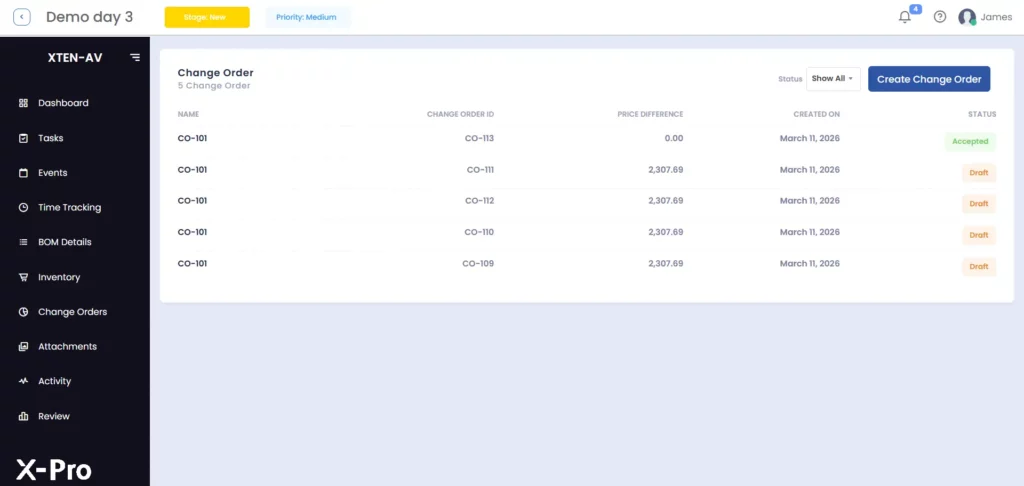
Change orders are normal in AV workflows. Clients change their minds. Site conditions surprise you. Equipment gets discontinued mid-project. The thing that is not normal but happens constantly, is failing to track those changes against the budget.
A Real AV Scenario
An integrator is three weeks into a 40-room hotel AV deployment. The client decides to add bedside tablet control to every room. Legitimate change order: new hardware, additional programming hours, updated documentation.
If this gets verbally agreed on a site visit and never formally logged as a change order budget item, the integrator absorbs the full cost. That is $12,000 in equipment and 35 hours of programming gone.
This is not a hypothetical. It happens on almost every large hospitality AV project that lacks structured change order budget tracking.
How Change Orders Erode Margin
One informal change order will not kill a job. But they stack up. An extra cable run, a different mount, a display upgrade in one room or a scope addition in another.
On a project with 15-20 informal changes, the untracked cost can hit $20,000-$30,000. That is your entire margin on a mid-size commercial integration wiped out by changes that were never logged.
The fix is simple. Log every change, formal or informal, with a cost value. Then invoice for it.
How Can You Track Procurement and Material Spend?
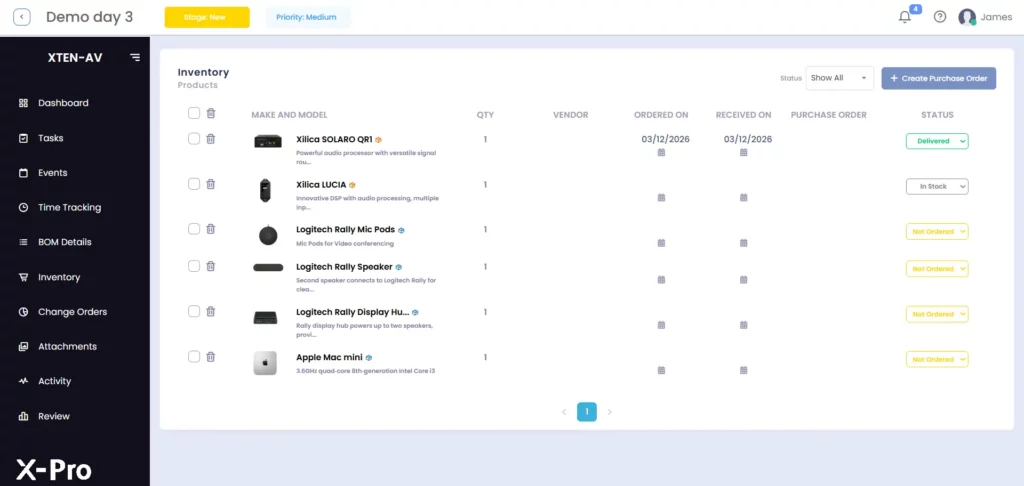
Procurement cost tracking is the most underrated component of AV project budget management. Here is a practical framework.
Keep a Live BOM Tied to the Budget
Your bill of materials should never be a static document. Every design change, substitute product, and pricing revision should update the BOM in real time, and that update should flow directly into your project budget. When design and procurement are working from the same live BOM, duplicate orders and pricing surprises become rare rather than routine.
Track Vendor Pricing Variance
Between the time you quote a project and the time you place purchase orders, prices move. Some items go down. Many go up. Your procurement tracking should capture the variance between quoted price and actual order price for every line item. This data also improves future estimate accuracy, you build a real pricing baseline instead of relying on catalog guesswork.
Monitor Inventory and Avoid Over-Ordering
Over-ordering is a hidden project cost. Equipment sitting in a warehouse is tied-up working capital. Tracking material spent against procurement cycles (the sequence from purchase order to delivery to installation) helps you right-size orders and reduce unnecessary overhead.
Which AV Project Budget Tracking Software Is Best?
Generic project management tools were not designed for AV workflows. Here is how they compare to AV-specific platforms.
Feature | Generic Tools (Monday, Asana, Excel) | AV-Specific Platform (XTEN-AV) |
BOM Integration | ❌ None, manual entry | ✅ Live BOM tied to budget |
Labor Tracking | ⚠️ Generic time logs only | ✅ Phase-specific, role-based |
Change Order Tracking | ❌ No built-in workflow | ✅ Formal CO process with budget link |
Proposal-to-Budget Link | ❌ Separate tools | ✅ Proposal flows directly into project budget |
AV-Specific Phases | ❌ Not applicable | ✅ Design, procurement, install, commissioning |
Real-Time Variance | ⚠️ Manual calculations | ✅ Automatic budget vs actual tracking |
Construction Budget Tracking for AV | ❌ Not supported | ✅ Phase-gated budget by scope |
How Does XTEN-AV Solve AV Project Budget Tracking?
XTEN-AV was built specifically for AV integrators. Every module connects to your project budget, not as an add-on but as a core function.
X-PRO: AV Project Management Software
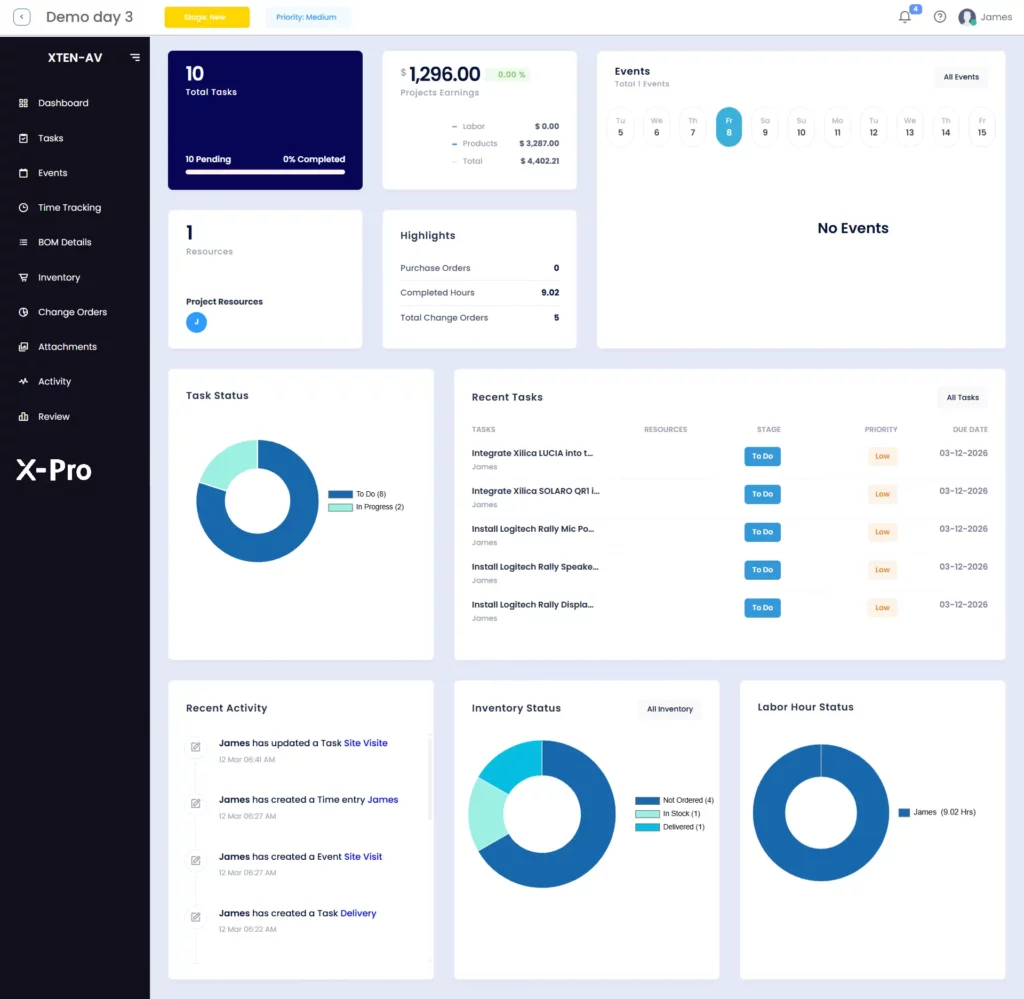
X-PRO is XTEN-AV’s end-to-end AV project management software. The system provides a single platform to manage project budget tracking, labor scheduling, project phase management and real-time cost monitoring.
The project manager can access cost estimates, actual spending, cost category and individual team member work for each project phase, without needing to extract information from three separate systems.
The system establishes a direct connection between your proposal data and X-PRO, which enables automatic budget baseline creation once a job is won.
Learn how AV project management software improves budget tracking with X-PRO.
X-DOC: AV Proposal Software
X-DOC is XTEN-AV’s AV proposal software.The system creates precisely organized proposals that include real-time BOM integration, built-in labor cost assessments and profit margin management features. The X-DOC proposal system directly provides data to the X-PRO project budgeting system which results in your estimate maintaining an identical value to your budget throughout various stages of project development.
The two systems X-DOC and X-PRO work together to process change order updates.
Learn how AV proposal software X-DOC, helps you win more deals by creating proposals faster and better.
Why Does It Matters for Integrators? Most AV integrators use between 4 and 7 different tools to manage a single project: a spreadsheet for the BOM, a separate estimating tool, a project management platform, an email thread for change orders, and a CRM for the proposal. None of these tools talk to each other. XTEN-AV collapses that stack into one connected platform designed around the AV workflow. The result is not just efficiency, it is margin recovery. |
The all-in-one solution for your AV needs
Transform your audio-visual experience with XTEN-AV.
No Credit Card required
Audio Visual System Design Mastery + Winning Proposals = 10x Productivity!
- ✔ Automatic Cable Labeling & Styling
- ✔100+ Free Proposal Templates
- ✔ Upload & Create Floor Plans
- ✔1.5M Products from 5200 Brands
- ✔ AI-powered ‘Search Sense'
- ✔Legally Binding Digital Signatures

Conclusion
Project budget tracking is not a finance department concern. It is a core operational function for any AV integration firm that wants to protect margin, scale efficiently, and win repeat business.
Every dollar lost to untracked labor, informal change orders, and procurement surprises is a dollar that came directly from your profit. The problem is not that AV projects are too complex to track. The problem is that most firms are using tools that were never designed for AV project cost control.
The integrators who consistently close jobs at target margin are not necessarily better at AV. They are better at connecting their proposal, their budget, their BOM, and their change order process into a single, visible system.
XTEN-AV was built to make that connection possible for every AV integrator, regardless of team size or project complexity.
Run your last AV project through XTEN-AV and uncover hidden cost overruns. Start your free trial of XTEN-AV and connect your proposals, BOM, project phases, and budget tracking in one platform built for AV integrators.
FAQ's
The project budget tracking process requires real-time monitoring of all project expenses which include labor costs, material expenses, change order costs, subcontractor fees and their comparison to the initial project budget estimate.
The system provides AV project managers with complete access to track cost discrepancies during all project stages which include the proposal and commissioning phase.
Because most integrators use disconnected tools. Spreadsheets, email threads, and separate estimating software cannot talk to each other. That makes real-time cost visibility nearly impossible. Without dedicated AV project cost tracking software, variances stay hidden until the job closes.
The system provides real-time comparison between your initial cost estimate and your current spending for each project phase and expense category.
The system detects both labor cost overruns and procurement cost increases at an early stage, which enables you to implement corrective measures before these issues lead to total margin loss.
Every change, formal or informal, gets logged with a labor cost, material cost, and a link to the project budget. The system establishes an audit trail which enables precise billing procedures while protecting your profit margin from hidden expenses.
AV-specific platforms like XTEN-AV X-PRO outperform generic tools. Tools like Monday or Asana lack BOM integration, AV phase tracking, and a direct proposal-to-budget connection all of which are essential for real-time AV project cost control.
Log hours daily by role and phase. Compare actual hours against phase milestones, not just project totals. Use AV project management software that connects scheduling to your budget so labor cost impact is visible the same day, not at close-out.
Labor by role and phase, full BOM with actual purchase prices, overhead, subcontractor fees, all change orders, and real-time margin tracking. Missing even one of these creates a blind spot that compounds into a cost overrun by the time you notice it.
Standard accounting records costs after the fact. AV project profitability tracking monitors costs as they happen against estimates, by phase. The goal is to catch variance while you can still act on it, not produce a report on what went wrong.
Explore more by topic

AV Design Mastery + Winning Proposals = 10x Productivity!
- Automatic Cable Labeling & Styling
- 100+ Free Proposal Templates
- Upload & Create Floor Plans
- 1.5M Products from 5200 Brands
- AI-powered ‘Search Sense'
- Legally Binding Digital Signatures
No Credit Card Required
Related Blogs
-

- Posted by Sahil Dhingra

Audio Visual A Complete Guide to Commercial AV Companies: What to Expect,...
-
- Posted by Sahil Dhingra
Audio Visual 6 Best Field Service Management Software for Audio Visual (AV)...
-
- Posted by Sahil Dhingra
Audio Visual What Is an AV Connection Check and Why Does It...
