







Small Audio Visual (AV) Rack Design Guide for Limited Spaces

Sahil Dhingra
Published 01 June 2026
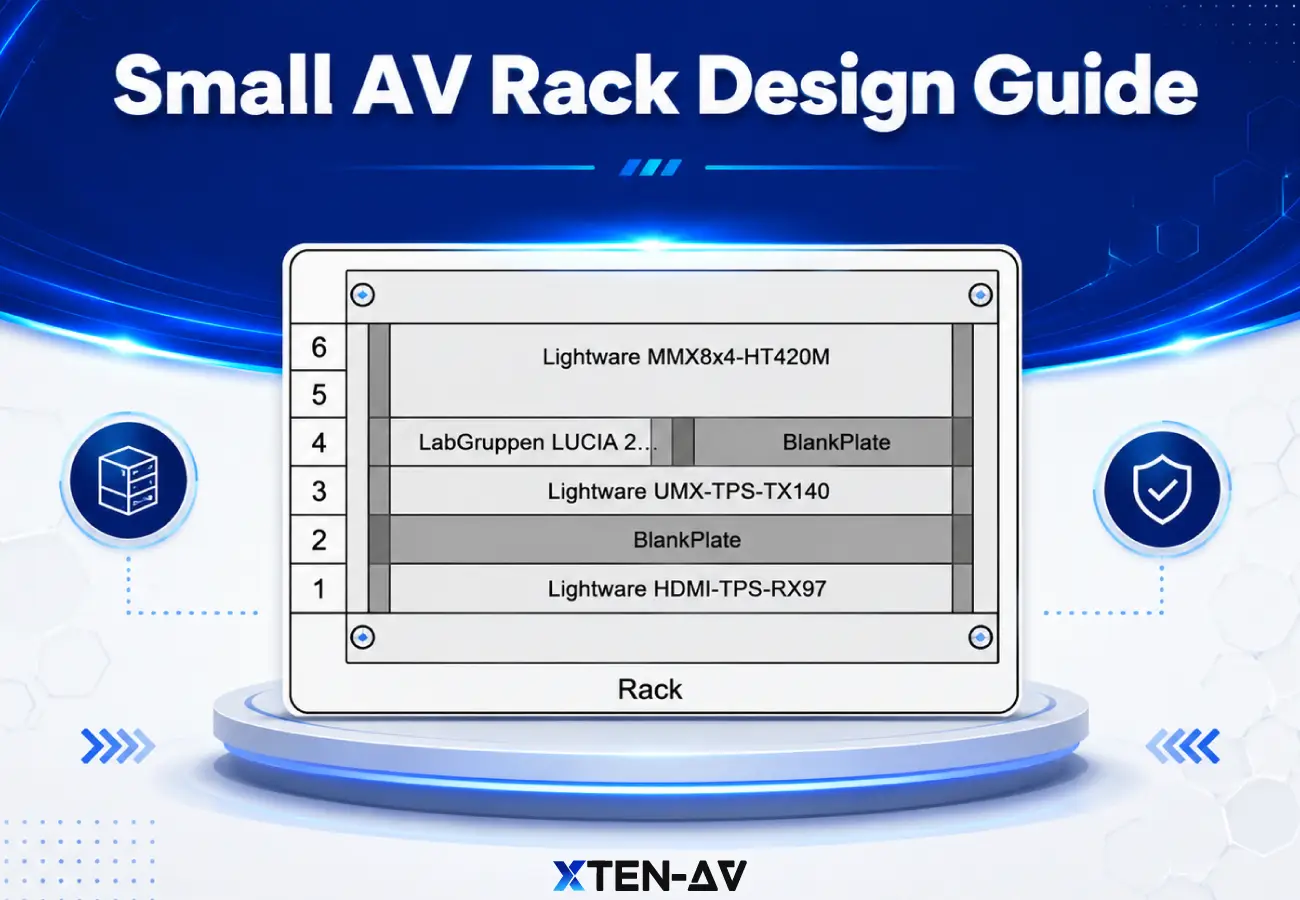


A small AV rack may look simple, but it serves as the backbone of an AV system. In huddle rooms, security system, home theatres, classrooms and retail setups, compact AV racks typically range from 6U to 24U and bring together all significant components.
However, designing a small AV rack is not always easy. Even a mini-AV rack still has to include network switches, DSPs, codecs, amplifiers, media players, control processors, PDUs, UPS units and dense cables. Poor layout can cause problems like:
Limited rack space
cable congestion
restricted airflow
reduced service access,
This can lead to issues like overheating, cable clutter, hard maintenance and no room for future upgrades.
To overcome these challenges, AV integrators need smarter ways to plan where to put equipment, how to route cables, ventilation, power distribution and service access before installation starts. In this regard, X-Draw’s rack elevation diagram tool helps teams’ design (Audio visual) AV rack layouts faster, reduce manual guesswork and create cleaner, service-ready AV rack designs from the start.
Key Takeaways
A small AV rack is an ideal choice for compact spaces like huddle rooms, classrooms, retail, and small conference rooms.
Always consider equipment, airflow, cable routing, and future expansion space before deciding the rack size.
It is crucial to follow a structured placement strategy, heavy equipment at the bottom, heat generating devices should be placed properly for better airflow and frequently accessed devices need to be placed at reachable heights.
Small AV racks are flexible in where and how they’re used, whereas wall mount AV racks are fixed to walls and thus, require careful planning due to access limitations.
Avoid common mistakes like overloading the rack, ignoring service access, and stacking heat-heavy devices together.
X-Draw helps automate rack layouts, ensure accuracy, and speed up the design process.
The all-in-one solution for your Audio Visual (AV) Project Design & Documentation needs
Transform your audio-visual experience with XTEN-AV.
No Credit Card required
What Is a Small Audio Visual (AV) Rack?
Small AV racks, including wall mounted, cabinet and shallow racks offer compact and organized storage to securely keep AV equipment in space constraint environments. Small AV racks are available in different rack unit sizes. Rack unit (U) defines the height of the cabinet, where 1U=1.75 inches. But it is crucial to not just think about numbers, but how many devices are needed now and in the future.
6U: This rack size supports a simple setup with switches, routers and essential devices.
9U: This rack size is space efficient for basic network switches, network patch panels and small UPI units, making it an apt choice for small offices.
12U: This is another popular size for SMBs that provide enough space for server, switches and networking gear. It even supports better airflow than small AV racks.
15U: A balanced choice for growing setups, offering AV professionals increased capacity for integrated home systems.
18U: It can accommodate multiple servers, switches and UPS systems, offering hassle-free cable management and space for future upgrades.
24U: It can include multiple servers, power units and networking devices, ensuring proper airflow, structured cable management and scalability is easy.
This Audio visual (AV) rack unit guide helps AV professionals plan AV rack that ensures better equipment layout, cooling efficiency, and long-term scalability.
Where Are Small AV Racks Used?
Small AV racks are widely preferred in environments where big racks are not practically possible, such as huddle rooms, classrooms, small conference rooms, retail signage areas, home theaters, security systems, and control closets. To better understand usage, these setups are matched with specific rack units (U) sizes:
Huddle rooms: The usual suggested rack size is 6U–12U, supporting compact devices like codecs, switches, and processors.
Classroom: The typical rack size is 9U–18U, accommodating amplifier, DSP, receiver, and network switches.
Retail signage: It usually falls within the 6U–12U range and includes media players, switches, and power units.
Home theatres: Home theatre planners commonly use 12U–24U rack sizes, accommodating receivers, amplifiers, and streaming devices.
Security systems: It typically uses 12U–24U rack sizes, which is well-suited for equipment like NVRs, PoE switches, and UPS systems.
Small conference rooms: It generally uses 12U–24U rack sizes, supporting DSPs, codecs, amplifiers, and switches.
How Do You Choose the Right Small AV Rack Size?
When it comes to choosing a small AV rack, it is important to check more than just the height.
Check device depth: Amplifiers, DSPs, UPS units and network switches should fit without blocking rear cable access.
Add shelves: If you need to place non rack mountable devices such as media players, control hubs or small receivers, add shelves to it.
Add PDU/UPS space: Reserve space for PDU, UPS, patch panel and cable management accessories mainly because small racks often become crowded.
Add cable bend space: Leave enough space at the rear so HDMI, speaker wire and control cable are not tightly bent.
Add ventilation: Plan ventilation with vented panels for amplifiers or heat-generating equipment.
Do not fill the rack completely: keep spare space for troubleshooting and future upgrades.
Small AV Rack Layout Examples by Room Type
A small AV rack layout needs to be planned strategically to maximize space, manage heat and ensure serviceability. Below, the layout is defined broadly through room type, rack size and equipment list.
Huddle Room: It has a compact AV setup and typically falls in the 6U-12U range, making it a smart choice for display connection, wireless presentation device, DSP/PDU and network switch. The rack should not be filled completely because even small huddle rooms need spare space for power adapters, cable routing and future device upgrades.
Small Conference Room: This room type generally falls in the 12U-24U range which can support a DSP, amplifier, control processor, network switch, video conferencing codec, wireless presentation system, PDU or UPS. It should account for proper heat generating devices with proper ventilation around them.
Classroom: Compact AV racks for the classroom usually come in the 9U-18U rack size, including equipment like DSP, control processor, network switch, video codec, wireless mic system and PDU. Prioritize ventilation for amps and leave some space for future lecture capture gear and projector interfaces.
Retail Signage: This kind of setup typically uses 6U–12U wall-mount racks for media players, network switches, PoE injectors, and PDU powering digital displays. Focus on compact design with strong cable management and cooling to handle 24/7 operation.
Security System: It commonly falls in the 12U-24U rack size range, supporting POE switches, UPS, access controllers, NVR/DVR. Additionally, lockable doors, environmental monitoring for humidity and vented panels are key features that ensure uptime.
What Should Go Where in a Small AV Rack?
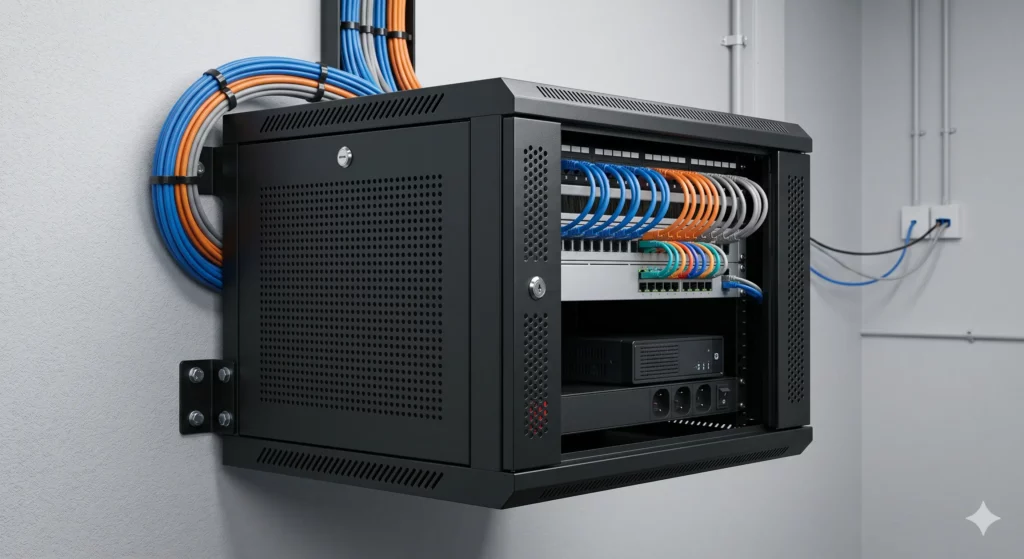
A well-organized small AV rack should follow a few key principles; heavy equipment should be placed at the bottom to ensure stability. Heat generating devices should be kept with sufficient airflow clearance. Also, devices that need to be serviced on a frequent basis should be placed at easy-to-reach heights and power devices should be placed where it’s safe and easy to access, with clean cable routing.
A structured approach to arrange the rack is from top to bottom:
- At the top, keep the patch panel or network switch for easier cable entry.
- The upper middle section should include devices like the control processor or DSP so that any kind of adjustment or servicing can be done easily.
- The middle section is best suited for equipment like receiver or matrix switcher, where signal routing is central.
- The lower middle should accommodate the amplifier and at the bottom, place the UPS or power conditioner as these are heavier and help anchor the rack for better stability.
What Are the Biggest Small AV Rack Design Mistakes?
Small AV rack design issues occur when AV designers prioritize short-term space constraints over long-term usability, serviceability, and system growth. Steer clear of these AV rack design mistakes for better performance:
Choosing the smallest rack to save space: Designing strictly by keeping in consideration only current equipment leads to overcrowding and poor serviceability.
No future expansion room: Failing to leave spare spacing makes upgrades difficult and often forces partial rebuilds later.
Too much cable slack: unmanaged cable slack is the most common AV rack cable management mistake that creates clutter, restricts airflow, and creates troubleshooting issues.
No service access: Installing racks in tight enclosures without rear or side access paves the way for troublesome maintenance
Heat-heavy equipment stacked together: Placing amplifiers, switches and processors in the same area increases thermal buildup.
UPS placed too high in the rack: Heavy UPS units installed at upper positions affect stability and increase problems during servicing.
No rack elevation before installation: Skipping proper floor clearance or mounting height can lead to moisture risk, poor airflow, and difficult cable entry.
Small AV Rack vs Wall Mount AV Rack
When planning an AV system, small AV rack and wall mount AV rack are preferred but they are not the same thing. A small AV rack refers to the overall compact size of the rack, whereas a wall mount AV rack refers particularly to how the rack is installed.
Looking at the difference closely:
- For placement, a small AV rack can be used in cabinets, closets, walls and floors. And, a wall mount AV rack is limited to wall installation.
- If you consider the best use case, small AV racks are perfect for limited space systems, while wall mount is best suited in places where floor space is constrained.
- Service access in small AV racks depends on where they are placed. However, wall mount racks need careful planning accessibility for maintenance and cable management.
Talking about equipment depth, small AV racks give more flexibility in the types of equipment they can include, while wall mount Audio visual (AV) rack planning should be done carefully due to its mounting constraints.
How Do You Manage Heat in a Small AV Rack?
Managing heat in a small AV rack is a key part of AV rack cooling guide that focuses on proper airflow and effective cooling strategies. AV teams must maintain consistent airflow throughout the rack. Stacking heat-generating devices like amplifiers and switches together should be avoided to eradicate localized hot spots.
Proper spacing should be there between components for ventilation. Furthermore, small business AV teams should focus on using vented panels or rack fans in enclosed setups for effective airflow. Proper cable management is also crucial as poorly routed cables can obstruct airflow.
How Should Cable Management Work in a Small AV Rack?
Small AV racks require short, clearly labelled and organized cable paths, as excess cable easily clutters and reduces airflow. To achieve this, cable management should follow a few key practices.
Use short, direct cable paths in order to keep the rack clean and efficient. Label both ends of every cable for easy identification during maintenance. Avoid tight bends to prevent any kind of cable damage and signal issues. Use patch panels wherever required to maintain a structured and scalable setup. AV teams have to make sure that service loops are easy to get to but they should not be in excessive amounts. At last, write down all final connections as this will make the future upgrades smoother and troubleshooting will be easy.
How XTEN-AV Helps Design Small Audio Visual (AV) Racks Layouts?
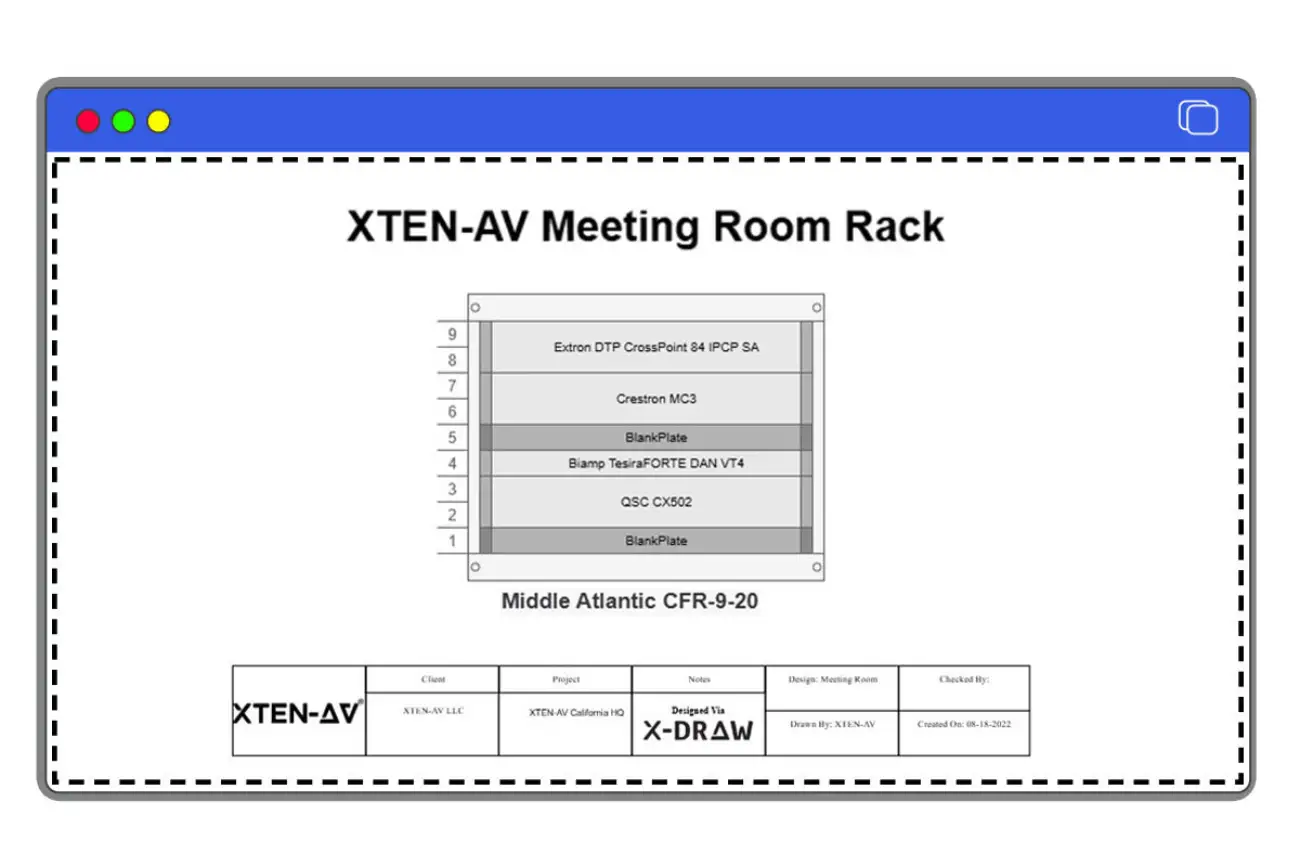
XTEN-AV helps design small AV racks through its Audio visual (AV) rack design software i.e. X-Draw, combining automation, accuracy and simplifying documentation.
Create rack elevation: X-draw simply converts your Bill of Material (BOM) into structured and accurate rack elevation drawings. This eradicates the problem of manually drawing blocks and redrawing layouts.
Checks heat and ventilation into rack designs: X-Draw considers thermal output and ventilation requirements while automating placement. This is a crucial factor in small AV rack design as poor airflow can lead to overheating.
Automates cable labelling: It provides automated labeling that enables you to schedule and manage cables through automation.
Large product library for better AV design: Designers are able to choose from a library of 1.5 million products from 5200 leading brands, creating perfect audiovisual equipment layouts with ease.
Build compact rack layout with AV templates: With pre-built templates, creation of rack layouts can be done in minutes. This is said to be useful for repeatable small rack setups.
The all-in-one solution for your AV needs
Transform your audio-visual experience with XTEN-AV.
No Credit Card required
Audio Visual System Design Mastery + Winning Proposals = 10x Productivity!
- ✔ Automatic Cable Labeling & Styling
- ✔100+ Free Proposal Templates
- ✔ Upload & Create Floor Plans
- ✔1.5M Products from 5200 Brands
- ✔ AI-powered ‘Search Sense'
- ✔Legally Binding Digital Signatures

Conclusion
Poor alignment between rack layout and labeling leads to rework and installation delays. There is no denying the fact that every decision, from rack size to device placement and AV rack depth and height directly impacts performance, cooling, and serviceability. A well-organized small AV rack cabinet ensures that even dense setups remain organized, accessible, and scalable over time. By focusing on structured layouts, proper airflow, and smart cable management and using tools like X-Draw by XTEN-AV, AV professionals can turn even the smallest racks into high-performing system, which is ready for future upgrades.
Tired of rework on every AV rack project? Use X-Draw to create accurate and installation-ready AV rack design.
FAQ's
A small AV rack is a compact equipment enclosure (typically 6U–24U) used to accommodate audiovisual components like receivers, switches, processors, and power units in space-constrained environments.
Rack size should be chosen after considering current equipment and future expansion. It is said that most setups usually require extra space with common sizes ranging from 6U for simple and small setups to 24U for bigger and complex systems.
A 12U AV rack is usually sufficient for small conference rooms, supporting equipment like DSPs, amplifiers, switches, and control systems, with limited room for future upgrades.
Yes, wall mount racks are suitable for compact AV systems in huddle rooms. However, weight limits, ventilation and service access should be considered during installation.
You need to maintain front-to-back airflow, avoid stacking all heat heavy devices together. Vented panels or fans can also be needed for proper spacing and cable management to avoid any blockage.
Some of the equipment includes DSPs, AV switches, small network switches, control processors, media players, amplifiers and power distribution units.
Use short cable runs, label both ends, avoid tight bends, control service loops, and use patch panels where needed. Keep cables organized to maintain airflow and smoothen maintenance.
Yes, XTEN-AV helps design small AV rack layouts using X-DRAW, which enables rack elevation design, equipment placement, and accurate system schematics for AV projects.
Explore more by topic

AV Design Mastery + Winning Proposals = 10x Productivity!
- Automatic Cable Labeling & Styling
- 100+ Free Proposal Templates
- Upload & Create Floor Plans
- 1.5M Products from 5200 Brands
- AI-powered ‘Search Sense'
- Legally Binding Digital Signatures
No Credit Card Required
Related Blogs
-

- Posted by Sahil Dhingra

Audio Visual A Complete Guide to Commercial AV Companies: What to Expect,...

-
- Posted by Sahil Dhingra
Audio Visual 6 Best Field Service Management Software for Audio Visual (AV)...
-
- Posted by Sahil Dhingra
Audio Visual What Is an AV Connection Check and Why Does It...
