5 Best AV Single-Line Diagram Software for AV System Design!

Sahil Dhingra
Published 27 March 2026


AV system design requires structured documentation, but many integrators still rely on generic CAD tools, which are not specially built for the project workflows. These tools don’t include drawing symbols, signal flow logic and clear device connections, which are needed for creating accurate schematic layouts.
This often leads to spending extra time on revising drawings and updating project files. It reduces focus on efficient workflows and smooth project execution.
In this blog, we will discover the 5 best single-line diagram software which streamlines design, improves documentation accuracy and reduces manual drafting effort.
Key Takeaways
The top AV single-line diagram software for system design includes X-DRAW by XTEN-AV, D-Tools, ConnectCAD, Microsoft Visio and AVSnap.
X-DRAW by XTEN-AV enables integrators to create structured AV single-line diagrams, signal paths and wiring documentation with automated cable labeling.
D-Tools supports equipment databases, proposals and project documentation, while diagrams are usually created using external tools.
ConnectCAD allows creating detailed connectivity diagrams, rack elevations and system schematics within the Vectorworks ecosystem.
Microsoft Visio enables teams to build signal flow and connection diagrams using customizable shapes.
AVSnap provides a free option for equipment layouts, rack diagrams and AV connection mapping.
What Is an AV Single Line Diagram? How It Differs from Signal Flow and AV Schematics
An AV single-line diagram is a simplified system representation used in design to show devices and their primary signal paths, defining overall system connectivity. Schematics provide detailed wiring, while the signal flow diagrams illustrate how audio, video and control signals move through the system. This makes it easier for integrators to understand the overall structure before installation begins.
By providing a system-level overview, it enables teams to understand design intent before deployment. This reduces coordination gaps and rework. It also defines how the AV devices connect and function, improving alignment across design, engineering and project teams.
Looking to understand system layouts and signal flow for AV projects? Discover how devices interact through schematics and drawings. Explore our detailed roadmap for implementing single-line diagrams with confidence.
The all-in-one solution for your Security System Design & Installation needs
Transform your audio-visual experience with XTEN-AV.
No Credit Card required
How to Choose the Right AV Single-Line Diagram Software
Selecting the right AV SLD drawing software is an essential step for producing structured technical documentation. These schematic diagrams simplify understanding of the overall configuration setup and show how audio-visual components work within the setup. A capable platform allows installers to represent device connectivity, signal paths and overall system architecture in a logical layout without relying on generic drawing tools. This approach reduces the time spent on manual diagram creation.
The all-in-one solution for your AV needs
Transform your audio-visual experience with XTEN-AV.
No Credit Card required
Here are the key capabilities mentioned below, which AV teams must evaluate:
AV Equipment Symbols and Manufacturer Libraries
Always prefer a professional diagramming tool with AV symbol library support. This provides standardized CAD blocks for DSPs, switches, displays, microphones, amplifiers and control systems. By using real equipment symbols, teams can represent system designs more clearly and follow the industry-level AVIXA guidelines.
Clear Audio, Video and Control Signal Representation
Choose a reliable drawing software which lets you clearly map how audio, video and control signals move between the various sources, devices and endpoints. Accurate signal mapping allows AV engineers to easily understand system operation clearly before progressing to detailed wiring connections.
Support for Multiple AV System Diagrams
A modern design platform must support multiple AV system diagrams, which include single-line, schematic and signal flow diagrams. This enables integrators to document overall system layouts and detailed signal paths. Learn more about recommended diagramming software in our guide:
Top Free 5 Signal Flow Diagram Software for Audio Designers.
Precise Signal Flow Mapping
The best AV single-line diagramming tool should clearly define signal paths, port connections and wiring logic properly. With accurate mapping, it improves troubleshooting efficiency and reduces the chances of installation errors during system commissioning and on-site deployment.
Workflow Coordination and Project Tracking
An advanced platform needs to support coordination across every stage of the system deployment. It must enable equipment tracking, progress monitoring and real-time project updates. This improves team alignment, reduces errors and ensures accurate project execution.
Best Drawing Software for AV Single Line Diagrams
Many AV single line diagram software platforms exist, but only a few provide a clear and intuitive way to represent system layouts and drawing schematics. The leading solution should allow integrators to define the overall system structure, follow signal flow and organize documentation efficiently. This supports smooth project delivery.
Here are the 5 best system design tools for creating, visualizing and documenting professional audio-visual workflows efficiently.
X-Draw by XTEN-AV
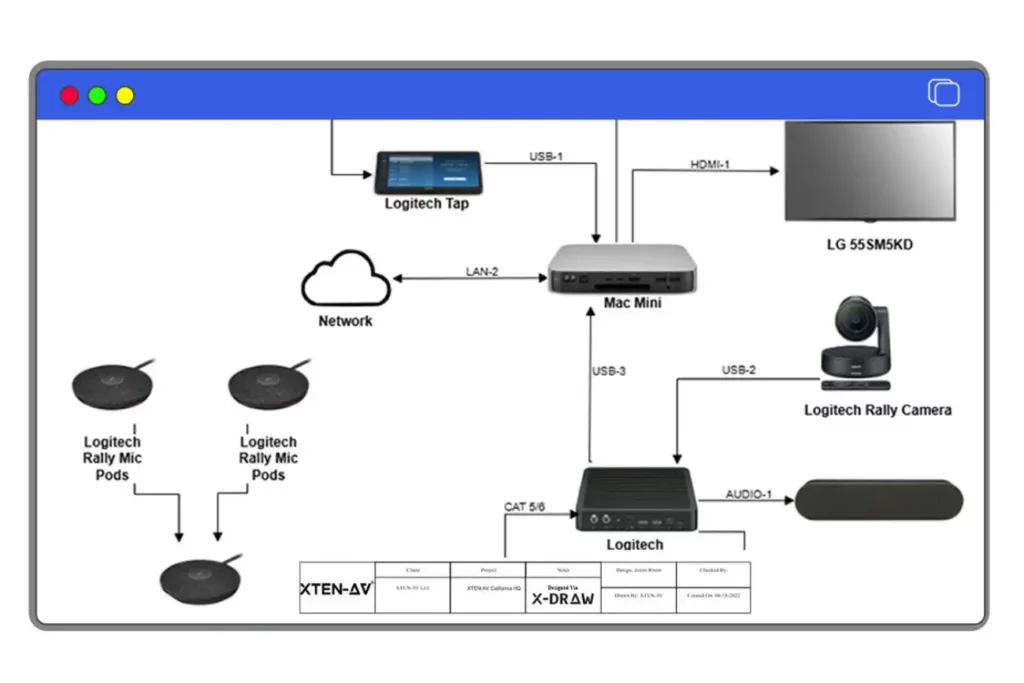
X-DRAW is a cloud-based av cad design software built to eliminate disconnected workflows between design, BOM creation and documentation. It is built for integrators who need accurate single-line diagrams aligned with real project data. Unlike generic CAD tools, the platform connects design directly with a 1.6M + AV equipment library, ensuring diagrams use real manufacturer data rather than generic symbols.
Key Features of X-DRAW
Pre-Built AV Room Templates for Faster System Diagrams
X-Draw offers ready-to-use pre-designed templates which are specially designed for various room types such as meeting spaces, conference areas, classrooms, etc. These pre-built layouts streamline SLD creation and bring uniformity across system documentation.
Automatic Cable Labeling for Clear AV Documentation
It offers automated generation of cable labels and schedules, which keep signal routes organized and easy to interpret. This approach allows AV installation teams to clearly understand the system layout during the deployment stage.
Rack Layouts with Automated Equipment Dimensions
Determine the size and dimensions of the AV equipment rack. It automatically organizes rack height, equipment placement and spacing based on system signal flow. This helps streamline planning and improve overall installation accuracy.
Port-Based Signal Flow Mapping
Device blocks include clearly defined inputs and outputs. This simplifies mapping signal paths between sources, processors, switching hardware, amplifiers and displays within well-structured single-line AV schematics.
AI-Powered Device Search for Smarter AV System Design
Finding compatible equipment can slow down system planning. AI-driven Search Sense identifies suitable devices instantly. It allows designers to build accurate system diagrams without spending time reviewing multiple specification sheets.
Rack Design with Built-In Heat and Ventilation Checks
X-Draw evaluates equipment heat and ventilation during rack planning. It enables early identification of thermal issues to avoid overheating in high-density rack setups and large-scale system deployments.
Pros
- Works efficiently across both small setups and large multi-room installations.
- Supports importing of existing AV CAD layouts (DWG/DXF) to align with room and system designs seamlessly.
- Creates deployment-ready diagrams for field execution.
- X-Draw ensures clear signal routing and device connections for reliable on-site installations.
- Enables real-time collaboration, keeping designers, integrators and AV project teams aligned.
Cons
New users may require a short learning period to get familiar with X-DRAW.
Integration
X-Draw is a part of the XTEN-AV ecosystem. It integrates with tools like HubSpot, QuickBooks, Salesforce, Zoho and Microsoft Dynamics. This connects diagram creation with project and AV client workflows.
User review
Users appreciate X-DRAW for streamlining AV design workflows. Also allows teams to create structured diagrams with less manual dependency.
Why do AV professionals prefer this platform?
When schematics and BOMs are managed separately, AV project workflows become inefficient. Tools like Visio,D-Tools often require manual updates, which impact signal flow clarity and documentation accuracy.
To address this challenge, XTEN-AV is the preferred choice as an AV diagram software for integrators. It combines system design, equipment data and documentation in one centralized workflow. This enables faster execution and more accurate deliverables.
XTEN-AV Pricing Plans
- Free Trial
- XTEN-AV offers 15 days of free trial.
- Basic Plan
- $104.25 per user/month (billed annually)
- Business Plan
- $111.75 per user/month (billed annually)
- Enterprise Plan
- $126.75 per user/month (billed annually)
- Project Management Plan (X-PRO Add-On)
- $11.25 per user/month (billed annually, optional)
D-Tools
D-Tools is a modern AV business management platform used for engineering documentation and project-related workflows. This platform offers D-Tools SI for on-premise infrastructure and D-Tools Cloud for cloud-based workflow. It helps designers to create organized signal flow and engineering diagrams. These schematic drawings describe how sources, processors, switching hardware, amplifiers and displays interact within the overall system architecture.
Key Features of D-Tools
AV Signal Flow Documentation
Create system diagrams which show device connections and signal routing across equipment.
Integrated Equipment Database
Access an extensive library of manufacturer products to build system diagrams and documentation.
System Documentation Generator
Automates the process of creating AV wiring diagrams, equipment lists and cable labeling details.
Proposal and Project Workflow
Users can align design outputs with proposals and project management tools.
Pros
- Strong capabilities for the system documentation.
- Extensive product database for design workflows.
- Supports installation documentation alongside AV diagrams.
Cons
- AV Interface can feel complex for new users.
- Set up and configuration may require proper training.
Integration
D-Tools can easily integrate with CRM tools like Salesforce and accounting software such as QuickBooks to support AV business operations.
User review
Users appreciate D-Tools for its in-depth installation documentation. However, some users mention that it takes time to become familiar with the platform.
Looking for similar AV system design platforms? Explore our D-Tools Alternatives guide.
Managing complex AV projects can be challenging when project records and design data are not well-connected. This makes it difficult to track updates and maintain consistency across various project stages.
Solutions such as XTEN-AV address this by improving how system details flow across teams. D-Tools is considered as an AV system design software for its ability to keep project data organized and support proper design workflows.
D-Tools Pricing Plans
- Free Trial / Demo
- D-Tools provides a free demo, while trial options depend on the selected plan.
- D-Tools Cloud – Solo
- Plan starts from $99/user/month (Billed monthly or annually)
- D-Tools Cloud – Duo
- Plan Starts at $179/user/month (more users & features)
- D-Tools Cloud – Team & Enterprise
- Custom pricing based on team size.
- System Integrator (D-Tools SI)
- From $1,800/user/year (on-premise, quote required)
ConnectCAD
ConnectCad is an AV connectivity design solution developed by Vectorworks. It is specially designed to help integrators build organized single-line connectivity drawings as well as organized signal flow diagrams. It focuses on defining device inputs, outputs, and signal routes rather than on visual representation alone. Through this approach, it facilitates designers to manage system topology with greater accuracy.
Key Features of ConnectCAD
Connectivity-Based Diagram Design
Users can create signal flow diagrams by just defining device inputs, outputs and their related circuit connections.
Automated AV Documentation Reports
The platform supports the facility to generate connection reports and system documentation directly from diagrams.
Cable and Circuit Management
ConnectCAD can track cable paths and circuit connections across various AV systems.
Rack Layout
It links single-line diagrams with rack layouts to visualize equipment placement and system structure.
Pros
- It offers strong connectivity mapping for complex systems.
- Useful for large-scale system design projects.
- Supports structured AV system documentation.
Cons
- Only suitable for users who are familiar with the Vectorworks ecosystem.
- Pricing of ConnectCAD may be higher for smaller teams.
Integration
ConnectCad works well within the Vectorworks ecosystem only.
User review
Users highlight its strong capability in mapping complex AV connections, but suggest that it works best for teams already using Vectorworks.
Visualizing signal paths in complex systems can be challenging in generic CAD environments. This often impacts system clarity and design accuracy.
Schematic software such as ConnectCAD and XTEN-AV enhances how connections are defined within system architecture. As an AV line schematic software, they are preferred for creating structured diagrams within CAD workflows.
ConnectCAD Pricing Plans
- Free Trial
- Connect CAD offers a free trial of 7 days
- Spotlight + ConnectCAD
- €150 per month (billed annually €1,800).
- Design Suite + ConnectCAD
- €190 per month (billed annually €2,280).
- Perpetual License (One-time option)
- Approximately $3,900 with Spotlight or $4,900 with Design Suite, depending on the package.
VISIO
Visio is a widely used diagramming tool developed by Microsoft. It is used for creating flowcharts, engineering diagrams and networking layouts. AV system Integrators use this platform to develop equipment connection diagrams when dedicated design tools are not available. By using customizable shapes and templates, teams can represent devices within an organized layout. These devices include sources, processors, switching hardware and displays.
Key Features of Visio
Custom Diagram Templates
Allows users to create templates for AV signal flow and connectivity diagrams.
Shape Libraries
Visio has a wide range of customizable shapes which can be used to represent equipment. within system layouts.
Microsoft Ecosystem Integration
Works seamlessly with Microsoft 365 applications for simplifying file sharing and documentation management.
Cloud Collaboration
Allows teams to access, review and edit diagrams through cloud-based collaboration.
Pros
- Visio offers a user-friendly interface for users looking for diagramming solutions.
- Enables easy creation of simplified signal flow diagrams.
- Flexible diagram Customization Options.
- Easily gets integrated with Microsoft productivity tools.
Cons
- Not specifically designed for AV workflows
Integration
Visio works smoothly across the Microsoft ecosystem with seamless integration support across teams, Excel, Power BI, Power Automate, PowerPoint and OneDrive.
User review
Visio users value the flexibility to create diagrams. But also mention that they often need to rely on manual methods to create device symbols and signal paths.
Some AV projects required quick diagram creation without using specialized tools. In such scenarios, flexibility becomes an important key aspect.
Software such as Microsoft Visio and XTEN-AV support schematic design in different ways. Visio can be considered as an AV schematic diagramming software for building custom diagrams. Although it requires additional effort to align perfectly with AV workflows. Checkout more detailed on visio alternative
Microsoft Visio Pricing Plans
- Free Trial
- Visio offers a 30-day free trial.
- Visio Plan 1
- The plan starts at $5 per user/month (billed annually)
- Offers Web-based diagramming capabilities.
- Visio Plan 2
- The plan starts at $15 per user/month (billed annually)
- Includes both desktop and web application support.
- One-Time Purchase (Perpetual License)
- Visio Standard 2024
- $309.99 (one-time purchase)
- Visio Professional 2024
- $579.99 (one-time purchase)
- Visio Standard 2024
AV Snap
AVSnap is a freeware solution developed by Altinex Inc. It is used by engineers to create AV schematics, signal flow layouts and use for various equipment configurations. The platform provides a visual workspace with device symbols, cable path mapping and rack planning tools to map system architecture during the project planning stage. With built-in component libraries and reporting capabilities, it allows teams to manage equipment placement and signal routing, making it a practical solution for diagram creation.
Key Features of AVSnap
Extensive AV Equipment Symbol Library
Offers a wide range of AV device symbols used for building system schematics.
Signal Flow Mapping Tools
Supports clear mapping of device connections and signal paths throughout the system.
Rack Layout Design Support
AV Snap allows the creation of rack elevation diagrams for planning equipment installation.
Built-In Project Reporting Tools
It generates technical reports and system documentation directly from AV diagrams.
Pros
- Free AV diagramming software.
- AV Snap is specially designed for system schematics.
- It supports dedicated equipment symbol libraries.
- Useful for small-scale design projects.
Cons
- The interface of AVSnap may feel outdated as compared to modern CAD platforms.
- It offers limited cloud collaboration capabilities.
Integration
AVSnap doesn’t connect directly with external business applications like HubSpot or QuickBooks.
Reviews
Users of AVSnap like the software for its interactive interface, but also reported the issue of bugs in the software, leading to performance instability.
Looking beyond AVSnap? Check our guide on free AV schematic drawing software.
Pre-design phase and smaller AV projects often require quick visualization of system connections before detailed design begins. In such cases, teams prioritize speed and simplicity over advanced configuration.
Solutions like AVSnap and XTEN-AV are well preferred for various stages of the project workflows. They range from faster design drafting to structured planning and complete execution.
Pricing Plans of AVSnap
Free Version
- Fully Free to use software.
- No subscription required.
Enterprise / Support
- AVsnap offers custom support options available upon request.
Name of the AV Software | Best for | Why AV teams Prefer This | AV Single-Line Diagram capability |
X-DRAW | Integrators who need AI-powered AV system design software. | Create AV schematics, signal flow diagrams, device layouts and wiring diagrams with automated cable labeling. Also offers an AI-assisted device search. | Built specifically for AV single-line diagrams, it supports structured device placement, signal routing and cable labeling. It also links equipment data to improve accuracy in documentation. |
D-Tools | Engineers managing AV project documentation and system design workflows. | Large AV product catalog, estimation tools and documentation used by integration firms. | AV diagrams are typically created through Visio or AutoCAD, with equipment linked to the D-Tools project database. |
ConnectCAD | Designers creating detailed AV schematics and signal connectivity diagrams | Integrated with Vectorworks for AV system design, rack layouts and signal routing. | Dedicated AV schematic tools for signal flow diagrams, circuit connections and rack elevation diagrams. |
Microsoft Visio | Teams need generic diagramming for AV signal flow diagrams. | Flexible diagram solution with customizable shapes and templates | AV single-line diagrams can be created using custom AV symbol libraries and connectors, but workflows are mostly manual. |
AVSnap | Professionals who are looking for free AV diagramming software. | Popular for AV system diagrams, rack layouts and signal routing diagrams | Supports AV schematics with device symbols, signal connections and cable lists, though automation capabilities are limited |
AV Design Mastery + Winning Proposals = 10x Productivity!
- ✔ Automatic Cable Labeling & Styling
- ✔100+ Free Proposal Templates
- ✔ Upload & Create Floor Plans
- ✔1.5M Products from 5200 Brands
- ✔ AI-powered ‘Search Sense'
- ✔Legally Binding Digital Signatures

Why do AV Experts prefer X-Draw by XTEN-AV for signal line diagrams?
While designing professional AV systems, precision is a critical aspect at every stage of the project lifecycle. From the overall system layout to each port, cable and signal connection, every element needed to be documented accurately for ensuring smooth deployment. This is why leading designers and integrators prefer X-DRAW by XTEN-AV. It is more than a generic drawing schematic tool. The platform offers complete CAD and diagramming capabilities to deliver with greater efficiency, clarity and follow the industry-recognized AVIXA AV Standards.
Let’s explore the key capabilities of X-DRAW for simplifying signal line diagram creation:
1. Built for Professional AV Design Workflows:
X-Draw is built to solve the limitations of generic CAD tools. It supports handling signal routing, device logic and port mapping intuitively. By this method, AV diagrams represent the actual system setups without additional adjustments.
2. Large AV Product Library with Verified Specifications:
It offers users access to an extensible product library with accurate ports and connector details. In this way, your single-line diagrams align with real-world AV installations, making project planning and its related implementation smoother.
3. Smart Signal Flow Visualization:
Through proper AV signal flow visualization, each audio, video or data is clearly represented. By automatic line routing, color-coded connections and port labelling make schematic diagrams easy to read and follow. Through this process, it assists teams to easily understand complex signal paths easily.
4. Streamlined AV System Workflow:
X-DRAW integrates AV system diagrams with rack layouts and BOMs. When designs change, updates apply automatically across the project. This keeps device ports, cable connections and signal flow accurate, reduces manual errors, while saving valuable time.
5. Cloud Collaboration and Version Tracking:
Teams can work on the same AV design from anywhere while maintaining accuracy and project consistency. Version tracking ensures every update is recorded across the project, preventing miscommunication in device connections and signal flow.
6. AI-Assisted Diagram Automation:
With AI-powered assistance and automated connection validation, X-DRAW allows AV integrators to create diagrams faster while maintaining accuracy. Designers can focus on system performance and device connectivity instead of repetitive drawing tasks.
7. Clear and Professional AV Deliverables:
Teams who want diagrams to be clear, visually professional and follow industry-standard AVIXA standards can consider X-Draw. Every port, cable label and signal routing is clearly defined. This allows integrators and clients to understand the AV system properly. Also, reduce the chance of installation errors.
Conclusion
When AV integrators explore the best single line diagramming software, the aim is not just about finding a drawing and schematics solution. The real objective is to enhance how systems are designed, documented and delivered. As project requirements grow, integrators search for a solution which supports room layouts, signal paths, schematic drawings, rack layouts, floor plans while keeping all documentation organized within a centralized workflow.
For these modern requirements, teams can consider X-DRAW by XTEN-AV. The platform provides a dedicated environment for creating AV schematics, mapping signal paths and providing structured system layouts with greater precision. By using these intuitive workflow modules and pre-designed templates, installers and integrators can simplify diagram creation and maintain consistency across project designing, planning and its related documentation.
See How AV Integrators Automate Design, Documentation and Deliver Projects Faster with XTEN-AV!
FAQs
A Single-line Diagram focuses on showing overall AV layout, whereas schematics offer in-depth device details needed for installation and simplifying documentation.
The top 5 single-line AV drawings preferred by integrators are X-DRAW by XTEN-AV, D-Tools, AV Snap, Microsoft Visio and AutoCAD.
No, a single-line diagram shows the room structure, while a signal flow diagram represents how audio, video and control signals move through the AV setup.
The single-line diagram depends on the room specifications. For example, in an AV conference room, it usually includes a presentation source, display, conferencing camera, microphones, DSP, amplifier, speakers, control system and the main signal path details.
Labeling each path depends on the signal type and its related function. For example, use HDMI labels for video, Dante for network audio and control lines for room control or AV automation.
Note:
The content in this blog is based on publicly available information and AV user feedback from sources such as G2, Capterra and Reddit. All product names and trademarks belong to their respective owners.
Explore more by topic

AV Design Mastery + Winning Proposals = 10x Productivity!
- Automatic Cable Labeling & Styling
- 100+ Free Proposal Templates
- Upload & Create Floor Plans
- 1.5M Products from 5200 Brands
- AI-powered ‘Search Sense'
- Legally Binding Digital Signatures
No Credit Card Required
Related Blogs

-

- Posted by Sahil Dhingra

Audio Visual 5 House of Worship AV Installation Mistakes that Cause Poor...
-
- Posted by Sahil Dhingra
Audio Visual 7 Task Management Methods for AV Integrators to Keep Projects...

-
- Posted by Sahil Dhingra
Audio Visual Top 5 Alternatives to AlarmCAD for AV System Integrators Sahil...