







ANSI Lumens vs Lumens vs Lux vs Nits for Projectors

Sahil Dhingra
Published 16 June 2026
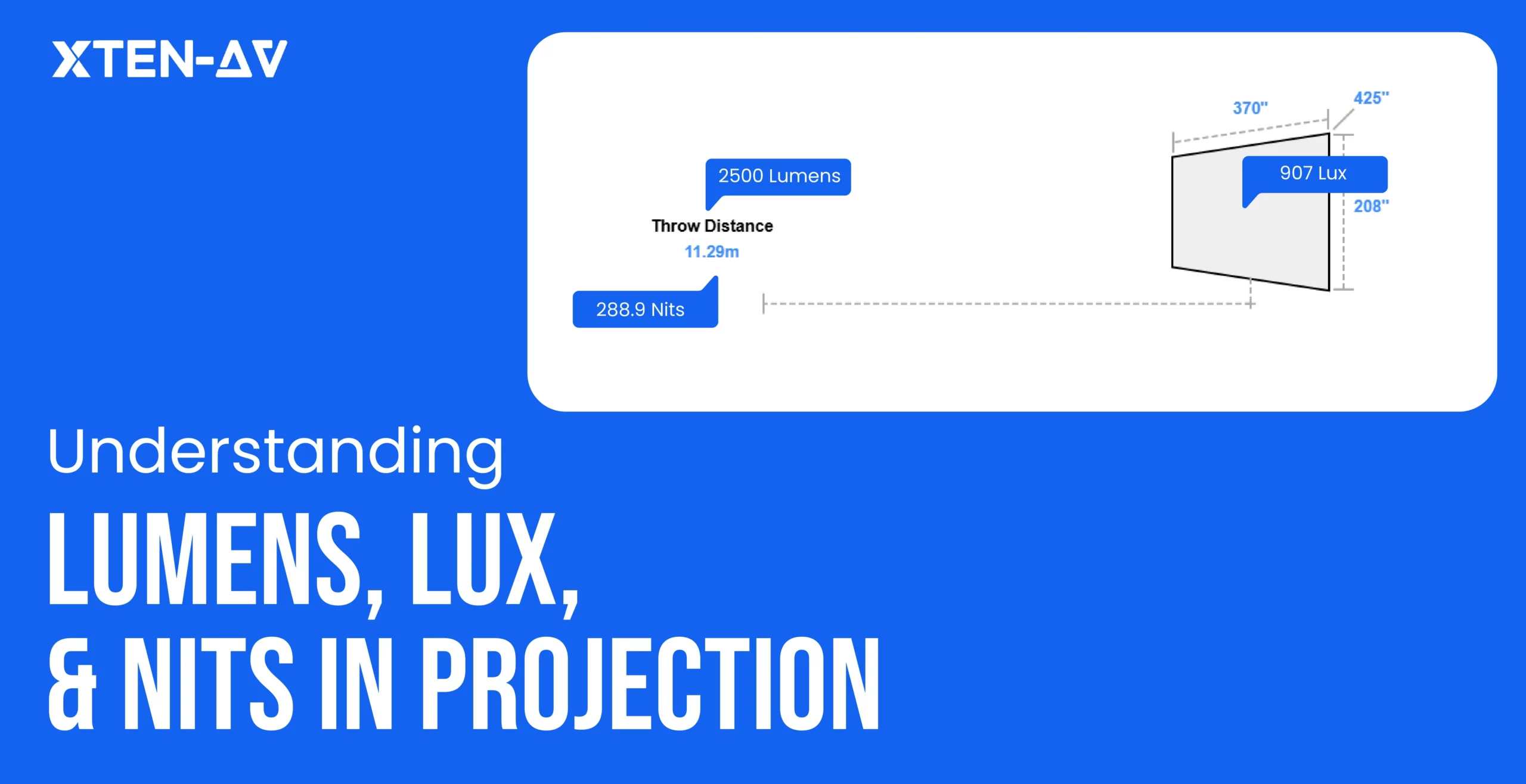


Projector brightness can be measured using different standards. Among these, ANSI Lumens is known as the most reliable and standardized metric as well because it measures the actual light output projected onto the screen. When comparing ANSI lumens vs lumen, ANSI lumens provide a far more accurate representation of real-world projector performance. In comparison, terms like Lumens or LED Lumens are often marketing figures that refer to the unfiltered light at the bulb. Other measurements such as Nits, which indicates the brightness emanated from a display surface and Lux, which measures the intensity of light falling on a surface. AV professionals need to understand these differences when planning projector setups and using XTEN-AV projector integration helps AV professionals accurately align brightness requirements with real-world AV scenarios.
In this blog, you’ll discover how to master projector brightness, decode lumens vs nits, and choose the right setup for any room or screen.
Key Takeaways
- ANSI lumens use a standardized approach to measure projector brightness, giving a realistic measure of actual projector brightness.
- Screen size and gain impacts perceived brightness, bigger screens or low-gain surfaces need higher projector output.
- A high-lumen can also appear washed out even in bright rooms. AV professionals should anticipate how ambient light would affect readability.
- Consider contrast ratio, color accuracy, throw distance and uniformity are crucial to consider for image clarity.
- Video wall vs projector comparisons require different metrics; nits for displays, ANSI lumens for projectors.
- Use XTEN-AV’s projector brightness calculator for real-world accuracy based on screen, lighting, and projector type.
The all-in-one solution for your Audio Visual (AV) Project Design & Documentation needs
Transform your audio-visual experience with XTEN-AV.
No Credit Card required
What is the difference between ANSI lumens, lumens, lux, and nits?
Light brightness is explained in several ways depending on whether it’s discussed about a source, surface or display. And it is crucial to consider that each unit focuses on a somewhat different aspect of brightness. In this regard, lumens measure total light produced by a source. ANSI, regulated measurement used specifically for projector light output. Lux measures how much light falls on a given surface area and Nits measure brightness from a display.
Unit | Measures | Best Used For | Projector Relevance |
ANSI Lumens | Standardized project brightness output | Projector specs comparison | Key metric for projectors |
Lumens | Total light output | General lighting sources | Useful but less standardized |
Lux | Intensity of light on a surface | Room light | Crucial for viewing environment |
Nits | Display brightness | Displays/visible luminance | Useful for screen visibility |
What are ANSI lumens in projectors?
ANSI lumens are a standardized way of measuring projector brightness, allowing accurate comparison of projector light output in a more reliable way than lumen ratings. So, in the discussion of ANSI lumens vs lumens, ANSI lumens are considered more trustworthy.
If you ask “how many lumens do I need for a projector,” the answer depends on the screen size, viewing purpose, room size and ambient light. A small classroom may need fewer lumens, while a bright conference room, auditorium, or large screen setup needs higher ANSI lumen output for clear visibility.
Why standardized measurement matters
Manufacturers can measure lumens differently, which often leads to consistent or exaggerated brightness claims. ANSI lumens tackle this issue by simply following a standardized testing method where brightness is measured across multiple points on the displayed image.
This standardized approach offers:
- Consistent brightness testing across several brands
- Less dependence on inflated marketing specifications
- Realistic representation of usable on-screen brightness
Projector Comparison
When comparing two projectors:
- 1,000 ANSI Lumens will consistently outperform a projector claiming 3,000 Marketing Lumens
- Proper ANSI testing considers balanced white light output, helping evade overly tinted or unrealistic high-brightness modes.
- ANSI lumens are measured using a standardized testing process rather than varying manufacturer-defined methods.
Business/classroom/auditorium use
ANSI lumens play a significant role in determining how effectively a projector performs in different environments.
Business Spaces: A typical range of 3,000-5,000 ANSI lumens support clear and readable presentations in moderate ambient light.
Auditoriums: Auditoriums or lecture halls usually require 6,000-10,000+ ANSI lumens to effectively maintain image visibility across wider screens and longer viewing distance.
Classroom: Classrooms usually need around 3,000-6,000 ANSI lumens so students can view projected text, chart and video content without washed-out visuals.
Why should AV professionals not rely only on marketing brightness numbers?
AV professionals should not rely on marketing brightness numbers as they are measured in ideal lab conditions and do not reflect real world performance. Projector brightness depends on ambient light, contrast ratio, screen size, viewing distance, brightness uniformity and color accuracy. A display with high advertised brightness numbers can appear faded in real-world environments. So, it is of utmost importance for AV teams to evaluate overall visual performance and real-use testing instead of depending only on headline brightness specifications.
Are ANSI lumens better than regular lumens?
Yes, ANSI lumens are better than regular lumens for comparing projectors because they follow a more standardized brightness measurement approach. When evaluating ANSI lumens vs lumens, ANSI testing offers a realistic indication of projector performance in real AV environments as its testing takes reading from nine points on a white image which showcases more realistic projector brightness performance. In contrast, regular lumens can be vague or marketing driven and only describe general light output and as a result, two projectors with the same rating perform differently in real AV environments.
Why does it matter in real rooms?
The brightness of the projector changes once the image spreads across a screen. For example, if 1200 lumens are spread across a 3m ² screen, the screen receives approximately 400 lux. And, if the room lighting adds 600 lux on the same wall, the projected image may look dull or washed out.
Not always. If we talk about the real-world discussion, one user measured a projector rated at 2,000 ANSI lumens and saw it produced about 1300 lumens, which dropped to around 1,100 lumens after calibration and color correction. This should not be considered as a universal rule, don’t forget to check ANSI lumens against -screen size, ambient light, screen, room type and real viewing conditions.
What is lux in projector planning?
Lux measures how much light falls on a surface. And, in project planning, helping AV teams understand how bright the projected image will appear on the screen or wall after the projector light reaches that surface.
Let’s take a look at a real AV Planning Scenario: A 6,000-lumen projector that delivers a bright and sharp image on a 120-inch screen in a low ambient light room with controlled conditions may still struggle when the same setup is used in a different environment.
In a classroom with daylight, where sunlight reduces perceived contrast and makes text-heavy slides harder to read. In such a case, AV teams need to evaluate how much usable light is actually reaching the screen surface and whether the projector can maintain enough screen brightness during daytime use.
Additionally, in a conference room with lights on, the image often competes with overhead lighting used for meetings and video calls, so AV teams typically need higher lux on the screen to maintain readability, especially for content like spreadsheets or presentations.
In an auditorium with controlled lighting, the same 6000 lumen projector may perform better because of low ambient light hitting the screen. Lower ambient lux allows the projected image to maintain good clarity and contrast even on larger screens.
Therefore, AV professionals should calculate lux on the screen based on screen size, ambient light, screen gain, throw distance, and room usage to ensure that image remains clear in real-world conditions.
What are nits, and do they matter for projectors?
Nits measure visible brightness from a display surface, expressed as candela per square meter (cd/m²). They are commonly used for TVs, LED walls, and monitors because those displays generate their own light directly from the screen surface.
For projectors, brightness is generally measured in ANSI lumens and not nits. However, nits still matters at the time of comparing how bright a projected image appears on the screen in comparison to other technologies.
Nits matter in projection
A projector throws light onto a screen and it reflects that light back to the viewers. The final perceived brightness depends on several factors in which some of them are:
- Screen size
- Projector lumen output
- Room’s ambient lighting
- Throw distance
For example, a 5,000 ANSI lumen projector may look bright and clear on a 100-inch screen in a controlled conference room, but when it is used on 180-inch screen in a brighter environment then this means that light will spread across a larger surface area, negatively impacting perceived brightness, text readability and contrast.
As a result, text readability, projector contrast ratio, and overall image punch can noticeably decrease even though the projector lumen rating remains exactly the same. This is why AV professionals should evaluate not just lumens, but also how bright the projected image will actually appear to viewers in real-world conditions.
Which brightness measurement should AV professionals use?
AV professionals should use different brightness measurements to evaluate different parts of the projection or display system. Some important factors for projector planning include ANSI lumens, screen gain and ambient light to name a few. These help in determining how bright the image will appear in real-world environments.
For direct-view displays and LED walls, nits become useful because brightness is directly measured from the display surface. This distinction is crucial for video wall vs projector comparison as a video wall is measured by surface brightness, whereas a projector is measured by total light output.
How AV teams use each measurement:
ANSI lumens: It measures projector light output and can be used for comparing projector models
Screen gain: It measures reflected brightness towards viewers.
Ambient light values: Helps in determining whether the room needs a brighter projector or better lighting.
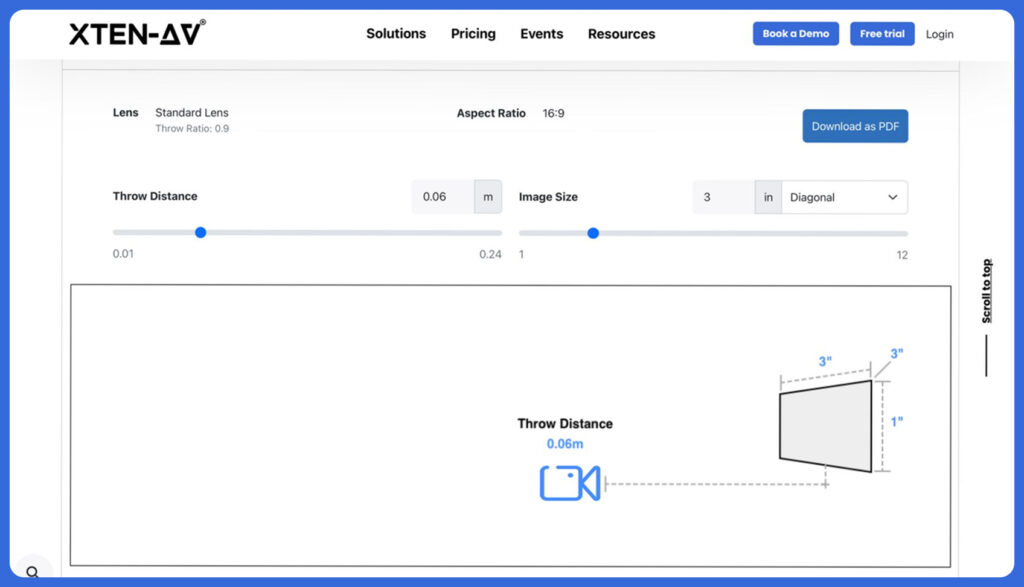
XTEN-AV’s projector brightness calculator enables AV professionals to accurately estimate projector brightness considering numerous real-world factors, including screen dimensions, ambient light in lux or foot-candles, front-wall or side-wall projector placement, LCD, DLP or laser projector type and viewing environment. AV professionals and system integrators can make wise decisions that strategically align with both the environment, and the intended projector use case.
How to use the XTEN-AV Projector Calculator?
- Enter screen details: Input screen size (for example, a 150-inch diagonal (16:9 screen that would be approximately 131 inches x 74 inches) and then select screen gain (commonly 1.0)
- Set room lighting & placement: Add ambient light (e.g. 200 lux for partial daylight) and choose projector placement: front or side wall.
- Choose usage & projector type: Select the basic or analytical usage purpose and then projector technology, DLP or LCD
- Get instant lumen recommendation: Calculator will give you a tailored ANSI lumen range as per the room’s actual conditions. It even distinguishes between lamp-based and laser projector brightness levels. In such a scenario, it would recommend 78882 lux for lamp-based models or 59161 lux for laser projectors.
Get matched suggestions: you will get suitable projector models that match the required brightness and setup conditions.
How do screen size and screen gain change brightness requirements?
Screen size and screen gain are crucial inputs when planning an AV setup as they directly influence how bright a projected image appears.
Bigger screens require higher projector brightness as the same amount of light is spread over a wider area. As the size of the screen increases, image density increases and thus, when a projector works great for a smaller display it may look dim on a large wall or auditorium screen. Hence, AV professionals opt for a projector screen size guide to match screen dimensions with the correct lumen output.
Screen gain is also a significant aspect in perceived brightness. It measures how effectively a screen reflects light back toward viewers. Higher gain screens tend to reflect more light, automatically making the image look brighter without increasing projector power. While, lower gain screens absorb or diffuse more light, which can reduce brightness and may need a stronger projector for better clarity, especially in ambient light conditions.
Common Mistakes when comparing projector brightness based on ANSI Lumens vs Lumens vs Lux vs Nits
When it comes to comparing projector brightness, AV decisions go wrong because brightness is evaluated in isolation instead of as part of a full system.
Comparing lumens without checking ANSI/ISO method: When comparing projector brightness without using standardized ANSI/ISO methods, you are looking at marketing lumens or LED lumens and these figures are higher and not much reliable in comparison to ANSI/ISO. As a result, they can produce misleading brightness values, making projectors seem brighter than they actually are in real-world conditions.
- Ignoring ambient light: When a mistake of ignoring lighting conditions is done, then you will get a projector that performs well in a dark space and may look washed out in a bright space
- Ignoring screen size: This is also one of the biggest mistakes as when the screen size increases, the light is spread over a larger area, making them look dull.
- Ignoring screen gain: Screen gain measures the reflectivity of a screen. A 1.0 gain screen reflects lights in all directions. Whereas, a higher gain enhances brightness and lower gain may require a stronger projector to achieve the same visual impact.
Comparing projector brightness directly with TV nits: Some users incorrectly compare projector brightness directly with TV nits even though they use different measurement systems. Projectors are rated in ANSI lumens (total light output), while TVs use nits (cd/m²) (brightness per unit area). Since one measures total light and the other measures surface luminance, thus cannot be directly compared without considering screen size and viewing conditions.
- Assuming higher lumens always means better image quality: It’s a misconception that higher lumens always mean better image quality. While lumens measure brightness, overall image quality also depends on color accuracy, uniformity and contrast for a clear and balanced visual experience.
- Ignoring contrast ratio: This can lead to images that appear bright, but lack depth. When there are mixed lighting conditions, low contrast can diminish detail in bright and dark areas. This will negatively impact visual clarity and quality.
The all-in-one solution for your AV needs
Transform your audio-visual experience with XTEN-AV.
No Credit Card required
Audio Visual System Design Mastery + Winning Proposals = 10x Productivity!
- ✔ Automatic Cable Labeling & Styling
- ✔100+ Free Proposal Templates
- ✔ Upload & Create Floor Plans
- ✔1.5M Products from 5200 Brands
- ✔ AI-powered ‘Search Sense'
- ✔Legally Binding Digital Signatures

Conclusion
Projector brightness is more than just lumens, it depends on how the entire setups performs in a real-world environment. ANSI measures projector light output, but several factors such as ambient light, screen gain, room environment and throw distance affect how bright the image will look. With understanding of ANSI lumens vs lumens, lux vs lumens and nits vs lumens, AV professionals can compare projectors, displays and video walls in a more efficient manner. With a projector brightness calculator by XTEN-AV, AV professionals can ensure that the projected image is bright enough in a dark room or well-lit conference room and auditorium.
Wondering how many lumens you need for a projector? Use XTEN-AV’s projector brightness calculator for the right ANSI lumen range for different spaces.
FAQ's
No, ANSI lumens are a standardized and accurate measurement of a projector, averaging light output across several points on a screen. While lumens measure the brightest point or the light source, giving non-standardized numbers.
Room size and lighting play a key role. ANSI lumen required around 1,500–2,500 for dark rooms, 3,000–5,000 for classrooms or conference rooms, higher for bright spaces.
They are not the same. Lux measures light on a surface area and lumens measure total light output from the projector source.
No, nits are used for TVs and monitors, while projectors are measured in lumens.
Yes, but lumens cannot be converted to nits directly because you need screen size and screen gain. Key Conversion Formula: Nits = (ANSI lumens × screen gain × 3.426) ÷ screen area in sq. ft.
They look different because of differences in contrast ratio, color accuracy and lens quality.
The best brightness for a classroom projector is between 3,000-5,000 ANSI lumens that ensures clear images even in brightly lit rooms.
For most conference rooms, a brightness of 3,000 to 4,000 ANSI lumens is ideal, ensuring clear, vivid presentations even with ambient light.
Explore more by topic

AV Design Mastery + Winning Proposals = 10x Productivity!
- Automatic Cable Labeling & Styling
- 100+ Free Proposal Templates
- Upload & Create Floor Plans
- 1.5M Products from 5200 Brands
- AI-powered ‘Search Sense'
- Legally Binding Digital Signatures
No Credit Card Required
Related Blogs
-

- Posted by Sahil Dhingra

Audio Visual A Complete Guide to Commercial AV Companies: What to Expect,...
-
- Posted by Sahil Dhingra
Audio Visual 6 Best Field Service Management Software for Audio Visual (AV)...
-
- Posted by Sahil Dhingra
Audio Visual What Is an AV Connection Check and Why Does It...
