







AV Submittal Package Guide for Audio Visual System Integrators

Sahil Dhingra
Published 16 June 2026
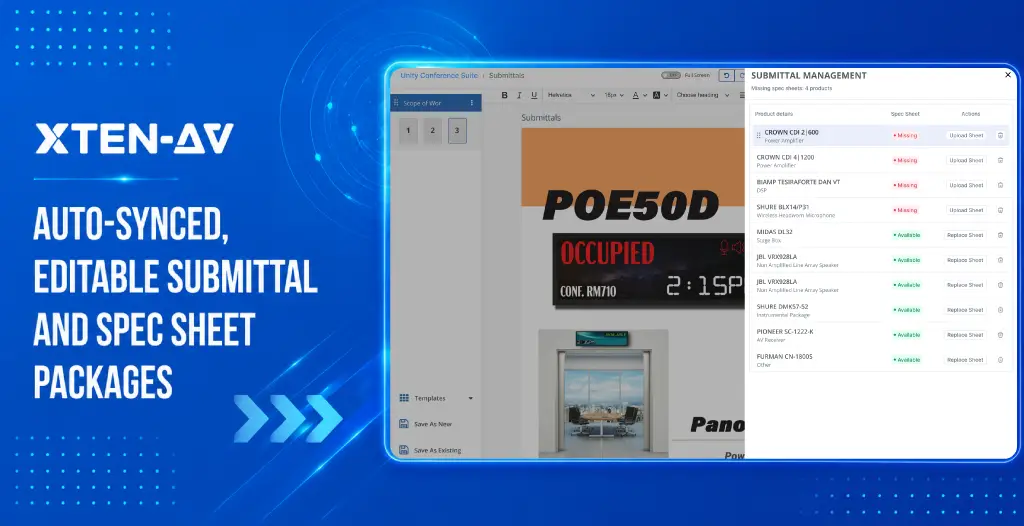


An AV submittal package is a set of documents prepared before equipment is ordered or installed. It gives consultants, clients, and project stakeholders the information needed to verify that the proposed system meets project requirements.
The AV submittal package can include the following:
- AV bill of materials
- manufacturer datasheets
- cut sheets, signal flow diagrams
- rack elevations
- floor plans
- wiring details
- substitutions
- revision notes.
What goes in depends on the project. The contract specification sets the requirement.
It is not a folder of saved PDFs. It is a review document with a clear structure and a defined purpose. The first package is the easy part. The hard part is keeping it accurate after the design changes.
A display gets substituted. A DSP changes because the original is out of stock. A mount gets added after someone walks the site. Each change puts the submitted package out of sync with the actual design. The reviewer is now looking at the wrong information.
That gap has to be caught before resubmission. Not after.
Key Takeaways
- An AV submittal package is not a folder of datasheets. It is a structured review document that connects proposed equipment, drawings, and product information before procurement or installation.
- Required documents vary by project. The contract specification not general practice sets what goes in the package.
- On many commercial, higher education, and government projects, Division 27 audiovisual specifications define the exact submittal requirements.
- Approval typically comes before procurement. Equipment ordered before approval puts the integrator at financial risk if a product is rejected.
- The first package is the easy part. The real challenge is keeping it accurate after the BOM changes.
- One product substitution can affect the BOM, the product sheet, the rack elevation, and the revision notes, all at once.
- Missing product sheets are a common gap. Flag unavailable datasheets before the package goes out, not during review.
- BOM-linked workflows reduce manual rebuilding. When products change, the team resyncs the package rather than rebuilding it from scratch.
The all-in-one solution for your Audio Visual (AV) Project Design & Documentation needs
Transform your audio-visual experience with XTEN-AV.
No Credit Card required
What Is an AV Submittal Package?
An AV submittal package is a review package prepared before AV equipment is ordered or installed. It helps consultants, clients, and project stakeholders verify that the proposed system meets project requirements.
Take a corporate conference room. The scope has displays, a PTZ camera, ceiling microphones, a DSP, a control processor, mounts, and cabling. A good package does not just list those products. It puts the manufacturer sheets and drawings in order. The reviewer can see what was proposed, where each item connects, and how it fits the room.
A folder of unsorted PDFs fails that test. A structured package passes it.
Requirements vary by project, owner, consultant, and contract specification. Some packages need a full drawing set. Others require only a BOM and product data sheets. The contract governs what is required.
On many commercial, higher education, and government projects, Division 27 audiovisual specifications set the submittal requirements. Those specs list exactly which documents must be submitted and approved before procurement starts.
Why Do AV Integrators Prepare Submittals Before Procurement or Installation?
A consultant might approve the display but reject the ceiling microphone. Coverage requirements were not met. If that equipment was already ordered, the integrator covers the replacement cost. That is one reason submittal approval usually comes before procurement.
Approval Before Ordering: Why Timing Matters
Most public AV specifications require approval before equipment gets purchased or installed. The exact requirements depend on the contract. But ordering before approval puts the integrator at risk. If a product gets rejected after it’s ordered, the cost usually falls on them.
Approval does not hand off responsibility either. Coordination accuracy stays with the integrator regardless.
Review comments are common, especially on larger projects. During an AV consultant review, reviewers may request additional documentation, revised drawings, or clarification on proposed substitutions before granting approval.
A consultant may ask for a revised rack elevation, supporting documentation for a substituted DSP, microphone coverage details, or additional mounting information for a display. The submittal process exists to catch these issues before equipment arrives on site.
What Documents Should an AV Submittal Package Include?
Required documents vary by project. The table below covers what commonly appears in structured AV submittal packages.
Document | Why It Matters | When It Is Especially Useful |
Cover page and project details | Identifies the project, contractor, date, and submission context | Every structured submission |
Table of contents and index | Helps reviewers navigate the package | Large commercial, government, and institutional projects |
AV BOM or equipment list | Shows products, quantities, and components | Procurement and consultant review |
Manufacturer datasheets | Provides full technical product information | Every proposed device or cable category where required |
Cut sheets | Summarizes key specs for faster review | Reviewer-friendly product confirmation |
Signal flow diagrams | Shows device connections and signal direction | Audio, video, and control coordination |
Rack elevations | Shows rack layout, product placement, and accessories | Rack-based AV systems |
Floor plans and reflected ceiling plans | Shows spatial placement in context | Displays, speakers, cameras, and ceiling devices |
Wiring and riser drawings | Shows infrastructure and routing | Construction coordination |
Plate and panel drawings | Shows connections and interface details | Floor boxes, wall plates, and interface panels |
Product substitution documentation | Explains alternatives to specified equipment | Availability issues or approved-brand changes |
Revision notes | Explains what changed and when | Resubmissions and scope updates |
No single list applies to every project. The applicable specification defines what is required. Together, these documents form the core AV project documentation used for review, coordination, procurement, and installation planning.
Many of these documents also help with trade coordination. Floor plans and reflected ceiling plans show where each device goes in the room. Reviewers use them to spot conflicts with lighting, HVAC diffusers, and ceiling infrastructure before installation starts.
Who Reviews an AV Submittal Package?
The reviewer depends on the project. On a commercial project, it is usually the client or their AV consultant. On a construction project, the general contractor or construction manager often runs the review. Architects and engineers may weigh in on items that touch their scope. A typical path looks like this:
- The integrator prepares the package.
- The project engineer reviews it internally.
- It then goes to the consultant or GC.
- They leave comments.
- The team corrects and resubmits if needed.
- Once it clears review, procurement and installation can move forward.
The reviewer might be checking product acceptability, substitution justification or construction coordination. It depends on what the project requires. On federal and higher education projects, procurement stakeholders may also be involved.
No universal approval chain applies to every project. In many projects, this review cycle is one of the final checkpoints in the AV procurement process before equipment purchasing begins.
How Are AV Submittals Different from Spec Sheets, Cut Sheets, and Shop Drawings?
The submittal package is the container. Spec sheets, cut sheets, and shop drawings are document types that go inside it. Depending on the project requirements, AV shop drawings may be included within the submittal package or submitted as separate review documents.
Term | Meaning | Role in the Project |
AV submittal package | Complete structured review package | Organizes documentation for review |
Spec sheet | Manufacturer technical-information document | Confirms product characteristics |
Cut sheet | Selected or summarized product-information page | Makes technical review faster |
Shop drawing | Project-specific coordinated drawing | Shows how the AV system fits the installation |
Closeout documentation | Final project records | Supports handover, maintenance, and service |
The confusion usually comes from teams using these terms interchangeably. A cut sheet is one page. A submittal package may contain dozens of them, organized by system area, with drawings and revision notes alongside.
What Makes an AV Submittal Package Difficult to Prepare Manually?
Downloading one datasheet is not the hard part. The hard part is keeping dozens of product documents accurate while the equipment list keeps changing.
Here is what that looks like. The consultant flags that the specified display is unavailable. The project engineer updates the BOM. Finds the datasheet for the replacement. Removes the old sheet. Checks whether the accessories still match. Pulls up the rack elevation. Then reviews the whole package again to make sure it reflects the current design.
That is one substitution. Most projects have several.
That process gets repeated for every product change. Manual folder structures make version control difficult. Large PDF files make sharing slow. Pages from prior submissions sometimes survive into new packages when the team is moving fast.
Missing product sheets are a common problem. Some manufacturers do not publish full technical documentation publicly. A product gets added to the BOM, and the sheet does not exist in any downloadable format. That gap surfaces at the worst possible moment, shortly before submission.
Why Do AV Submittal Packages Become Outdated After BOM Changes?
Equipment changes. The product sheets do not always follow. That is when the package becomes inaccurate.
This is the most common failure pattern in manually prepared submittal packages.
BOM Change | Documentation Risk | Review Impact |
Display model replaced | Old datasheet remains in package | Reviewer evaluates the wrong product |
DSP removed from design | Outdated product pages remain | Package no longer reflects current scope |
PTZ camera added | Supporting sheet is missing | Submission gap discovered late |
Mount added after site review | Accessory is absent from package | Procurement and installation questions arise |
Wireless microphone substituted | Alternate documentation not included | Consultant cannot assess the proposed change |
Rack elevation revised | Earlier version remains in package | Reviewer works from outdated layout |
Product sheet unavailable | Gap not flagged before submission | Review cycle delayed while team locates documentation |
A single product substitution can affect the BOM, the product sheet section, the rack elevation, and the revision notes. Each element needs to be checked. Manual packages make that checking slow and inconsistent.
The impact often extends beyond a single document. A display may be changed from a 75-inch model to an 86-inch model after review. That one decision can affect the mounting hardware, wall support requirements, viewing distances, rack equipment, and supporting drawings. When documentation is not updated together, reviewers end up assessing outdated information.
How Can AV Teams Prepare a Review-Ready Submittal Package?
This checklist applies regardless of the tools being used.
- Confirm the reviewer, required format, and submission deadline
- Review the applicable project specification for required document types
- Freeze the BOM at the review stage before assembling the package
- Confirm product names, models, and quantities match the active design
- Collect required manufacturer datasheets for every proposed product
- Organize sheets in a logical sequence aligned with the BOM or system areas
- Include relevant AV drawings: signal flow, rack elevations, floor plans, or wiring diagrams as required
- Label substitutions clearly with supporting documentation
- Add a cover page, table of contents, and section index where required
- Remove blank, duplicated, or outdated pages
- Identify any products where a datasheet is unavailable
- Review the complete package before submission
- Update and resubmit when the BOM changes
How Does BOM-Linked AV Submittal Software Reduce Manual Rebuilding?
Most teams rebuild their submittal package by hand after every BOM change. They hunt for the new datasheet. Delete the old page. Reformat the PDF. Check for gaps. It takes time. And it has to happen again the next time something changes.
BOM-linked submittal software connects the documentation package to the active equipment list. When a product changes, the team updates the BOM and re-exports. No manual rebuilding from scratch.
XTEN-AV works this way. The submittal lives inside AV design and drawing software in X-DRAW, connected to the live BOM and design workflow. The team can download the package as an original or compressed PDF. They can open it in x.doc audio visual (av) proposal creation and tracking software to add content, remove pages, or duplicate sections. The Unavailable Products section flags any products without accessible spec sheets before the package goes out.
When a product is updated or removed from the BOM, the team runs Resync Submittals. The package refreshes against the current design.
Update the BOM. Resync the submittal. Keep the package aligned with the latest AV design.
This does not guarantee approval. It does not remove the review step. It removes the manual effort of rebuilding documentation every time the equipment list changes.
Generate AV documentation from the design workflow and resync the submittal package when your BOM changes.
The all-in-one solution for your AV needs
Transform your audio-visual experience with XTEN-AV.
No Credit Card required
Audio Visual System Design Mastery + Winning Proposals = 10x Productivity!
- ✔ Automatic Cable Labeling & Styling
- ✔100+ Free Proposal Templates
- ✔ Upload & Create Floor Plans
- ✔1.5M Products from 5200 Brands
- ✔ AI-powered ‘Search Sense'
- ✔Legally Binding Digital Signatures

AV Submittal Package Checklist Before Sending for Review
- Latest BOM is included and matches the active design
- Product names, models, and quantities are accurate
- Manufacturer datasheets are organized and present
- Missing product sheets are identified and flagged
- Product substitutions are clearly labeled with supporting documentation
- Rack elevations, floor plans, or wiring diagrams are included where required
- Blank and irrelevant pages are removed
- Package is indexed with a table of contents where required
- Project details and revision dates are visible
- PDF has been reviewed in full before submission
- File size is suitable for the intended handoff method
- Package has been resynced after any recent BOM changes.
Stop Rebuilding AV Submittal Packages After Every Design Change
See how XTEN-AV connects AV design, BOMs, and editable submittal documentation inside one workflow.
FAQ's
An AV submittal package is a type of AV equipment submittal used during the project approval process. It is a set of documents AV integrators prepare before equipment is ordered or installed. It typically includes the BOM, datasheets, cut sheets, drawings, substitutions, and revision notes.
Most packages have a cover page, table of contents, and AV BOM. Common additions are datasheets, cut sheets, signal flow diagrams, rack elevations, floor plans, and wiring diagrams. What is required depends on the contract.
Most AV equipment submittals are prepared by the AV integrator or project engineer. On larger projects, a documentation coordinator handles it.
It depends on the project. The reviewer could be the AV consultant, client, architect, GC, or construction manager.
Not quite. A spec sheet is the full manufacturer document. A cut sheet is a shorter selected page used to speed up review.
A submittal package collects product documents for review. A shop drawing shows how equipment is planned for the actual site. Shop drawings can be included in the package or sent separately.
Yes. The BOM lists proposed products, quantities, and components. Reviewers use it to check sheets and drawings against what was specified.
No. Most specifications require approval before procurement. Ordering early puts the contractor at risk if a product gets rejected.
Label each substitution clearly and include manufacturer documentation for the replacement. The reviewer needs enough to assess the change.
Flag it before submission. Catching it early gives the team time to find documentation or consider an alternative.
Update the BOM. Replace outdated sheets and add new ones. Review the full package before resubmitting. In XTEN-AV, Resync Submittals refreshes the package after BOM changes.
Yes. XTEN-AV generates BOM-linked submittals from X-DRAW. The package can be exported as a PDF, edited in X-DOC, and resynced after BOM changes. The Unavailable Products section flags missing sheets before submission.
Explore more by topic

AV Design Mastery + Winning Proposals = 10x Productivity!
- Automatic Cable Labeling & Styling
- 100+ Free Proposal Templates
- Upload & Create Floor Plans
- 1.5M Products from 5200 Brands
- AI-powered ‘Search Sense'
- Legally Binding Digital Signatures
No Credit Card Required
Related Blogs
-

- Posted by Sahil Dhingra

Audio Visual A Complete Guide to Commercial AV Companies: What to Expect,...
-
- Posted by Sahil Dhingra
Audio Visual 6 Best Field Service Management Software for Audio Visual (AV)...
-
- Posted by Sahil Dhingra
Audio Visual What Is an AV Connection Check and Why Does It...
