








5 Best AVSnap Alternatives for Professional AV System Design

Sahil Dhingra
Published 24 AUG 2026
AV design engineers who are handling complex projects often need more than basic diagramming software. They require modern AV CAD drawing software with AI-assisted design capabilities, cloud-based collaboration, estimation tools and the ability to create detailed engineering drawings as technical requirements expand.
AVSnap is known for providing free audiovisual system design software that helps AV professionals create visual routing diagrams for AV systems. It also supports system layouts, signal-flow diagrams and material lists, making it useful for basic AV diagramming and early-stage design requirements.
However, AVSnap may not be able to meet the needs of teams looking for extensive AV manufacturer libraries, advanced CAD-based design automation and stronger software integration support. As project complexity increases, missing device libraries and disconnected AV tools can increase manual effort.
In this guide, we’ll take a closer look at AVSnap alternatives to help you find the right platform for professional system design and diagramming.
As AV systems become more complex, basic diagramming may no longer be enough. Accurate AV design requires detailed schematics, reliable product data and installation-ready documentation.
Key Takeaways
- The top AVSnap alternatives for professional AV schematic design include XTEN-AV (X-DRAW), D-Tools, Stardraw Design, Microsoft Visio and Lucidchart.
- Each platform supports different stages of AV projects. Some focus on technical drawings and system planning, while others support estimation, project delivery or collaboration.
- AV designers must compare schematic drawing capabilities, rack elevations, cable schedules, product data and file compatibility before selecting the drawing platform.
- Dedicated AV CAD design software is better suited to projects that require BOMs, manufacturer data and installation-ready drawings.
- XTEN-AV is worth considering for complete AV system design and diagramming. It also offers AI-assisted capabilities, AVIXA-standard blocks and a 1.5M+ product library.
What is AVSnap?
AVSnap is a freeware AV system integration and design software developed by Altinex, Inc. It can be used by system integrators and engineers for creating routing diagrams for AV systems. These routing diagrams are similar to schematics or network diagrams. The platform supports architectural drawings, AV rack elevation diagrams, cable routing and system diagrams. It is preferred by AV companies and consultants globally for its easy-to-use interface and offering practical tools for schematic drawings, documentation and presentations. AVSnap also supports cable schedules, material lists, PDF management and device-function capabilities.
Why Do AV Professionals Look Beyond AVSnap?
AVSnap supports essential system design and documentation tasks, including AV wiring diagrams. As project complexity grows, integrators often need faster drawing creation, stronger integrations and greater automation. According to an AVIXA research report, 70% of respondents use generative AI, making these capabilities increasingly important when evaluating AV CAD drawing platforms.
The table below highlights key AV requirements, where AVSnap may be limited and why these gaps matter to integrators:
AV Requirements | AVSnap Limitation | Why It Matters |
Product Libraries | Some devices may require manual symbol creation. | Broader AV product libraries can make equipment selection more efficient. |
CAD Compatibility | DWG/DXF support is limited. | AV CAD software can simplify the exchange of drawings with architects and consultants. |
Design Automation | AI-driven drawing and prompt-based automation are not available. | Automation can speed up revisions and complex AV system design tasks. |
Estimating & Proposals | Dedicated estimating and quotation tools are not included. | AV integrators may need separate software for pricing and proposals. |
Project Management | Task and installation tracking are not built in. | AV project management software can help keep schedules and field activities organized. |
Service Management | Post-installation service tools are not included. | AV service management supports maintenance and ongoing customer service. |
Struggling to document complex AV connections? Explore the top wiring diagram software for clearer signal paths, cable connections and AV system integration.
Top 5 AVSnap Alternative Platforms for Professional AV Schematics and Diagramming
Choosing the right AV schematic software heavily depends on how efficiently it handles design revisions, automates technical drawings and keeps cable schedules, signal flows, rack layouts and AV manufacturer product data aligned.
Following are the top AVSnap alternatives to consider for advanced AV design and diagramming needs:
1. XTEN-AV (X-DRAW)
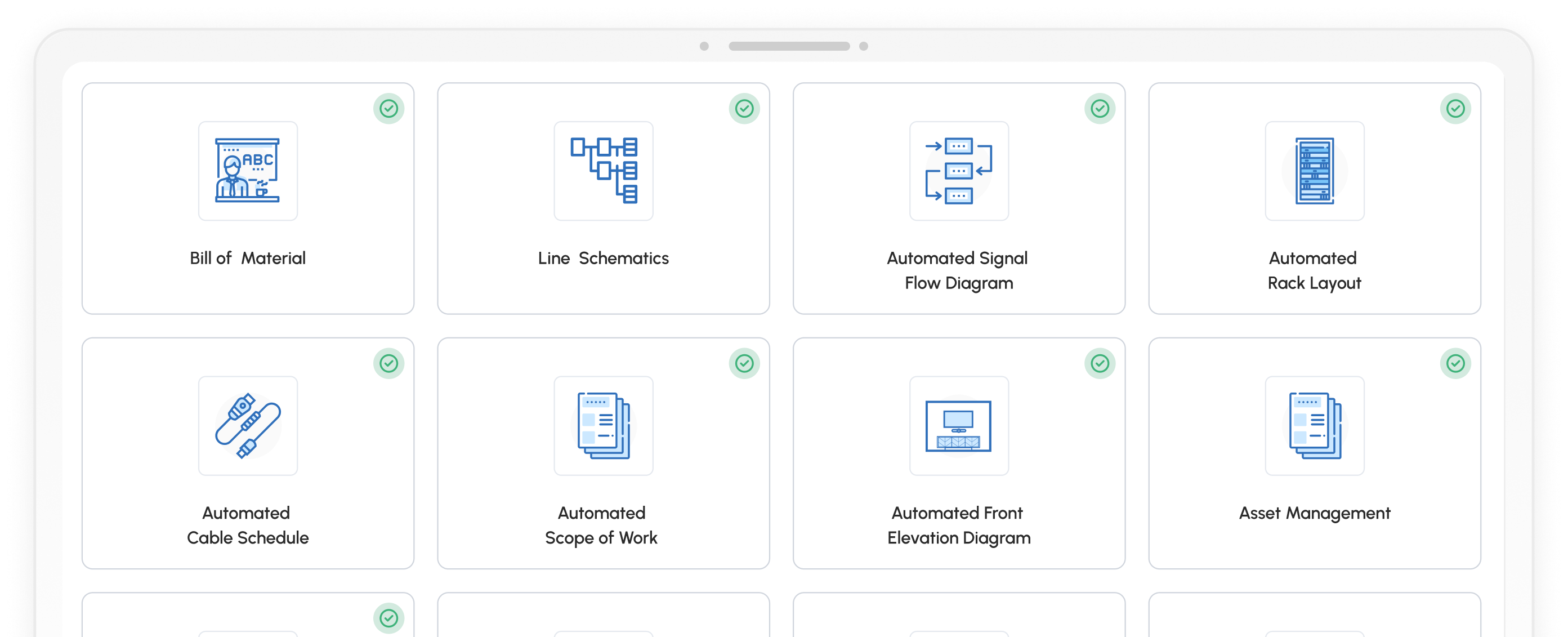
Built for AV design engineers, consultants and integrators, X-DRAW by XTEN-AV is a cloud-based, AI-powered AV schematic drawing platform that generates complete design deliverables in a single unified environment. It enables the creation of automated AV BOMs, line schematics, signal flow diagrams, rack layouts and cable schedules. Floor plans, front elevations and submittals are also supported, giving teams the flexibility to develop detailed AV design documentation within a centralized platform. Its AV product library includes 1.5M+ products from 5,200+ brands, while Search Sense streamlines equipment selection.
Best For:
Design engineers and system integrators who need one unified platform for floor plans, line schematics, automated signal flow diagrams, rack elevation diagrams, cable schedules and complete AV submittals.
Key Features of X-DRAW:
Pre-designed AV templates.
Automated cable labeling and styling.
AI-powered Search Sense.
Site survey conversion into accurate AV floor plans.
Manufacturer-accurate device dimensions with AVIXA-standard blocks.
Supports thermal and ventilation planning for AV rack layouts.
AI-assisted connection check that flags invalid signals, uncertain connector pairs and loose cables.
Pros:
- Makes AV equipment selection easier with a multi-brand product library.
- Enables teams to review and update designs through cloud-based collaboration.
- Helps designers plan equipment placement using 2D and 3D floor plans.
- Speeds up design reviews and client approvals.
- Supports DWG/DXF imports for existing AV CAD layouts.
Want these advantages in your next AV project? Start your XTEN-AV free trial today and create AV CAD drawings faster with built-in automation.
Cons:
New users may experience a short learning curve when transitioning from generic or basic diagramming platforms.
Integration:
X-DRAW is part of the XTEN-AV ecosystem with built-in integrations for HubSpot, QuickBooks, Salesforce, Zoho and Microsoft Dynamics, helping to keep CRM, pricing, accounting and project data connected.
XTEN-AV Pricing Plans:
Free Trial
XTEN-AV offers a 15-day free trial.
Basic
$104.25/user/month, billed annually.
Business
$111.75/user/month, billed annually.Enterprise
$126.75/user/month, billed annually.X-PRO Add-On
$16.88/user/month, billed annually. Available as an optional add-on.
D-Tools is an AV business software platform built for system integrators. It connects system design with audiovisual estimation and quotation, procurement, project coordination, field activities and service. D-Tools System Integrator (SI) supports detailed engineering documentation and can be deployed on-premises or in a hosted environment. Meanwhile, D-Tools Cloud covers proposals, inventory, scheduling and service management in a cloud-based environment.
Best For:
AV integration firms that need system design, estimating, procurement and project management connected in one platform.
Key Features of D-Tools:
AV system schematics and wiring diagrams.
Rack elevation and plan-view creation.
Extensive AV product library.
BOM-linked estimating.
Automated proposal creation.
Project and field service management.
Inventory and procurement tracking.
Pros:
Keeps estimation, design and installation activities aligned.
Gives AV integrators clear visibility into labor, schedules, job costs and project status.
Provides field technicians with mobile access to AV drawings, tasks and job details.
Supports both cloud-based and on-premises deployment options.
Cons:
Requires time for initial setup and adoption.
The interface can feel less intuitive for new users.
Technical support can be slow or inconsistent, according to user feedback.
System Integrator requires a minimum of five users.
Integration:
D-Tools easily integrates with QuickBooks, HubSpot and Xero. It also enables seamless data synchronization between D-Tools SI and D-Tools Cloud.
D-Tools Pricing Plans:
Free Trial / Demo
D-Tools offers a free demo, while trial options vary by plan.
D-Tools Cloud – Single
Plan starts at $89/month, billed annually.
D-Tools Cloud – Duo
Plan starts at $161/month, billed annually.
D-Tools Cloud – Team
Plan starts at $314/month, billed annually.
D-Tools Cloud – Company
Plan starts at $584/month, billed annually.
D-Tools Cloud – Enterprise
Plan starts at $1,079/month, billed annually.
System Integrator (D-Tools SI)
Starts at $1,800/user/year with a minimum of 5 users. Available as a hosted or on-premises solution.
Not sure D-Tools is the right fit? Explore the best D-Tools substitutes and compare leading AV platforms by features, pricing and capabilities.
Stardraw Design focuses on detailed audiovisual engineering. As specialized AV CAD software, it includes tools for block schematics, rack elevations, pictorial views, plan layouts and custom panels. Manufacturer-specific libraries provide equipment-based symbols for accurate drawing creation.
Best For:
AV engineers and consultants who need detailed technical documentation.
Key Features of Stardraw Design:
- Block schematic drawing tools.
- 19-inch rack elevation design.
- Pictorial system drawings.
- Floor and reflected ceiling plan views.
- Custom panel and plate layouts.
- Manufacturer-specific product libraries.
- Product grid for equipment and cable data.
- DWG/DXF import and export.
Pros:
- Speeds up creation of detailed AV engineering drawings.
- Keeps equipment and cable information organized for installer handoff.
- Supports consistent drawing standards across complex AV projects.
- Makes it easier to accommodate custom or manufacturer-specific devices.
- Suits integrators that prefer a structured CAD-style design environment.
Cons:
- Runs natively on Windows only.
- Manufacturer library access varies by package.
- Updates and cloud services require an active subscription.
Integration:
Stardraw integrates with CAD-based project environments through DWG/DXF import and export, while scheduled data exports support cable lists, equipment schedules and other AV project deliverables.
Stardraw Design Pricing Plans:
Free Demo
Stardraw Design offers a fully functional 30-day demo with access to 20 manufacturer libraries.
Entry-Level
$550 for the first user in the first year. Includes 20 manufacturers.
Additional Entry-Level License
$275 per additional license.
Professional
$2,100 for the first user in the first year. Includes 70 manufacturers.
Additional Professional License
$1,050 per additional license.
Year 2 Subscription
Entry-Level: $275/year.
Professional: $1,050/year.
Turn architectural plans into AV-ready layouts. Explore floor plan software to place equipment and prepare detailed project drawings.
Microsoft Visio is a general-purpose platform that can be adapted as AV drawing software for floor plans, network layouts, AV single-line diagrams and schematics. Custom shapes, connectors and layers support company-specific standards, making it a better choice for organizations already using Microsoft 365.
Best For:
AV Designers who already use Microsoft 365 and need flexible technical diagrams without dedicated engineering automation.
Key Features of Microsoft Visio:
- Custom shapes and symbols.
- Network and technical diagrams.
- Floor plan creation.
- Layers and containers.
- Shape data management.
- Engineering diagram templates.
- Microsoft 365 connectivity.
Pros:
- Offers flexibility to create company-specific drawing standards.
- Fits easily into organizations already using Microsoft applications.
- Works well for single-line diagrams and general system planning.
- Provides a large collection of reusable shapes for different technical use cases.
- Suitable when custom diagramming is more important than AV-specific automation.
Cons:
- Not specifically developed for audiovisual engineering.
- Does not include a dedicated AV manufacturer database.
- Equipment symbols and product data may require manual setup.
- Provides limited native BOM and cable automation.
If Microsoft Visio feels too generic for AV diagramming, explore the best Microsoft Visio alternatives for schematics, rack elevations and cable documentation.
Integration:
Visio works smoothly across the Microsoft ecosystem. It also seamlessly integrates with Teams, Excel, Power BI, Power Automate, PowerPoint and OneDrive.
Microsoft Visio Pricing Plans:
Free Trial
Visio offers a 1-month free trial.
Visio Plan 1
Starts at $5/user/month, billed annually. Includes web-based diagramming capabilities.
Visio Plan 2
Starts at $15/user/month, billed annually. Includes both desktop and web applications.
One-Time Purchase
Visio Standard 2024
$309.99, one-time purchase.
Visio Professional 2024
$579.99, one-time purchase.
Lucidchart is a cloud-based visual workspace suited to AV system diagramming, network layouts and early-stage planning. It combines easy-to-use drawing tools with real-time collaboration, AI-assisted creation and data-driven visuals. For audiovisual projects, it is most useful for conceptual layouts, stakeholder reviews and early design discussions rather than detailed engineering documentation.
Best For:
AV Design teams that need quick technical diagrams, shared reviews and system concepts in a cloud-based environment.
Key Features of Lucidchart:
AI-assisted diagram creation.
Real-time team collaboration.
Data linking and visualization.
Conditional formatting.
Custom templates and shape libraries.
Layer and revision management.
Presentation-ready diagrams.
Pros:
Makes system concepts easy to share with clients and project stakeholders.
Allows multiple users to review changes in real time.
Provides quick access without dedicated desktop drafting software.
Works well for early planning, architecture discussions and design reviews.
Offers a low-cost entry point for occasional diagramming needs.
Cons:
Not developed specifically for professional AV engineering.
Does not include a dedicated AV manufacturer database.
Lacks native AV BOM generation.
Offers limited cable and rack documentation capabilities.
Integration:
Lucidchart connects with Google Workspace, Microsoft 365, Slack, Jira and Confluence. It also supports Visio import and export for easier file compatibility.
Lucidchart Pricing Plans:
Free Trial
Lucidchart provides a 7-day free trial for paid plans.
Free Plan
Available at no cost with limited editable documents and shapes.
Individual
Starts at $9/month. Includes unlimited documents and shapes, premium templates, cloud storage and Visio import/export.
Team
Starts at $10/user/month. Includes added collaboration and team management features.
Enterprise
Custom pricing based on organization size and requirements.
Still arranging rack equipment manually? Explore the best rack diagram software to create accurate rack layouts faster.
How to Choose the Best AVSnap Alternative for AV System Design?
Choose the right platform by comparing drawing depth, product data, collaboration, CAD compatibility and AV system documentation requirements. The best fit should align with your technical needs, project complexity and preferred design approach.
The table below compares the leading AVSnap alternatives by their best use case and core capabilities:
Platform | Best For | Core Capabilities |
XTEN-AV (X-DRAW) | Complete AV CAD drawing and diagramming. | Generate automated AV BOMs, line schematics, signal flows, rack elevations, floor plans and cable schedules, backed by 1.5M+ products from more than 5,200+ brands. |
D-Tools | AV integration business management. | System design, estimating, proposals, procurement, scheduling, inventory and field service. |
Stardraw Design | Detailed AV engineering output. | Block schematics, rack elevations, plan views, panel layouts and DWG/DXF support. |
Microsoft Visio | Custom technical visualization. | Flexible shapes, floor plans, single-line diagrams, layers and Microsoft 365 connectivity. |
Lucidchart | Collaborative system planning. | AI-powered diagram generation, shared editing, data linking, templates and presentation tools.
|
Make your AV schematics easier to read, review and hand off. Compare the leading AV single line diagram software for professional system drawings.
Audio Visual System Design Mastery + Winning Proposals = 10x Productivity!
- ✔ Automatic Cable Labeling & Styling
- ✔ 100+ Free Proposal Templates
- ✔ Upload & Create Floor Plans
- ✔ 1.5M+ Products from 5200 Brands
- ✔ AI-powered 'Search Sense'
- ✔ Legally Binding Digital Signatures

Conclusion
For AV designers looking beyond basic diagramming, the right platform should support schematics, rack layouts, floor plans, cable labeling and reliable product data. XTEN-AV is worth considering for teams seeking a complete AV design and diagramming environment with AI-assisted drawing, an extensive product library and dedicated AV CAD block symbols aligned with AVIXA standards. Stardraw Design, D-Tools, Microsoft Visio and Lucidchart also suit different needs across technical drawing, estimation, project management and collaboration.
FAQ’s
AV professionals may need access to extensive manufacturer libraries, stronger integrations, cloud collaboration and greater design automation as project complexity grows.
AV system integrators should compare product libraries, drawing capabilities, CAD support, automation, cable labeling, rack documentation, integrations and pricing.
The best AVSnap alternatives are XTEN-AV (X-DRAW), Stardraw Design, Microsoft Visio, D-Tools and Lucidchart.
AVSnap alternatives range from free diagramming tools to paid AV design platforms with monthly or annual subscription plans.
Note:
The content in this blog is based on publicly available information and user feedback from sources such as G2, Capterra and Reddit. All product names and trademarks are the property of their respective owners.

Explore more by topic
Related Blogs

-

- Posted by Sahil Dhingra

Audio Visual AV Commissioning Checklist & Best Practices for Integrators Sahil Dhingra...
-
- Posted by Sahil Dhingra
Audio Visual AV Cybersecurity Best Practices: Securing Networked Audiovisual Systems Sahil Dhingra...
-
- Posted by Sahil Dhingra
Audio Visual 7 Best Floor Plan Software for AV System Integrators Sahil...





