








Commercial AV Installation Documentation: What AV Field Teams Need On-site

Sahil Dhingra
Published 17 AUG 2026
In commercial AV integration, profit margins are rarely lost in the boardroom. They are lost on-site when field teams receive missing, unclear or outdated project documentation. Without accurate drawings, equipment details, cable information and installation instructions, teams make decisions with incomplete information.
These documentation gaps can lead to installation errors, missing equipment, repeated site visits, approval delays and higher labor costs. Traditionally, preparing a complete installation package required weeks of manual drafting. Even a small design revision could force audio visual (AV) engineers to update the BOMs, schematics, cable schedules, rack layouts and other important documents separately.
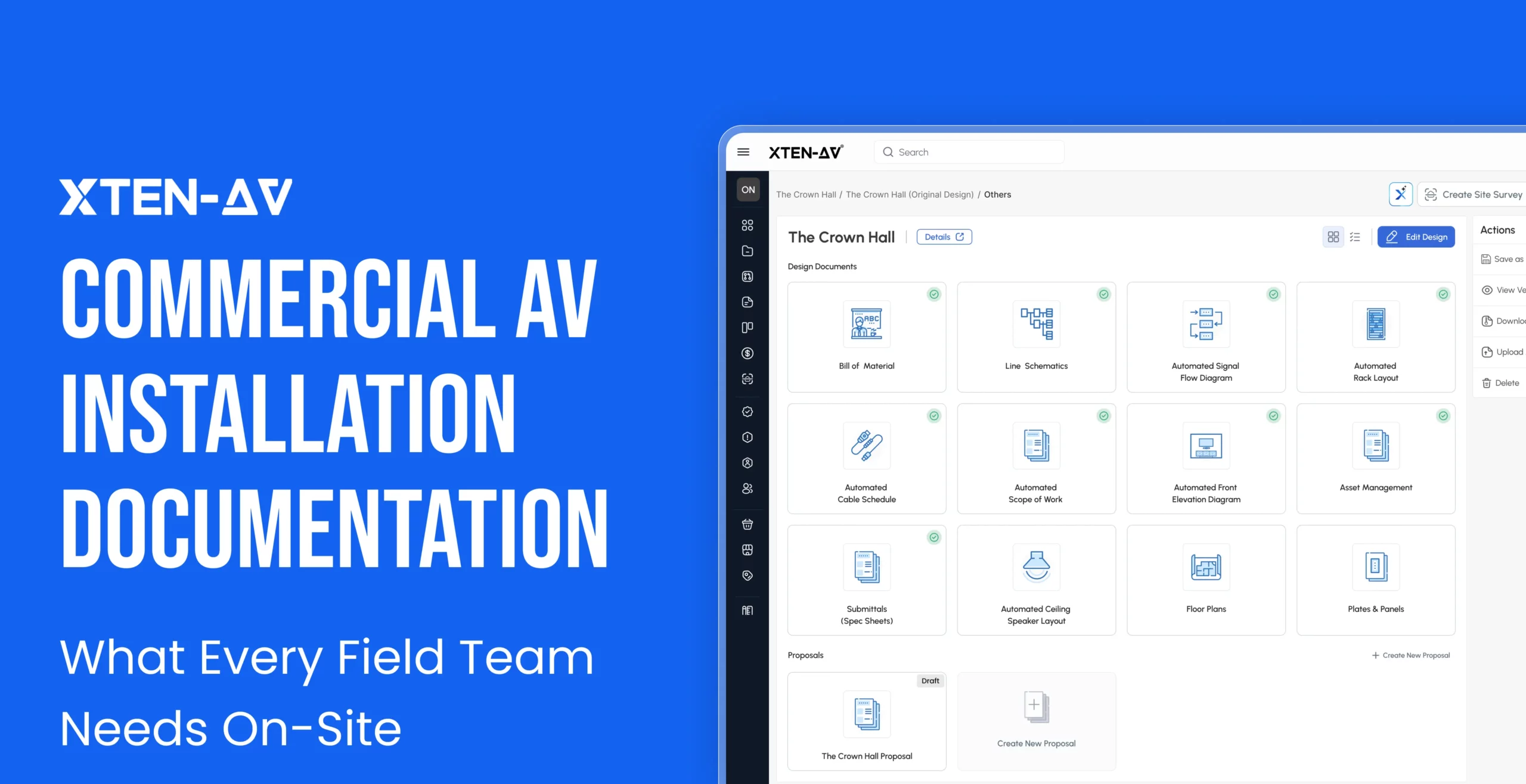
Modern AV integration firms are eliminating manual paperwork bottlenecks by leveraging AI-generated documents from a single drawing. They can automatically generate 12 project deliverables without manually re-entering the same data. Hence, AV designers, project managers, and installers have access to more consistent project information from design through installation and handover.
Key Takeaways
- Commercial AV installation depends on well-structured and accurate documentation as much as it depends on technical expertise. Even minor documentation gaps can lead to installation errors, project delays and costly site work.
- Every audio visual (AV) document helps ensure the system is built exactly as designed. From design validation and procurement to installation, commissioning and handover, each document prevents costly mistakes at every stage of the project.
- X-DRAW can automatically generate 12 professional AV documents from a single AV design. Once a designer completes a room drawing, the platform can produce the required commercial AV installation documentation.
- Automating AV documentation eliminates manual work. Accurate project records make troubleshooting, maintenance and future system upgrades easier.
- Manually maintaining multiple AV documents increases the risk of revision errors. If even one design change is missed, field teams may work from conflicting versions, resulting in procurement errors, installation delays and commissioning issues.
Understanding Commercial AV Installation
Commercial audio visual (AV) installation refers to the design, integration and setup of audio, video, lighting and control systems in commercial environments such as offices, educational institutions, healthcare facilities, hospitality venues, government buildings and retail spaces.
The installation process begins after the AV system has been designed and approved. During this stage, commercial AV installers turn the approved design into a fully functional system. They mount hardware, pull structural cabling, build equipment racks, configure devices and verify signal paths to ensure the system runs smoothly.
Commercial installations often involve hundreds of interconnected devices across multiple rooms, buildings and other commercial spaces. They also require collaboration among AV designers, engineers, project managers, procurement teams, installers and commissioning specialists. Every team depends on the same project information to complete the work accurately and efficiently.
Even a small design revision or missing project detail can affect procurement, installation, testing and final handover. Hence, synchronized documentation plays a vital role in every commercial AV installation. It keeps teams aligned, minimizes field rework and ensures that the installed system matches the latest approved AV design.
Why Documentation Makes or Breaks a Commercial AV Installation?
AV documentation translates the approved design into instructions that field teams can follow. A commercial AV system design has little value on-site unless installers have a proper understanding of where equipment belongs, how devices connect, what each cable serves and what the complete AV system should include. The design becomes useful when an installer can read a cable label or when a project manager can explain the scope of work without relying on the designer for every detail.
Here’s what poor documentation actually costs:
Repeat Site Visits:
A missing connection detail, incorrect cable label or unclear mounting requirement can force field teams to return to the site. Every additional visit increases labor costs and minimizes the profit margin.
Longer Commissioning:
When the installed system does not match the approved design, commissioning shifts from performance verification to fault finding. AV engineers need to determine what was installed before they can test whether the system works as intended.
Information Gaps during Handover:
Important project details move between designers, engineers, procurement teams, project managers and installers. Without clear documentation, crucial information can be overlooked or lost as the project moves between teams.
Reduced Client Trust:
Clear documentation shows that a commercial AV company has control over the project. Incomplete or inconsistent files or spreadsheets can create uncertainty and affect client confidence.
Commercial AV system integration firms pay close attention to commercial AV installation documentation. This is because it keeps decisions visible, teams aligned and the installed AV system consistent with what was approved.
The Hidden Cost of Disconnected AV Documentation
Disconnected AV documentation causes field errors because line schematic drawings, equipment data, cable details and rack layout no longer describe the same AV system.
A single design change can affect installation. Replacing one device may change rack space requirements, connection points and cable types. When each document is maintained in a separate tool, some files may be updated while others continue to show the previous design. This is when problems reach the job site. The Bill of Material (BOM) may show the new part number or quantities, but the rack layout still shows the old unit. The line schematic may show revised device connections, while the cable schedule includes outdated source and destination details. Installers then spend time resolving discrepancies instead of completing the installation.
The hidden cost appears as interrupted cable pulls, additional site visits and increased labor hours to name a few. The issue is not that teams lack documentation. The problem is that documents are not generated from a single drawing. Instead of manually rebuilding project information in multiple formats, AV teams need a connected set of documents that covers system connections, equipment requirements, physical placement, installation scope, compliance information and long-term asset records.
The 12 Essential Commercial AV Installation Documents
Commercial AV installation documents are the core technical and project deliverables that field teams use to build, connect, verify and handover an AV system. Together, these professional deliverables keep equipment data, signal paths, cable details, device locations, project scope and final records aligned.
Manually creating these documents enables designers to recreate the same project information across multiple drawings, spreadsheets and files. Every design revision then needed to be updated manually in each document. This increases the risk of mismatched equipment data or outdated information.
X-DRAW by XTEN-AV simplifies this process by generating professional AV documentation automatically from a single system drawing. It serves as AV system design and integration software for commercial AV companies, connecting the approved system drawing with the documents needed for streamlined installation.
Once a designer finishes a room drawing, the platform can automatically generate the documents below without additional manual work. There is no need to redraw schematics, re-type information or copy part numbers between tools. The designer creates the design once and the field team gets everything it needs.
Audio Visual (AV) Line Schematics
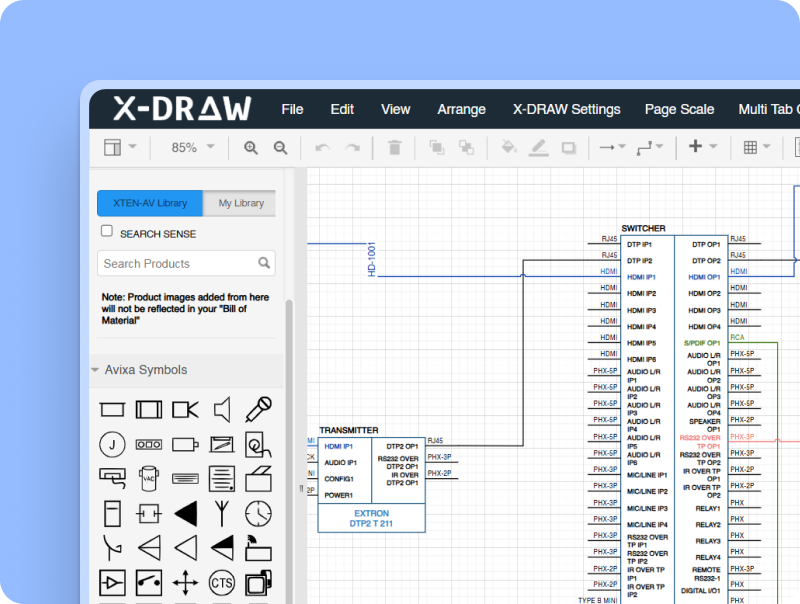
This is the most important technical document in a commercial AV installation. It provides a technical overview of how AV devices connect within a commercial AV system. During installation, AV technicians use line schematics to understand the overall system architecture, identify device connections, confirm signal paths and determine how all the components work together.
Without a proper schematic, installers may connect equipment incorrectly or ignore required interfaces. Commercial AV design software can generate line schematics directly from the system design. When any product, port or connections change, the drawing can be automatically updated and there is no need to build the entire schematic manually.
With XTEN-AV’s X-DRAW, AV professionals can create detailed line schematics from AV design. These connected drawings provide designers, engineers, installers and commissioning teams with a reliable technical document throughout the complete project.
AV Bill of Material (BOM)
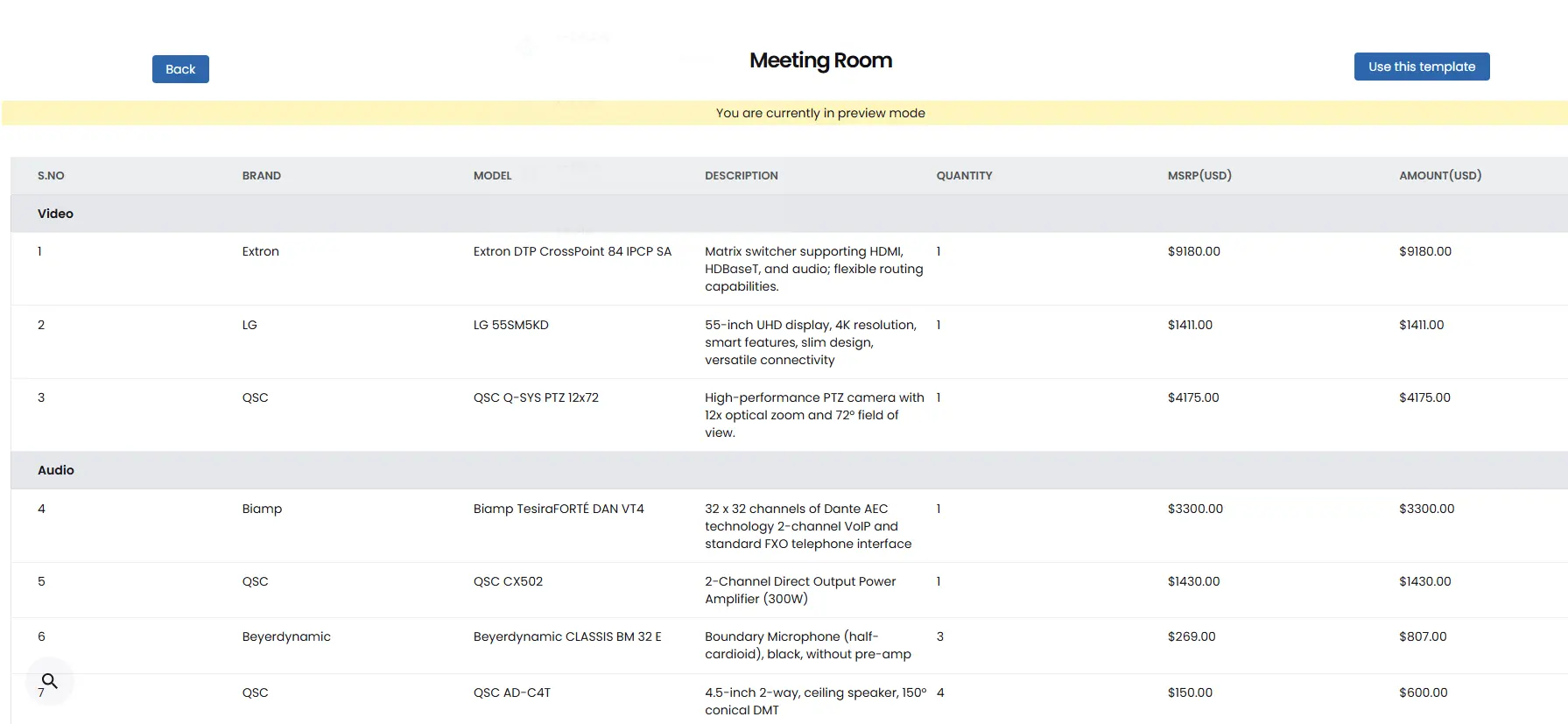
A Bill of Material includes product names, part numbers, quantities and pricing. Procurement teams use the BOM to order equipment, while project managers and AV installers use it to confirm that all the required products have arrived on-site. An incomplete or outdated BOM can lead to missing equipment, delayed installation and emergency purchases.
AV BOM software can generate the equipment list directly from the approved system design, reducing the need to maintain separate spreadsheets.
XTEN-AV enables AV professionals to generate BOM from the products added to the drawing in X-DRAW. As a result, it minimizes duplicate data entry and helps prevent mismatches between the approved design, quoted equipment and purchased quantities.
Automated Signal Flow Diagram
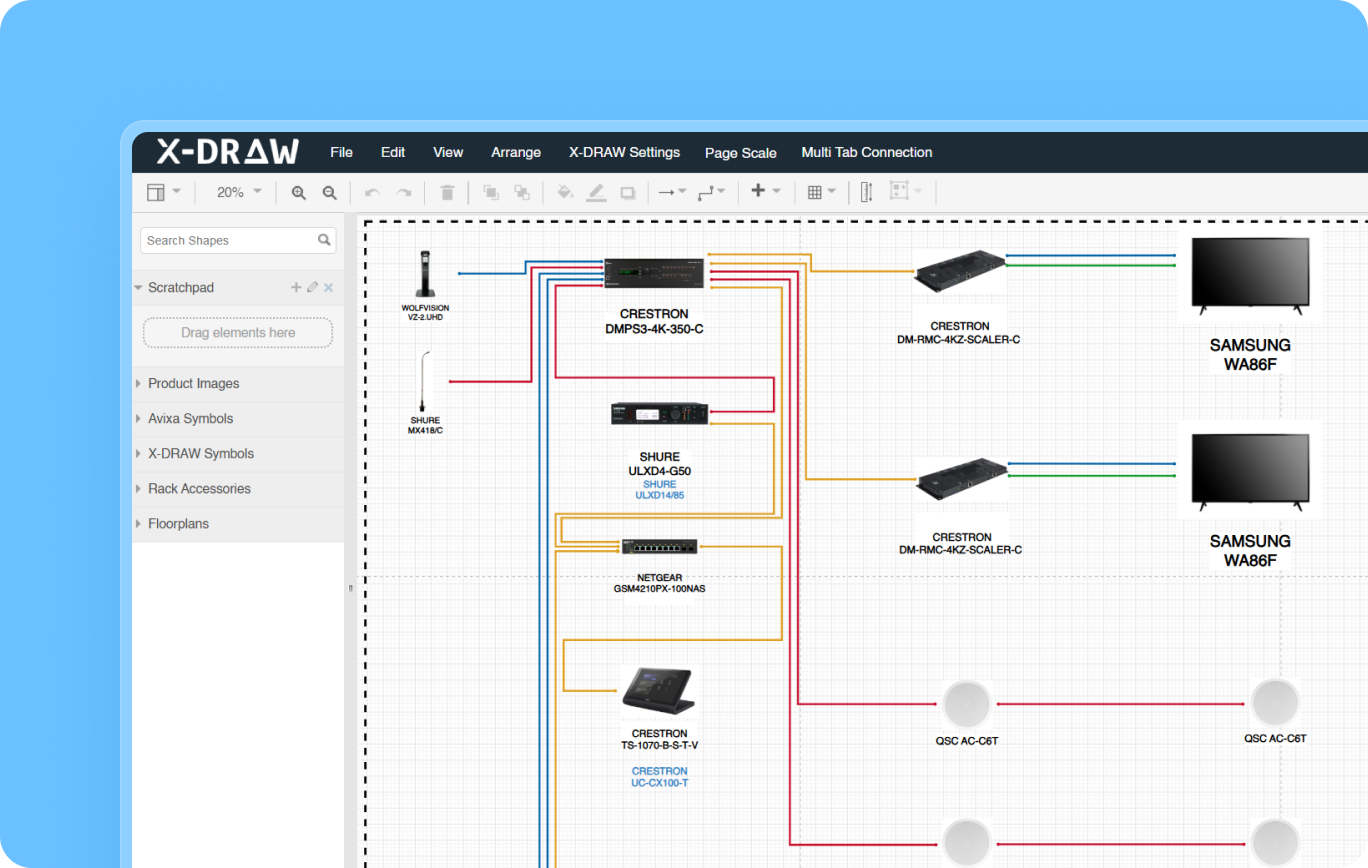
A signal flow diagram shows how audio, video, control and network signals move between devices in a commercial AV system. Field teams will have a clear connection path for every source, switcher, processor, amplifier, speaker, control device and display. During the installation process, field teams use the diagram to identify source and destination devices, verify connections and troubleshoot signal issues. If there is no proper signal flow diagram, installers may rely on assumptions, outdated drawings or repeated calls to the AV designers.
AV signal flow diagram software can generate the drawings and as devices or connections change, the diagram can be updated without manual redrawing. This keeps connection details aligned with the latest project details and supports a smoother installation.
In X-DRAW, AV professionals can create detailed signal flow diagrams from device connections. These drawings provide a dependable reference for system installation, commissioning, troubleshooting and post-installation servicing.
Automated Rack Layout
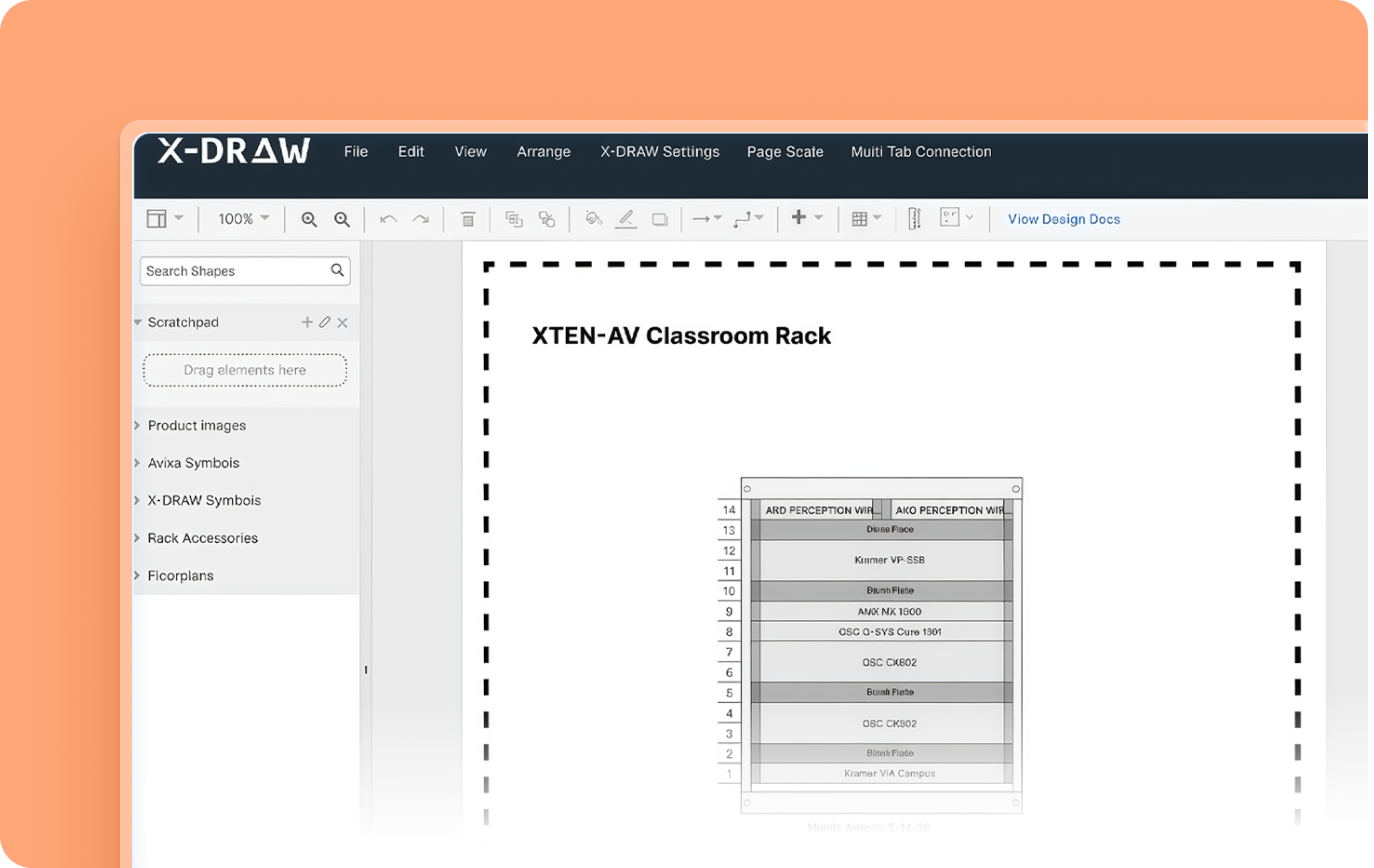
A rack layout shows where each AV device will be positioned within an equipment rack. It identifies rack-unit allocation, blank spaces, control processors, power distribution units and other rack accessories. Rack builders and AV installers use this document in order to confirm equipment positioning before mounting devices. It helps AV teams manage rack space, airflow, equipment weight and accessibility. When there is no proper rack layout, devices may be installed in the wrong place or leave insufficient space for proper airflow and future maintenance.
AV rack design software can generate rack elevations from the equipment included in the AV system design. When a device is added, removed or replaced, the rack layout can be revised along with the other related documentation.
XTEN-AV’s X-DRAW helps AV teams create rack layouts that give rack builders and field technicians a clearer plan for mounting, wiring, testing and maintaining the equipment.
Automated Cable Schedule
A cable schedule provides a structured list of every cable needed in a commercial AV system. It can include cable type, source, destination and cable label. AV installers use cable schedules to pull, label, route and test cables. Missing or incorrect cable details can result in incorrect cable pulls, duplicate work and delayed testing.
AV cable schedule software creates these records from the connections already defined in the system design. When a device or signal path changes, the cable details can be updated without maintaining a disconnected spreadsheet.
AV professionals can generate detailed cable schedules from connected line schematics and signal flow diagrams in X-DRAW design. Field crews can identify and verify every cable during installation, which improves cable-tracking accuracy.
Automated Ceiling Speaker Layout
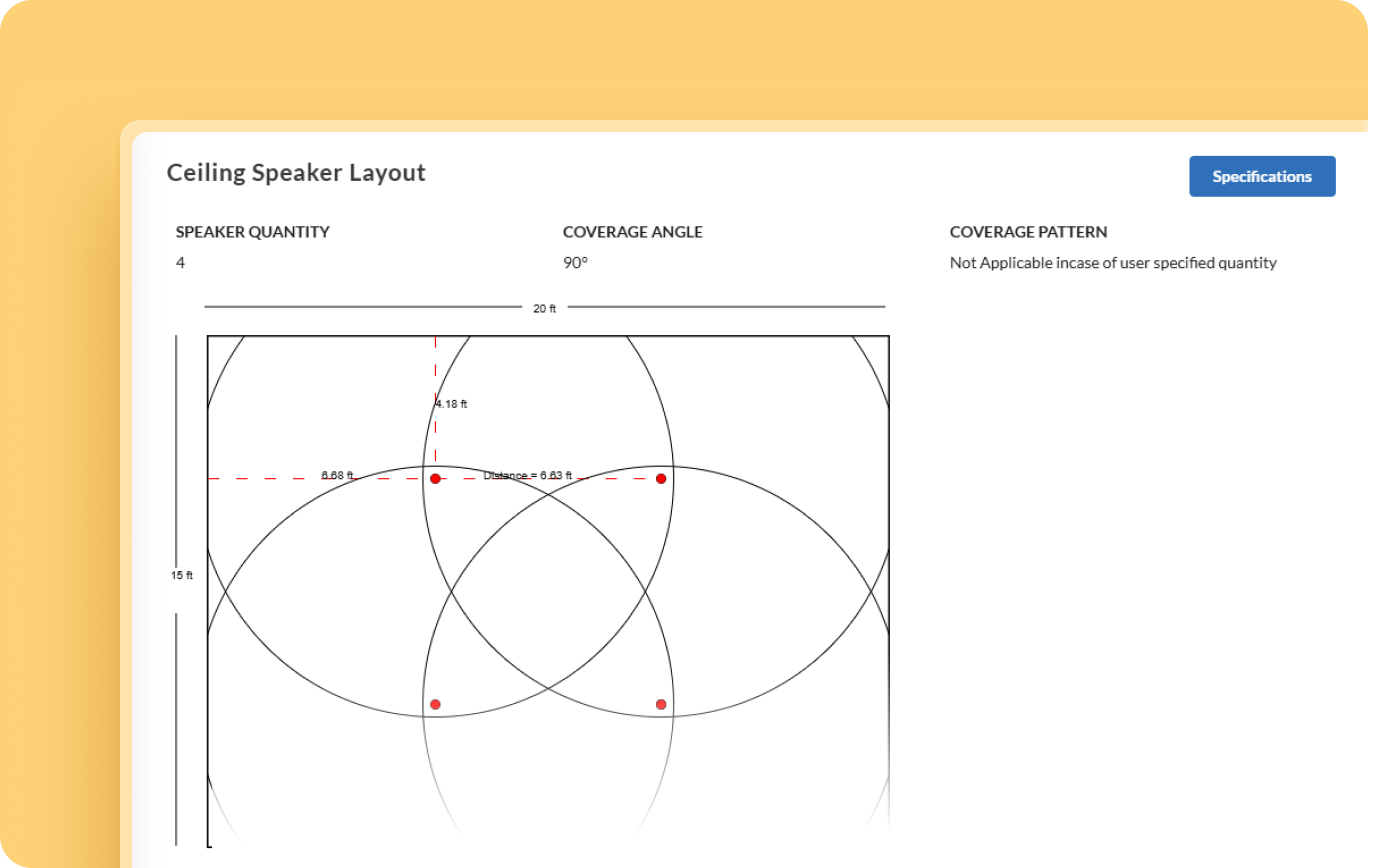
Ceiling speaker placement affects coverage consistency, sound pressure levels, intelligibility and the number of loudspeakers required for a room. Assuming placement from a basic floor plan can create coverage gaps or excessive overlap.
Automated Commercial AV speaker layout and placement show the recommended speaker positions based on the room dimensions, ceiling height and product specifications. Proper speaker placement is essential for delivering clear and consistent sound throughout a room. Incorrect positioning can result in uneven audio coverage, dead zones and poor speech intelligibility.
Ceiling speaker layout software can generate the placement diagram from the AV system design. If any change occurs in the room layout, device positions or selected speaker model, the drawing can be revised without recreating the ceiling plan manually.
XTEN-AV generates the ceiling speaker layout from the device positions defined in X-DRAW. Audio designers and installation crews receive a coordinated reference for speaker placement and on-site execution.
Automated Scope of Work
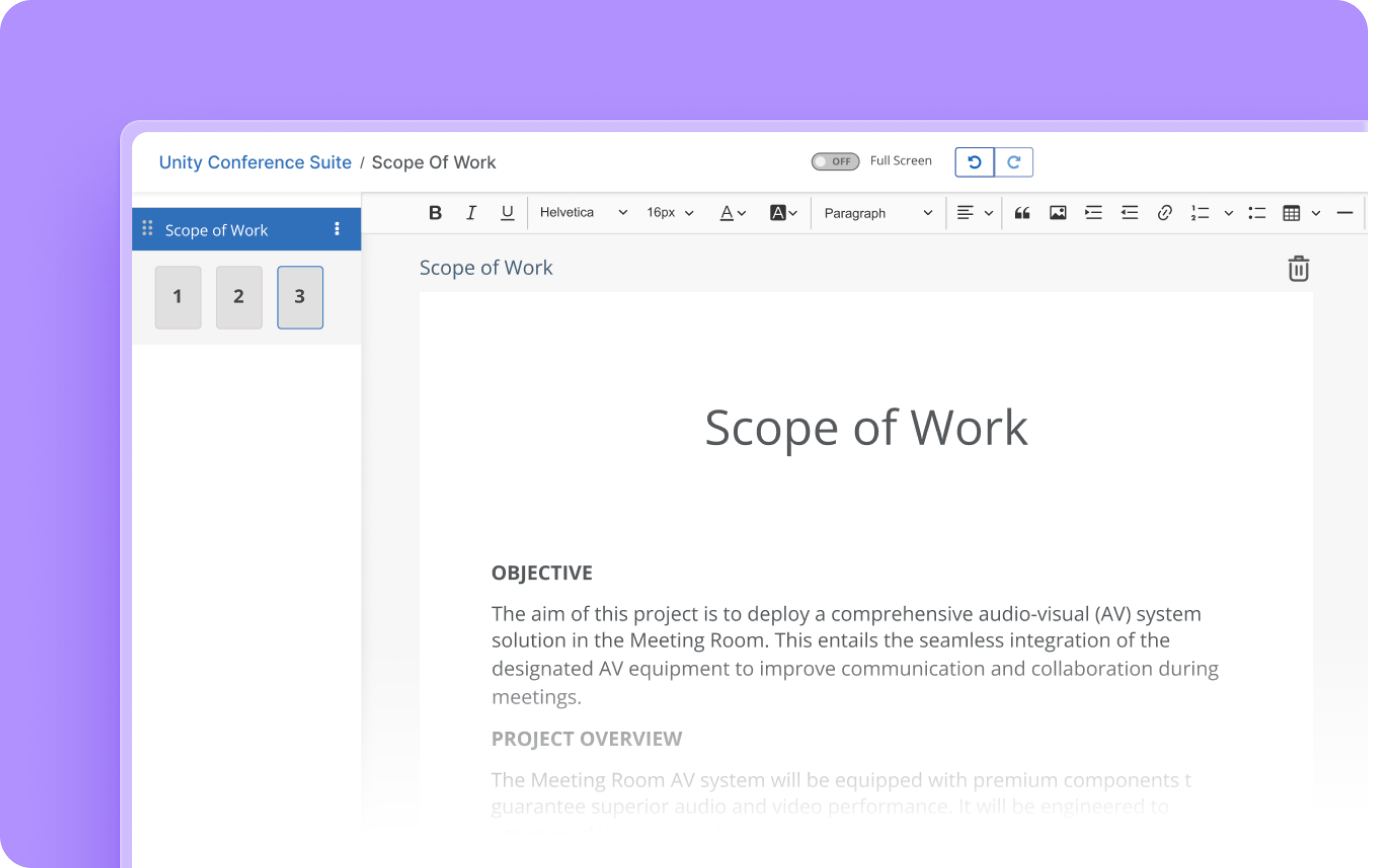
A scope of work provides a narrative description of the AV system, project responsibilities, installation activities and key deliverables. During project delivery, AV teams use the document to align equipment installation, cabling, testing and handover activities. An incomplete scope can result in unclear responsibilities, missed tasks and disagreements over project deliverables.
AV scope of work software can generate detailed project details covering the proposed AV system that helps project managers coordinate resources, gives field teams clear installation requirements, and provides clients with visibility into the agreed project scope.
XTEN-AV brings this workflow into X-DRAW, where the scope of work is automatically generated from the system design. As products, rooms or system requirements change, the document can be updated to showcase the latest design revisions, helping AV teams work from accurate, up-to-date project information throughout the installation process.
Audio Visual (AV) Floor Plans
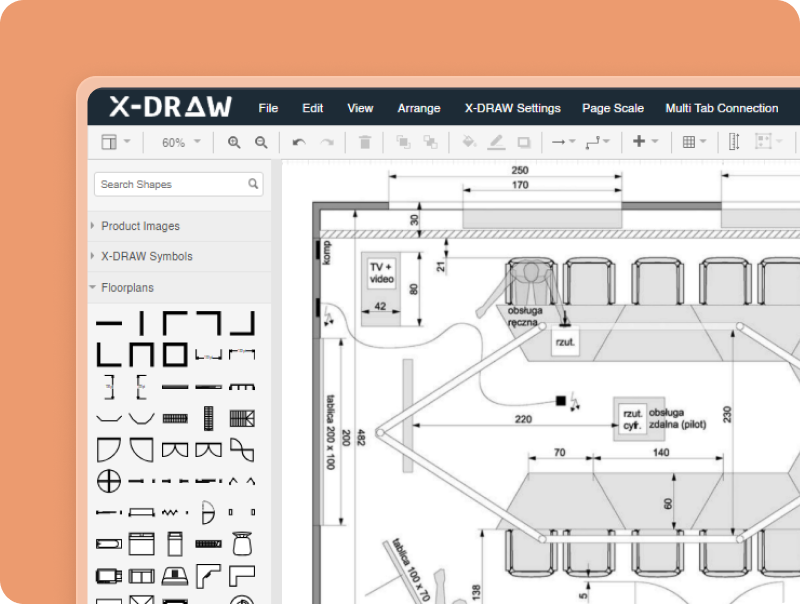
Floor plans show how equipment fits within the physical layout of a room. The AV document identifies the placement of displays, speakers, cameras, projectors, microphones and other system components. AV installers rely on them to locate equipment and avoid conflicts with structural elements or architectural features.
AV floor plan software helps AV companies work directly on existing architectural drawings instead of recreating the room layout manually. This improves coordination between AV designers, architects, facilities teams and clients while keeping equipment locations aligned with the latest design.
AutoCAD drawings can be uploaded into X-DRAW as the base for the AV system design. Equipment can be positioned directly on the floor plan, giving project teams a clear visual for design review, installation and client approval.
Automated Front Elevation Diagram
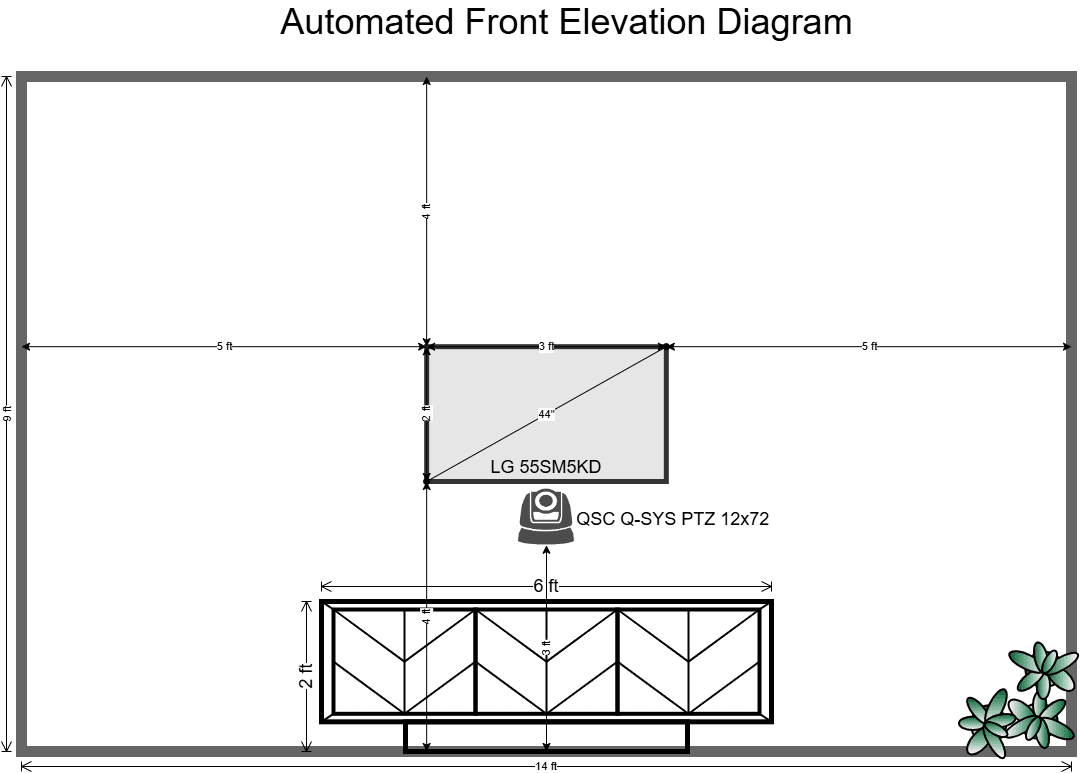
A front elevation diagram provides a front-view elevation drawing of the AV system installation. For AV designers, it confirms mounting heights, display positioning and how the front-of-room elements line up before installation begins. The drawings also give clients a complete visual understanding of the proposed room setup. This makes review and approval of design easier. Installers can position wall-mounted equipment accurately on-site.
AV elevation drawing software creates this visual directly from the approved system design, minimizing the need to prepare separate elevation drawings manually. In X-DRAW, AV integration firms can generate front elevation diagrams using the latest equipment placement and room information. This enables designers, clients and installers to work from an accurate project reference.
AV Plates & Panels
Plates and panels documentation defines the configuration of wall plates and other AV connection points. The document shows installers and low-voltage contractors how the wall plate should be configured, which port carries which signal and how the connection should be labelled.
Without standardized documentation, installers may assign the wrong connector to a wall plate or use inconsistent port labels. These mistakes make future troubleshooting more time-consuming. AV plate and panel design software helps teams create these details from the approved system design instead of documenting each connection separately.
In the XTEN-AV platform, this commercial AV installation documentation is generated from the connections created in X-DRAW design. It plays a vital role in minimizing manual re-entry and it stays aligned with the latest project revisions.
Submittals Packages (Spec Sheets)
AV submittals bring together a compiled set of manufacturer documents for every piece of equipment used in the design needed for client, AV consultant or contractor review before beginning the installation.
Preparing these documents manually can be time-consuming, especially when equipment selections or design details change. Incorrect submittals create confusion, delay approvals and installers may work from incorrect project details.
AV submittal software helps teams organize drawings and product details into a coordinated approval package. In XTEN-AV, project information created in X-DRAW can be used to prepare submittals and spec sheets. This allows AV teams to reflect the latest design revisions and provide clients, consultants and field teams with an accurate project reference.
Asset Management
This refers to a compiled set of manufacturer documents for every piece of equipment used in the design. This verifies that the selected equipment meets the AV project’s design before beginning the installation work.
Instead of manually compiling specification sheets for hundreds of AV products, X-DRAW can generate a complete submittal package. This speeds up approvals and confirms that the documentation matches the latest approved equipment selection.
Asset management documentation records the AV equipment installed across rooms. It gives service teams a clear view of the systems they manage. Without centralized asset information, they may spend additional time searching through drawings, spreadsheets and handover files before solving an issue. Incomplete records can also make maintenance planning, equipment replacement and future upgrades more difficult.
AV asset management software keeps installed equipment and service information organized in one place. With XTEN-AV’s X-DRAW, AV professionals can document products across rooms, racks and zones directly from the system design, making tracking and maintenance easier.
Audio Visual System Design Mastery + Winning Proposals = 10x Productivity!
- ✔ Automatic Cable Labeling & Styling
- ✔ 100+ Free Proposal Templates
- ✔ Upload & Create Floor Plans
- ✔ 1.5M+ Products from 5200 Brands
- ✔ AI-powered 'Search Sense'
- ✔ Legally Binding Digital Signatures

Conclusion
Successful commercial AV installations depend on more than technical expertise. The installation process largely depends on accurate documentation that turns an approved AV design into a system that field teams can install, verify and handover with confidence.
A stronger approach is to create every project deliverable from the same approved design. This is because it keeps equipment information, system connections, project scope and installation requirements aligned throughout the project. XTEN-AV addresses this through X-DRAW platform.
It enables AV professionals to automatically generate 12 professional deliverables from a single drawing without additional manual work. This gives audio visual (AV) designers, project managers, procurement teams, installers and commissioning teams a consistent source of project information while minimizing revision errors and manual documentation efforts.
FAQ’s
Commercial AV installation documentation is the complete set of AV drawings, schedules, specifications and project records. It ensures every AV team works from the same project details.
Yes, X-DRAW can automatically generate 12 professional AV installation documents from a single system drawing.
Accurate installation documents give field teams clear instructions for equipment placement, device connections, cable routing and labelling. This minimizes installation errors, delays and unnecessary site visits.
A complete list of documents includes line schematics, Bill of Material, signal flow diagrams, rack layout, cable schedule, ceiling speaker layout, scope of work, floor plans, front elevation diagram, plates & panels, submittals and asset management.
Accurate, synchronized documentation gives field teams access to current installation details, diminishing clarification requests and delays during installation and commissioning.

Explore more by topic
Related Blogs
-

- Posted by Sahil Dhingra

Audio Visual AV Cables Guide: Types, Connectors, Uses and Wiring Diagrams for...
-
- Posted by Sahil Dhingra
Audio Visual Courtroom Audio Visual (AV) Systems: A Complete Guide for Courts...

-
- Posted by Sahil Dhingra
Audio Visual 10 Best draw.io Alternatives for AV Professionals Sahil Dhingra Published...





