







How to Choose the Right Commercial AV Software for Your Integration Business

Sahil Dhingra
Published 23 Nov 2026
Managing a commercial AV integration business includes multiple processes, including system design and equipment selection to cost estimation, proposals, installation and after-sales service. As projects become more complex, managing these activities through disconnected applications can result in inaccurate bills of materials (BOMs), pricing discrepancies, delayed approvals and limited project visibility.
In this regard, commercial AV software helps AV integrators streamline these tasks by connecting technical design, sales, project execution and service management. However, not every solution offers the same capabilities. Some tools focus exclusively on AV drawings or proposals, while others support multiple business operations within an integrated platform. Choosing the right commercial AV software requires evaluating its design capabilities, automation features, third-party integrations, project management tools and scalability.
In this guide, we’ll explore the essential software categories, features and evaluation criteria AV integrators should pay attention to before investing in a solution.
Key Takeaways
- Commercial AV software helps integrators streamline system design, BOMs, proposals, project execution and after-sales service.
- Disconnected applications can create inaccurate equipment pricing, inconsistent documentation and limited project visibility.
- The integrated process connects AV design, cost estimation, CRM, procurement, accounting and service management.
- Essential features include automated AV drawings, BOM management, dealer pricing, proposal creation and project tracking.
- Evaluating integration compatibility, scalability, security, usability and total software costs is essential before finalizing the purchase.
- Testing software with actual AV projects helps integrators determine whether a platform meets its working requirements.
What Is Commercial AV Software?
Commercial AV software refers to digital tools and platforms that help audiovisual system integrators design, estimate, sell, install and maintain commercial AV systems. These solutions support AV system schematics, equipment selection, bill of materials (BOM) generation, cost estimation, proposal creation, project scheduling and service management.
Depending on business requirements, AV integrators can use specialized applications for individual tasks or integrated platforms that connect multiple processes.
For example, an AV designer can create a conference room system design, generate its BOM, apply equipment pricing and pass the information to the sales team for proposal preparation. Once approved, project managers can use the same project information to coordinate installation and manage subsequent service requirements.
This connected approach helps AV integration companies maintain consistent project information, improve coordination and manage business operations more efficiently.
Still spending hours on manual estimates and pricing updates? Discover how to automate commercial AV proposals for faster, more accurate submissions.
What Software Does a Commercial AV Integration Company Need?
A commercial AV integration company needs AV system integrator software that supports system design, BOM creation, cost estimation and proposals, along with built-in CRM, dealer pricing integrations and after-sales service management.
The following software categories are crucial for managing a commercial AV integration business:
| Software Category | Key Functions for AV Integration Business |
| AV Design and Diagramming Software | Creates system schematics, signal flow diagrams, rack elevations, cable schedules, floor plans and BOMs. |
| AV Quoting and Estimating Software | Prepares equipment quotations, built-in calculation tools for accurate, error-free cost and labor estimates, and personalized, branded proposals with trackable URLs. |
| AV Project Management Software | Manage installation tasks, technician assignments, inventory management, purchase orders and project profitability. |
| AV Service Management Software | Manage service calls, maintenance agreements, service contracts and technician scheduling. |
| CRM Software | Manages customer accounts, contacts, sales opportunities and project information. |
The right combination depends on the size of the integration business, project complexity and existing technology stack. Small integrators may initially require specialized AV design and proposal tools, while growing integration firms may benefit from platforms that connect engineering, sales, installation and service teams.
What Problems Do Disconnected Tools Create for AV Integrators?
Commercial AV integration companies often use different tools for system design, cost estimation, proposals, procurement, project management and after-sales service. This leads to data silos, manual re-entry and costly version errors.
Here are common problems caused by disconnected AV business tools:
Inconsistent AV Design and Documentation
When engineering teams rely on disconnected CAD tools, spreadsheets and static PDFs, signal flow schematics, rack elevations and BOMs quickly fall out of sync. A single change to equipment specification often fails to update across every document, resulting in missing cables, wrong orders and incompatible hardware. Furthermore, field technicians face on-site delays as they troubleshoot outdated blueprints and unrecorded field modifications.
Inaccurate Equipment Pricing and Cost Estimates
When dealer pricing platforms and proposal software operate separately, cost updates, quantity changes and revised labor estimates may not be reflected in client proposals. These discrepancies can affect purchasing decisions, project budgets and profit margins.
Disconnected CRM and Sales Records
When CRM applications are not connected with AV integration software, customer details, sales opportunities and proposal details remain scattered across different platforms. Sales reps are forced to manually re-enter contact details and project scopes across multiple platforms, slowing down quote turnaround times and creating version confusion.
Limited Project and Installation Visibility
When AV project management software operates separately from system design, procurement information and equipment lists, managers lack real-time insight into equipment delivery status, technician schedules and installation progress. Field technicians often work from outdated scope of work or miss critical change orders. This leads to costly site revisits, budget overruns and delayed project handoffs.
Following an AV commissioning checklist helps integrators verify system functionality, identify outstanding issues and maintain accurate documentation before final project handover.
Disconnected Service Records and Maintenance Contracts
When AV service management software operates separately from engineering, project management and CRM systems, support technicians may lack immediate access to updated drawings, equipment specifications and installation documentation for troubleshooting and maintenance. Managing service calls, maintenance agreements, technician schedules and contract renewals across separate applications can also affect service efficiency and recurring revenue opportunities.

These problems show why selecting commercial AV software requires a lot more than just comparing individual features. It is crucial for AV integrators to assess whether a platform can connect design, proposals and project information with existing CRM, accounting, distributor pricing and service pricing.
Which Business Processes Should Commercial AV Software Connect?
Commercial AV software should connect CRM, AV system design, BOMs, dealer pricing, cost estimation, proposals, procurement, accounting, project management and after-sales service in a single ecosystem. These connections help AV integrators keep customer records, equipment specifications, project costs and installation details remain accurate and consistent across departments. Integrating these processes improves project visibility, pricing accuracy, financial control and service management.
Here are the key business processes commercial AV software should connect:
AV System Design, BOMs and Dealer Pricing
Accurate equipment data is essential when designing commercial AV systems. By integrating AV design software with product libraries and distributor pricing platforms like ADI and Snap One provide access to dealer-specific equipment pricing. When AV engineers select displays, DSPs, amplifiers or control processors, pricing automatically populates the bill of materials. With this real-time connection, sales and procurement teams build accurate estimates and purchase orders using relevant equipment specifications, quantities and dealer prices.
Cost Estimation, Proposals and Client Approvals
Connecting cost estimation directly with AV proposal software turns finalized BOMs into professional, client-ready quotes in minutes. Equipment costs, installation labor, shipping, and target profit margins carry over automatically, eliminating costly mistakes and manual data entry. Modern AV proposal platforms streamline client review by presenting itemized scopes and system summaries. Integrated e-signatures speed up client approvals.
CRM and Sales Opportunity Management
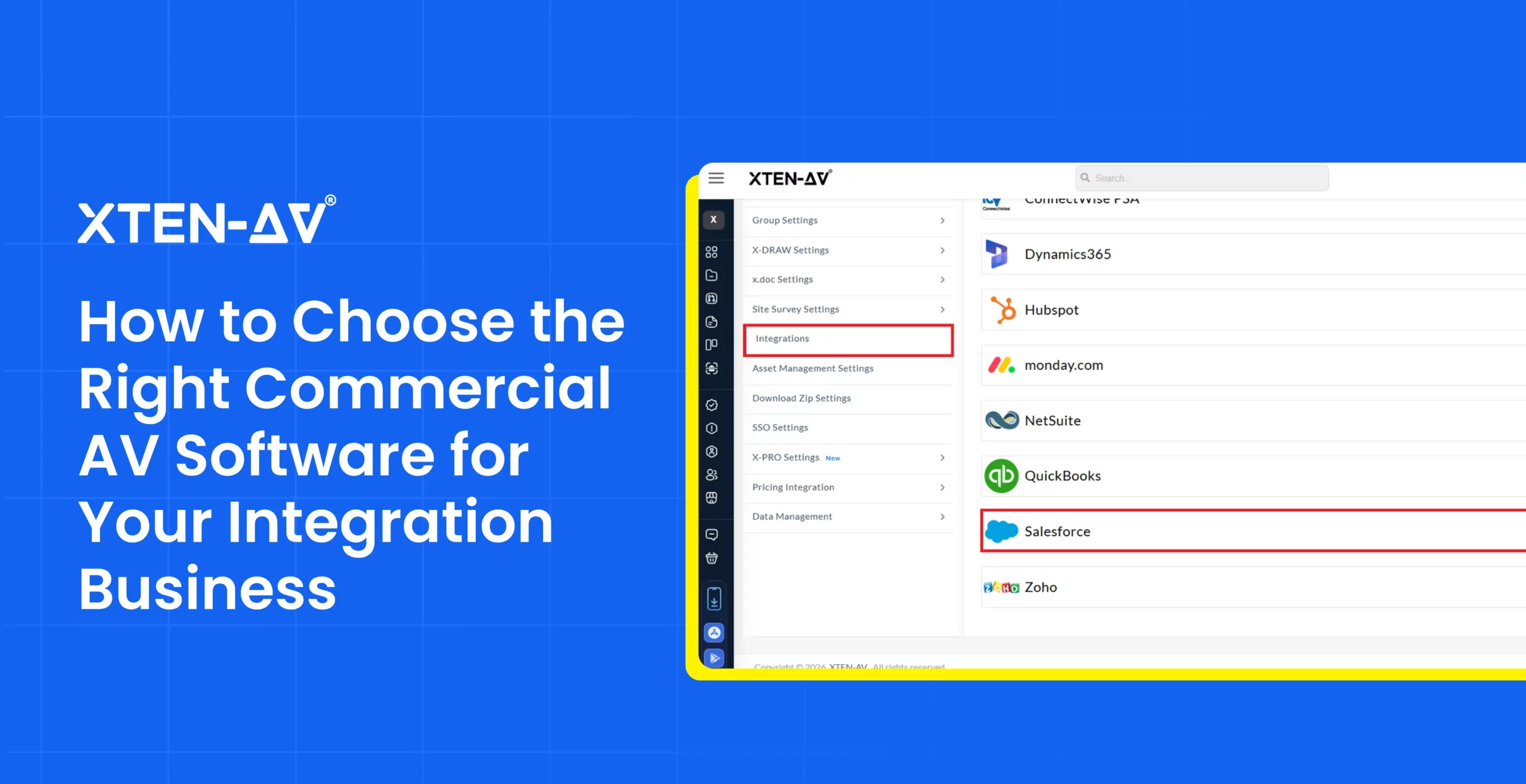
Commercial AV projects begin with a client requirement or sales opportunity. When connecting AV software with CRM platforms like Salesforce, Zoho CRM, HubSpot and Microsoft Dynamics 365 allows integrators to share customer contacts, account details and sales opportunities. When a sales representative logs a new enquiry for a conference room AV installation, contact details, site requirements transfer into the AV project workspace. Sales and engineering teams can track the opportunity alongside project designs and proposal details without maintaining separate customer records.
Procurement, Accounting and Financial Management
An approved AV proposal provides the basis for equipment purchasing and financial planning. A commercial AV software with accounting applications such as QuickBooks helps businesses manage purchase orders and client invoices. Instead of manually transferring line items into spreadsheets, purchasing managers work directly from the finalized BOM to ensure every display, processor and cable matches the approved scope.
Service Management and Customer Records
Connecting after-sales service management with project documentation and CRM records and engineering documentation gives technicians access to important information when handling maintenance requests. When a client reports an issue with a conference room audio system, the assigned technician can refer to the original drawings, equipment specifications and installation records before visiting the site.
Standalone AV Software vs. Integrated Commercial AV Software: What’s the Difference?
Integrated commercial AV software connects design, BOMs, cost estimation, proposals, project management, and service in one system, unlike standalone tools that require separate processes.
| Comparison Area | Standalone AV Software | Integrated Commercial AV Software |
| AV System Design | Handled in a separate application. | Connected to other supported project processes. |
| BOM Management | Needs manual data transfer. | Connected to system design details. |
| Cost Estimation | Handled separately. | Connected to project estimates and equipment. |
| Project Management | Separate project records. | Connected project details. |
| Proposal Creation | Independent quoting process. | Connected design and cost details. |
| Service Management | Separate service documentation. | Connected project and customer records. |
What Key Features Should You Look for in Commercial AV Software?
When evaluating commercial AV software, integrators should check how well the software connects existing business applications, maintains accurate project information and supports profitability as business demands grow.
Here are the key features to evaluate before choosing software for your AV integration business:
| Key Feature | What AV Integrators Should Look For |
| AV Design and Drawing Automation | Automated AV schematics, signal flow diagrams, rack elevations, cable schedules and floor plans. |
| Automated BOM Management | Bill of materials linked to system drawings with updated equipment specifications, pricing and quantities. |
| CRM Integration | Connectivity with Salesforce, HubSpot, Microsoft Dynamics 365 to manage contacts, accounts and sales opportunities. |
| AV Proposal Creation | Proposal templates, equipment and labor cost calculations, electronic signatures and revision tracking. |
| AV Project Management | Technician assignments, installation scheduling, project cost monitoring and labor tracking. |
| AV Service Management | Service call tracking, maintenance agreements, technician scheduling and contract renewals. |
How Can Commercial AV Software Improve Project Profitability and Service Revenue?
Commercial AV software boosts profitability by helping integrators maintain accurate equipment costs, control labor expenses, manage project budgets and identify opportunities for recurring service revenue.
Here are the key ways commercial AV software can support business profitability and service revenue:
Improve Cost Estimation and Protect Profit Margins
Accurate cost estimation is important to protecting margins on complex commercial AV installations. Integrating system design software with dealer pricing platforms enables integrators to build BOMs using current equipment cost. When estimates accurately capture dealer pricing, installation hours, target margins, teams eliminate accidental underbidding. This helps in delivering competitive client proposals while protecting profitability on every project.
Control Installation Costs and Labor Expenses
Installation delays, unplanned labor hours and on-site equipment changes can inflate project expenses. AV project management software helps integrators track technician hours, installation schedules, material expenses and milestone progress against estimated budgets. Project managers gain immediate visibility into resource utilization and can identify budget deviations early so that informed decisions can be made to protect project margins.
Maintain Financial Accuracy Across Business Systems
Disconnected estimating, purchasing and accounting tools create costly discrepancies between approved estimates, purchase orders and invoices. Integrating commercial AV software with accounting platforms ensures every proposal, purchase orders and client invoice share one unified financial record. This helps AV integrators monitor project expenses, track purchasing commitments and evaluate profitability using more reliable financial records.

Generate Recurring Revenue Through AV Service Contracts
The right commercial AV software helps integrators transition from one-off installation projects to predictable, high-margin recurring revenue by connecting as-built design records, project BOMs and device specifications directly to service management modules. AV professionals can pitch multi-year support and preventive maintenance contracts at project handoff.
Complex AV drawings and disconnected tools slowing you down? See how commercial AV software brings schematic drawing automation, proposals and project management together.
How Do You Evaluate Commercial AV Software Before Buying?
Selecting commercial AV software involves more than comparing feature lists. AV integrators should evaluate how well a platform supports their existing process, connects with business applications and accommodates future operational requirements.
Here’s the commercial AV software buying checklist:
- Hands-On Trial: Test the software using an actual AV project. Select a conference room or a classroom to test BOM creation, proposal revisions, equipment substitutions and installation planning.
- Verify Third-Party Integrations: Confirm compatibility with your CRM, accounting and dealer pricing platforms. Test data synchronization, supported functions and additional integration costs.
- Check Total Software Costs: Compare subscription plans, user licenses, add-ons, training costs and implementation expenses. You can also check which capabilities are included in each plan.
- Ease of Use and Adoption: Involve AV designers, sales representatives, project managers and field technicians test the platform properly. Check the availability of product training, technical assistance, implementation guidance and documentation.
- Scalability and Vendor Support: Evaluate technical support, security, user permissions and the platform’s ability to accommodate more projects.
Are inaccurate estimates, rising equipment costs and installation delays affecting your profit margins? Learn how to prevent cost overruns in commercial AV projects and improve profitability.
Want to see how XTEN-AV can support your integration business?
How Does XTEN-AV Support AV Design, Proposals, Installation and Service?
XTEN-AV is an AI-Powered, cloud-based platform designed for AV system integrators, designers and consultants that connects system design, proposals, project management and after-sales service within one ecosystem. It also supports integration with CRM, accounting and distributor pricing platforms to keep technical, customer and financial details connected.
Here’s how its capabilities support different requirements of an AV integration business:
AV Drawing and Diagramming:
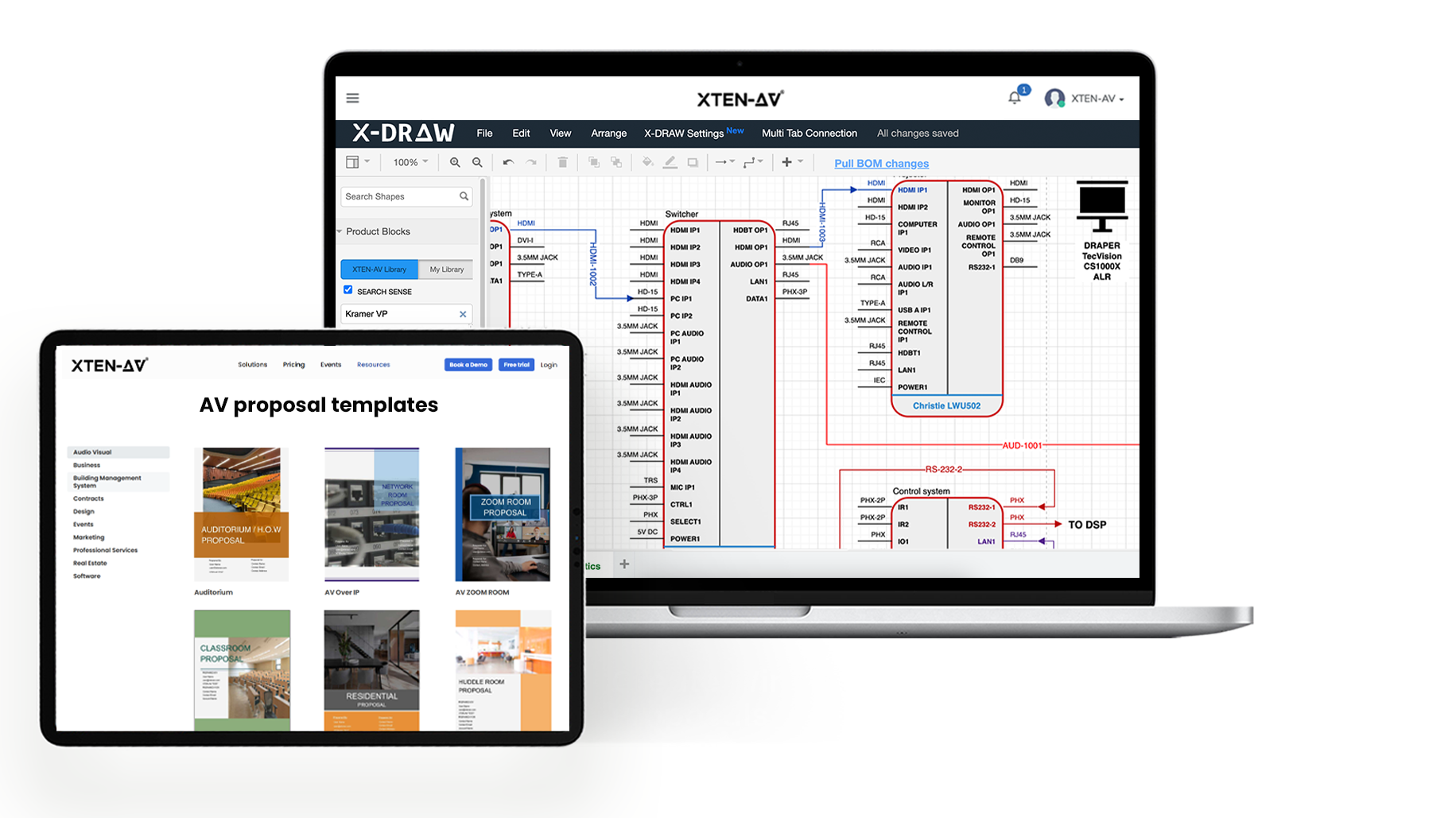
X-DRAW is an AV design and drawing software that helps integrators create technical drawings and documentation with automated drawing capabilities. Equipment information stays connected to engineering documents, making it easier to manage design changes.
With X-DRAW, AV designers and engineers can:
- Generate AV schematics, rack elevations, signal flow diagrams, cable schedules and floor plans.
- Generate BOMs directly from system designs, keeping engineering documentation aligned across every stage of a project.
- Apply dealer-specific equipment pricing directly to BOMs and project estimates.
AV Proposals and Cost Estimation:
x.doc helps AV sales professionals prepare accurate quotations, control project costs and secure client approvals without manual spreadsheet work.
From preparing an initial quotation to receiving client approval, x.doc enables integrators to:
- Create branded, client-ready AV proposals in minutes using 100+ customizable templates.
- Calculate equipment costs, installation labor charges and target profit margins accurately.
- Check when clients open proposals, review specific sections and request revisions so follow-up with the client can be done at the right time.
- Built-in electronic signature within the platform for quick approvals.
AV Project Management:
X-PRO Install brings real-time visibility to commercial AV project execution, allowing teams coordinate installations and monitor performance from initial handoff through final commissioning.
Once a project moves into installation, X-PRO Install helps businesses stay organized through:
- Manage installation schedules, task checklists, technician assignments and project milestones in one visual workspace.
- Track field technician working hours properly through mobile clock-in and clock-out.
- Check labor cost, material expenses, profitability and project performance metrics.
- Manage equipment inventory, vendor purchase orders and generate client-ready invoices.
After-Sales Service Management:
X-PRO Service brings complete after-sales service management, allowing AV integrators to manage maintenance activities and recurring customer relationships.
For integrators offering technical support and maintenance contracts, the platform provides:
- Track service calls through a Kanban board with Open, Assigned, Scheduled, In Progress and Completed stages.
- Assign AV technicians, set service priorities and schedule maintenance requests.
- Create service agreements with proposal-style documentation to close maintenance deals faster.
- Manage service contracts, renewal information and customer service history.
- Monitor recurring service revenue, technician utilization rates and service performance through analytics.

Accounting and Dealer Pricing Integration:
XTEN-AV supports bidirectional synchronization with selected CRM platforms, accounting integrations for supported financial transactions and distributor connections for accessing dealer-specific equipment pricing.
Depending on their existing business systems, AV integrators can:
- Connect Salesforce, HubSpot and Microsoft Dynamics 365 to keep customer records, accounts and sales opportunities synchronized automatically.
- QuickBooks and Zoho Books integration to support purchasing, invoicing and financial processes.
- Pull real-time equipment costs from ADI, Snap One and custom dealer price lists directly into BOMs and proposals.
- Coordinate teams using built-in CRM and chatter communication tools, along with supported third-party business management integrations.
Wondering if your CRM, accounting and dealer pricing tools can work together? Explore XTEN-AV Integrations to discover how your business systems can stay connected.

Conclusion
Choosing the right commercial AV software is not just about comparing design and project management features. AV integrators should look for a platform that connects technical drawings, documentation, pricing, proposals, installation management and service records with existing business applications. Before finalizing, test how the software performs on actual projects, supports current processes and accommodates future upgrades. Schedule a free trial of XTEN-AV to see how its connected capabilities support commercial AV integration business.
Audio Visual System Design Mastery + Winning Proposals = 10x Productivity!
- ✔ Automatic Cable Labeling & Styling
- ✔ 100+ Free Proposal Templates
- ✔ Upload & Create Floor Plans
- ✔ 1.5M+ Products from 5200 Brands
- ✔ AI-powered 'Search Sense'
- ✔ Legally Binding Digital Signatures
FAQs
AV design software creates system drawings and BOMs, while AV business management software handles CRM, proposals, project costs, installations and service contracts.
Yes, commercial AV software supports installation planning, technician scheduling, service calls, maintenance agreements and contract renewals.
AV integrators use software for system design, AV proposals, cost estimation, project management and installation planning.
AV software improves profitability by automating design, improving cost estimates, optimizing resource allocation and minimizing costly project errors.
It tracks equipment costs, dealer pricing, labor expenses and project budgets to help integrators monitor profitability.
Yes, it supports integration with Salesforce, HubSpot, QuickBooks Online and Zoho Books etc. for connected business processes.
Integrators should test BOM generation, proposal creation, equipment pricing, third-party integrations, installation tracking and ease of use.
Commercial AV software pricing depends on features, user licenses and subscription plans. Additional costs may apply for integrations, automation and project management capabilities.

Explore more by topic
Related Blogs
-

- Posted by Sahil Dhingra

Audio Visual Why Commercial AV Proposals Take Too Long to Prepare and...
-
- Posted by Sahil Dhingra
Audio Visual Top 5 AV Project Management Software with CRM and Invoicing...
-
- Posted by Sahil Dhingra
Audio Visual Why Commercial AV Projects Run Over Budget and How to...
AV Design Mastery + Winning Proposals = 10x Productivity!
- Automatic Cable Labeling & Styling
- 100+ Free Proposal Templates
- Upload & Create Floor Plans
- 1.5M Products from 5200 Brands
- AI-powered ‘Search Sense'
- Legally Binding Digital Signatures
No Credit Card Required