7 Task Management Methods for AV Integrators to Keep Projects on Schedule in 2026 and Beyond

7 Task Management Methods for AV Integrators to Keep Projects on Schedule in 2026 and Beyond

Author Image

Sahil Dhingra

Published 10 SEPT 2026

Task Management Strategies for AV Integrators
Summarize with:

AV project managers can finalize an installation plan and still face delays when submittal approvals are pending, site access changes, equipment delivery dates shift or technician coverage becomes limited. These issues can disrupt sequencing across procurement, rack build, field installation, commissioning and closeout.

According to AVIXA’s 2026 Channel Survey, 76% of channel providers expect business growth, while staffing and skilled labor shortages remain the top concern. For AV firms, rising demand with limited technical capacity makes crew utilization, resource planning, and milestone control more critical across concurrent jobs.

In this blog, we will discover various task management methods AV integrators can use to prioritize critical activities, assign ownership, surface dependencies, coordinate technical resources and keep project delivery aligned with planned milestones.

“For AV integrators, effective project management depends on keeping tasks, technician schedules, field updates and time tracking connected across AV CAD design, installation, commissioning and closeout.” ~AVNetwork

  • Effective task management methods provide AV professionals with better visibility into priorities, dependencies, responsibilities and installation milestones. 
  • Successful AV delivery depends on aligning equipment readiness, technician availability, field activities, and commissioning requirements with planned timelines. 
  • Structured approaches such as activity prioritization, ownership assignment, dependency tracking and progress reviews support smoother installation coordination. 
  • Resource planning and labor tracking provide clearer insight into workload capacity, technician utilization, and scheduling requirements. 
  • XTEN-AV (X-PRO) is worth considering for AV professionals seeking better visibility into assignments, technician schedules, field updates, and resource planning across installation and service activities.

What Are Task Management Methods for AV Projects?

Task management methods are structured techniques that enable AV project managers to plan, prioritize, organize and monitor activities throughout project execution. These approaches create a clear framework for managing responsibilities, deadlines, dependencies and resources.

For AV firms handling multiple installations, task management for managers provides better visibility into technician schedules, equipment readiness, field activities and project milestones. Approaches such as task prioritization, dependency tracking, resource planning, and progress reviews support smoother coordination and stronger control over complex AV deployments.

Managing complex AV deployments requires clear visibility into tasks, resources and team capacity. Learn how AV project resource management software helps integrators improve coordination, track progress and keep installations aligned with project goals.

Why Task Management for Project Managers Matters in AV Project Scheduling?

AV project scheduling involves multiple dependencies, including equipment readiness, technician availability, installation activities and commissioning timelines. Effective task management techniques allow AV project managers to organize priorities, align resources and maintain control over key milestones.

Here are the key areas where better planning improves project scheduling:

  • Improves Schedule Planning

Clear visibility into activities, dependencies and deadlines helps managers create realistic installation plans and stay aligned with requirements.

  • Optimizes Resource Allocation

Tracking AV technician availability, equipment requirements and workload distribution supports efficient resource planning.

  • Enables Progress Visibility

Using structured task tracking methods makes it easier to monitor completed work, pending items, and upcoming milestones.

  • Improves Field Coordination

Updated details keep project managers, installation teams and technicians aligned during deployment.

  • Supports Faster Decisions

Accurate status updates allow managers to respond to schedule changes and address potential delays quickly.

If you’re finding it difficult to keep AV activities organized and assign responsibilities clearly, don’t worry. Learn how to assign tasks to team members and keep your installation activities aligned with project requirements.

What Are the 7 Best Task Management Strategies and Techniques for AV Integrators

Managing AV deployments requires alignment between equipment readiness, installation schedules, field activities and commissioning requirements. Effective task management strategies allow AV integrators to organize priorities, assign responsibilities and maintain control across complex installations.

Following are 7 proven approaches that enable integrators to enhance scheduling, field coordination and delivery planning across complex installations:

No. Task Management Strategy AV Implementation Business Impact
1 Prioritize Critical Activities Focus on high-impact activities such as procurement, equipment readiness, installation, programming and testing. Keeps key milestones aligned with delivery timelines.
2 Structure Installation Activities Organize site preparation, equipment setup, configuration and commissioning stages. Improves planning clarity and execution control.
3 Track Dependencies Monitor activities that rely on equipment availability, programming completion or testing requirements. Prevents delays caused by blocked activities.
4 Assign Clear Ownership Define responsibilities for project managers, installation teams and field technicians. Improves accountability and reduces missed handoffs.
5 Plan Resources and Schedules Align AV technician availability, equipment requirements and site timelines. Supports better scheduling and resource utilization.
6 Review Progress Regularly Monitor completed work, pending items, field updates and upcoming milestones. Helps identify risks before they impact timelines.
7 Centralize Project Information Keep schedules, AV documents, updates and installation details accessible through a unified platform. Gives teams access to accurate and current information.

How Can AV Project Managers Improve Task Tracking, Scheduling and Resource Planning?

Successful AV installations depend on accurate scheduling, technician availability, equipment readiness and timely completion of critical activities. A structured approach gives AV professionals better visibility into assignments, priorities and resource requirements throughout the delivery process.

Using reliable time management resources supports better planning of labor availability, site activities and installation timelines. Tracking workload, upcoming milestones, and resource utilization allows teams to identify scheduling gaps and make adjustments before they impact delivery.

Clear visibility into assignments, schedules and field updates enables smoother alignment between office staff, technicians and installation personnel while maintaining consistency across complex AV projects.

Need better consistency across complex AV installations? Discover how
AV standardization creates clear guidelines, supports repeatable processes, and enables scalable system delivery.

How Does XTEN-AV Help AV Integrators Manage Projects and After-Sales Service?

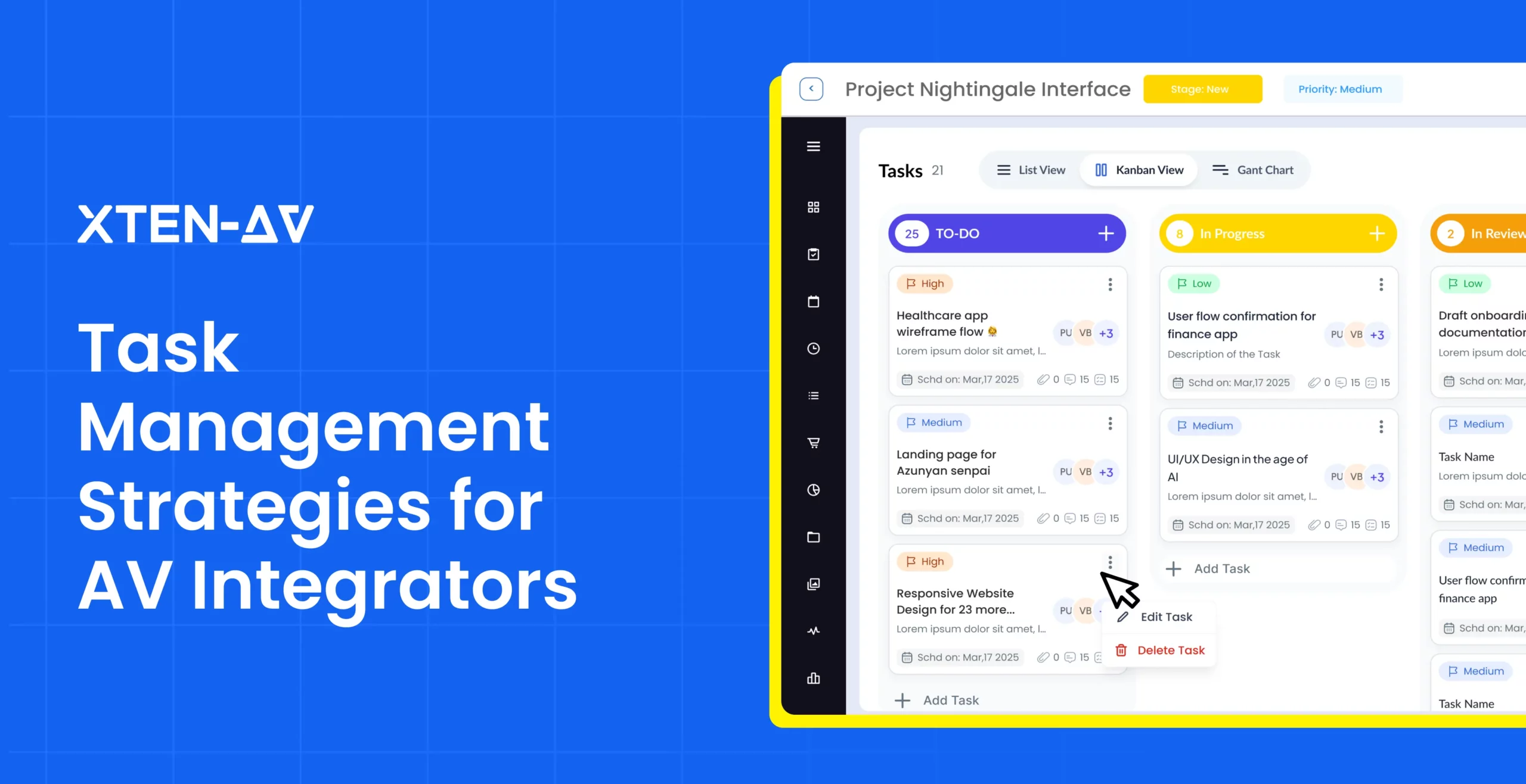
X-PRO by XTEN-AV is AV time management software built for AV project managers to coordinate schedules, field activity, technician time, procurement, and after-sales service from one platform. X-PRO has two modules: X-PRO Installation and X-PRO Service. X-PRO Installation covers task planning, scheduled events, field execution, inventory, purchase orders and invoicing, while X-PRO Service manages service calls, service agreements, service analytics and service contracts.

Kanban UI_Task Management

Here are the key X-PRO features AV project managers can use to manage installation work and after-sales service:

  • Task Management & Event Linking

Create activities, set priorities, assign ownership, and connect work to scheduled events. Installation teams can stay aligned with deadlines and milestones.

  • Dashboard & Calendar

Track due dates, upcoming events, crew assignments, and active work in one place. Scheduling conflicts become easier to identify before they affect site activity.

  • Dedicated Mobile App & Field View

Office users can access dashboards, documents, reports, and approvals from mobile devices. AV field technicians can review drawings, task lists, job details, and update progress onsite.

  • Clock-In & Clock-Out

AV technicians can record hours directly from the job site. Time entries provide accurate labor records for cost tracking and job analysis.

  • Inventory, Purchase Orders & Invoicing

Monitor equipment availability, create POs and manage invoices as installation progresses. This keeps purchasing activity aligned with upcoming site requirements.

  • Service Call Kanban

Organize calls across open, assigned, scheduled, in progress and completed stages. Priority, assignee, category and time window remain visible at a glance, making 

X-PRO a strong option for evaluating field service management software for AV support teams.

  • AV Technician Scheduling & Utilization

Assign field resources based on availability, workload and scheduled calls. Utilization data improves capacity planning accuracy.

  • Service Agreements & Contract Management

Maintain agreements, support contracts, client entitlements and renewal status in a centralized record. Recurring commitments stay visible after handover.

  • Service Analytics

Review call volume, utilization, close rate, sales cycle and revenue metrics. These meaningful AV insights provide a measurable view of after-sales performance.

Keep AV Projects on Schedule with Smarter Task Management

AV Task Management Checklist for Installation & Field Coordination

Effective AV task management requires clear ownership, equipment readiness, technician availability and timely field updates. Consistent labor tracking also gives managers better visibility into actual hours, cost variance and resource utilization across active installations.

Following is a concise AV-specific checklist for keeping field execution aligned with key milestones:

AV Task Management Area What to Verify Why It Matters
Task ownership Assignee, priority and due date. Prevents missed handoffs.
Scheduled activities Tasks linked to key project events. Maintains alignment with planned milestones.
Equipment readiness Inventory status and open POs. Avoids technician downtime onsite.
AV Technician allocation Crew availability by job. Limits scheduling conflicts.
Field updates Progress, blockers and time entries. Provides current execution status.
Project documents Latest drawings and task notes. Gives office and field teams consistent information.
Milestone readiness Open items before commissioning or closeout. Identifies schedule risks early.

Choosing the right platform can simplify AV project coordination. Discover the best AV project management software guide to compare features and find the right fit for your team.

Conclusion

AV schedules become challenging to manage when field updates, technician availability, equipment status, and approvals are scattered across multiple tools. For firms handling concurrent installations, AV engineer time tracking helps improve visibility into actual hours, planned effort, and resource utilization. Project managers and service managers seeking a structured approach for task coordination, field activities, and post-installation support can explore X-PRO by XTEN-AV, a cloud-based AV project management platform designed for scheduling, technician coordination, and project visibility. Schedule Your XTEN-AV Demo to discover how better planning and tracking can support your AV requirements.

Audio Visual System Design Mastery + Winning Proposals = 10x Productivity!

  • Automatic Cable Labeling & Styling
  • 100+ Free Proposal Templates
  • Upload & Create Floor Plans
  • 1.5M+ Products from 5200 Brands
  • AI-powered 'Search Sense'
  • Legally Binding Digital Signatures
Laptop Mockup

FAQ’s

Kanban is a practical option for AV project delivery because it gives project managers a visual view of work across CAD design, procurement, installation and commissioning.

Break major milestones into assigned activities with clear due dates, then monitor equipment delivery, site readiness, crew availability and installation sequencing.

It compares estimated hours with actual AV technician time, making labor overruns, staffing gaps and cost variances easier to identify.

Use it when you need to manage multiple jobs, AV technician schedules, field updates, deadlines and labor records from one centralized platform.

Monitor equipment availability, client approvals, site readiness, technician capacity, punch-list progress and commissioning readiness to keep project delivery on schedule.

XTEN-AV

Manage Multiple Audio Visual (AV) Projects with XTEN-AV

Share Article

Explore more by topic

Related Blogs
Task Management Strategies for AV Integrators
  • Sahil Dhingra
  • Posted by Sahil Dhingra
September 15, 2026

Audio Visual 7 Task Management Methods for AV Integrators to Keep Projects...

AlarmCAD alternatives for AV system integrators including XTEN-AV, FireCAD, Bosch, Bluebeam, and System Surveyor
  • Sahil Dhingra
  • Posted by Sahil Dhingra
September 14, 2026

Audio Visual Top 5 Alternatives to AlarmCAD for AV System Integrators Sahil...

Best BOM Management Software for AV Integrators
  • Sahil Dhingra
  • Posted by Sahil Dhingra
September 10, 2026

Audio Visual 5 Best BOM Management Platforms for AV System Integration Sahil...

Sahil Dhingra
Sahil Dhingra
Sahil Dhingra is Co-Founder and CEO of XTEN-AV, a cloud-based Audio Visual (AV) system design & integration software for system design, proposals, project management, and post-installation service. With 10+ years of experience in software development, business analysis, and product leadership at companies including Apple, HP, and Cisco, Sahil leads XTEN-AV’s product vision for connected AV project lifecycle management. He focuses on building AI-assisted SaaS workflows that help AV teams reduce manual effort across system design, BOM creation, proposals, documentation, project delivery, reporting, and after-sales service.

Leave a Reply

Your email address will not be published. Required fields are marked *

This website stores cookies on your computer. Cookie Policy