







Boardroom AV Equipment: What You Need for a Modern Executive Meeting Room

Sahil Dhingra
Published on 20 May 2026
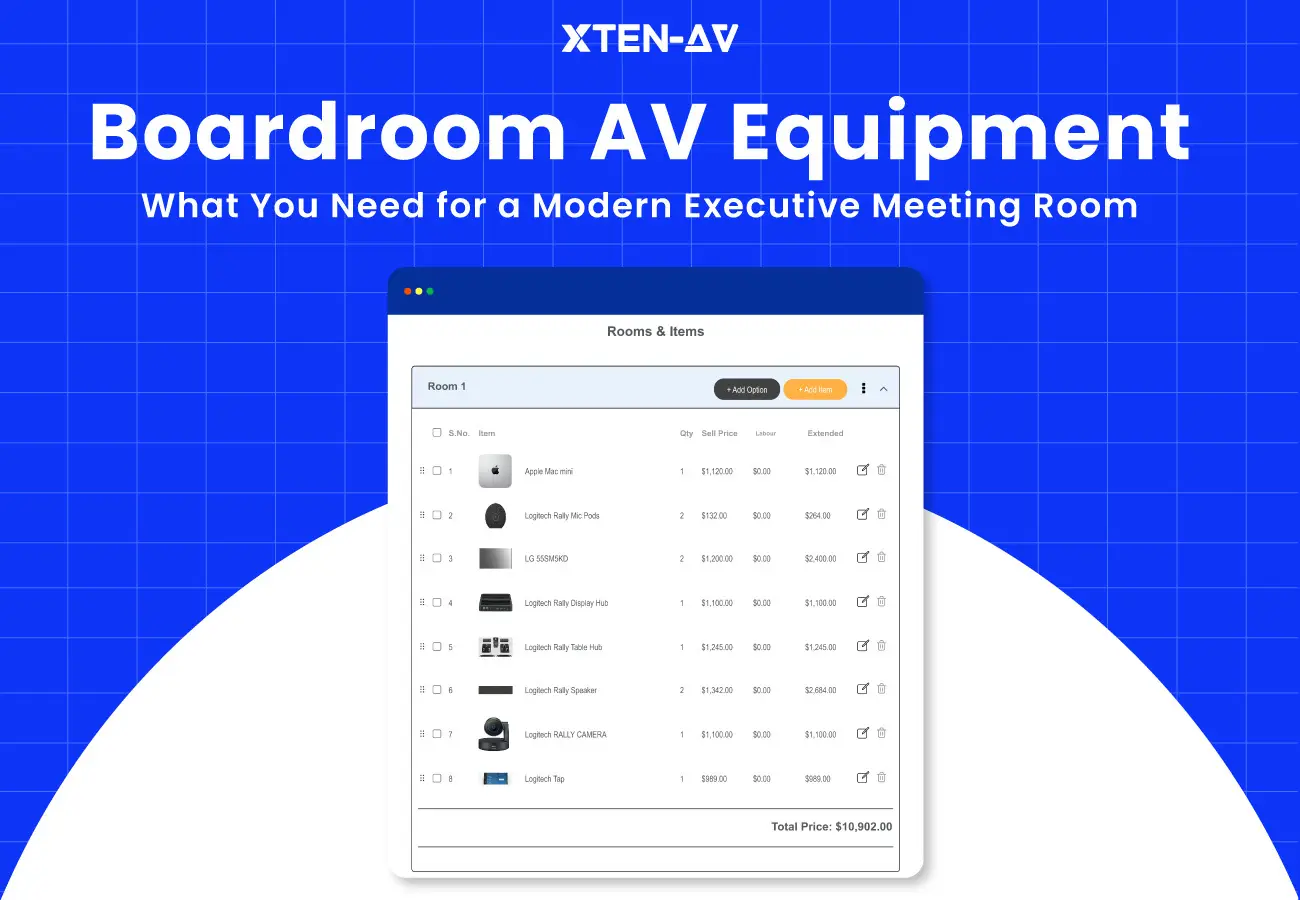


The boardroom is where decisions get made. It is also where poor AV does the most damage. Muffled audio on a client call, a camera that cuts off half the room, a display too small to read from the far end of the table, these are not minor inconveniences. They cost deals and credibility.
Modern boardrooms run hybrid meetings by default. Every piece of boardroom AV equipment needs to function simultaneously for both the people present in the room and the people participating in the remote call.
The design of boardroom AV systems fails in most cases because design decisions create problems which destroy all equipment functionality.
This guide breaks down every component in a boardroom AV system. It covers what to spec, what gets left out, what causes rework, and how to build an accurate BOM from your design. If you design or sell boardroom AV systems, this is your reference.
A modern boardroom AV equipment setup includes:
- Display systems: single or dual flat panel screens sized to the room.
- Audio systems: includes microphones speakers and a DSP processor.
- Video systems: uses PTZ cameras or intelligent auto-framing cameras.
- Conferencing platform: supports Teams Rooms, Zoom Rooms and Webex through certified hardware.
- Control system: uses a touch panel which enables users to manage the room with one tap.
- AV infrastructure: includes cabling network connectivity and power distribution.
Key Takeaways
Display size must come from room geometry, not budget. Use the 0.1 rule: display diagonal in inches equals one-tenth of the farthest viewing distance in inches.
Ceiling height and table material directly affect microphone performance. Both need to be documented before you spec audio.
DSP is not optional. Without it, even premium microphones produce unusable audio on the far end of a call.
Hybrid readiness must be designed from day one. Retrofitting a room for video calls after the fact rarely works well.
The most expensive rework traces back to the design stage, not the equipment. Coverage maps, sight line checks, and accurate BOMs prevent most of it.
Five to ten percent of project margin is lost on average due to missed BOM items and change orders. DSP tuning labor, acoustic treatment, and control programming are the most common omissions.
A vague BOM gets the wrong items ordered. Every line needs a manufacturer, model number, and description.
X-DRAW generates the BOM from the room design. X-DOC turns that BOM into a client-ready proposal without manual data entry.
The all-in-one solution for your Audio Visual (AV) Project Design & Documentation needs
Transform your audio-visual experience with XTEN-AV.
No Credit Card required
What Equipment Is Needed in a Boardroom AV Equipment Setup?
A boardroom AV system has six categories. Each one affects the others. Get any one wrong and the whole room suffers.
1. Display Solutions
The display is the first thing clients see and the last thing they want to squint at. Most boardrooms need a flat panel display between 75 and 98 inches. A dual display setup or laser projector system becomes necessary for spaces which require extended viewing distances.
- The 0.1 rule: display size in inches should equal one-tenth of the farthest viewing distance. A 30-foot room calculates to ~36 inches by rule, but in practice requires 75–98 inches for real-world readability.
- Brightness depends on the room. Office spaces need between 500 and 700 nits of brightness for their standard operations.
- Glass-walled rooms need 700–1000 nits. The display becomes unreadable when it lacks sufficient brightness to operate in a sunlit environment.
- Dual displays let you show a content slide on one screen and the video call on the other. For hybrid boardroom equipment, this is the standard setup, not a luxury.
- Mount the display so the center sits at seated eye level, approximately 42 to 48 inches from the floor. Higher mounts cause neck strain and look poor on camera.
Common boardroom AV failure: Undersized displays in long rooms. A 65-inch screen in a 30-foot boardroom is unreadable past the halfway point.
How X-DRAW helps: Most display sizing mistakes are caught on-site, after mounting and cabling are done. X-DRAW flags display size against room dimensions during the design phase, before procurement starts. You fix it on the drawing, not on a ladder.

2. Audio Systems
Bad audio ends meetings. Good audio is invisible. Boardroom audio visual equipment has three parts: microphones, speakers, and a DSP.
Microphones:
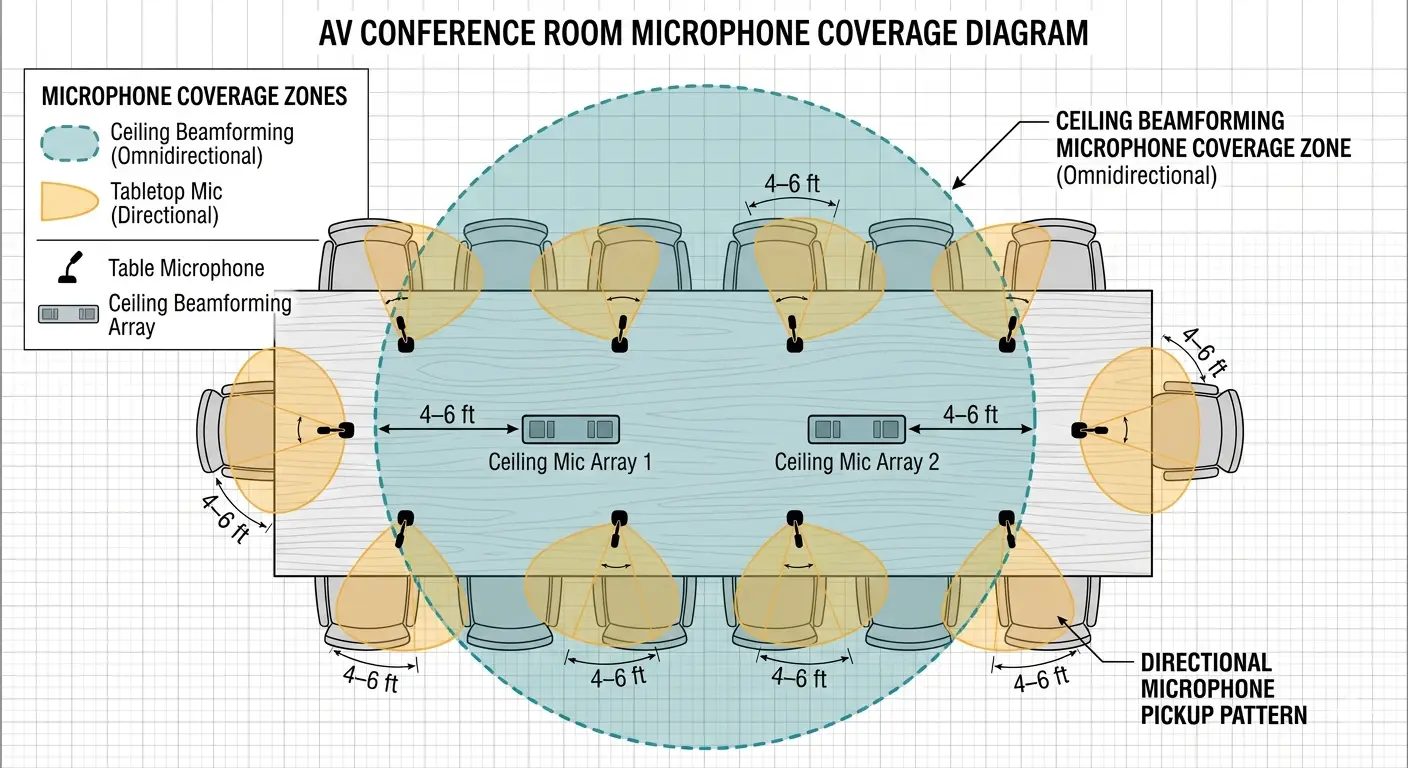
Table microphones, boundary or gooseneck, work for smaller rooms with fixed seating. Place them within 4 to 6 feet of every participant.
- Ceiling height changes everything. Rooms with ceilings above 12 feet need beamforming microphone arrays with longer throw distance. Standard ceiling mics lose pickup quality as ceiling height increases.
- Table material also affects audio. Hard polished surfaces like glass or lacquered wood reflect sound back into the mic. This causes echo that the DSP has to work harder to remove. Acoustic felt pads or a fabric table runner help.
- Beamforming mics use directional pickup to follow the active speaker automatically. Useful in large rooms without a dedicated AV operator.
Avoid a single omnidirectional microphone in rooms over 20 feet. Dead zones are guaranteed, and clients will hear them.
Speakers:
- Ceiling speakers spread sound evenly and reduce echo from hard surfaces.
- Soundbars work under the display in smaller rooms. In rooms over 20 feet, coverage becomes inconsistent.
- Loudspeaker positions should follow a coverage map. Placing them where they look good is how you get uneven audio.
DSP:
- A DSP handles echo cancellation, noise suppression, automatic gain control, and EQ. Without it, far-end participants hear echo and background noise regardless of microphone quality.
- Some conferencing appliances include a built-in DSP. Standalone DSP processors give more tuning control for complex rooms.
- For larger boardrooms on AV-over-IP networks: Dante-enabled DSPs integrate with networked audio infrastructure. This matters when the boardroom is one room in a larger AV-over-IP deployment across a floor or building.
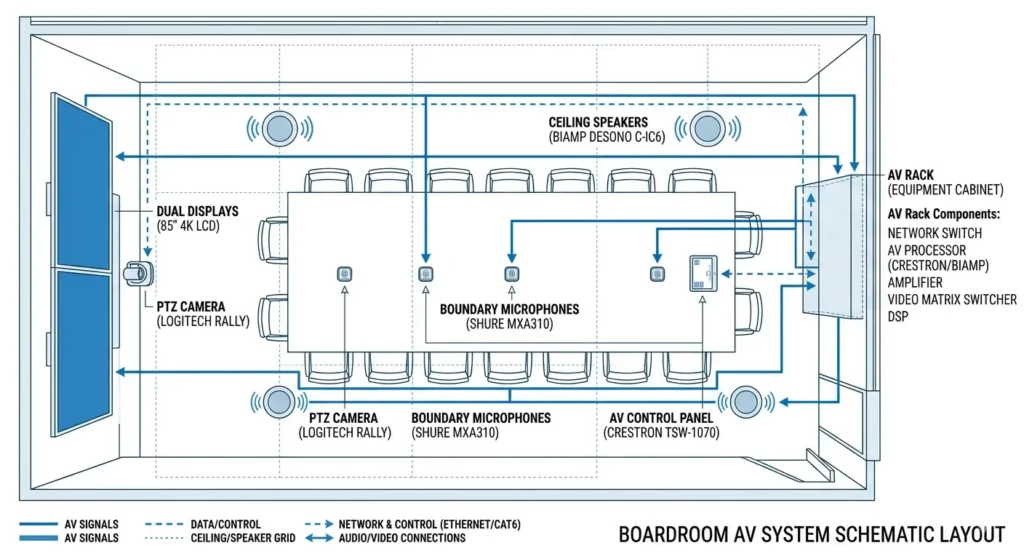
How X-DRAW helps: X-DRAW signal flow diagrams show every audio device in the chain, from mic to DSP to speaker, with the correct connection type. When you generate the BOM from X-DRAW, the DSP, cables, and audio accessories are already listed. Nothing gets dropped.
3. Video Systems
The camera is how remote participants see the room. A bad angle or low resolution reads as unprofessional before anyone speaks.
- PTZ cameras support preset positions for different seating layouts.
- The intelligent cameras use automatic framing capabilities to follow the current speaker while they change the camera view. Useful in rooms without a dedicated AV operator.
- Place the camera at the display eye line. Ceiling-mounted cameras shoot down at participants. Table-level cameras shoot up. Both look wrong on a call.
- For rooms longer than 30 feet, use two cameras: one wide-angle for the full table and one PTZ for close-ups.
- 4K cameras are now standard in executive boardroom AV equipment. The extra resolution holds up better when downscaled for transmission.
How X-DRAW helps: Camera position and sight lines are part of the X-DRAW room design. You place the camera in the drawing, verify the field of view against room geometry, and document the mounting spec. All before the hardware ships.
4. Conferencing Systems
The conferencing system is what ties the room to the outside world. Most enterprise boardrooms today run on one of three platforms:
- Microsoft Teams Rooms serves organizations that use Microsoft 365 as their existing software platform.
- Zoom Rooms operate as the primary system in organizations that use multiple platforms while Zoom serves as their standard operating system.
- Cisco Webex serves as the main solution for locations that need to implement strict security protocols and follow regulatory requirements. All platforms require certified hardware components.
- A conferencing appliance such as a Logitech Rally Bar, Poly Studio, or Cisco Room Kit bundles camera, mic, speaker, and compute in one unit.
A standalone room PC provides users with greater system flexibility which requires additional work to connect different components.
- Touch controllers manage call launch, input switching, volume, and room presets from a single interface.
- Always check platform certification before specifying hardware. Uncertified gear causes echo, sync problems, and support headaches.
How X-DOC helps: Once you select a platform, X-DOC lets you build the proposal around the certified equipment package for that platform. Line items pull from the BOM, quantities auto-populate, and the client sees a clean scope document, not a spreadsheet.
5. Control Systems
An Audio visual (AV) control system lets one person manage the entire room from one interface. No hunting for remotes, no fumbling with inputs.
- A touch controller from Crestron, Extron, AMX, or Q-SYS handles display power, source switching, volume, lighting, shades, and call launch from a single panel.
- Automated startup sequences, display on, camera to preset, platform launched, are expected in executive boardrooms. Manual startup is a red flag at this price point.
- IP-based control lets your team monitor and troubleshoot the room remotely. This is the base layer for any managed service contract.
6. Infrastructure and Connectivity
Infrastructure is what every other system depends on. It is also the first category cut when a budget gets tight.
- Network: AV devices need their own VLAN. Hardwired Ethernet for all room PCs and codecs. Wi-Fi is not stable enough for boardroom AV system design.
- AV connectivity: HDMI 2.0 or DisplayPort for display signals. HDBaseT for long cable runs without signal loss. USB-C with DisplayPort Alt Mode for presenter convenience.
- Cabling: Use rated pathways. Label every run. Undersized conduit is one of the most common rework triggers on boardroom installs.
- Power: UPS on AV racks. Surge protection on every display. Dedicated circuits sized for peak load.
- AV accessories: Signal boosters, cable management panels, rack strips, and patch panels round out the conference room AV equipment package.
How X-DRAW helps: X-DRAW documents every signal path, cable type, and connector in the design. When the BOM generates, infrastructure items, cables, patch panels, and rack accessories are already counted and listed. No spreadsheet guesswork.
Which Boardroom Audio visual (AV) Parts Are Most Often Forgotten?
These are the items that do not show up on the room render but always show up as change orders. Every one of them is a real cost to your project margin.
1. DSP tuning and programming
A DSP that is not tuned is just a box in a rack. Tuning requires specialist time on-site: echo cancellation thresholds, gate settings, EQ curves. This labor gets cut from early proposals to hit a budget number and comes back as a change order at commissioning.
2. Acoustic treatment
Glass walls, polished table surfaces, and hard floors cause reverb. Premium microphones pick up room reflections alongside speech. The DSP system requires acoustic panels, ceiling baffles or a carpet to achieve complete performance. Acoustic treatment rarely makes it into a first-draft boardroom AV BOM.
3. Cable management hardware
Raceways, in-table boxes, floor boxes, and Audio visual cable ties are low-cost items that clients notice immediately if they are missing. A messy cable run in an executive boardroom is a finishing problem that reflects on the whole installation.
4. Mounting hardware and back boxes
Display mounts, camera brackets, rack rails, and wall plates all need to be specified and costed. Wrong or missing hardware pushes commissioning dates out.
5. Network readiness
AV teams often arrive on-site expecting a ready network. VLANs are not set up. PoE switches are not configured. Firewall rules block the conferencing platform. Each of these is a delay that is not the AV team’s fault but still becomes their problem.
6. Control system programming
Every control system needs custom programming for the room. This is a significant labor line. If it is not in the original scope, it will be a change order. It is also what separates a good installation from a great one.
How X-DOC prevents this: X-DOC includes a pre-built boardroom AV checklist inside the proposal template. It covers hardware, labor, programming, and accessories. When you build the proposal in X-DOC, missing line items are flagged before the document goes to the client. Change orders from omissions become less common. |
What Audio visual (AV) Equipment Mistakes Cause Boardroom Rework Later?
Most boardroom rework is not caused by bad equipment. It is caused by design decisions that looked fine on paper. These are the most common ones.
1. Microphone placement
Table microphones placed more than 4 to 6 feet from participants produce thin, distant audio. The selection of ceiling microphone positions without a coverage map results in dead zones that extend to the ends of extended tables.
2. Speaker coverage gaps
One ceiling speaker does not cover a 30-foot boardroom. A soundbar under the display does not reach the back row. Coverage must be mapped against room dimensions before speaker positions are locked. Gaps found after installation mean new conduit runs.
3. Camera angle errors
Ceiling-mounted cameras create a downward angle that makes everyone look smaller than they are. The cameras which operate from a proximity to the display area make it difficult for participants to maintain eye contact with the lens during video calls.
4. Display too small for the room
A 65-inch meeting room display in a 30-foot room is not readable past the halfway point. This is the most common boardroom complaint after handover. Sizing must come from room geometry, not from budget discussions.
5. No hybrid design from the start
Boardrooms spec’d for in-room use and then retrofitted for video calls rarely work well. The camera is in the wrong position. The microphones do not reach everyone. The DSP was not sized for hybrid use. Hybrid readiness needs to be in the design brief, not added later.
How X-DRAW catches this early: X-DRAW lets you lay out the room with accurate dimensions and place every device: mic, speaker, camera, display, on a scaled drawing. Coverage gaps and placement conflicts show up in the design view before any hardware is ordered. Fixes at the drawing stage cost nothing. Fixes on-site cost time, materials, and client trust. |
How Do You Turn Boardroom AV Equipment Planning into an Accurate BOM?
A boardroom AV BOM is a device-level list of every item needed to build and commission the room. Hardware, cable, accessories, labor, and programming. A BOM with gaps is a proposal with problems.
Here is how the process works when it is done right.
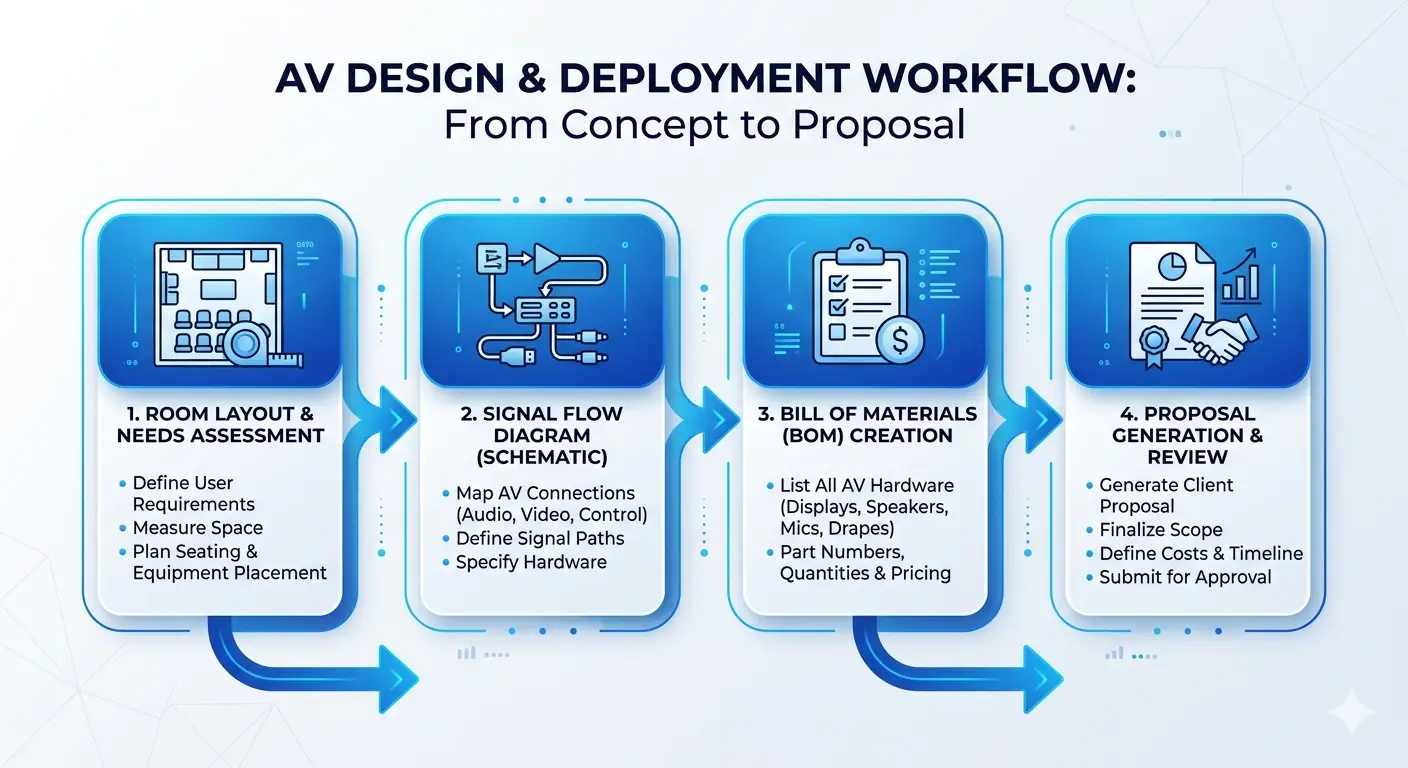
Step 1: Requirements Gathering
Start with the client. What conferencing platform do they use? How many seats? Do they need hybrid support? What does the existing IT infrastructure look like? The answers shape every spec decision.
Step 2: Room Analysis
You need to collect data on the space measurements. The team needs to establish ceiling height, wall materials, window locations and lighting types. A glass-walled boardroom needs completely different audio treatment than a carpeted room with fabric panels.
Step 3: Equipment Selection
Select hardware that matches both the room requirements and the conferencing platform. Confirm that every device is certified for the target conferencing system. Compatibility between the mic, DSP, codec, and touch controller has to be verified before the BOM is final.
How X-DRAW helps here: X-DRAW’s integrated product library includes manufacturer model numbers and specs. You place devices in the signal flow, and the tool builds the device list as you design. You are not filling in a spreadsheet after the fact, the BOM grows with the drawing.
Step 4: Device-Level Detail
Every line in the boardroom AV device list needs a manufacturer, model number, and description. Line items like “audio system” or “camera” tell procurement nothing. Vague BOMs get the wrong items ordered.
Step 5: Quantity Estimation
Count everything. Microphone drops, speaker positions, cable runs, rack units, wall plates, patch panel ports need to be counted. The missing quantities lead to procurement delays and extra costs for last-minute sourcing.
How X-DRAW helps here: When you draw signal runs in X-DRAW, cable quantities calculate from the drawing. Speaker positions count automatically. Rack items populate as you add them to the design. The BOM that comes out reflects the drawing, not an estimate
Step 6: Package and Propose
A boardroom equipment package bundles hardware, installation labor, DSP programming, control programming, and commissioning into one clear scope. Clients review it faster when everything is in one place.
How X-DOC helps here: X-DOC pulls the BOM from X-DRAW directly. Line items, quantities, and descriptions transfer into the proposal template without copy-paste. You adjust pricing, add scope notes, and send a professional document. A boardroom AV proposal that used to take a day to build takes a few hours.
X-DRAW + X-DOC in practice: → The AV integrator using X-DRAW to design a boardroom which has 25 seats with a layout that includes two 86-inch displays and a ceiling mic array and four ceiling speakers and a DSP and a PTZ camera and a Crestron touch controller. The signal flow diagram documents every connection. X-DRAW which is Boardroom audio visual (AV) system integration and design software generates the BOM: 47 line items including cable, accessories, and rack hardware. → The integrator opens X-DOC, imports the BOM, selects the boardroom proposal template, and fills in the project details. The proposal is ready for client review in under two hours. No spreadsheet. No manual counting. |
The all-in-one solution for your AV needs
Transform your audio-visual experience with XTEN-AV.
No Credit Card required
Audio Visual System Design Mastery + Winning Proposals = 10x Productivity!
- ✔ Automatic Cable Labeling & Styling
- ✔100+ Free Proposal Templates
- ✔ Upload & Create Floor Plans
- ✔1.5M Products from 5200 Brands
- ✔ AI-powered ‘Search Sense'
- ✔Legally Binding Digital Signatures

Conclusion
The boardroom AV system contains multiple components which need to function together. The system requires all components including displays, microphones, cameras, DSP, control systems and infrastructure to function properly. When one piece is wrong, the whole room suffers.
The best way to avoid rework is to get the design right before anything ships. The combination of accurate room drawings, complete BOMs & clear proposals helps to minimize mistakes throughout all project phases.
X-DRAW handles the design and BOM. The client-ready proposal is created through X-DOC which transforms existing content. Your current process which uses spreadsheets and manual counting needs a better solution.
Want to see how X-DRAW and X-DOC work on a boardroom project?
Start a free trial at XTEN-AV and build your next boardroom AV proposal from design to delivery.
FAQ's
A boardroom AV system requires displays (flat panel or dual displays), audio (microphones, speakers, DSP systems), video (PTZ or intelligent cameras), a conferencing platform (Teams Rooms, Zoom Rooms, Webex conferencing systems that use certified codecs or conferencing appliances), a control system that includes a touch controller and AV systems which include network and cabling and power components.
For rooms under 20 feet, table or boundary microphones work well when placed within 4 to 6 feet of all participants. The installation of beamforming microphone arrays and ceiling microphone systems provides complete coverage for large spaces without requiring table-based cable installations. The microphones require a DSP system for proper operation.
The standard selection for cameras requires PTZ systems which operate at 4K resolution. The system requires two cameras for spaces exceeding 30 feet which includes a wide-angle camera and a PTZ camera. It should be positioned at display eye level.
DSP programming labor, acoustic treatment, cable management hardware, control system programming, mounting hardware, and network readiness work. Each one has a real cost. Missing any of them creates change orders. X-DOC’s proposal checklist is built to catch these before the proposal goes out.
The 0.1 rule states that display screens should have their diagonal measurement in inches to match their maximum viewing distance which displays as one-tenth of their total viewing distance in inches.
Use at least 500 nits brightness for rooms with natural light. It also needs two displays for hybrid meetings to show content on one display and video calls on the second display.
X-DRAW handles room layout, signal flow design, and BOM generation. X-DOC turns that BOM into a client-ready proposal. Together they cover the full workflow from design to signed proposal, with hardware quantities and line items tied directly to the drawing.
Explore more by topic

AV Design Mastery + Winning Proposals = 10x Productivity!
- Automatic Cable Labeling & Styling
- 100+ Free Proposal Templates
- Upload & Create Floor Plans
- 1.5M Products from 5200 Brands
- AI-powered ‘Search Sense'
- Legally Binding Digital Signatures
No Credit Card Required
Related Blogs
-

- Posted by Sahil Dhingra

Audio Visual A Complete Guide to Commercial AV Companies: What to Expect,...
-
- Posted by Sahil Dhingra
Audio Visual 6 Best Field Service Management Software for Audio Visual (AV)...
-
- Posted by Sahil Dhingra
Audio Visual What Is an AV Connection Check and Why Does It...
