








5 Best Rack Builder Software Tools for AV Design Engineers in the USA (2026)

Sahil Dhingra
Published 10 AUG 2026
An AV rack can look complete in a system design and still create issues onsite. A DSP, amplifier or network switch may fit the planned rack units, yet its depth, rear I/O, cable clearance or thermal requirements can affect nearby equipment. Without adequate airflow, ventilation and maintenance access, these constraints may only become apparent during the deployment stage.
According to Zigaflow, building a 4U to 8U AV rack can require 6 to 10 hours of AV technician labor. This represents significant field time that can be affected by inaccurate equipment placement, poor rack-unit planning and unresolved cable routing. When these details are not resolved during the design phase, AV technicians may need to make field modifications during the rack assembly process.
In this guide, we compare the best rack builder software options for equipment placement, CAD diagram creation and professional rack planning. Each platform is evaluated to identify the right AV rack builder for professional schematic design projects.
“Effective AV rack design goes beyond equipment placement. Rack-unit planning, thermal management, power distribution and cable management must be considered before the final installation phase”
Key Takeaways
- The five best rack builder software options for AV design engineers are XTEN-AV, Snap One, Stagerack, Visual Paradigm Online and Creately.
- Accurate AV rack planning depends on rack units, equipment dimensions, airflow, power distribution, cable routing and service clearance.
- Specialized AV rack software offers better equipment planning, design automation, and documentation capabilities than general diagramming tools.
- Automated rack elevations, cable schedules and Bills of Materials (BOMs) keep AV project documentation accurate during design revisions.
- AV professionals may consider XTEN-AV for AI-assisted rack planning, automated elevations, thermal management, ventilation planning and 2D/3D visualization.
What is AV Rack Builder Software?
AV rack builder software is a specialized platform for systematic planning, configuring and documenting rack-mounted audiovisual systems before the installation stage. It enables design engineers to arrange AV equipment properly, validate rack space and create precise installation documentation for proper project execution.
This platform standardizes rack layouts across projects, helping maintain proper equipment placement and simplify collaboration between design, installation and deployment teams. Capabilities like equipment libraries, cable routing and rack elevation diagrams enhance overall system design accuracy.
How does Rack Builder Software Work?
Rack Builder Software plays a major role in transforming equipment requirements into organized AV schematic designs using AI-assisted planning and automation. AV professionals can configure cabinet specifications, validate equipment placement, generate automated rack schedules and produce installation-ready deliverables from a single CAD drawing platform.
The following step-by-step process shows how AV rack building software converts equipment requirements into complete project deliverables:
1. Configure Cabinet Specifications
Define the proper cabinet size, available rack units (U) and AV mounting preferences. These settings are important for establishing the CAD design parameters before placing the essential system components.
2. Place AV Equipment
Add necessary amplifiers, DSPs, matrix switches, network switches, PDUs, UPS systems and other important rack-mounted devices from the integrated product library. The AV platform validates mounting compatibility, dimensions and available space as equipment is positioned.
3. Optimize Equipment Placement
Arrange components based on airflow, thermal management, weight distribution, service accessibility, power distribution and cable routing. Equipment placement improves overall cooling efficiency, streamlines the AV rack installation process and supports long-term system reliability.
Designing a compact rack? Explore our Small AV Rack Design Guide to maximize equipment space, improve cooling performance and maintain service access without compromising reliability.
4. Generate AV Project Deliverables
Automatically generate rack schedules, equipment labels, signal flow diagrams, port mapping, AV BOMs and engineering documentation. Every deliverable should stay synchronized with the latest project revisions.
5. Validate and share the AV CAD Design
Always review the completed schematic CAD drawing, resolve placement issues, share the latest project files with engineering, procurement, deployment and service teams. Maintaining a centralized project record keeps stakeholders aligned with the approved design.
Key Considerations When Choosing a Rack Planner for AV Projects
The table below summarizes the most important capabilities to consider when evaluating a rack planner:
Key Considerations | Why It Matters |
AV Product Library | Access accurate AV manufacturer specifications and current product data. |
CAD & Diagram Integration | Connect rack plans with AV floor plans, drawings and signal flow diagrams. |
Custom Rack Templates | Standardize AV rack designs across projects and engineering teams. |
Multi-Rack Support | Manage multiple racks within a single AV project efficiently. |
Cloud Collaboration | Keep engineering, sales, procurement and AV installation teams aligned. |
Revision Control | Track design changes and maintain version accuracy at various project stages. |
Open Export Formats | Export DWG, PDF, Excel and other project-ready deliverables. |
Scalability | Support everything from small AV installations to enterprise deployments. |
Top 5 Rack Builder Software for Audio Visual (AV) Design Engineers
Finding the right platform for AV rack building can help in enhancing overall design accuracy and planning efficiency. We have compared five leading software based on rack visualization, equipment placement, diagramming features and overall usability for AV design engineers:
Built for audiovisual system integrators, consultants and design engineers, XTEN-AV is cloud-based AV rack design software with AI-assisted planning and advanced diagramming capabilities. It allows users to create automated rack elevations and review equipment placement in both 2D and 3D views. The platform also supports generating floor plans, signal flow diagrams, cable wiring diagrams and provides access to 1.5 M+ products from 5,200+ brands. Its connected CAD design environment simplifies product selection and keeps related AV drawings synchronized as project changes are made.
Best For:
AV system integrators, consultants and design engineers who need one platform for rack planning and AV CAD drawings.
Key Features:
- AI-assisted rack elevation creation.
- 2D and 3D rack visualization.
- Thermal and ventilation planning.
- Automated cable labeling.
- Manufacturer-accurate equipment dimensions.
- Front and rear rack views.
- Multi-brand AV product library.
Pros:
- Shortens the time required to prepare rack drawings.
- Keeps related AV plans consistent after design changes.
- Supports faster design reviews and client approvals.
- Improves coordination between engineering and AV installation teams.
- Brings equipment rack configuration and system schematics into one workspace.
Cons:
- New users may require some time to become familiar with the platform’s AV design and diagramming capabilities.
Snap One offers Strong Rack Builder, a rack configuration tool for products within its ecosystem. AV integrators can select an enclosure, assign devices to rack units and review AV rack dimensions. They can then add compatible shelves, panels and accessories before ordering. This focused setup makes it easier to confirm equipment fit and prepare the required hardware list for proper installation.
Best For:
AV integrators who want a faster way to confirm equipment fit, select compatible accessories and prepare rack hardware for ordering purposes.
Key Features:
- Rack unit (RU) allocation.
- Enclosure configuration.
- Compatible accessory selection.
- Hardware list generation.
- Product fit verification.
- Account-based project access.
Pros:
- Saves time when preparing rack-based AV installations.
- Improves overall coordination between design, purchasing and AV field teams.
- Keeps rack builds consistent across similar projects.
- Minimizes last-minute changes before equipment is ordered.
- Enhances installation readiness through accurate rack configuration.
Cons:
- AV Product selection is limited to the Snap One ecosystem.
- Requires a Snap One account to access the tool.
- Does not include advanced AV engineering features such as schematic drawings and signal flow diagrams.
Built for live events, touring productions and broadcast applications, Stagerack offers AV professionals a structured way to organize audio, lighting, video and network equipment across front, rear and side rack views. It also serves as a custom rack panel designer, allowing users to create patch panels, group devices and export detailed PDF reports for technical teams.
Best For:
Live sound engineers, touring crews and broadcast technicians who design and manage portable AV rack systems.
Key Features:
- Offers front, rear and side rack views.
- Custom patch panel designer.
- Verified equipment database.
- AI-powered specification lookup.
- Device grouping with color labels.
- PDF project report generation.
Pros:
- Brings structure to touring and live-event equipment layouts.
- Makes reviews clearer for sound, lighting, video and broadcast teams.
- Improves coordination among production crews and vendors.
- Keeps equipment details clear for transport, setup and live production.
- Generates clear reports for AV project planning.
Cons:
- Full project access requires a paid subscription.
- The free sandbox is available only on the desktop version.
- The tool is intended for production environments rather than fixed installations.
Working on a residential installation? See how to plan a home theater AV rack with practical tips for layout, cooling, cable routing and future expansion.
Designed for technical diagramming, Visual Paradigm Online includes a free rack editor with prebuilt rack components, templates and alignment guides. It supports server cabinet diagrams, network maps, floor plans and UML models. This AV platform is suitable for teams who want to create basic rack layouts without specialized engineering software.
Best For:
IT administrators, network engineers, infrastructure teams and system designers who need rack diagrams alongside other technical visuals.
Key Features:
- Prebuilt rack components.
- Rack diagram templates.
- Smart alignment guides.
- Real-time collaboration.
- PNG, SVG and PDF export.
- Cross-platform access.
Pros:
- Simplifies the basic rack layout creation process.
- Supports several technical diagram types in one centralized workspace.
- Enhances coordination across distributed teams.
- Includes a free version for personal use.
- Provides multiple export formats for easy sharing.
Cons:
- Focuses on general technical diagramming rather than AV-specific engineering.
- The free version cannot be used for commercial projects.
- Advanced collaboration features require a paid plan.
A well-designed rack deserves proper cable routing. Review these AV rack cable management mistakes to improve airflow, streamline maintenance and keep installations organized.
Focused on collaborative infrastructure planning, Creately allows AV teams to create a network rack layout using industry-standard symbols, customizable templates and editable equipment data. Users can add cable connections, power requirements, specifications, links and supporting files directly to the rack diagram. Shared editing, comments, access controls and version history make reviews easier while keeping rack details up to date.
Best For:
Network administrators, system engineers, infrastructure consultants and data center teams creating rack layouts for planning, documentation and equipment management.
Key Features:
- Industry-standard rack symbol library.
- Customizable rack templates.
- Support for large AV rack layouts.
- Custom data fields.
- Comments and version history.
- PDF, PNG, SVG and CSV export.
Pros:
- Brings AV rack diagrams and project information into one workspace.
- Simplifies collaboration across distributed teams.
- Makes infrastructure updates easier to review.
- Supports organized documentation throughout project changes.
- Easily connects with popular business and productivity tools.
Cons:
- Focuses on infrastructure planning rather than AV-specific engineering.
- Advanced collaboration and administration features require a paid plan.
- Dedicated AV rack automation is not included.
Comparing platforms for professional rack documentation? Explore the best audiovisual AV rack diagramming tools for AV integrators and design engineers.
Which AV Rack Design Software is Right for Your Project?
Compare each platform’s category, ideal users and core capabilities to find the right AV rack design software for your project:
Platform | Category | Ideal Users | Core Capabilities |
XTEN-AV | Complete AV rack design software | AV system integrators, consultants and design engineers. | Automated rack elevations, AI-assisted design, synchronized AV CAD drawings and access to a product library with 1.5M+ AV products from 5,200+ brands. |
Snap One | Rack configuration | Integrators using the Snap One product ecosystem. | Enclosure planning, rack unit allocation, accessory selection and hardware preparation. |
Stagerack | Live production rack design | Live sound engineers, touring crews and broadcast technicians. | Front, rear and side views, custom patch panels, verified equipment data and PDF reports. |
Visual Paradigm Online | Technical rack diagramming | Network engineers, IT teams and system designers. | Templates, alignment guides, collaborative editing and multiple export formats. |
Creately | Collaborative infrastructure planning | Network administrators, infrastructure consultants and data center teams. | Equipment data, comments, access controls, version history and shared AV diagrams. |
Why Audio Visual (AV) Designer Prefer XTEN-AV for AV Rack Design?
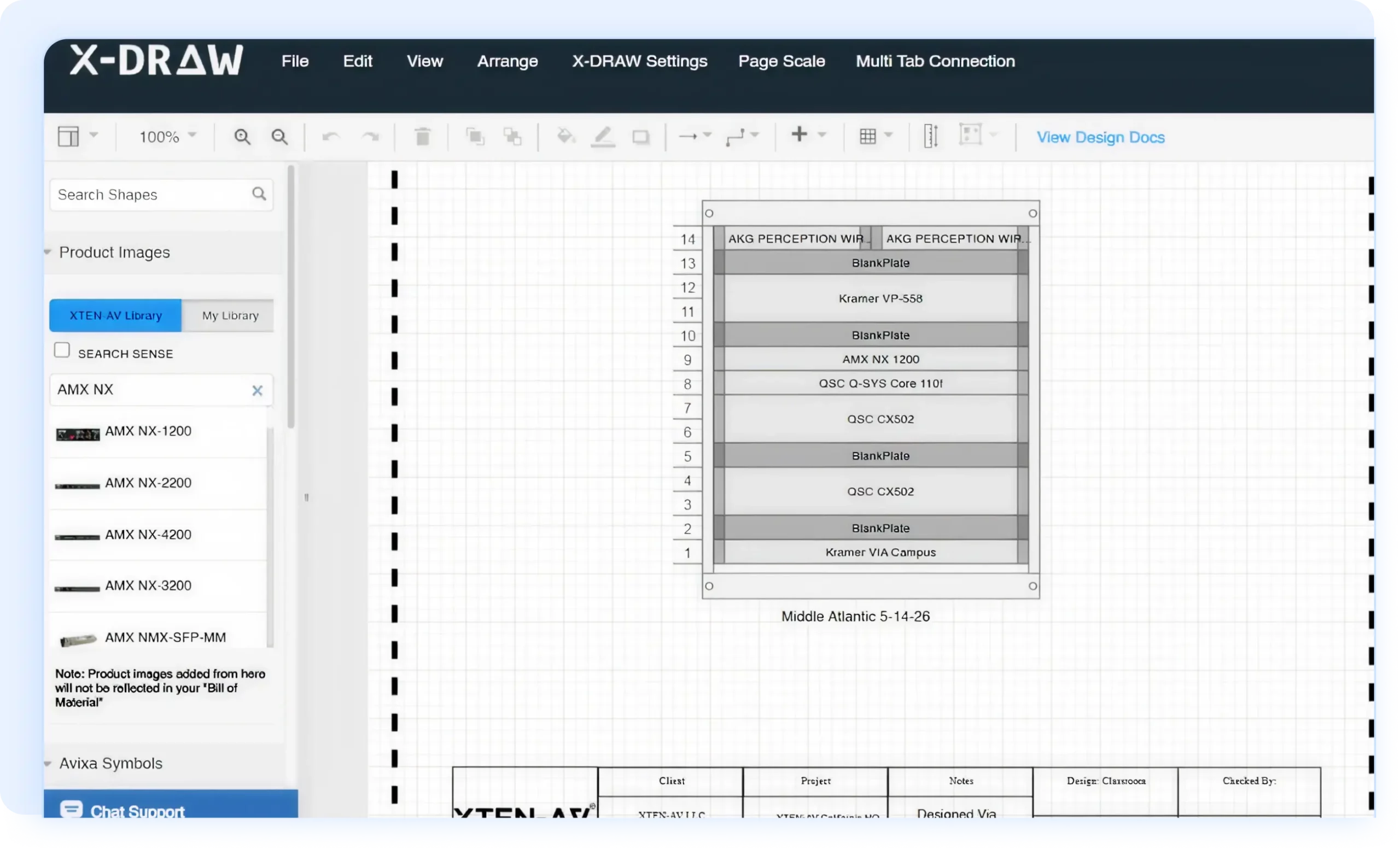
XTEN-AV offers a free rack planner with automated device placement, multi-view rack visualization and layout optimization. The full platform expands this process with drawing automation, synchronized AV designs, cable schedules, AV BOMs and project-ready deliverables.
Following are the key reasons AV teams choose XTEN-AV for rack design:
Automated Rack Elevations
Generate accurate front and rear elevations directly from the AV CAD drawings. Equipment positions remain aligned when project details change.
Thermal and Ventilation Planning
Review heat output, airflow, spacing and ventilation requirements before final deployment. This provides AV design teams a clearer view of potential thermal concerns inside the rack.
Accurate AV Equipment Placement
Place products using manufacturer-specific dimensions instead of generic blocks. AVIXA-compliant symbols provide a more reliable view of rack fit and AV device positioning.
Cable and Power Planning
Organize cable routes, power distribution and equipment connections within the same design environment. Automated cable labeling keeps AV installation details clear and consistent.
Cloud-Based Collaboration
Designers, consultants and installation teams can review the latest project information from one cloud-based platform, minimizing version confusion during AV approvals and site preparation.
Audio Visual System Design Mastery + Winning Proposals = 10x Productivity!
- ✔ Automatic Cable Labeling & Styling
- ✔ 100+ Free Proposal Templates
- ✔ Upload & Create Floor Plans
- ✔ 1.5M+ Products from 5200 Brands
- ✔ AI-powered 'Search Sense'
- ✔ Legally Binding Digital Signatures

Conclusion
Professional AV projects require more than basic rack diagrams. AV design engineers must evaluate rack builder software based on engineering accuracy, manufacturer-specific product data, design automation and connected AV documentation.
This guide compares leading rack builder software based on equipment placement, rack visualization, design automation, and project deliverables. For multi-brand AV systems, XTEN-AV offers an AI-powered audio rack builder that uses manufacturer-specific dimensions and supports thermal planning.
FAQ’s
XTEN-AV, Snap One, Stagerack, Visual Paradigm Online and Creately are among the best AV rack builder software options.
AV rack builder software enables AV professionals to design rack layouts, organize equipment placement and generate accurate rack elevations before installation.
Check rack accuracy, product libraries, exports and custom-device support. AV teams should also review BOM and cable labeling capabilities.
Yes, it can create front rack elevation diagrams. Some tools also offer rear and side views.
Add all device rack units. Include shelves, panels, cable managers, cooling and spare space.
AV rack builder software is designed for amplifiers, DSPs, processors and other AV equipment. Meanwhile, server rack builder software is used for servers, storage systems and networking hardware.
Yes, free AV rack builder software is available. Platforms such as XTEN-AV and Visual Paradigm Online offer free rack planning tools, although features and usage limits may vary.

Explore more by topic
Related Blogs

-

- Posted by Sahil Dhingra

Audio Visual AV Commissioning Checklist & Best Practices for Integrators Sahil Dhingra...

-
- Posted by Sahil Dhingra
Audio Visual AV Cybersecurity Best Practices: Securing Networked Audiovisual Systems Sahil Dhingra...
-
- Posted by Sahil Dhingra
Audio Visual 7 Best Floor Plan Software for AV System Integrators Sahil...





